
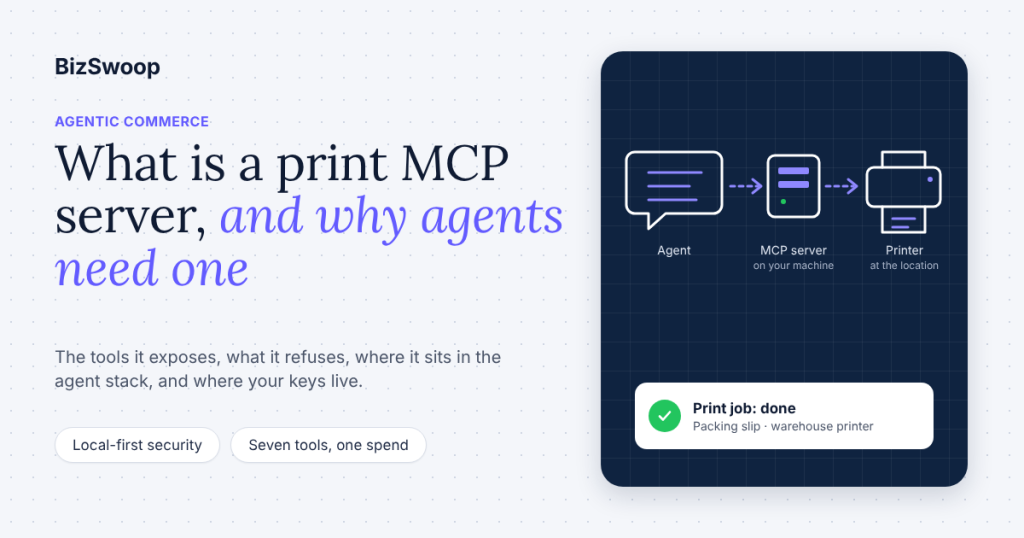
A print MCP server is a small program that gives an AI agent a printer: it exposes printers, print stations and print jobs as tools the agent can call through the Model Context Protocol, so that when the agent decides a packing slip, receipt, label or ticket needs to exist on paper, it can make that happen without a browser dialog or a person at the screen. In commerce, it is the last mile of agentic work, the step that turns “order 1042 has shipped” into a sheet at the packing bench.
The shortest way to see one is to install one. Here is the BizPrint MCP Server added to Claude Code, copied from the repository README this week (Node.js 18 or later; the two keys come from the Applications page of your BizPrint Cloud account):
git clone https://github.com/bizswoop-development/bizprint-mcp-server.git
cd bizprint-mcp-server
npm install
npm run build

claude mcp add bizprint -- node /absolute/path/to/bizprint-mcp-server/build/index.js \
  --env BIZPRINT_PUBLIC_KEY=your-public-key \
  --env BIZPRINT_SECRET_KEY=your-secret-key
Then the prompt that produces paper:
Print the packing slip at https://example.com/orders/1042/packing-slip.pdf on the warehouse printer, and tell me when it’s done.
The agent calls list_printers to find the warehouse printer, create_print_job with the document URL, and get_print_job until the status is done. The same server installs in Claude Desktop (manual config or, where it is available, the desktop extension); the W1 setup guide walks through both. One fact to hold onto for the rest of this piece: the BizPrint server runs on your machine, and there is no hosted version.
Key Takeaways
- A print MCP server turns printers into tools an agent can call. It speaks the Model Context Protocol on one side and a print service on the other, so an AI application can list printers, send a document and confirm it printed.
- Printing is the physical last mile of agentic commerce. Agents can read orders, reconcile inventory and draft messages, but a kitchen ticket, a pick list or a shipping label has to land on paper, and nothing in a language model can do that on its own.
- “Print MCP server” means three different things. 3D-printer servers slice and run models, office servers print files through CUPS or a desktop queue, and commerce servers print order documents to receipt, label and document printers in a cloud account. This piece is about the third.
- A trustworthy print tool exposes little and refuses a lot. List, inspect, print by URL, check status; no silent reprints, no arbitrary file reads, no customer data in the prompt that the document does not already need.
- Local-first is the honest security model today. The BizPrint MCP Server runs on the machine where the agent runs, keeps API keys in the OS keychain or the client config, and sends only the document URL and printer choice to BizPrint Cloud. There is no hosted BizPrint MCP endpoint.
- Billing follows the job, not the token. You pay per successful print, so the cost of an agent printing is the cost of the paper it produced; the MCP server and the API are included on every BizPrint plan.
What is MCP, and what does “server” mean here?
MCP, the Model Context Protocol, is an open standard for connecting AI applications to external systems, and an MCP server is the program on the far end of that connection that offers tools, data and prompt templates to the AI application. The protocol’s own introduction compares it to a USB-C port: one connector, many devices. The architecture overview names three participants. The MCP host is the AI application (Claude Desktop, Claude Code, an IDE, a custom agent runtime). The host creates one MCP client per server it connects to. The MCP server is the program that provides context and actions to that client.
Servers expose three primitives: tools (functions the model can invoke), resources (data the model can read) and prompts (reusable templates). A print MCP server is almost entirely tools, because printing is an action. The host discovers those tools with a tools/list request, hands their names, descriptions and input schemas to the model, and when the model decides to print, the host routes a tools/call to the server, which does the work and returns a result the model can read.
“Server” says nothing about where the program runs. The specification defines two transports. Stdio runs the server as a local process on the same machine as the client and talks over standard input and output; the spec describes these as local servers, and notes they typically serve a single client. Streamable HTTP runs the server somewhere on the network and talks over HTTP, which is what people mean by a remote or hosted server. Both are legitimate MCP servers. The difference matters a great deal for a print tool, because it decides where your credentials live and whose infrastructure sees your documents.
Why is printing the last mile for agents in commerce?
Printing is the last mile because it is the one step in a commerce workflow that a model cannot complete inside a computer. An agent can watch an order feed, decide what needs restocking, write the supplier email and reconcile the invoice; every one of those outputs is text that stays on a screen. A kitchen does not read a screen. A packer at a bench needs a slip in the box. A courier needs a label with a barcode. An event check-in needs a badge. Until the agent can produce those, a person is still in the loop at exactly the point where the work becomes physical, and the automation stops one step short of being useful.
That gap has been invisible in most “agents for commerce” writing because the demonstrations end at the decision. The order is flagged, the message is drafted, the dashboard updates. In a real store the decision is the cheap part. What costs time is someone noticing the flag, opening the order, pressing print and walking the paper to where it belongs. A print MCP server closes that loop: the agent that noticed the order can also hand it to the printer on the shelf behind the packing bench, then confirm the job came out before it tells anyone it is done.
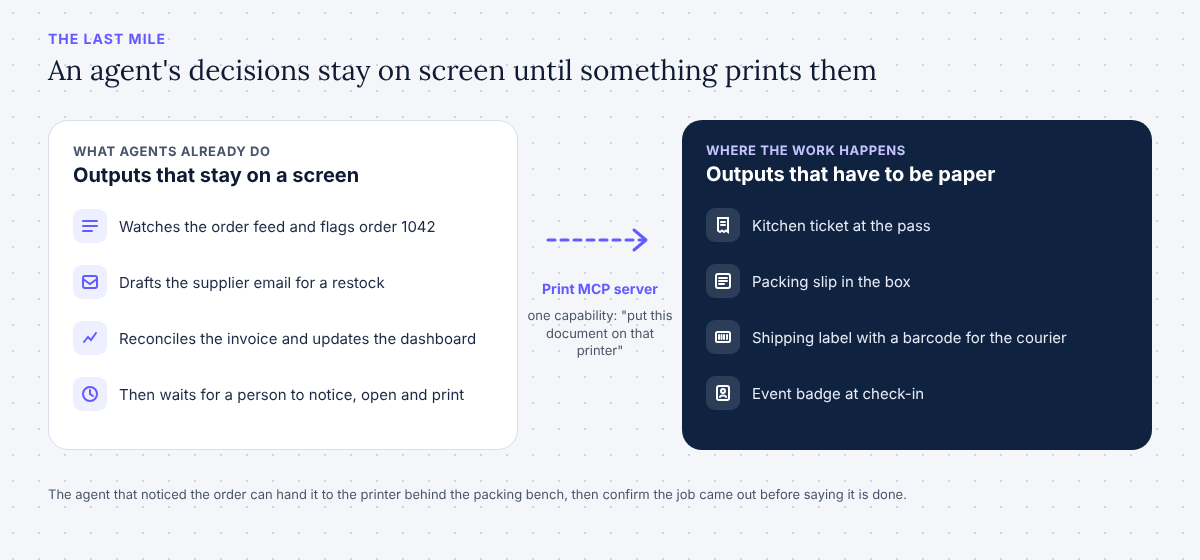
This is also why the MCP server is the right shape for the problem rather than a one-off script. The agent already has the order context from whatever system it is reading; it does not need a separate integration per document type. It needs one capability, “put this document on that printer,” with enough discipline around it that it cannot do harm. That capability, described in the protocol’s own vocabulary so any host can discover it, is what a print MCP server is.
Are all print MCP servers the same thing?
No. The phrase covers three categories that share a name and almost nothing else, and a search for “print MCP server” returns all three mixed together. The table separates them so you can tell which one you are reading about.
| 3D-printing MCP servers | Office / document MCP servers | Commerce print MCP servers | |
|---|---|---|---|
| What “print” means | Slice a model and run a 3D printer | Send a file to a desktop printer queue | Print an order document to a receipt, label or document printer |
| Typical examples | OctoPrint- and Bambu-style servers | mcp-printer (CUPS on macOS and Linux, renders Markdown and code to PDF) | BizPrint MCP Server; hosted services such as ezeep |
| Where it runs | Local, next to the printer | Local, on the machine with the queue | Local server talking to a cloud print account (BizPrint) or a hosted endpoint (ezeep) |
| Who the agent is working for | A maker or a print farm | A developer printing their own files | A store, restaurant, warehouse or event |
| What it must know | Filament, bed temperature, job progress | Page size, duplex, which local printer | Which printer is at which location, whether a station is online, whether the job printed |
| Who pays, and how | Nobody; it is your printer | Nobody; it is your printer | Per print job or per plan, so billing and limits are part of the design |
If you run a Shopify store or a WooCommerce kitchen, the first two columns are not for you, and a server that can print a Markdown file to the office laser will not route a ticket to the kitchen at the second location. The rest of this article is about the third column.
What does a print MCP server expose, and what must it refuse?
A good commerce print MCP server exposes a short list of tools that mirror the questions a person at the counter would ask, and it declines to do anything that is not one of those. The BizPrint server’s tool list, copied from the repository README this week, is seven tools:
| Tool | What it does | What the agent uses it for |
|---|---|---|
list_printers | Lists configured printers and their settings | “Which printers do I have, and what is the warehouse one called?” |
get_printer | Gets details for one printer by ID | Confirming a printer before sending a job |
list_stations | Lists print stations and their status | “Is the kitchen station online right now?” |
get_station | Gets details for one station by ID | Diagnosing an offline location |
create_print_job | Sends a document URL to a printer | The print itself |
get_print_job | Checks a print job’s status | “Did it come out?” |
list_print_jobs | Lists print jobs with pagination | “What did we print this morning?” |
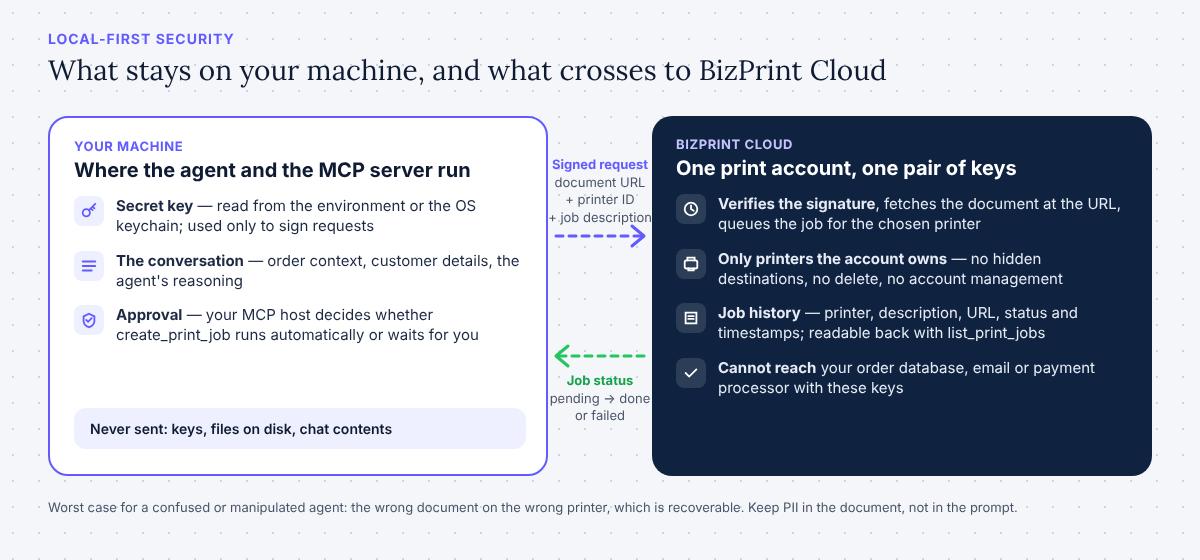
Notice what the surface does not include. There is no tool that accepts raw file contents, because the server prints by URL: the document already exists somewhere (your order system, a PDF endpoint, a template renderer), and the server passes that address to BizPrint Cloud, which fetches and prints it. There is no tool that reads your file system, so the agent cannot print something it found on your disk. There is no delete, no account management, no “print to every printer.” The server’s own README states the data boundary plainly: print job data (document URLs and printer selections) is sent to the BizPrint Cloud API, nothing from the conversation is collected, and nothing is stored locally beyond the API keys.
That restraint is the design, not an omission. A print tool is a tool that spends money and makes physical objects appear in a workplace, so the things it refuses matter as much as the things it does:
- No silent reprints. A job is created once, with a description the agent must supply, so a human reading the job list can see why each sheet was printed. If a job fails, the right behavior is to report the status, not to retry until something comes out.
- No customer data in the prompt that the document does not need. The agent needs a document URL and a printer. It does not need the customer’s address pasted into the chat to print a label that already carries it. Keep PII in the document, behind your own authentication, and keep the conversation to references.
- No access to anything but printing. The server authenticates to one print account with one pair of keys. It cannot reach your order database, your email or your payment processor, so a confused or manipulated agent can at worst print the wrong document, which is recoverable.
- No hidden destinations. Every job names a printer the account owns. The agent cannot send a document to a printer it discovered elsewhere.
The MCP security guidance frames the general principle as scope minimization: a token with broad scopes raises the blast radius of any compromise, so servers should expose the minimum set of low-risk operations and elevate only when needed. A print server with seven read-mostly tools and one spending tool is that principle applied to paper.
Ready to let your agent print? Every BizPrint account starts with 25 free print jobs, no card required, and the MCP server is included on every plan.
Where does a print MCP server sit in the agent stack?
It sits between the AI application and the print service, on the same machine as the application, and understanding the layers is what makes the security and billing questions easy to answer. Read top to bottom, a print from an agent passes through seven layers:
- The model decides, from the order context it already has, that a document should be printed, and chooses a tool and its arguments.
- The MCP host (Claude Desktop, Claude Code or another local-server client) receives that tool call and, depending on its settings, asks you to approve it.
- The MCP client inside the host sends
tools/callto the print server over stdio. - The print MCP server, a local Node.js process in BizPrint’s case, validates the arguments, signs a request with your secret key and calls the print service’s REST API. Every request is signed; the developer docs describe the scheme and the endpoints.
- The print service (BizPrint Cloud) authenticates the request, fetches the document at the URL you gave it, and queues a job for the chosen printer.
- The print station, a small app on a Windows, macOS, Linux or Raspberry Pi OS desktop or an Android device at the location, receives the job and drives the printer (ESC/POS and StarPRNT receipt and label printers through Android stations, standard printers through desktop stations).
- The printer produces the sheet, the station reports back, and the job’s status moves from
pendingthroughprocessingandconnecting-to-printertodoneorfailed, which the agent reads withget_print_job.
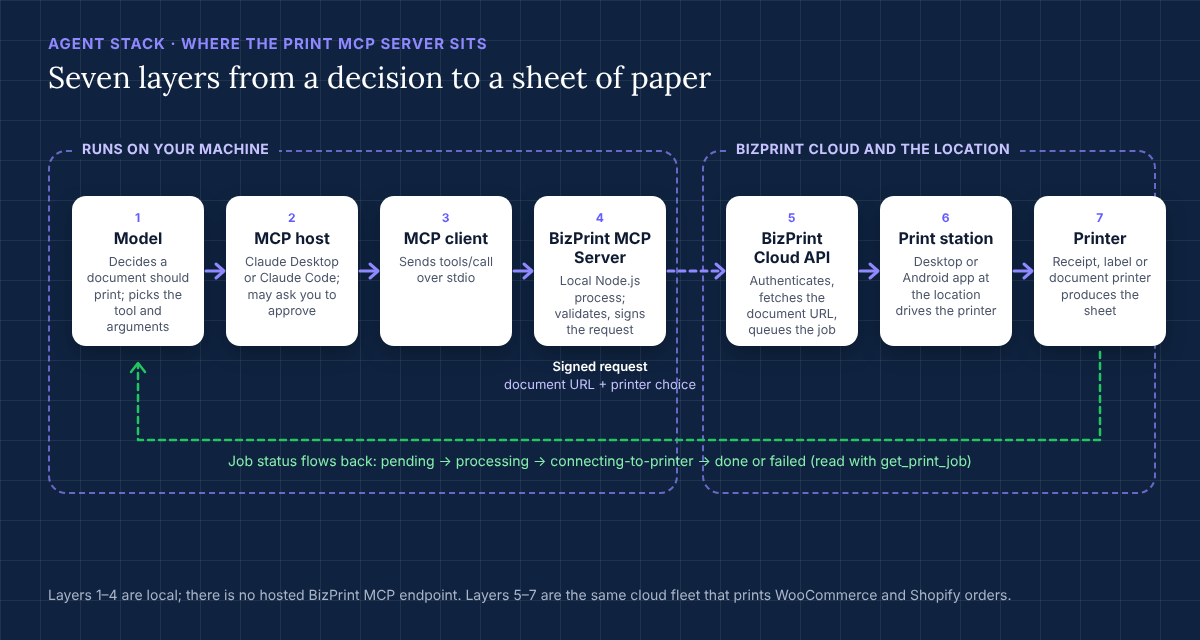
Layers one through four run on your machine. Layers five through seven are the same cloud print infrastructure that already prints WooCommerce and Shopify orders for BizPrint’s merchants; the MCP server simply gives the agent the same entry point those plugins use. That is why an agent can print to a kitchen in one city and a packing bench in another from one tool: the routing problem was solved for store platforms first, and the agent inherits it. The Print API guide covers layers four and five in depth for developers who would rather call the API directly, and the packing-slip recipe shows the whole stack firing from a single Claude prompt.
How should you think about security for an agent that can print?
Treat a print MCP server like any other credentialed tool you hand to an agent: decide where the keys live, what the tool can reach, and who approves a spend. The local-first design answers the first two questions by construction, and the host’s approval settings answer the third.
Where the keys live. The BizPrint server reads BIZPRINT_PUBLIC_KEY and BIZPRINT_SECRET_KEY from the environment of the process your MCP host starts, or from the OS keychain when installed as a desktop extension. The secret key never leaves the machine; it is used to sign each request. Anthropic’s desktop extension documentation describes exactly this model, local servers that “access only what the user can access” with “no data transmitted unless explicitly designed,” and recommends it for sensitive operations, with remote MCP reserved for internet-hosted services and public APIs.
What a hosted server changes. Hosted print MCP servers exist. ezeep runs one at a public HTTPS endpoint with OAuth 2.0 sign-in and twenty tools, including account administration; it serves many clients and supports many hosts. That is a real convenience, and for some teams the right trade. What you give up is the boundary: your credentials become a token held by a relay, the document path passes through a third party’s server before it reaches the printer, and the tool surface includes user and group management alongside printing. BizPrint made the opposite choice. The server is open source under the MIT license, it runs where your agent runs, and there is no hosted version of it; where a hosted client cannot launch a local process, BizPrint does not run there today. The MCP security guidance is explicit that local servers carry their own risks, chiefly that a malicious server binary can do anything the user can, which is the argument for installing from a repository you can read, pinning a version, and keeping the tool list short enough to audit in a minute.
Who approves the spend. Printing costs money and makes objects. In Claude Desktop and Claude Code you control whether tool calls run automatically or wait for your approval; for a print tool, the sensible default while you are building a workflow is to approve each create_print_job and let the read-only tools run freely. Once the agent’s behavior is predictable, a scheduled job that prints the morning pick list unattended is reasonable, because the worst outcome is a wasted sheet and a failed status in the job list. Keep the description argument meaningful (“Pick list, 2026-11-09, warehouse A, 14 orders”) so the job history reads as an audit log.
What is logged. Every job is recorded in BizPrint Cloud with its printer, description, URL, status and timestamps, and the agent can read that history back with list_print_jobs. The server itself keeps nothing beyond the keys, and the README states that no conversation data or personal information is collected by the extension.
How does billing work when an agent prints?
You pay per successful print job, which makes the cost of agent printing exactly the cost of the paper the agent produced. The MCP server and the Print API are included on every BizPrint plan, and every account starts with 25 free print jobs with no card required; development mode lifts that limit while you test, so an agent can call create_print_job as often as you like during development without spending real jobs. Current plan details and rates are on the pricing page, which is the place to check them rather than any blog post.
Two consequences follow for anyone designing an agent workflow. First, a failed job does not cost you a print, so a retry policy can be simple: check get_print_job, and if it reports failed, surface the station status before trying again. Second, because the agent sees the job list, it can enforce a budget you set in plain language (“never print more than 50 jobs in a day without asking”) by counting what it has already sent. The same per-job model applies whether the document came from a WooCommerce order, a Shopify Flow or an agent’s decision, so moving a workflow from plugin to agent does not change what you pay.
When does a print MCP server beat calling the API yourself?
Use the MCP server when a model is making the decision to print; use the Print API when your own code is. The server is a thin, well-described wrapper over the same REST API, so the question is only who holds the logic.
| Situation | Better fit | Why |
|---|---|---|
| A person asks Claude to print something during a conversation | MCP server | The model discovers the tools and fills in the arguments from context |
| An agent decides, from order data, that a document should print | MCP server | Same reason; the agent keeps one capability and your approval rules |
| A web app prints a receipt when an order is paid | Print API | Deterministic trigger, no model needed; see the Print API guide |
| A WooCommerce or Shopify store prints on order status | Platform plugin or app | Already built, no code; the W1 setup guide explains where the agent fits beside them |
| A scheduled job prints a pick list every morning | Either | Agent if the list needs judgment (what to include), API if it is a fixed query |
The line is not permanent. A team that starts with an agent printing on request often ends up with the API behind a scheduled job once the workflow is stable, and the reverse happens when a fixed integration needs judgment it did not have. Because both paths end at the same cloud account, printers and job list, switching is a matter of who calls POST /jobs, not a migration. The W5 piece on why agentic commerce needs a last mile, Agentic Commerce Needs a Last Mile: Where Print Fits, takes the strategic side of that argument further.
Which AI clients can use the BizPrint print MCP server today?
Claude Desktop and Claude Code, which are the two clients the repository documents; any other host that can launch a local stdio server can in principle run it, but BizPrint has not tested or published instructions for others, so treat that as unverified. The server does not support hosted-only clients, because there is no remote endpoint to point them at: a web-only assistant that can connect only to HTTP MCP servers cannot reach it. If you need an agent in a hosted environment to print through BizPrint, the path today is the Print API from your own backend, with the MCP server reserved for the desktop and terminal hosts where it runs. That is also the honest answer to the hosted alternatives named above: they reach more clients; BizPrint keeps your keys and your documents on your side of the line.
Frequently asked questions
What is a print MCP server?
A print MCP server is a program that exposes printing as tools over the Model Context Protocol, so an AI application such as Claude can list printers, send a document to one and check that the job printed. In commerce, the BizPrint MCP Server exposes seven tools over a cloud print account that already routes orders to receipt, label and document printers.
Are you printing 2D documents and receipts, or 3D models?
Most servers called “print MCP servers” fall into one of three groups: 3D-printer servers that run a maker’s printer, office servers that print files to a local queue, and commerce servers that print order documents to printers at a store, kitchen or warehouse. BizPrint is in the third group; if you want to print a 3D model or a Markdown file from your laptop, the first two groups are the better fit.
What AI client are you using, and does it matter?
It matters. The BizPrint server runs locally over stdio and is documented for Claude Desktop and Claude Code. Hosts that can only connect to remote HTTP servers cannot use it, because BizPrint does not run a hosted MCP endpoint; for those environments, call the Print API from your own code instead.
How do I connect a print MCP server to Claude?
Clone the repository, run npm install and npm run build, then either run claude mcp add bizprint -- node /path/to/build/index.js with your two keys as environment variables for Claude Code, or add the same command to claude_desktop_config.json for Claude Desktop. If the BizPrint extension appears under Settings > Extensions in your Claude Desktop, that installs the same server with the keys stored in your OS keychain. The W1 setup guide has the full walkthrough.
What is the difference between BizPrint and a local CUPS MCP server?
A CUPS-based server such as mcp-printer prints files that exist on your computer to printers configured on that computer, and runs on macOS and Linux only. BizPrint prints documents by URL to receipt, label and document printers attached to stations anywhere, through a cloud account that knows which printer is at which location and reports whether each job printed. One is a developer’s desktop printer made agent-accessible; the other is a store’s print fleet made agent-accessible.
Is there a hosted version of the BizPrint MCP server?
No. The BizPrint MCP Server runs locally on the machine where your MCP host runs, keeps your API keys there, and talks to BizPrint Cloud over signed requests. There is no hosted or remote version, and no plan to describe one here until it exists.
What does it cost for an agent to print?
You pay per successful print job; the MCP server and the API are included on every BizPrint plan, every account starts with 25 free print jobs without a card, and development mode lets you test beyond that limit. Current rates are on the pricing page.
Can an agent print something it should not?
It can print the wrong document to the wrong printer, which is why the tool surface is small, every job carries a description, and your MCP host can require approval for create_print_job. It cannot read your file system, reach other services with the print credentials, or send a document to a printer your account does not own.
Give your agents the last mile
If your agents already make decisions about orders, inventory or fulfillment, the missing step is the one that puts those decisions on paper where the work happens. The BizPrint MCP Server is open source, runs where your agent runs, and prints through the same cloud fleet that handles your store’s orders today.
Start printing from your app or agent
