
The Stripe Reader S700 is Stripe’s flagship smart reader — a $299 Android-based device with a 5.5-inch 1080p touchscreen, Wi-Fi and Ethernet connectivity, and roughly 15 hours of battery — and it is worth buying when you run a fixed or semi-fixed counter that needs a self-contained, customer-facing register; it is overkill for purely mobile or pop-up selling, where the $59 WisePad 3 or M2 do the job for a fraction of the cost. In short: the S700 is the right answer for a stationary store and the wrong answer for someone who just needs to take an occasional card in the field.
We deploy and integrate Stripe Terminal hardware for a living — across retail counters, restaurants, multi-location operations, and platform builds on the BizSwoop Connect layer — so this guide is written from devices we have actually set up and run, not from a spec sheet. It covers what the S700 is, who should buy it, how to set it up, how it stacks against the other readers, what it really costs over its life, and where it has bitten us in the field.
This is a cluster piece in the complete 2026 Stripe Terminal hardware guide. If you are weighing the S700 specifically against Stripe’s cheaper portable reader, jump to Stripe Reader M2 vs S700: Which Should You Buy?.
What is the Stripe Reader S700?
The Stripe Reader S700 is Stripe’s most capable Terminal device: a smart, Android-based card reader with its own touchscreen that can run as a countertop register or be carried handheld, connecting over Wi-Fi or Ethernet rather than tethering to a phone.
Unlike Stripe’s mobile readers, the S700 does not need a separate tablet or phone to be useful — the screen, the operating system, and the network connection are all on the device. That makes it the closest thing in Stripe’s lineup to an all-in-one smart terminal, while still being driven by the Stripe Terminal SDK and settling into your normal Stripe account. Stripe introduced it as a “customizable smart reader,” meaning you can run a checkout app directly on the device, per Stripe’s S700 announcement and product page.
Here are the at-a-glance specifications, drawn from Stripe’s hardware documentation and hands-on reviews:
| Spec | Stripe Reader S700 |
|---|---|
| Price (USD) | $299 |
| Display | 5.5-inch IPS LCD, 1920×1080, ~580 nits, Gorilla Glass |
| Platform | Android (Qualcomm SM6125) |
| Memory / storage | 4 GB RAM / 64 GB storage |
| Connectivity | Wi-Fi; Ethernet (via dock); cellular on the S710 variant |
| Payment methods | Chip, swipe, contactless (tap), digital wallets |
| Battery | ~15 hours active use; ~2.5 hours to full charge |
| Power | USB-C, ~12W recommended |
| Dimensions / weight | 161.9 × 81.6 × 21.4 mm / ~318 g |
| Form factor | Countertop (docked) or handheld |
Specs and pricing are current as of mid-2026 from Stripe’s S700 page and the Terminal devices page; always confirm against Stripe before purchasing, as hardware pricing and regional availability change.
Who is the Stripe Reader S700 for?
The S700 is for merchants who need a self-contained, customer-facing register at a fixed or semi-fixed location — retail counters, cafes and quick-service spots, salon and clinic front desks, and multi-location stores that want a consistent device at every counter.
A one-sentence test: if a customer will stand in front of the device and you want it to look and behave like a real terminal — with its own screen showing the amount, tip prompts, and a polished tap-or-insert experience — the S700 is built for that. If instead a staff member will pull a reader out of a bag to take an occasional payment, you are paying $290 extra for a screen you do not need.
The S700 fits well when:
- You have a dedicated counter and reliable Wi-Fi or Ethernet.
- You want the same device across multiple registers or locations for staff familiarity and easier support.
- You value the customer-facing screen for tipping, confirmation, and branding.
- You may run a checkout app directly on the device rather than tethering to a separate tablet.
It is the wrong choice when your selling is genuinely mobile, intermittent, or budget-constrained — covered next.
When should you choose a different reader instead?
Choose a different Stripe reader when your selling is mobile, occasional, or cost-sensitive: the BBPOS WisePad 3 or Stripe Reader M2 ($59 each) suit pop-ups, markets, field sales, and trade shows, while Tap to Pay on a phone costs nothing in hardware and is the fastest way to start.
The S700’s strengths — its own screen, its network independence, its countertop presence — are exactly what a mobile seller does not need and should not pay for. A market vendor, a field technician, or a sales rep taking a deposit at a trade show is better served by a pocketable Bluetooth reader paired to a phone or tablet, or by Tap to Pay where the phone is the reader.
This is the platform-neutral call we always make: the best reader is the one that matches how you sell, not the most expensive one. If you are not running a counter, do not buy a counter device. The full decision tree across all readers lives in the 2026 hardware guide, and the head-to-head against the cheapest US reader is in Stripe Reader M2 vs S700.
How do you set up the Stripe Reader S700? (Step by step)
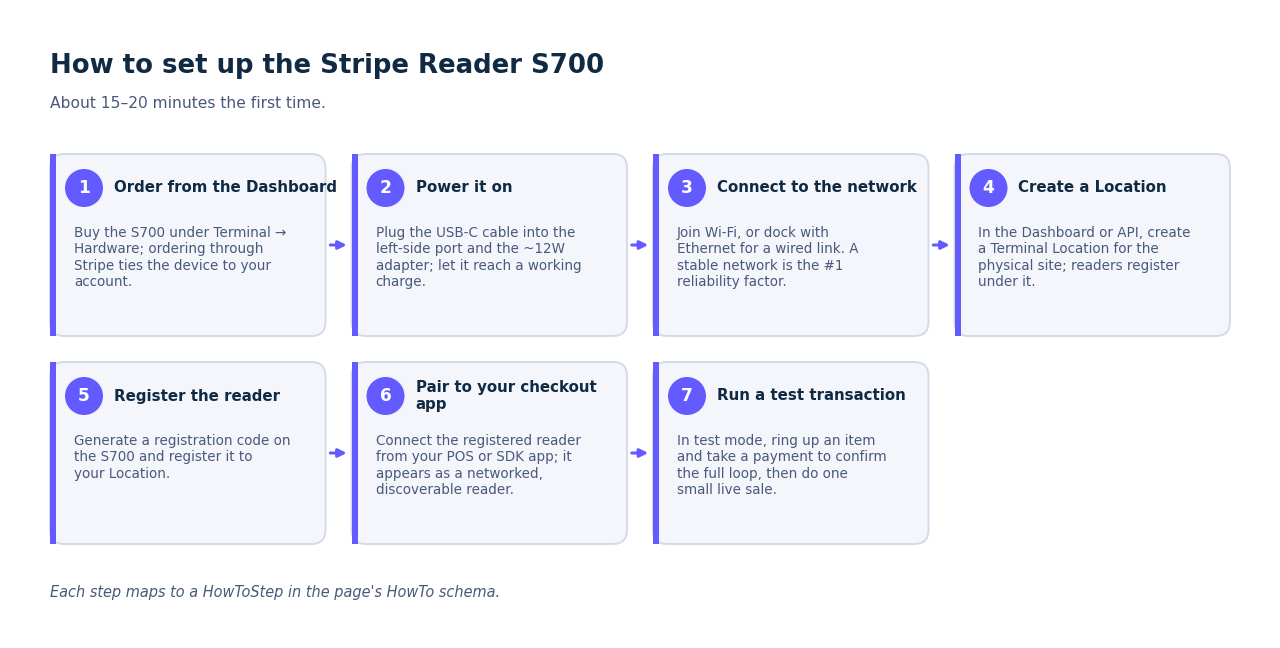
You set up the Stripe Reader S700 by ordering it from the Stripe Dashboard, charging and powering it, connecting it to your network, creating a Location and registering the reader, then pairing it to your checkout application and running a test payment — about 15–20 minutes the first time.
- Order from the Dashboard. Purchase the S700 in the Stripe Dashboard under Terminal → Hardware. Ordering through Stripe ties the device to your account for registration.
- Power it on. Plug the supplied USB-C cable into the port on the left side of the reader and into the provided power adapter. Stripe recommends ~12W; let it reach a working charge before setup.
- Connect to the network. On the device, join your Wi-Fi network, or seat the S700 in a dock with Ethernet for a wired connection. A stable network is the single biggest determinant of reliable pairing — do not set it up on a guest network with a captive portal.
- Create a Location. In the Dashboard (or via the API), create a Terminal Location representing the physical site. Readers are registered under a Location, which also scopes settings and reporting.
- Register the reader. Generate a registration code on the S700 and register it to your Location, following Stripe’s S700 setup documentation. A POS layer usually surfaces this in its own settings so you are not touching the API directly.
- Pair to your checkout app. Connect the registered reader from your POS or your custom checkout app built on the Terminal SDK. Because the S700 is networked, it appears as a discoverable reader on your account rather than a Bluetooth device.
- Run a test transaction. In Stripe test mode, ring up an item and take a payment on the reader to confirm the full loop — collect, confirm, and (if integrated) order creation — before going live. Then do one small live transaction to verify settlement.
For the broader integration context — connecting the S700 into a real register and back-office — see how Stripe Terminal works as a POS, and for running several S700s across sites, the Locations API guidance in the hardware pillar.
How does the S700 compare to the WisePad 3 and M2?
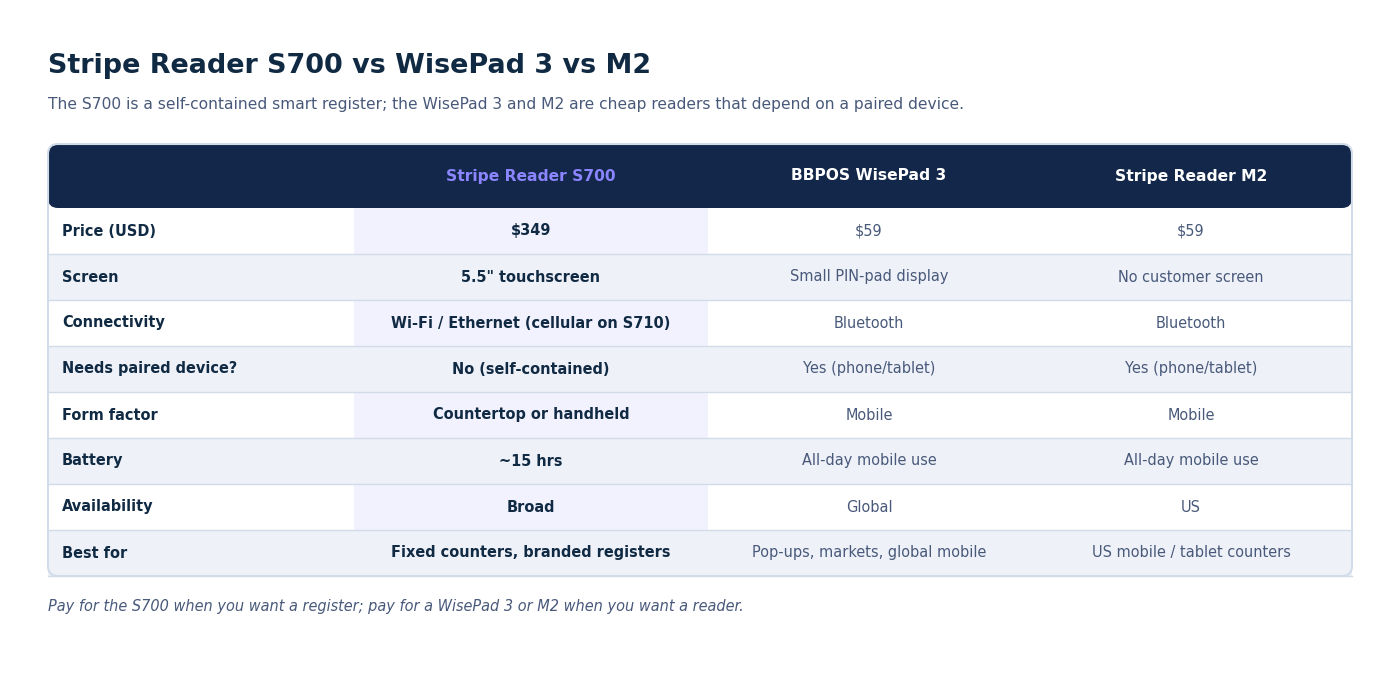
The S700 differs from the WisePad 3 and M2 primarily in autonomy and price: it is a self-contained smart reader with its own screen and network connection at $299, while the WisePad 3 and M2 are inexpensive $59 mobile readers that depend on a paired phone or tablet over Bluetooth.
| Stripe Reader S700 | BBPOS WisePad 3 | Stripe Reader M2 | |
|---|---|---|---|
| Price (USD) | $299 | $59 | $59 |
| Screen | 5.5″ touchscreen | Small PIN-pad display | No customer screen |
| Connectivity | Wi-Fi / Ethernet (cellular on S710) | Bluetooth | Bluetooth |
| Needs paired device? | No (self-contained) | Yes (phone/tablet) | Yes (phone/tablet) |
| Form factor | Countertop or handheld | Mobile | Mobile |
| Battery | ~15 hrs | All-day mobile use | All-day mobile use |
| Availability | Broad | Global (built for Stripe’s global users) | US |
| Best for | Fixed counters, branded registers | Pop-ups, markets, global mobile | US mobile / tablet counters |
The summary: pay for the S700 when you want a register; pay for a WisePad 3 or M2 when you want a reader. The screen and network independence are the entire value gap. Prices and availability are from Stripe’s Terminal devices page and WisePad 3 page; the deeper three-way breakdown is in the hardware pillar.
What does the Stripe Reader S700 really cost to own?
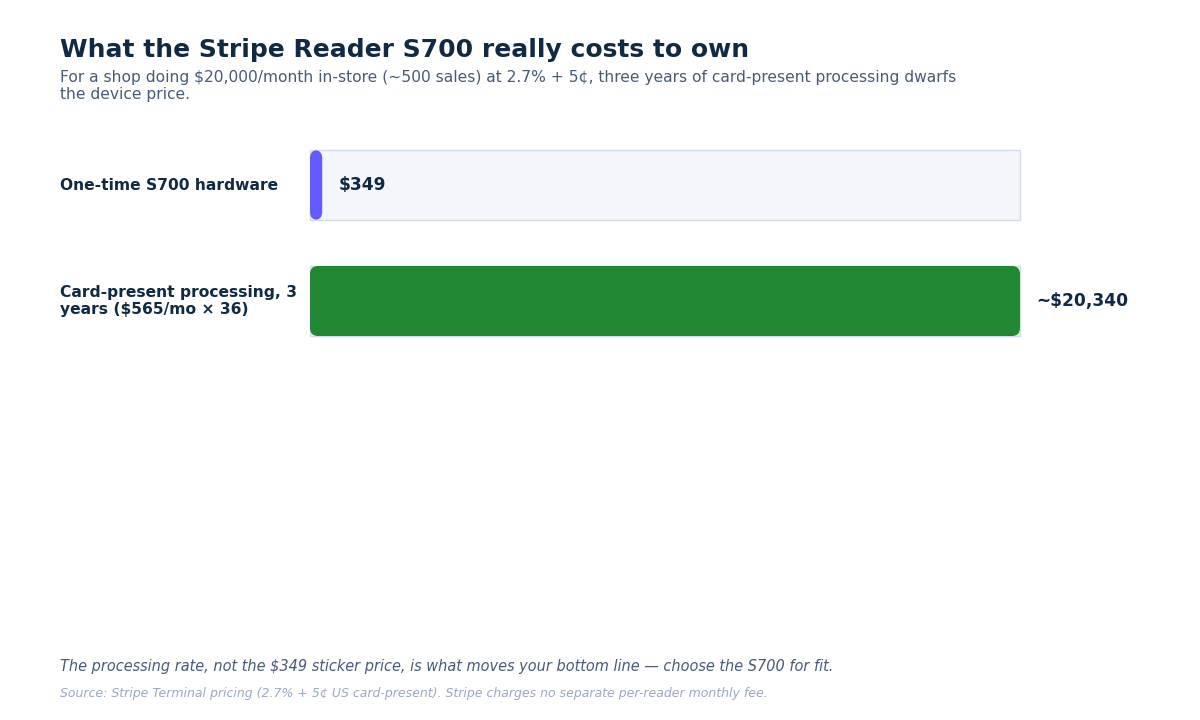
The S700’s real cost is the $299 device plus the standard Stripe Terminal processing rate of 2.7% + 5¢ per US card-present transaction — there is no separate per-reader monthly fee from Stripe, so total cost of ownership is hardware plus processing plus whatever POS software you run on top.
Breaking down total cost of ownership over a typical multi-year life:
Upfront hardware: $299 per reader (a dock and accessories are extra if you want a fixed countertop setup).
Processing: 2.7% + 5¢ per successful card-present transaction in the US, per Stripe Terminal pricing. This is lower than Stripe’s 2.9% + 30¢ online rate — the card-present discount reflects lower fraud risk. A store doing 500 in-person sales a month pays roughly $565 in processing on $20,000 of volume.
POS software: Stripe charges no register software fee; you supply the checkout layer. That is either a POS subscription or the engineering cost of a custom build on the SDK.
Replacement horizon: Smart readers are durable but not eternal. Budget for a multi-year replacement cycle and keep at least one spare for any single-counter operation — a dead reader with no backup is a closed register. The full lifespan-and-TCO analysis across all readers is in Stripe Terminal Reader Lifespan & Total Cost of Ownership.
Spread over three years, a single S700 running a busy counter costs a few cents per day in hardware amortization — the processing rate, not the device price, is what actually moves your bottom line.
Real-world reliability notes
In practice the S700 is reliable when the network is reliable and frustrating when it is not — the most common “hardware” problems we troubleshoot turn out to be Wi-Fi issues, not device faults.
A few field notes from deployments:
Network first. The S700’s biggest dependency is connectivity. A weak or congested Wi-Fi signal at the counter produces slow pairings and intermittent drops that masquerade as device failures. Where it matters, run Ethernet through the dock. This is the number-one cause of S700 support tickets we see.
Keep a spare for single-counter sites. Because the S700 is the whole register, a single-reader counter has a single point of failure. For any business where a closed register means lost sales, a backup reader (even a cheap WisePad 3) is cheap insurance.
Battery is good but not infinite. ~15 hours of active use comfortably covers a normal day, but a long event day or a forgotten overnight charge can catch you out. Dock it when idle.
Updates and reboots. As an Android device it occasionally updates and reboots; schedule that for off-hours rather than discovering it mid-rush. General reader error patterns are catalogued in Stripe Terminal Reader Errors: Troubleshooting Guide.
None of these are dealbreakers — they are the ordinary operational realities of running a connected smart terminal, and they are entirely manageable with a little planning.
Where can you buy the Stripe Reader S700?
You buy the Stripe Reader S700 directly through the Stripe Dashboard under Terminal → Hardware, which is the route Stripe recommends because it registers the device to your account; some Stripe partners and resellers also stock it.
Buying through the Dashboard is the cleanest path: the order is tied to your Stripe account, registration is straightforward, and you are guaranteed a current-revision device. Confirm pricing and shipping availability for your region on Stripe’s S700 page at the time of purchase. If you are deploying many readers across multiple locations — or reselling Terminal hardware to merchants as a platform — talk to us about the registration and Locations setup before you order in bulk; getting the Location structure right up front saves rework later.
Frequently asked questions
Is the Stripe Reader S700 worth buying?
Yes — if you run a fixed or semi-fixed counter that needs a self-contained, customer-facing register. The S700’s $299 price buys a built-in touchscreen, network connectivity, and independence from a paired phone, which is exactly what a stationary store wants. For mobile, occasional, or budget-limited selling, the $59 WisePad 3 or M2, or free Tap to Pay, are the better value.
How much does the Stripe Reader S700 cost?
The S700 costs $299 as a one-time hardware purchase. On top of that, Stripe charges 2.7% + 5¢ per successful US card-present transaction; there is no separate monthly fee for the reader itself. You also supply the POS software that runs the register. Confirm current pricing on Stripe’s S700 page.
Does the Stripe Reader S700 need a phone or tablet?
No. Unlike the Bluetooth WisePad 3 and M2, the S700 is a self-contained smart reader with its own Android operating system, touchscreen, and Wi-Fi/Ethernet connection. It can run a checkout app directly and does not need to be tethered to a separate device.
What’s the difference between the S700 and the S710?
The S710 is the cellular-enabled variant of the S700. It adds mobile data connectivity for situations where Wi-Fi or Ethernet is not available or not reliable, while sharing the same screen, platform, and payment capabilities. Choose the S710 if your counter location lacks dependable wired or wireless internet. Both readers list at $299 in the US (Stripe pricing as of October 2026).
Can the Stripe Reader S700 work with WooCommerce?
Yes. The S700 connects through the Stripe Terminal SDK, so it works with any POS layer that supports Terminal — including WooCommerce-native registers. See the Stripe Terminal for WooCommerce implementation guide for how a networked smart reader fits a WooCommerce store.
How long does the Stripe Reader S700 battery last?
About 15 hours of active use on a full charge, with a full recharge taking roughly 2.5 hours over USB-C. That comfortably covers a standard retail day; dock the reader when idle and it effectively never runs low under normal counter use.
Make the right hardware call
The Stripe Reader S700 is the best Stripe Terminal device for a real counter and the wrong one for a bag — that is the whole decision in a sentence. If you run a fixed register and want a self-contained, customer-facing terminal, it is worth the $299; if you sell on the move, save the money and use a WisePad 3, M2, or Tap to Pay.
Choosing hardware for a multi-location rollout, a platform deployment, or an unusual environment? We have set up Stripe Terminal across retail, hospitality, field services, and platform builds. Book a hardware advisory call and we will help you spec the right readers, Location structure, and integration before you spend a dollar on devices.
Related reading: The Complete 2026 Stripe Terminal Hardware Guide · Stripe Reader M2 vs S700 · How Stripe Terminal Works as a POS
