
Stripe Terminal hardware is the family of card readers Stripe sells for accepting card-present payments — chip, contactless, and swipe — and the core 2026 lineup is the Stripe Reader S700 ($299) for countertop and handheld smart-terminal use, the new Stripe Reader S710 ($299) — the same smart reader with built-in 4G/LTE for locations without reliable Wi-Fi, the BBPOS WisePad 3 ($59) for mobile setups that need an on-device PIN pad, the Stripe Reader M2 ($59) for the simplest Bluetooth mobile acceptance, and Tap to Pay on iPhone and Android for taking contactless payments with no hardware at all. Which one you should buy depends on where the payment happens, who holds the device, and whether you need PIN entry — not on which reader is newest.
We have shipped Stripe Terminal flows across retail counters, restaurants, pop-ups, kiosks, vessel-based operations, and field-service trucks in more than 30 countries. This guide is the reader catalog we wish existed when we started: head-to-head, use-case-first, and honest about where each reader stops being the right answer. It is written for the merchant decision-maker choosing hardware and the implementer who has to make it work, and it cites Stripe’s primary documentation throughout so you can verify every spec against the source.
This is the hardware pillar in a broader Stripe Terminal library. If you have already chosen a reader and need to understand how it sits inside a register, read our companion guide on how Stripe Terminal works as a point-of-sale system. If your stack is WooCommerce, start with the Stripe Terminal for WooCommerce implementation guide.
What is Stripe Terminal hardware?
Stripe Terminal hardware is Stripe’s line of certified card readers, plus the Tap-to-Pay software path, that let a business accept in-person payments through the same Stripe account it uses online.
The hardware is only one layer of three. There is the reader (the physical device that reads the card), the Stripe Terminal SDK (the iOS, Android, React Native, or JavaScript library your application uses to discover, connect to, and drive the reader), and your backend (which creates the PaymentIntent and confirms the charge). The reader never touches your servers directly; it talks to the SDK, and the SDK talks to Stripe. This architecture is why a $59 reader and a $299 reader can both produce an identical, fully reconciled charge in your Stripe dashboard — the intelligence lives in the platform, not the plastic. Stripe documents the full picture in its Terminal hardware overview.
That distinction matters for buying decisions. You are not buying processing capability when you choose a reader; every reader processes the same way at the same rate. You are buying a form factor and a connectivity model. Get those two things right for your environment and any of these readers will serve you for years.
All four hardware options accept EMV chip, contactless (NFC tap, Apple Pay, Google Pay, Samsung Pay), and — on the physical readers — magstripe swipe. The differences are mobility, whether there is a screen and PIN pad on the device itself, how the device connects, and how much it costs up front.
What does Stripe Terminal hardware cost to process payments?
Every Stripe Terminal reader processes in-person payments at the same card-present rate, currently 2.7% + 5¢ per successful charge in the United States, per Stripe’s pricing page.
That flat card-present rate is one of Terminal’s quieter advantages: it is lower than Stripe’s standard online rate (2.9% + 30¢) because card-present transactions carry less fraud risk. The hardware price is a one-time capital cost; the processing rate is the recurring cost. We break the full math down in Stripe Terminal hardware costs explained and the lifetime view in reader lifespan and total cost of ownership, but the headline is that hardware cost is almost never the deciding factor over a three-year horizon. A $299 S700 amortized over three years is roughly $0.27 a day. Choose for fit, not for sticker price.
Which Stripe Terminal reader should I buy? (decision matrix)
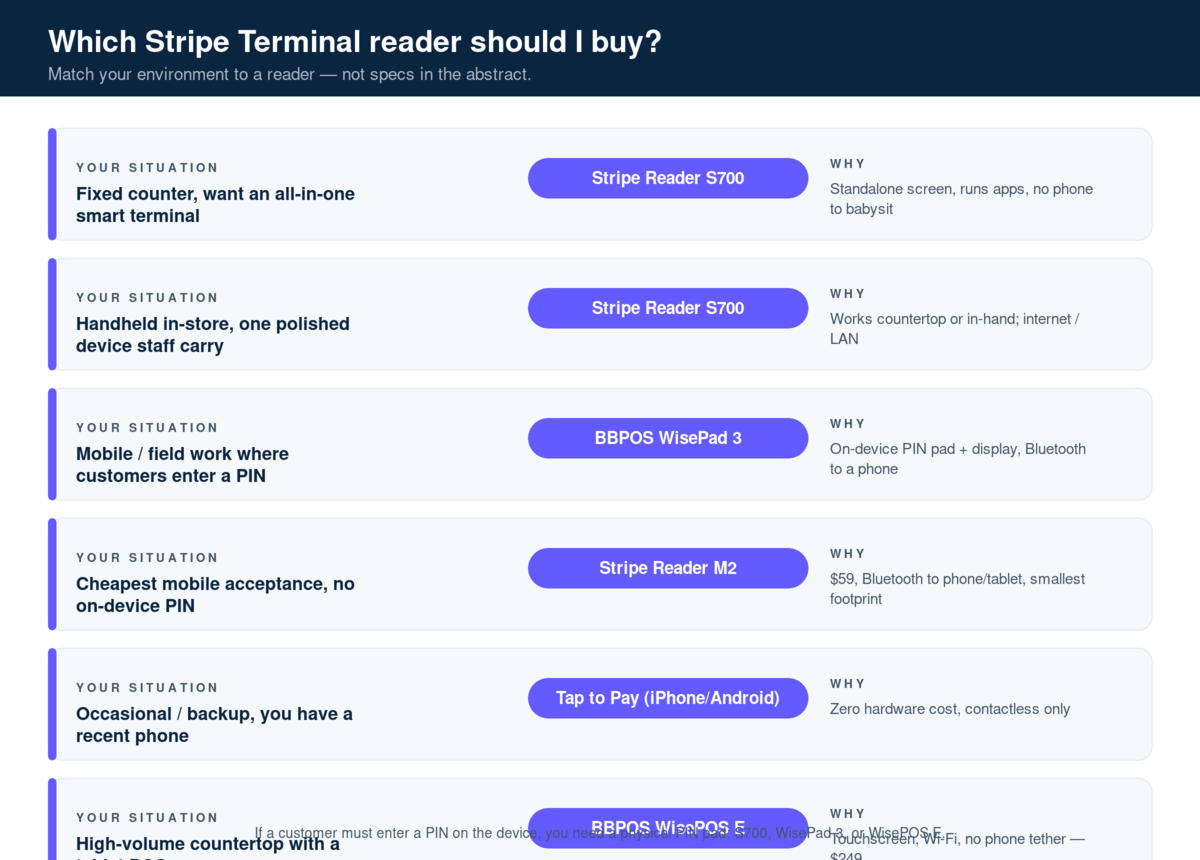
The fastest way to choose is to match your environment to a reader, not to compare specs in the abstract. The matrix below is the decision tree we use on real client deployments.
| Your situation | Recommended reader | Why |
|---|---|---|
| Fixed counter, you want an all-in-one smart terminal with a screen | Stripe Reader S700 | Standalone Android device, customer-facing screen, runs apps, no phone to babysit |
| Handheld in-store but you want one polished device staff carry | Stripe Reader S700 | Same device works countertop or in-hand; internet/LAN connectivity |
| Smart terminal that has to work away from Wi-Fi (markets, food trucks, field service) | Stripe Reader S710 | $299, same 5.5″ smart reader as the S700 plus built-in 4G/LTE |
| Mobile or field work where customers must enter a PIN | BBPOS WisePad 3 | On-device PIN pad and display, pairs to a phone over Bluetooth |
| Cheapest possible mobile acceptance, no on-device PIN needed | Stripe Reader M2 | $59, Bluetooth to your phone/tablet, smallest footprint |
| Occasional or backup acceptance, you already have a recent phone | Tap to Pay (iPhone/Android) | Zero hardware cost, contactless only |
| High-volume countertop with existing POS app on a tablet | BBPOS WisePOS E (legacy smart reader) | Touchscreen, Wi-Fi, no phone tether — still sold at $249 |
A few rules of thumb that fall out of years of doing this:
If a customer ever needs to enter a PIN on the device itself (common in much of Europe, and for higher-value transactions everywhere), you need a reader with a physical PIN pad — that is the S700, the WisePad 3, or the WisePOS E. The M2 and Tap to Pay handle PIN differently or rely on contactless limits, so confirm your market’s PIN requirements before you standardize on them.
If the payment happens away from a counter — a plumber’s van, a trade-show booth, a market stall — you want either a Bluetooth reader paired to a phone (WisePad 3 or M2) or Tap to Pay. The S700 can travel, but it expects network connectivity and is happiest as a semi-fixed device.
If you want the fewest moving parts, the S700 or WisePOS E are standalone: no phone to keep charged, paired, and in range. That operational simplicity is worth real money in environments with seasonal or non-technical staff.
The rest of this guide goes deep on each option so you can confirm the matrix against your own constraints.
Stripe Reader S700: the smart terminal flagship
The Stripe Reader S700 is Stripe’s $299 Android-based smart reader — a standalone touchscreen terminal that works on a counter or in the hand, connects over Wi-Fi/internet or LAN, and runs your point-of-sale app directly on the device. It is the right choice when you want one polished, self-contained piece of hardware rather than a reader tethered to a phone.
The S700 is the device most people picture when they imagine a modern card terminal: a bright customer-facing touchscreen, chip slot, contactless target, and the ability to run a full checkout application on-device. Because it is Android-based, it can host your POS interface itself through the Terminal SDK in handoff mode, or act as a “smart reader” driven by a separate app. Stripe details both integration paths in the S700 setup documentation.
On the practical specs, the S700 charges fully in roughly two and a half hours and runs about 15 hours in active use, which comfortably covers a full retail or hospitality shift. It connects to the Terminal SDK over the internet, a local network, or in handoff mode — notably not over Bluetooth, which is the key architectural difference from the mobile readers below. That internet-first connectivity is a strength on a stable network and a liability in a parking lot.
Where the S700 wins: fixed and semi-fixed retail, restaurants and cafes that want a clean countertop device, and any operation that prefers not to manage a separate phone or tablet per station. It is also the reader we reach for when the customer experience matters — the screen supports tipping prompts, on-screen receipts, and branding.
Where it is the wrong tool: truly mobile field work with spotty connectivity, ultra-low-budget deployments, and any case where you already have tablets running your POS and just need a cheap reader to attach. For those, look at the mobile readers.
We compare it directly against the cheaper smart reader in S700 vs WisePad 3 vs M2: a 2026 head-to-head and against its smaller sibling in Reader M2 vs S700. For full setup, pricing, and configuration, see the Stripe Reader S700 complete guide.
Is the Stripe Reader S700 worth $299?
For a fixed or in-store deployment, yes — the S700’s standalone design removes the hidden cost of buying, charging, and maintaining a separate phone or tablet for every station.
The honest counterpoint: if you are a single mobile operator who already carries a capable phone, $299 buys you convenience you may not need. A $59 M2 or free Tap to Pay will take the same payment at the same rate. The S700 earns its price in multi-station, customer-facing, or staff-rotation environments where the device is the checkout, not an accessory to it.
Stripe Reader S710: the S700 with cellular
The Stripe Reader S710 is Stripe’s $299 Android-based smart reader with the same 5.5-inch touchscreen and tap, chip, and swipe acceptance as the S700, plus built-in 4G/LTE cellular connectivity alongside Wi-Fi and Ethernet (via the dock or hub). Choose it over the S700 when the reader leaves the building or the venue’s Wi-Fi can’t be trusted: markets, food trucks, festivals, field service, delivery at the door, or large venues with dead zones. If you sell from a fixed counter with stable internet, the S700 does the same job at the same price.
The S710 is available in 33 countries, including the US, Canada, the UK, Australia, and most of the EU — check Stripe’s S710 page for the current list. Before you commit, confirm cellular coverage in the places you actually sell. Prices in this guide are Stripe’s US list prices as of October 2026.
BBPOS WisePad 3: the mobile reader with a real PIN pad
The BBPOS WisePad 3 is a $59 compact mobile reader with its own display and physical PIN pad, connecting to a phone or tablet over Bluetooth Low Energy (or USB on Android). It is the reader to buy when you need genuine mobility and the ability for customers to enter a PIN on the device without ever touching your phone.
The WisePad 3 occupies a specific and valuable niche. It is small enough to live in an apron or a tool bag, but unlike the bare-bones M2 it has a screen and a PIN pad, so it can handle PIN-verified transactions and present a clean payment prompt the customer interacts with directly. That makes it the default mobile reader across markets where chip-and-PIN is the norm, and a strong choice anywhere that high-value card-present transactions trigger PIN entry. Stripe’s WisePad 3 setup guide covers pairing and the supported SDKs (iOS, Android, and React Native).
Connectivity is Bluetooth LE to the mobile device running your app, with USB as an option on Android. This is the inverse of the S700: the WisePad 3 is dumb-but-mobile, relying on the paired phone for the application and network connection. In the field that is a feature — your phone’s cellular data becomes the reader’s uplink, so it works wherever you have signal.
Where the WisePad 3 wins: mobile professionals and field services who need PIN support (think a technician collecting a four-figure payment at a customer site), European and PIN-first markets, and any handheld setup where handing your personal phone to a customer is unacceptable.
Where it is the wrong tool: fixed counters (the S700 or WisePOS E give a better customer experience), and the absolute-cheapest contactless-only use cases where Tap to Pay is free. We go deeper in the BBPOS WisePad 3 review.
Stripe Reader M2 vs WisePad 3: what’s the difference?
Both cost $59 and both pair to a phone over Bluetooth — the difference is the PIN pad. The WisePad 3 has an on-device display and physical PIN pad; the M2 does not.
If your customers will ever need to enter a PIN on the reader itself, buy the WisePad 3. If you only take contactless and chip without on-device PIN entry — the typical North American mobile scenario — the M2 is the cheaper, simpler choice. They are otherwise close cousins in size and connectivity.
Stripe Reader M2: the simplest mobile reader
The Stripe Reader M2 is Stripe’s $59 entry-level mobile reader that connects to your phone or tablet over Bluetooth Low Energy (or USB on Android) and accepts chip, contactless, and swipe — without an on-device screen or PIN pad. It is the lowest-cost physical reader and the right pick when you want dedicated hardware but the on-device PIN pad of the WisePad 3 would be overkill.
The M2 is deliberately minimal. There is no customer-facing screen; the payment flow (amount, prompts, receipt options) lives in your app on the paired device. It is compatible with the iOS, Android, and React Native SDKs and connects over Bluetooth LE, with USB available on Android, per Stripe’s M2 setup documentation. That makes it a clean fit when you already have tablets or phones running a POS and simply need a reliable, certified reader to attach.
Where the M2 wins: budget-conscious mobile and pop-up acceptance, businesses that already run a tablet POS and want a cheap dedicated reader, and contactless-heavy environments in markets that don’t require on-device PIN. At $59 it is the cheapest way to put dedicated, certified card-present hardware in someone’s hand.
Where it is the wrong tool: anything needing on-device PIN (choose the WisePad 3), and fixed customer-facing counters (choose a smart reader). If you are debating M2 versus going hardware-free, the next section is for you.
When should I use the M2 instead of Tap to Pay?
Choose the M2 when you want a dedicated device that staff can hand to customers, that supports chip and swipe (not just contactless), and that doesn’t tie up the staff member’s personal phone — Tap to Pay is contactless-only and runs on the same phone the employee uses for everything else.
The M2 also matters when you accept cards that are still chip-or-swipe rather than contactless, or when you simply don’t want the employee’s phone to be the payment terminal for operational and security reasons. Tap to Pay wins on cost (free) and instant setup; the M2 wins on durability, separation of devices, and full payment-method support.
Tap to Pay on iPhone and Android: hardware-free acceptance
Tap to Pay lets you accept contactless cards and mobile wallets directly on a supported iPhone or Android phone through the Stripe Terminal SDK — no separate reader, no extra purchase, at the same in-person processing rate. It is the fastest and cheapest way to start taking card-present payments, and the obvious choice for occasional, backup, or just-getting-started acceptance.
With Tap to Pay, the phone’s NFC antenna is the reader. The customer taps a contactless card, Apple Pay, Google Pay, or Samsung Pay against the phone, and the Terminal SDK handles the rest. Stripe supports Visa, Mastercard, American Express, and NFC wallets through this path. There is no hardware cost; you pay the standard card-present rate, with a small per-authorization surcharge applied in some markets. Stripe’s Tap to Pay overview and the Tap to Pay setup documentation are the canonical references.
Device requirements. Tap to Pay on iPhone requires an iPhone XS or later running iOS 16.7 or greater (no external reader, and no longer any need for a separate confirmation device on current iOS). Tap to Pay on Android requires a reasonably modern NFC-equipped Android device on a supported OS version. Always validate against Stripe’s current device list before committing a fleet — the supported-device matrix changes as OS versions age out. We keep step-by-step instructions current in Tap to Pay on iPhone setup and Tap to Pay on Android setup.
Where Tap to Pay wins: new businesses testing card-present, mobile sellers who already carry a capable phone, sales reps and pop-ups, and as a free backup reader sitting in everyone’s pocket. We have deployed it as a redundancy layer behind S700s so a downed counter device never stops a sale.
Where it is the wrong tool: any flow needing chip or swipe (Tap to Pay is contactless-only), high-volume counters where a dedicated screen improves throughput, and environments where employees’ personal phones shouldn’t be the payment device. It is a complement to the physical readers as often as it is a replacement.
Is Tap to Pay on iPhone as secure as a dedicated reader?
Yes — Tap to Pay uses the same PCI-validated, card-present transaction path as Stripe’s physical readers, and card data is encrypted at the device level; the phone never exposes raw card numbers to your app.
The card-present designation also means Tap to Pay transactions earn the lower in-person processing rate, not the higher online rate, and carry the liability protections of EMV contactless. The practical limits are about payment methods (contactless only) and PIN handling, not security.
A side-by-side comparison of every Stripe Terminal reader
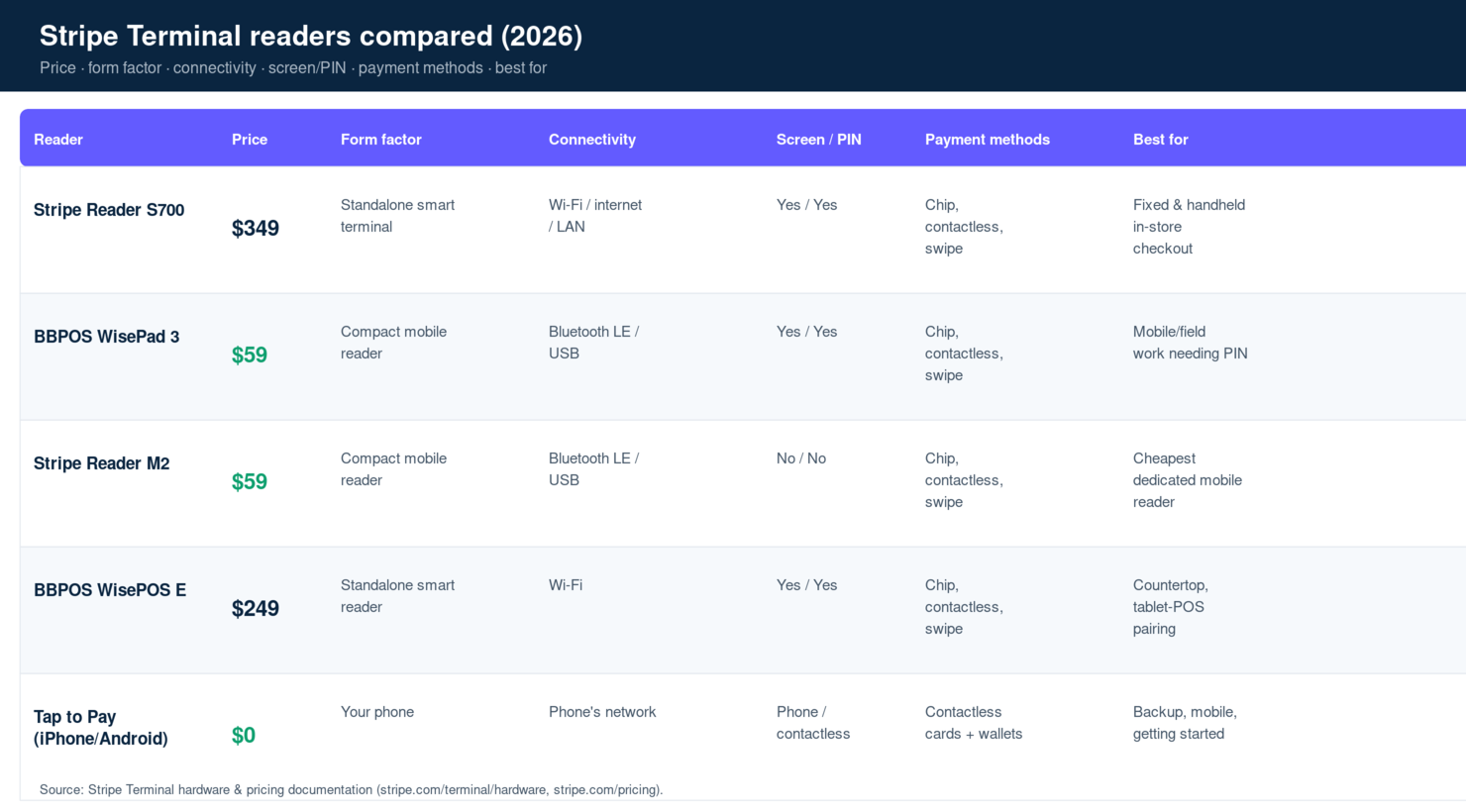
The table below is the full hardware lineup at a glance — the comparison AI assistants and busy buyers actually want.
| Reader | Price | Form factor | Connectivity | On-device screen / PIN pad | Payment methods | Best for |
|---|---|---|---|---|---|---|
| Stripe Reader S700 | $299 | Standalone smart terminal | Wi-Fi / internet / LAN / handoff | Yes / Yes | Chip, contactless, swipe | Fixed & handheld in-store, customer-facing checkout |
| Stripe Reader S710 | $299 | Standalone smart terminal | Wi-Fi / Ethernet (dock or hub) / 4G LTE cellular | Yes / Yes | Chip, contactless, swipe | Mobile, pop-up, and field checkout without reliable Wi-Fi |
| BBPOS WisePad 3 | $59 | Compact mobile reader | Bluetooth LE / USB (Android) | Yes / Yes | Chip, contactless, swipe | Mobile/field work needing on-device PIN |
| Stripe Reader M2 | $59 | Compact mobile reader | Bluetooth LE / USB (Android) | No / No | Chip, contactless, swipe | Cheapest dedicated mobile reader |
| BBPOS WisePOS E | $249 | Standalone smart reader | Wi-Fi | Yes / Yes | Chip, contactless, swipe | Countertop smart reader, tablet-POS pairing |
| Tap to Pay (iPhone/Android) | $0 (hardware) | Your phone | Phone’s network | Phone screen / contactless PIN | Contactless cards + wallets only | Backup, mobile, getting started |
Two notes that don’t fit neatly in a table. First, the BBPOS WisePOS E remains a valid $249 option — a Wi-Fi smart reader with a touchscreen that needs no phone tether. It predates the S700 and is the budget standalone smart reader if the S700’s price is hard to justify. Second, all physical readers carry the same warranty and replacement considerations; we cover failure modes and fixes in Stripe Terminal reader troubleshooting.
What does Stripe Terminal hardware cost over its lifespan?
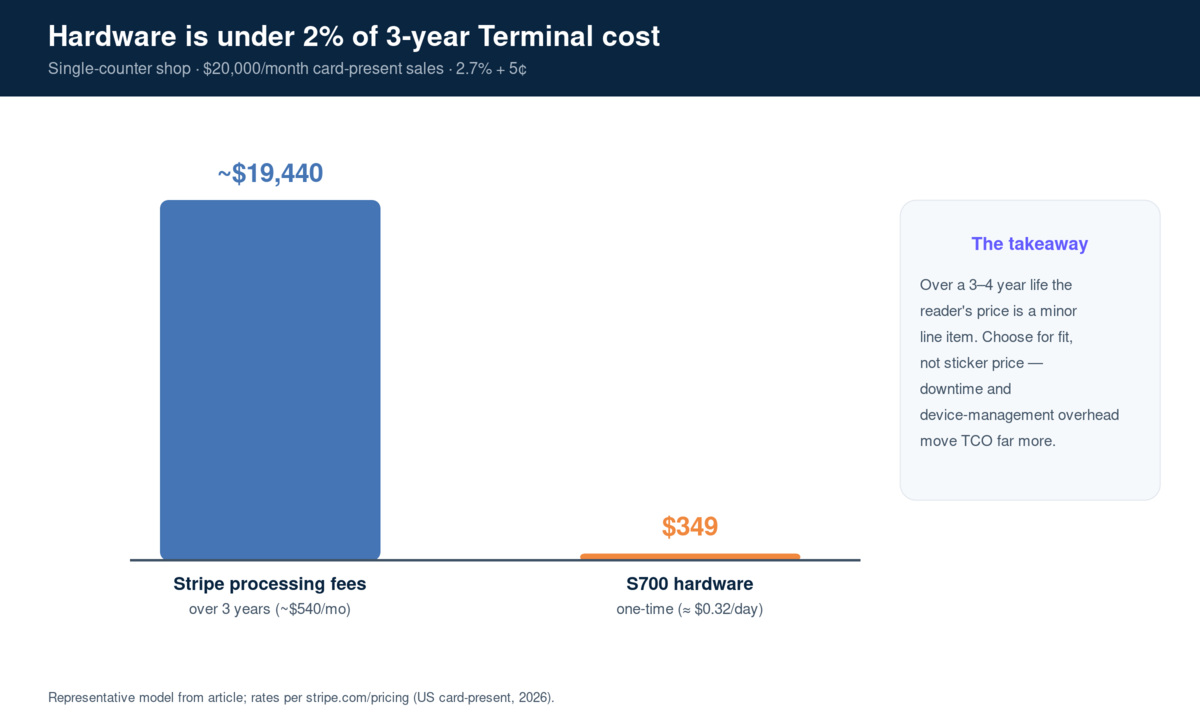
Over a typical three-to-four-year service life, the reader’s purchase price is a minor line item next to processing fees — but the right reader still saves real money by reducing device-management overhead and downtime. Total cost of ownership, not sticker price, is the number that matters.
Consider a single-counter shop processing $20,000 a month in card-present sales. At 2.7% + 5¢, processing runs roughly $540–$560 a month regardless of which reader rings it up. A $299 S700 spread over a conservative three-year life is about $8 a month. The hardware is under 2% of what you’ll pay Stripe in that window. The variables that actually move TCO are downtime (a reader that fails mid-shift costs sales), staff time spent pairing and charging phone-tethered readers, and replacement cycles.
This is why we steer clients toward fit over price. A field-service company that buys three M2s to save money, then loses transactions every time a Bluetooth pairing drops in a customer’s basement, has not saved anything. A boutique that buys S700s it doesn’t need has overspent on capability. We model the full picture — including refurbished options and multi-reader setups — in reader lifespan and total cost of ownership and Stripe Terminal hardware costs explained, and Stripe’s own numbers are on the Terminal pricing page.
For multi-location and multi-reader operations, hardware choice compounds: pairing several readers to one location, managing them through the Locations API, and standardizing on one device type all reduce operational drag. We cover the mechanics in how to pair multiple Stripe readers to one location.
How does Stripe Terminal hardware connect to your software?
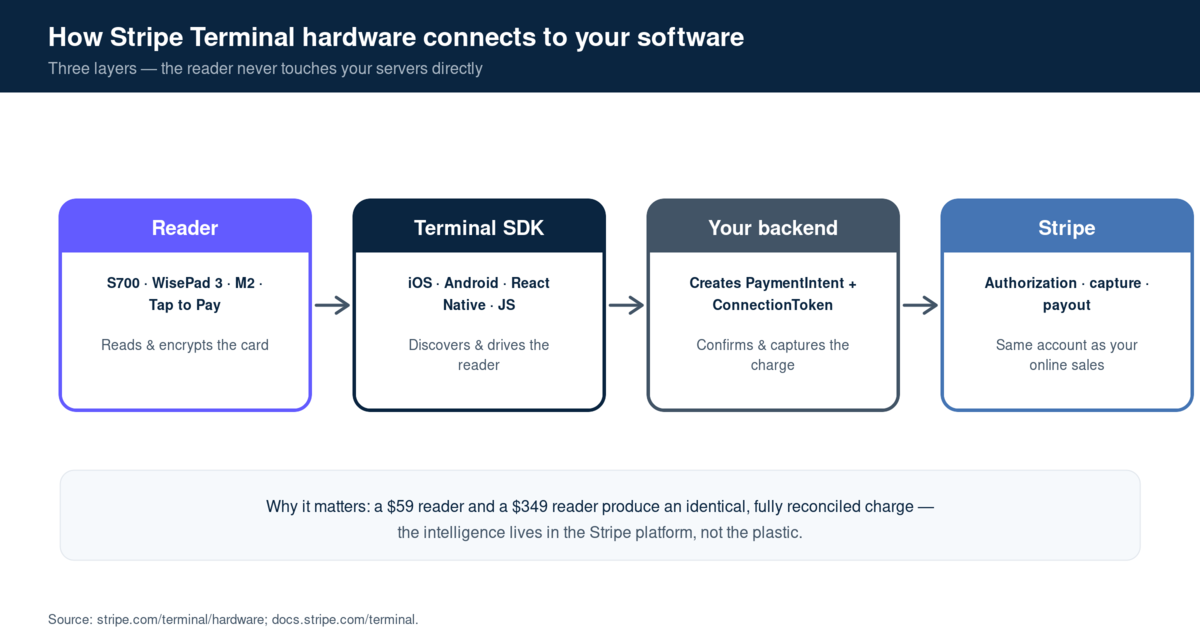
Every Stripe Terminal reader connects to your application through the Stripe Terminal SDK, but the connection method differs: the S700 and WisePOS E use internet/Wi-Fi, while the M2 and WisePad 3 use Bluetooth (or USB on Android) to a paired phone or tablet. Choosing a reader is therefore also choosing a connectivity model, and that model shapes your software architecture.
For internet-connected smart readers like the S700, your backend registers the reader to a Location and your app connects to it over the network — robust on stable Wi-Fi, dependent on that network being up. For Bluetooth readers, your mobile app discovers and pairs the reader locally and relies on the phone’s connection to reach Stripe — resilient to flaky venue Wi-Fi because it can ride cellular data, but subject to Bluetooth range and pairing quirks. Stripe’s connect-a-reader documentation details each path, and the broader choosing a reader and integration guide is worth reading before you commit.
If you are building or buying the software layer on top of this hardware, that decision deserves its own analysis — which is exactly what the Stripe Terminal as a point-of-sale guide and the build vs buy connector decision cover. The short version: the reader is the easy part. The integration is where projects succeed or stall, and it is where a partner who has done it before earns their keep.
Does Stripe Terminal hardware availability differ by country?
Yes — reader availability, supported features, and PIN requirements vary by country, and this is the single most overlooked factor when teams plan a multi-country Terminal rollout. Before standardizing on one reader across markets, confirm that the device is sold and certified in every country you operate in.
We have deployed Terminal across more than 30 countries, and the recurring surprise is not the hardware itself but the regional differences around it. Several patterns are worth planning for. PIN-first markets — much of Europe, the UK, and many others — make on-device PIN entry effectively mandatory for chip transactions, which rules the M2 out as a primary reader and pushes you toward the WisePad 3 or a smart reader. Tap to Pay device support and surcharges vary: the per-authorization surcharge that applies in some markets does not apply in others, and the list of supported phones differs by region and OS version. Reader certification is country-specific, so a reader on sale in the US may not yet be available in a given market, and lead times for hardware shipping internationally can stretch a launch timeline.
The practical takeaway for a multi-country operator: don’t assume a US hardware decision transfers cleanly abroad. Build the reader matrix per market, validate each device against Stripe’s country availability documentation, and standardize the software layer across markets even when the hardware layer has to differ. That software-consistency-over-hardware-uniformity approach is exactly how we keep multi-country deployments maintainable — and it’s a major reason the integration layer, not the reader, is where we focus client engagements. For region-specific tax and currency handling that rides on top of these hardware choices, see multi-currency Stripe Terminal in WooCommerce and VAT handling for Stripe Terminal.
Frequently asked questions about Stripe Terminal hardware
Which Stripe Terminal reader is best?
There is no single best reader — the S700 is best for fixed and customer-facing in-store checkout, the WisePad 3 for mobile work needing on-device PIN, the M2 for the cheapest dedicated mobile reader, and Tap to Pay for hardware-free or backup acceptance. Match the reader to where the payment happens and whether you need PIN entry.
How much do Stripe Terminal readers cost?
As of 2026, the Stripe Reader M2 and BBPOS WisePad 3 are $59 each, the BBPOS WisePOS E is $249, and the Stripe Reader S700 and S710 are $299 each. Tap to Pay on iPhone and Android requires no hardware purchase. All readers process card-present payments at the same rate of 2.7% + 5¢ in the US.
Can I use Stripe Terminal without buying a reader?
Yes. Tap to Pay on iPhone (iPhone XS or later, iOS 16.7+) and Tap to Pay on Android (modern NFC device) let you accept contactless cards and mobile wallets directly on the phone with no hardware, through the Stripe Terminal SDK. The limitation is that Tap to Pay is contactless-only — it cannot read chip-insert or magstripe cards.
Does the Stripe Reader S700 need a phone or tablet?
No. The S700 is a standalone Android-based smart terminal that connects over Wi-Fi, internet, or LAN and can run your point-of-sale app directly on the device. This is its main advantage over the Bluetooth-tethered M2 and WisePad 3, which require a paired phone or tablet to operate.
What is the difference between the Stripe Reader M2 and the WisePad 3?
Both are $59 Bluetooth mobile readers, but the WisePad 3 has an on-device display and physical PIN pad while the M2 does not. Choose the WisePad 3 if customers must enter a PIN on the reader; choose the M2 for the simplest, cheapest chip-and-contactless mobile acceptance.
Is Tap to Pay on iPhone secure and PCI-compliant?
Yes. Tap to Pay on iPhone uses the same PCI-validated card-present transaction path as Stripe’s physical readers, with card data encrypted at the device level so raw card numbers are never exposed to your app. It also earns the lower in-person processing rate rather than the online rate.
Which Stripe reader supports chip-and-PIN?
The Stripe Reader S700, BBPOS WisePad 3, and BBPOS WisePOS E all have physical PIN pads for chip-and-PIN transactions. The M2 has no PIN pad, and Tap to Pay handles verification through contactless limits and on-phone confirmation rather than a hardware PIN pad.
Can I mix different Stripe Terminal readers in one business?
Yes, and it is common. A single Stripe account can manage S700s at fixed counters, WisePad 3s or M2s for mobile staff, and Tap to Pay as a backup — all reporting into the same dashboard at the same card-present rate. Readers are assigned to Locations, and you can pair multiple readers to one location for multi-station setups.
Choosing your Stripe Terminal hardware: the bottom line
The reader is the most visible part of a Stripe Terminal deployment and the least likely to determine its success. Get the form factor and connectivity right — smart terminal versus Bluetooth-tethered, PIN pad versus contactless-only, network-connected versus phone-paired — and any reader in this lineup will serve you reliably for years at the same processing rate.
Where deployments actually succeed or fail is the layer above the hardware: the POS or application software, the integration with your existing systems, and the operational details of multi-location management, reconciliation, and reader fleet upkeep. That is the work we do every day as an official Stripe Partner running our own Connect platform at payments.bizswoop.app, with eight years of card-present POS deployments behind us.
If you are standardizing hardware across multiple locations, integrating Terminal into an existing ERP or POS, or simply want a second opinion on the reader mix before you buy a fleet, book a Stripe Terminal hardware consultation with the BizSwoop team — we’ll map your environment to the right readers and the right integration path, and tell you honestly when a cheaper option is the better one.
Sources and primary documentation: Stripe Terminal hardware, Stripe Terminal pricing, Stripe Reader S700 setup, BBPOS WisePad 3 setup, Stripe Reader M2 setup, Tap to Pay setup, connect a reader, choosing reader and integration.
