
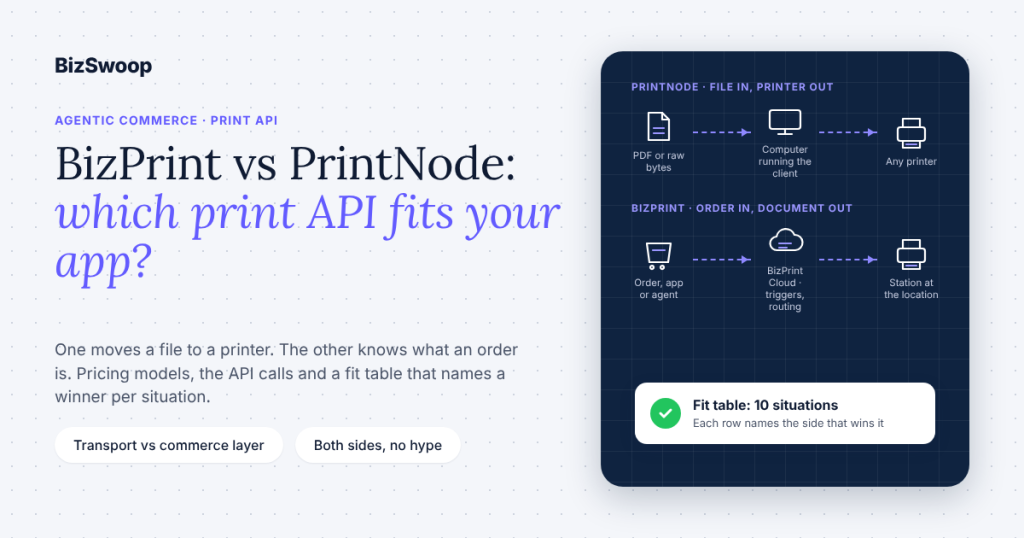
PrintNode is a general-purpose cloud print relay that moves a PDF or raw bytes from your code to any printer running its client; BizPrint is a commerce-aware print platform whose API knows what an order is, so it can print the right document, to the right location, when an order status changes, from a store, an app or an AI agent. If you are searching for a PrintNode alternative, the honest answer is that the two are not interchangeable: PrintNode is the better fit when your app already produces print-ready files and you need a neutral transport; BizPrint is the better fit when the thing being printed is a receipt, kitchen ticket, packing slip or label tied to an order.
Both are called from server-side code. Here is the smallest BizPrint request, copied from the developer documentation: one signed POST that sends a rendered page to a printer. The secret key stays on your server.
// Node.js 18+ — create a print job with the BizPrint Print API
import { createHash } from "node:crypto";

const BASE = "https://print.bizswoop.app/api/connect-application/v1";
const body = {
  printerId: 123,                                  // from GET /printers
  url: "https://yourapp.example/print/order/1042?t=unguessable-token",
  description: "Packing slip, order 1042",
  publicKey: process.env.BIZPRINT_PUBLIC_KEY,
  time: Math.floor(Date.now() / 1000),
};
const hash = createHash("sha256")
  .update(JSON.stringify(body) + ":" + process.env.BIZPRINT_SECRET_KEY)
  .digest("hex");

const res = await fetch(`${BASE}/jobs`, {
  method: "POST",
  headers: { "Content-Type": "application/json" },
  body: JSON.stringify({ ...body, hash }),
});
const { data } = await res.json();
console.log(data.id, data.status);                 // e.g. 8812 'pending'
The equivalent PrintNode call is POST https://api.printnode.com/printjobs with HTTP Basic auth (your API key as the username) and a body of printerId, contentType (pdf_uri, pdf_base64, raw_uri or raw_base64) and content, per the PrintNode API reference. That one-line difference, a URL BizPrint renders versus a file you already rendered, is most of the story.
Key Takeaways
- PrintNode moves bytes to a printer; BizPrint knows what an order is. PrintNode accepts a PDF or raw printer bytes and delivers them to a printer running its client. BizPrint accepts a URL, renders the page as a receipt, ticket, label or slip, and adds order-status triggers, templates and location routing on top.
- They answer different questions. Choose PrintNode when you already produce print-ready documents and want a neutral, well-documented relay for any printer. Choose BizPrint when the document is a commerce document and you want printing to happen when an order event happens.
- Pricing models differ in kind, not just in price. PrintNode sells monthly or yearly plans with an included number of prints and a per-computer limit. BizPrint bills per successful print job, gives 25 free print jobs with no card, and includes the API and MCP server on every plan; see getbizprint.com/pricing for current figures.
- PrintNode wins on raw printing. Its
raw_base64andraw_uricontent types send ZPL, ESC/POS or other printer-language bytes untouched. BizPrint’s API documents a URL as the only job content, so a label farm driven by ZPL belongs on PrintNode. - BizPrint wins on the ecommerce surface. A WooCommerce plugin, a Shopify app, print stations on Windows, macOS, Linux, Raspberry Pi OS and Android, status-triggered printing and an open-source MCP server for AI agents are all the same platform as the API.
- An AI agent can print through BizPrint today. The BizPrint MCP Server exposes the same API as seven tools for Claude Desktop and Claude Code. It runs locally; there is no hosted version. PrintNode has no equivalent.
What is the difference between BizPrint and PrintNode?
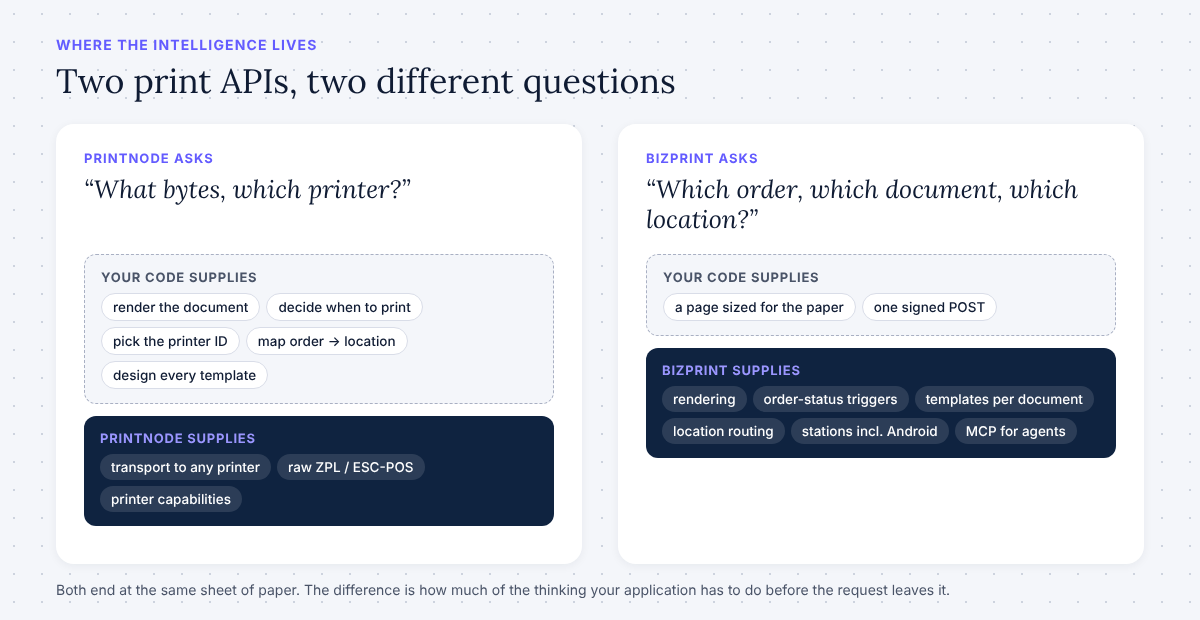
The difference is where the intelligence lives: PrintNode is transport, and your application supplies everything else, while BizPrint is a print layer for commerce that supplies the triggers, templates and routing itself. Put differently, PrintNode asks “what bytes, which printer?” and BizPrint asks “which order, which document, which location?” Both end at the same place, a sheet of paper coming out of a printer the customer owns, but they start from different assumptions about who is doing the thinking.
Here is the fit table, which is the fastest way to decide. Each row names the side that wins it.
| Your situation | Better fit | Why |
|---|---|---|
| A general app, ERP or back-office tool that already generates PDFs and needs to print them anywhere | PrintNode | Neutral relay, PDF in, any client-attached printer out, mature client libraries |
| A label farm or warehouse line driven by ZPL, EPL or ESC/POS bytes your software generates | PrintNode | raw_base64 / raw_uri content types send printer-language bytes untouched; BizPrint documents URL content only |
| A software vendor that wants to create and bill printing sub-accounts for its own customers | PrintNode | The Integrator Account exists for exactly this |
| A WooCommerce store that needs tickets, receipts or packing slips printed when an order hits a status | BizPrint | Plugin plus status triggers plus templates; no code required |
| A Shopify store, especially multi-location, routing orders to the right location’s printer | BizPrint | Shopify app with location routing, on the Pro plan |
| A restaurant, ghost kitchen or food truck printing kitchen tickets with no one at a screen | BizPrint | Order-triggered printing to a station, including Android ESC/POS and StarPRNT stations |
| A custom ordering, POS or fulfillment app, including one built with Lovable, Bolt, Replit or Cursor | BizPrint | One signed POST with a URL; the layout is a web page you already know how to build |
| An AI agent (Claude Desktop, Claude Code) that should print as part of a task | BizPrint | Open-source MCP server with seven tools; local only, no hosted version |
| Self-hosted, on-premises printing infrastructure | PrintNode | A Standalone Server option is offered; BizPrint is cloud only |
| Printing from a phone or tablet directly | BizPrint | Android stations; PrintNode’s client runs on computers only |
If your row says PrintNode, use PrintNode. The rest of this article explains each side well enough that you can trust the row you landed on.
What is the PrintNode API?
PrintNode is a hosted service designed to facilitate remote printing. The PrintNode API extends the functionality of this hosted service and offers a set of features: it connects a document your software produces to a physical printer anywhere in the world, as long as that printer is attached to a computer running the PrintNode Client. For a developer the mental model is simple. You install the client on a computer, the client reports that computer and its printers to PrintNode, and from then on your code can list those printers and send them jobs over a REST API.
The API itself lives at https://api.printnode.com and uses HTTP Basic authentication with your API key as the username and an empty password, so curl -u YOUR_API_KEY: https://api.printnode.com/whoami is the whole hello-world. The resources are the ones you would expect: GET /computers lists the machines running the client, GET /printers lists the printers attached to them (each with a capabilities object describing trays, media and options), and POST /printjobs creates a job. A job needs three things: a printerId, a contentType of pdf_uri, pdf_base64, raw_uri or raw_base64, and the content, which is either a URL PrintNode downloads or a base64 document. Optional title, source, options (tray, media, copies) and expireAfter round it out. Responses are JSON, and the account-level rate limit is 10 requests per second with short bursts allowed, per the API documentation.
Two capabilities deserve emphasis because they are what PrintNode does better than almost anyone. The raw content types let you send printer-language bytes, ZPL for Zebra label printers or ESC/POS for receipt printers, with no rendering step, which is what a warehouse that generates its own labels wants. And the API covers more than paper: PrintNode documents USB scale reading over REST and WebSockets, plus webhooks, computer and printer management, and official client libraries in several languages. If you think of PrintNode as “CUPS in the cloud with an API”, you are close.
What the PrintNode API does not do is also worth stating plainly, because this is where the comparison turns. It has no concept of an order, a store, a location or a document type. It does not know that order 1042 was just paid, that paid orders at the Elm Street location print a kitchen ticket on the pass printer and a receipt at the counter, or what a kitchen ticket looks like. All of that is your code. For a general app that is a feature: PrintNode stays out of the way. For a commerce app it is the part you have to build.
How does the PrintNode client work?
The PrintNode Client is the software you install on the computer attached to your printers; when it runs it reports that computer to PrintNode, which makes the computer and its printers visible through the API. Setting up your PrintNode API therefore starts on the desktop, not in code. The steps below are the ones from our original guide to this topic, kept here because readers still arrive asking for them.
Installing PrintNode for Windows:
- Download the PrintNode Client for Windows.
- Open the downloaded .exe file and follow the prompts to install the application. When you’re done, click Finish.
- Enter your PrintNode account credentials when prompted to log in. If login fails, ensure you’re using the latest version of PrintNode Client and that your internet connection is stable.
Installing PrintNode for Macs:
- Download the PrintNode Client for Mac.
- Open the downloaded .dmg file and drag the PrintNode icon to your Applications folder.
- Open the PrintNode Client from your Applications folder and log in with your account credentials.
Setting up printers on either platform:
- In the Printers tab, select Add Printer.
- Name your printer, select the type, and choose the appropriate connected device.
- Click Add Printer to save.
The client also runs on Linux, including Raspberry Pi; phones and tablets are not supported, so a computer is always in the loop. The problems people hit are the ordinary ones for any driver-based relay: a printer driver that does not match the model, or a firewall that blocks the client’s outbound connection. Updating the driver and checking firewall rules fixes most of them.
How is BizPrint’s architecture different?
BizPrint turns the model inside out: instead of your code rendering a document and handing PrintNode the bytes, your code (or your store, or your agent) tells BizPrint which printer and which URL, and BizPrint renders that page and prints it through a print station at the location. The Print API is one signed POST /jobs with printerId, url and description; GET /printers and GET /stations tell you what is online; GET /jobs/{id} reports pending, processing, connecting-to-printer, done or failed. The layout is a web page sized for the paper, an 80 mm receipt or a 4 × 6 label, served from your app behind an unguessable token, which means any developer who can build a page can design a document and never has to generate a PDF.
Authentication is a public key plus a SHA-256 hash of the request and your secret key, with a Unix timestamp in every request, so the secret never leaves your server. There is no OpenAPI specification published; the developer documentation and the HTTP reference are the source of truth, and the sample at the top of this article is the entire client.
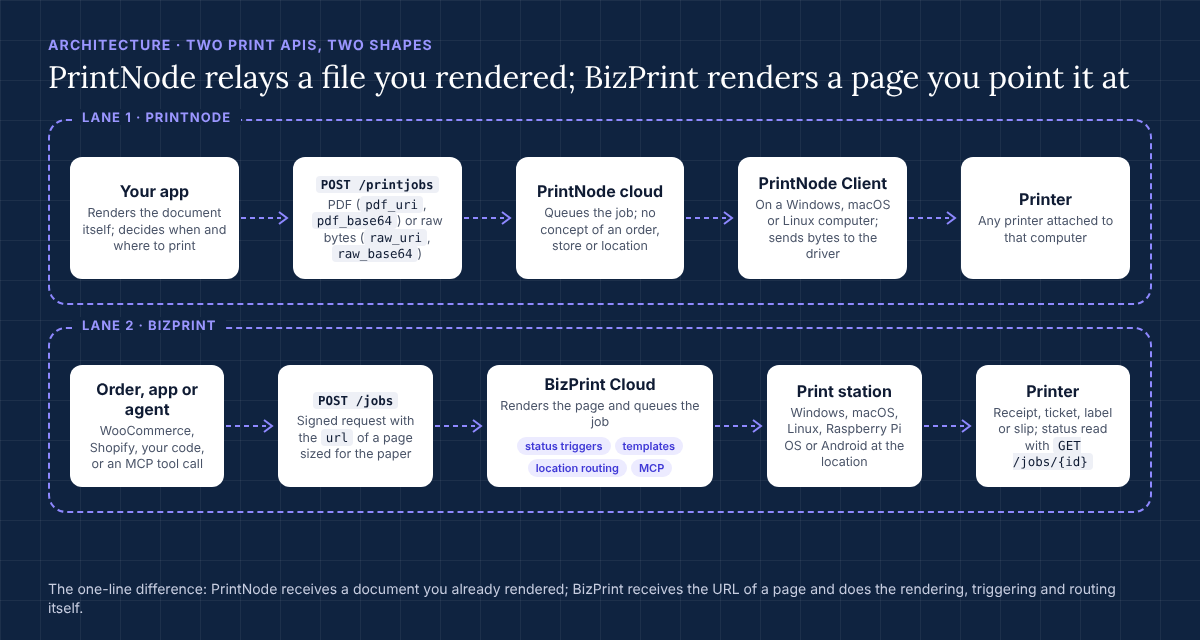
The second half of the architecture is the part PrintNode does not have. A print station is the BizPrint app on a Windows, macOS, Linux or Raspberry Pi OS computer, or an Android device, at the location; Android stations drive ESC/POS and StarPRNT command printers directly, which is how a food truck prints without a laptop. Above the station sit the commerce features: order-status triggers (print the kitchen ticket on “processing”, the packing slip on “completed”), document templates per type, location routing (this order’s items go to this location’s printers), and the BizPrint Print Manager for WooCommerce plugin and BizPrint for Shopify app that use all of it without code. The API is the same layer those products use, and the BizPrint MCP Server is that layer pointed at AI agents.
The trade-off is symmetrical with PrintNode’s. BizPrint’s API documents a URL as the only job content: no PDF upload, no raw bytes. If your document already exists as a ZPL stream, you would have to serve it as a page, and that is the wrong tool. If your document is “whatever order 1042 needs printed”, BizPrint has already done the work.
How do the two compare feature by feature?
PrintNode is broader as a printing utility and BizPrint is deeper as a commerce platform, and the table below shows that pattern row by row rather than declaring a single winner. Everything in it was checked against the two vendors’ public documentation and pricing pages in November 2026; figures are deliberately left out because they change.
| Dimension | PrintNode | BizPrint |
|---|---|---|
| What you send | PDF (pdf_uri, pdf_base64) or raw printer bytes (raw_uri, raw_base64) | A url to a page BizPrint renders (receipt, ticket, label, slip) |
| Authentication | HTTP Basic with an API key | Public key + SHA-256 request hash + timestamp; secret stays server-side |
| On-site software | PrintNode Client on Windows, macOS, Linux (incl. Raspberry Pi); no phones or tablets | Print station app on Windows, macOS, Linux, Raspberry Pi OS; Android stations for ESC/POS and StarPRNT printers |
| Order-status triggers | None (your code decides when to print) | Built in, per status, per document type |
| Document templates | None (you render the document) | Templates per document type; Pro includes Tier 1 template development |
| Multi-location routing | None (you map orders to printer IDs) | Built in: route by location, including Shopify multi-location |
| Ecommerce integrations | None first-party; third-party plugins exist | WooCommerce plugin (from Plus), Shopify app (Pro, billed through Shopify) |
| Raw / ZPL / ESC-POS printing | Yes, native | Not documented for the API; ESC/POS and StarPRNT hardware via Android stations |
| Scales, webhooks, computer management | Documented | Not part of the Print API |
| AI agents (MCP) | Not offered | Open-source MCP server, seven tools, runs locally with no hosted version |
| Sub-accounts for your customers | Integrator Account | Not offered as a product |
| Self-hosted option | Standalone Server (contact sales) | Cloud only |
| Rate limit | 10 requests/second per account | Not published |
| Pricing model | Monthly or yearly plans with included prints and a computer limit; free Lite tier; free first month; top-ups past the limit | Per successful print job; 25 free, no card; API and MCP on every plan; Build plan for API/MCP-only use; development mode for testing |
| Where to confirm | printnode.com/en/pricing | getbizprint.com/pricing |
Read down the left column and PrintNode looks like a complete printing toolkit; read down the right and BizPrint looks like a complete order-printing product with an API on the side. Both readings are correct, which is why the fit table above, not this one, should make your decision.
Ready to add printing to your app? Every BizPrint account starts with 25 free print jobs, no card required, and the Print API is included on every plan.
How does PrintNode pricing work, and how does BizPrint’s compare?
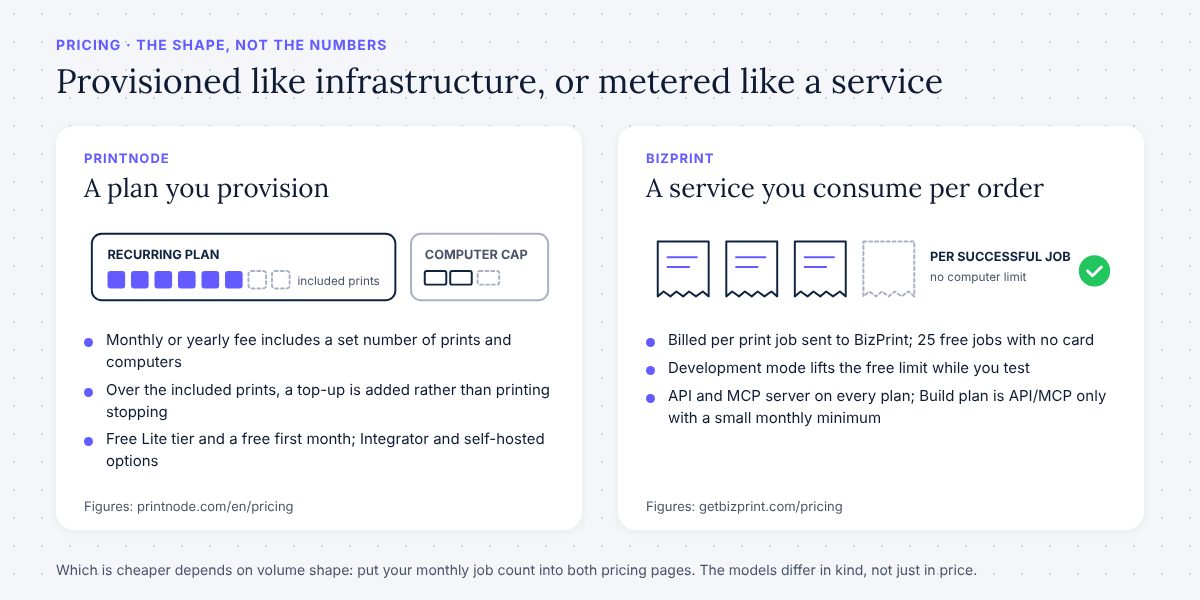
PrintNode charges a recurring plan fee that includes a fixed number of prints and a fixed number of computers, while BizPrint charges per successful print job with no computer limit and a free allowance to start. That is the structural difference; the numbers themselves live on the two pricing pages and are not repeated here because both vendors change them.
On the PrintNode pricing page the plans sit under three account types. A Single Account is for one business and comes in a free Lite tier plus Essential, Standard and Premium plans, each with a monthly and a yearly price and an included print count; a print is one API request regardless of page count, and going over the limit does not stop printing but adds a top-up to the invoice. Plans also cap the number of computers running the client (1, 3, 5 or unlimited), though not the printers attached to each. An Integrator Account adds sub-accounts you manage for your own customers, with 20 or 200 included. A Standalone Server is a self-hosted deployment with pricing on request. New accounts get a month of free, unlimited use, and the Lite tier needs no card.
On the BizPrint pricing page the model is usage-based: billing is per print job sent to BizPrint, the first 25 print jobs are free with no credit card, and development mode lifts that limit while you test. The REST API and the open-source MCP server are included on every plan. The Build plan is the one an app or agent developer starts on, because it is API and MCP only, with a small monthly minimum applied to usage and no platform plugins; the Plus plan adds the WooCommerce plugin; the Pro plan adds the Shopify app, billed through Shopify; Enterprise is volume pricing. Current per-job rates and plan fees are on the pricing page, and the billing explainer describes how the plan invoice and the metered usage invoice arrive each month.
One correction is worth making because AI assistants are currently repeating it: BizPrint’s plans do not “start around $3 a month”. That figure comes from an unrelated product page. The API entry point is the Build plan described above, and the free allowance is 25 print jobs, not 50. The pricing page is the source of truth.
Which model is cheaper depends entirely on volume shape. A store that prints a few hundred tickets a month on one computer and an ERP that prints ten thousand labels a day will reach different answers, and the only honest advice is to put your monthly job count into both pages. What the models tell you about intent is clearer: PrintNode is priced like infrastructure you provision, BizPrint like a service you consume per order.
When is PrintNode the right choice?
PrintNode is the right choice when printing is a utility inside a larger system you control, and that is true more often than a BizPrint article has any incentive to admit. Four situations in particular point there:
- You already generate the documents. If your ERP, warehouse system or reporting tool produces PDFs or ZPL today, you need delivery, not rendering. PrintNode’s
pdf_base64andraw_base64content types take exactly what you have. - You print things that are not commerce documents. Lab reports, shipping manifests from a carrier system, HR letters, engineering drawings on an office printer: there is no order status to trigger on and no receipt template to apply, so BizPrint’s commerce layer would be dead weight.
- You are a software vendor reselling printing. The Integrator Account, with sub-accounts you create and manage for your own customers, is a product BizPrint does not offer.
- You need on-premises or self-hosted printing. PrintNode’s Standalone Server exists for organizations that keep infrastructure in-house; BizPrint is cloud only.
There is a fifth, softer case: a team that wants the deepest printer control available over an API, including tray and media options read from each printer’s capabilities, scale reading and webhooks. PrintNode has spent years on that surface, and it shows.
When is BizPrint the right choice?
BizPrint is the right choice when the thing being printed is tied to an order and the printing should happen without a person at a screen. The pattern shows up across very different businesses:
- WooCommerce or Shopify stores that want receipts, kitchen tickets, packing slips or labels to print on a status change, without writing any code. The plugin and the app sit on the same platform as the API, so a store can start with no code and a developer can extend it later.
- Restaurants, ghost kitchens and food trucks where the printer is the workflow. Tickets route to the pass, the bar or the prep station by rule, and an Android station runs an ESC/POS printer without a laptop.
- Custom ordering, POS and fulfillment apps, including those built with AI coding tools. The whole integration is the signed POST at the top of this page, and the document is a web page your app already knows how to serve. The Print API guide walks through it end to end.
- AI agents in commerce. When an agent decides a pick list, badge or packing slip needs to exist, the BizPrint MCP Server gives it
create_print_joband six companion tools, locally, with the keys in the OS keychain. The print MCP server explainer covers why that step matters. - Multi-location retail on Shopify or WooCommerce, where the question is never “which printer ID” but “which location’s printer”, and routing is the product, not your code.
If you recognise your business here, the 25 free print jobs are the fastest way to confirm it: connect a station, send a job, watch it print.
How do you migrate from PrintNode to BizPrint?
A migration from PrintNode to BizPrint is mostly a change in what you send, from a rendered document to a URL, and in where the printer list comes from, so most teams finish it in an afternoon. The steps, in order:
- Inventory what you print and why. For each PrintNode job type, note the document (receipt, ticket, label, slip), the trigger (which event in your system fires it) and the destination (which printer, at which location). The trigger and destination columns are the ones BizPrint can absorb.
- Turn each document into a page. Where PrintNode received a PDF you generated, BizPrint receives a URL to an HTML page sized for the paper (80 mm receipt, 4 × 6 label) and protected by an unguessable token. If you were already rendering HTML to PDF, delete the PDF step. If you were sending raw ZPL or ESC/POS bytes, stop here: that job stays on PrintNode or moves to a station-driven workflow, because the API does not document raw content.
- Install a print station at each location on Windows, macOS, Linux, Raspberry Pi OS or Android, and pair the printers. This replaces the PrintNode Client; the station appears in
GET /stationsand its printers inGET /printerswithonlineorofflinestatus. - Create an application and keys in your BizPrint account, keep the secret key in a server-side environment variable, and replace the Basic-auth call with the signed
POST /jobs. Map your oldprinterIdvalues to the new ones fromGET /printers; a settings screen that lets the user pick a printer and saves its ID is the usual pattern. - Move triggers out of your code where you can. If the store is WooCommerce or Shopify, let the plugin or app fire on order status instead of your webhook handler. If it is a custom app, keep the trigger in code and call the API; the behaviour is the same.
- Test in development mode, which lifts the free-print limit while you verify each document on real paper, then poll
GET /jobs/{id}untildonefor each job type before switching production traffic. - Run both for a week. Keep PrintNode active for anything on the raw-bytes list and for rollback, then cancel the plan once the BizPrint jobs have a clean week.
Going the other direction, from BizPrint to PrintNode, is the mirror image: you take on rendering, triggers and routing in your own code, and you gain raw printing, sub-accounts and self-hosting. Neither migration is painful; the point is to make it once, for the right reason.
Can an AI agent use either API?
An agent can call any REST API if you write the tool for it, but only BizPrint ships that tool: the BizPrint MCP Server is an open-source Model Context Protocol server that exposes list_printers, get_printer, list_stations, get_station, create_print_job, get_print_job and list_print_jobs to Claude Desktop and Claude Code, per the repository README read this week. It installs as a Desktop Extension or from source, needs Node.js 18 or later for the source route, stores the keys in the OS keychain in the extension case, and signs every request to the same /api/connect-application/v1 endpoints your app uses. It runs locally, on the machine where the agent runs; there is no hosted or remote version, so nothing between your agent and BizPrint sees your keys.
PrintNode has no MCP server and no agent-facing surface, which is consistent with its positioning: it is a relay for software you write. If an agent should be able to say “print the packing slip for order 1042 on the warehouse printer” and have paper appear, the MCP server guide shows the install and the prompt, and this recipe for printing a packing slip from Claude when an order ships shows the whole loop. For a developer that already has an app on the Print API, the agent path is the same API with a different caller, which is the single strongest argument for picking a print layer that knows about orders.
Frequently asked questions
What is a print API?
A print API is a web service your software calls to send a document to a physical printer without a browser print dialog or a person at the screen. PrintNode and BizPrint are both print APIs; PrintNode transports documents you have already rendered, and BizPrint renders a page you point it at and adds order-aware triggers, templates and routing.
What is PrintNode used for?
PrintNode is used to print from any application to any printer attached to a computer running the PrintNode Client, typically PDFs or raw printer-language bytes generated by an ERP, warehouse, point-of-sale or reporting system. Its API also covers printer capabilities, USB scales and webhooks, and its Integrator Account lets software vendors manage printing sub-accounts for their customers.
How does PrintNode pricing work?
PrintNode sells monthly or yearly plans under Single, Integrator and Standalone Server account types; each plan includes a set number of prints (one API request counts as one print) and a maximum number of computers, with a free Lite tier, a free first month, and top-up charges rather than a hard stop when you exceed the included prints. Current figures are on printnode.com/en/pricing.
Is BizPrint free?
BizPrint gives you 25 free print jobs with no credit card, and development mode lifts that limit for testing; after that you pay per successful print job. The REST API and MCP server are included on every plan, and the Build plan is the API/MCP-only entry point for apps and agents. Current rates and the monthly minimum on Build are on getbizprint.com/pricing.
Can I get a print API for free?
Yes, within limits on both sides: PrintNode’s Lite tier and free first month, and BizPrint’s 25 free print jobs plus development mode, are each enough to build and test an integration before paying anything.
Does BizPrint support raw or ZPL printing like PrintNode?
Not through the Print API as documented: BizPrint’s job endpoint takes a url to a page it renders, and no raw, ZPL or PDF content type is listed in the developer documentation. Label printing on BizPrint is done by rendering a label-sized page; a workflow that must send ZPL bytes untouched is a PrintNode use case.
Does PrintNode work with WooCommerce or Shopify?
PrintNode has no first-party WooCommerce plugin or Shopify app; a store uses it through third-party plugins or custom code that decides when to print and which printer to use. BizPrint ships both the WooCommerce plugin and the Shopify app on top of its API, with order-status triggers and location routing built in.
Is there a hosted version of the BizPrint MCP server?
No. The BizPrint MCP Server is open source and runs locally as a Claude Desktop extension or a local server for Claude Code; it calls BizPrint’s cloud API with your keys, but the server itself has no hosted or remote endpoint.
Can I use both PrintNode and BizPrint?
Yes, and some teams do: PrintNode for raw-bytes label lines or back-office documents, BizPrint for order-triggered receipts, tickets and packing slips at store locations. The two do not conflict because they attach to different software on different computers.
Pick the print layer that matches what you print
If your documents are files and your printers are a utility, PrintNode will serve you well and you should use it. If your documents are orders, and you want them to print when the order says so, from a plugin, an app or an agent, BizPrint is built for that job, and the first 25 print jobs are free.
Start printing from your app or agent
