
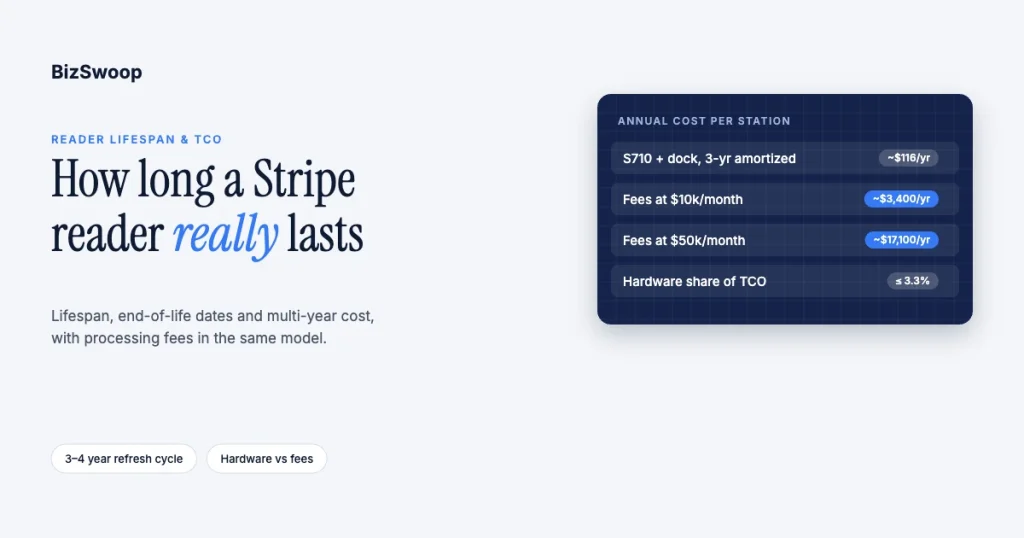
A Stripe Terminal reader realistically lasts 3 to 4 years of daily use. A sealed, non-replaceable battery, accumulated wear, or Stripe’s own end-of-life schedule eventually forces a replacement, and across that life the reader’s purchase price is small next to the in-person processing fees it collects. A $299 Stripe Reader S710 on a $49 dock amortizes to roughly $0.24–$0.32 a day over a 3-to-4-year life; a store doing $10,000 a month in person pays about $9 a day in processing fees. The real total-cost-of-ownership question is not “which reader is cheapest”. It is how lifespan, replacement cadence, and processing volume combine into a number finance can plan around.
We have run Stripe Terminal fleets through multiple hardware refreshes across retail counters, restaurants, pop-ups, and field-service trucks, and BizSwoop operates its own Stripe Connect platform at payments.bizswoop.app. This guide models the number most reviews skip: a multi-year TCO that combines hardware amortization, Stripe’s published reader end-of-life schedule, and processing fees at realistic volumes. Every Stripe price and date below was re-checked against Stripe’s own pages in November 2026. For reader selection, start with the Stripe Terminal hardware reader guide; for up-front device prices and fleet-rollout math, see Stripe Terminal hardware costs explained, which this piece extends into the multi-year view.
Key Takeaways
- Plan on a 3-to-4-year refresh. Bluetooth handhelds (M2) last about 2–3 years in heavy daily use; docked smart readers (S700, S710, T600) about 3–4 years.
- The battery is the clock. Stripe readers have sealed batteries, so battery wear, not processing hardware, usually decides when a unit is replaced.
- Stripe publishes end-of-life dates. The Verifone P400 stopped working on February 9, 2026, and the BBPOS WisePOS E reached end of sale on September 1, 2026, with hard end-of-life on February 1, 2031.
- Hardware is a few percent of TCO. At $10,000 a month in card-present volume, an amortized S710 station is about 3% of annual cost; at $50,000 a month it is under 1%.
- Old SDKs can strand working readers. Terminal mobile SDK versions 1.x–3.x are blocked from connecting to readers starting January 2027.
- Tap to Pay is not free on the fee side. It removes the hardware line but adds 10¢ per authorization, which can cost more per year than an M2.
How long does a Stripe Terminal reader last?
A Stripe Terminal reader lasts 3 to 4 years of daily, heavy counter or field use in practice, though Stripe’s published end-of-life schedules keep individual reader models supported for considerably longer before hard end-of-life.
Two different clocks run at once, and conflating them is where most “how long does it last” answers go wrong. The first is physical lifespan: how long the unit in your hand keeps working reliably before battery wear, connector fatigue, drops or spills take it out of service. The second is Stripe’s product lifecycle: how long a reader model remains orderable, receives firmware and security updates, and is allowed to process transactions at all, regardless of the condition of any single unit. A three-year-old M2 in daily use might die from battery wear long before the model reaches end-of-life; a discontinued model’s end-of-life can arrive before your unit shows any wear. Budgeting for one clock without the other is how fleets get surprised.
What does Stripe’s end-of-life schedule say about each reader?
Stripe publishes an end-of-life path for Terminal readers, which makes this one of the few hardware-planning questions with a primary-source answer.
Stripe’s end-of-life status page for Terminal card readers and SDKs describes a phased retirement: end of sale (no new orders), a maintained phase, a deprecated phase (critical bug and security fixes only), and end-of-life, when the reader can no longer process transactions. As of November 2026:
| Reader | End of sale | Later phases | Hard end-of-life |
|---|---|---|---|
| BBPOS WisePOS E | September 1, 2026 (warranty replacements continue) | Deprecated until February 1, 2028 | February 1, 2031 |
| Verifone P400 | September 14, 2021 | Critical updates only from October 1, 2024 | February 9, 2026 (already reached) |
| BBPOS Chipper 2X | January 31, 2022 | Stripe recommends migrating to the Stripe Reader M2 | Not published |
| Stripe Reader M2, S700, S710, T600 | Currently sold in the US; no end-of-life notice published | — | — |
Two things this table makes concrete. First, if you still run a Verifone P400, its hard end-of-life passed in February 2026: it cannot process transactions, whatever its physical condition. Second, the full retirement of a model like the WisePOS E, from end of sale to end-of-life, spans more than four years. That model-level clock rarely sets your refresh timing, because wear on individual units almost always arrives first. (The BBPOS WisePad 3 is still listed by Stripe but is not sold in the US.)
There is a second clock for any platform or custom integration: Terminal mobile SDK versions 1.x through 3.x will be blocked from connecting to card readers starting January 2027, per the same Stripe page, which says no extensions or exemptions are available. If your Terminal integration hasn’t been touched in a few years, that software end-of-life can strand working hardware; check your SDK version against Stripe’s SDK migration guide.
Why do Stripe Terminal readers wear out?
Stripe Terminal readers wear out mainly because their batteries are sealed and non-replaceable, not because the payment hardware fails, so “lifespan” is mostly a battery-degradation question.
- Battery wear is the dominant failure mode. Stripe rates the M2 at about 28 hours of active use and 42 hours standby per charge, and the S700 at about 15 hours active and 140 hours standby, both when new. Lithium batteries lose meaningful capacity over a few hundred full charge cycles, so a reader charged nightly shows a noticeable falloff within a year or two and eventually no longer covers a full shift. Because the battery can’t be swapped, the reader is what gets replaced.
- Firmware and connectivity add a slower wear vector. Stripe’s smart reader documentation notes that readers update automatically and restart daily for PCI compliance. That keeps them secure, but an aging unit runs progressively more demanding software on fixed hardware, which contributes to the “it just got flaky” complaints that precede a replacement.
- Physical wear depends on the environment. Drops, spills, charging-port fatigue, and touchscreen wear shorten lifespan faster in field service and high-volume counters than in a quiet boutique. A docked reader at a reception desk can outlast one riding in a technician’s truck by a wide margin.
Put together, the realistic bands are 2 to 3 years for a Bluetooth handheld (M2) in daily field or high-volume counter use; 3 to 4 years for a smart reader (S700, S710, T600) in a fixed dock or countertop role, where battery cycling is lighter; and shorter for any reader in a rough field environment.
What does a Stripe Terminal reader really cost over 3 years?
Over a 3-year life, a Stripe Terminal reader’s hardware cost amortizes to about $0.30 a day or less per station, while the same station’s processing fees run into thousands of dollars a year at any real volume, so volume, not hardware choice, determines total cost.
Using current US prices from Stripe’s Terminal pricing and the S700 device page, here is a single countertop station:
| Cost component | Stripe Reader S710 station | Stripe Reader M2 station |
|---|---|---|
| Hardware price | $299 | $59 |
| Dock (S710 only) | $49 | — (pairs with an existing phone or tablet) |
| Total hardware outlay | $348 | $59 |
| Amortized over 3 years | $0.32/day | $0.05/day |
| Amortized over 4 years | $0.24/day | $0.04/day |
| Annual hardware cost (3-year amortization) | ~$116/year | ~$20/year |
Now add processing at Stripe’s US in-person rate of 2.7% + 5¢ per transaction (Stripe pricing), at three monthly volumes with a $35 average ticket:
| Monthly in-person volume | Approx. transactions per month | Annual processing cost | Annual hardware cost (S710, 3-yr) | Hardware as % of annual TCO |
|---|---|---|---|---|
| $10,000 | ~286 | ~$3,410 | ~$116 | ~3.3% |
| $50,000 | ~1,430 | ~$17,060 | ~$116 | ~0.7% |
| $200,000 | ~5,715 | ~$68,230 | ~$116 | ~0.2% |
The pattern holds at every tier: hardware is a few percent of a station’s annual cost at most, and it shrinks as volume grows. Choose the reader on fit (connectivity, form factor, durability for the environment) rather than price: the $240 gap between a $59 M2 and a $299 S700 equals nearly four weeks of processing fees at $10,000 a month, and well under a week at $50,000. International cards (+1.5%) and optional P2PE (+5¢ per authorization) raise the fee side further; cellular S710 data adds $10 per reader per month.
The one place hardware cost does compound is a fleet-wide refresh: replacing 20, 50, or 100 stations at once when a model hits end-of-life or ages out together, which is common because fleets are usually bought in one rollout. That is a real capital event to plan for, even though it doesn’t change per-transaction economics.
Running a WooCommerce store and want in-person sales without a custom build? Jovvie adds a Stripe Terminal POS to your store, with our fees published up front.
What’s the best replacement strategy for a multi-reader fleet?
The best replacement strategy for a multi-reader fleet is staggered, condition-triggered replacement backed by a standing spare pool, not a calendar-driven mass swap, because it avoids both a capital spike and the downtime of running units to failure.
- Keep a spare pool of about 5% at all times, matching the spare-ratio math in our hardware costs guide. When a reader shows weak battery life or flaky connectivity, swap in a spare and bench-check the old unit instead of waiting for it to fail at the counter.
- Track charge-cycle age, not just calendar age. A reader charged twice a day in a busy restaurant ages faster than one charged nightly in a boutique; use real usage to decide which units to check first.
- Stagger purchases or replacements. A single bulk order means every unit ages in lockstep and hits its replacement window together. A staggered rollout, or a deliberately staggered replacement schedule for a fleet bought at once, spreads the outlay across budget cycles.
Stripe’s fleet documentation on ordering and returning readers covers bulk ordering and reader tracking in the Dashboard, which makes a condition-triggered strategy practical. Platforms that manage readers for sub-merchants on Stripe Connect can also recover refresh costs through application-fee structuring instead of billing them as a separate capital expense; we will cover that in a Connect platform economics guide.
Does Tap to Pay change the total-cost picture?
Tap to Pay removes the hardware line item entirely, with no reader to buy, charge or refresh, but it adds a per-transaction fee and shifts the lifespan question onto your phones.
- The phone becomes the asset with a lifespan. A staff or company phone has its own refresh cycle, usually set by its operating-system support window, not by Stripe.
- It is contactless only. There is no chip insert or swipe, so a card that won’t tap needs a backup reader.
- It costs 10¢ more per authorization. Stripe charges +$0.10 per Tap to Pay authorization on top of 2.7% + 5¢. At ~286 transactions a month that is about $340 a year, more than the annual cost of an amortized S710 and far more than an M2.
For teams that already carry phones for other work (field sales, delivery, service technicians), Tap to Pay still makes sense on convenience. For a fixed counter or a high-transaction station, a $59 M2 is usually cheaper and more durable over the life of the fleet. See our Tap to Pay on iPhone setup guide for the details.
The bottom line on Stripe Terminal TCO
Plan for a 3-to-4-year hardware refresh driven mainly by battery wear, watch Stripe’s published end-of-life schedule for older readers and SDKs, and stop optimizing the reader purchase price: at real transaction volume, processing fees outweigh even the most expensive Stripe reader within weeks. The number worth modeling is the combined one, hardware amortization plus processing at your actual volume, refreshed when fleet condition, not the calendar, says so. If you are also choosing the software layer, compare Stripe POS options on their fees too.
Frequently asked questions
How long does a Stripe card reader last?
A Stripe card reader lasts about 2 to 3 years as a Bluetooth handheld (M2) in daily heavy use, and 3 to 4 years as a smart reader (S700, S710, T600) in a fixed countertop role. Sealed, non-replaceable batteries are the main reason readers are eventually replaced.
Does Stripe replace Terminal readers under warranty?
Yes, within the warranty period, and Stripe says warranty replacements continue after a model’s end of sale; for example, the BBPOS WisePOS E keeps receiving them after its September 1, 2026 end of sale. Confirm the warranty terms for a specific unit in your Stripe Dashboard.
What happens when a Stripe Terminal reader reaches end-of-life?
When a reader model reaches end-of-life, it can no longer process transactions, so it is a hard stop rather than a gradual decline. The Verifone P400 reached this point on February 9, 2026. Stripe recommends migrating to a supported reader, such as the Stripe Reader M2, before a model’s published end-of-life date.
Is hardware or processing the bigger cost over a reader’s lifetime?
Processing fees, by a wide margin. A $299 smart reader on a $49 dock amortizes to about $0.32 a day over three years, while a station doing $10,000 a month in person pays about $3,400 a year at Stripe’s 2.7% + 5¢ rate, roughly 29 times the annual hardware cost.
Should I replace my whole fleet at once or stagger replacements?
Stagger replacements, triggered by observed battery or connectivity decline and backed by a spare pool of about 5%, rather than replacing the whole fleet on a calendar. A fleet bought in one rollout tends to age in lockstep unless replacement is deliberately staggered.
Will old Stripe Terminal SDK versions stop working?
Yes. Stripe says Terminal mobile SDK versions 1.x through 3.x will be blocked from connecting to card readers starting January 2027, with no extensions or exemptions, so integrations on those versions need to migrate to SDK v5 or later.
Want a multi-year TCO for your fleet?
We build this model for fleets before they place a hardware order, and re-run it against real account data for teams planning a refresh. Talk to a Jovvie advisor and we’ll model your station count, volume, and refresh timing before you commit budget.
Sources: End-of-life status for Terminal card readers and SDKs · Stripe Terminal pricing · Stripe pricing · Stripe Reader M2 · Stripe Reader S700 · Stripe smart readers · Order and return readers · Terminal SDK migration guide
