
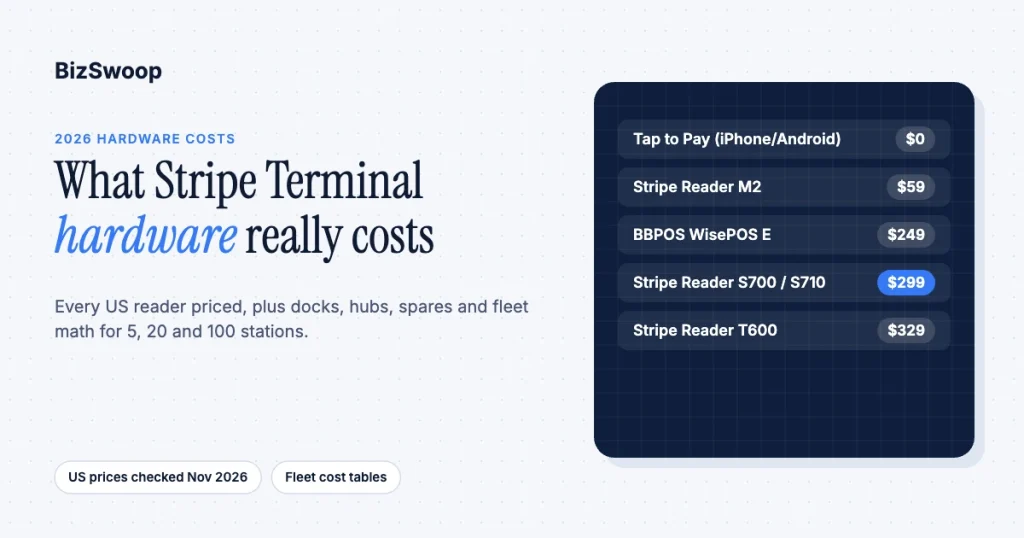
Stripe Terminal hardware costs $0 to $329 per station in the US in 2026. Tap to Pay on iPhone or Android needs no hardware, the Stripe Reader M2 is $59, the BBPOS WisePOS E is $249, the Stripe Reader S700 and the cellular S710 are both $299, and the 8-inch Stripe Reader T600 is $329. Processing is a flat 2.7% + 5¢ per in-person transaction on standard pricing, with no monthly reader fee except $10 per reader per month if you use cellular data. The reader is a one-time capital cost; the processing rate is the recurring cost; and for a multi-station rollout, accessories and spares matter as much as the sticker price.
We spec and deploy Stripe Terminal fleets across retail counters, restaurants, pop-ups, field-service trucks, and vessel-based operations, and BizSwoop runs its own Stripe Connect platform at payments.bizswoop.app. This guide is the total-cost breakdown we wish review sites published: current to the November 2026 US lineup, honest about where a $0 path beats a $299 one, and anchored to Stripe’s own device pages so you can verify every number. If you have not chosen a reader yet, start with the Stripe Terminal hardware reader guide, which matches devices to use cases, or the head-to-head Stripe Reader M2 vs S700.
Key Takeaways
- US readers cost $0 to $329. Tap to Pay is $0, the M2 is $59, the WisePOS E is $249, the S700 and S710 are $299, and the T600 is $329.
- The S700 and S710 now cost the same. Both are $299; the S710 adds 4G/LTE cellular, billed at $10 per reader per month when you use it.
- The BBPOS WisePad 3 is not sold in the US. Stripe’s US device catalog marks it unavailable, so US PIN-pad plans should use another reader.
- Accessories add about 16% to a countertop station. A $49 dock turns a $299 smart reader into a roughly $348 fixed station; hubs are $39 and cases $19.
- Processing dwarfs hardware. At 2.7% + 5¢, a store doing $50,000 a month in person pays about $1,350 plus 5¢ per sale in processing, more than any reader’s price.
- Fleets need spares. A 5% spare ratio keeps a dead reader from stopping a lane, and it belongs in the budget from day one.
How much does Stripe Terminal hardware cost?
Stripe Terminal hardware costs between $0 and $329 per station up front in the US, with no monthly reader fee on standard pricing (other than optional cellular data) and a flat in-person processing rate of 2.7% + 5¢ per successful transaction.
The table below is the current US lineup and the number to quote in a budget. Every reader processes at the same rate; you are paying for form factor and connectivity, not processing capability.
| Reader | Price (US) | Form factor | Connectivity | Best for |
|---|---|---|---|---|
| Tap to Pay (iPhone/Android) | $0 (+10¢ per authorization) | Your existing phone | Phone’s data or Wi-Fi | Zero-hardware, contactless-only acceptance |
| Stripe Reader M2 | $59 | Pocket Bluetooth reader | Bluetooth (USB on Android) to a phone or tablet | Cheapest physical reader, mobile acceptance |
| BBPOS WisePOS E | $249 | Smart reader with touchscreen | Wi-Fi, Ethernet with dock | Countertop or handheld, no phone tether |
| Stripe Reader S700 | $299 | Smart reader, countertop or handheld | Wi-Fi, Ethernet with hub | All-in-one smart terminal that runs your POS app |
| Stripe Reader S710 | $299 (+$10/month cellular) | Smart reader, countertop or handheld | Wi-Fi, 4G/LTE cellular, Ethernet with hub | Locations where Wi-Fi is unreliable |
| Stripe Reader T600 | $329 (+$39 optional Reader Hub) | 8-inch countertop smart reader | Wi-Fi, Ethernet with Reader Hub | Fixed counter with a large customer display |
| BBPOS WisePad 3 | Not sold in the US | Handheld with PIN pad | Bluetooth | PIN-first markets outside the US |
Prices are from Stripe’s Terminal devices page and individual device pages, checked November 2026. Two details most comparison articles still get wrong: the S700 dropped to $299, the same price as the cellular S710, and the T600 is now on sale in the US. If a comparison you are reading still shows the S700 at its old, higher price or the WisePad 3 as a US option, it is out of date.
What does each Stripe reader cost, and what are you paying for?
Each reader’s price maps to a specific deployment problem; buying the most expensive one “to be safe” wastes capital, and buying the cheapest one into the wrong environment costs more in staff friction than it saves.
Tap to Pay (iPhone/Android): $0 hardware. A compatible recent iPhone or Android phone becomes the contactless reader. It accepts taps and mobile wallets but not chip inserts or swipes, and Stripe adds 10¢ per Tap to Pay authorization on top of the standard rate. See our setup guides for Tap to Pay on iPhone and Tap to Pay on Android.
Stripe Reader M2: $59. The cheapest physical device: a pocket Bluetooth reader that pairs to a phone or tablet running your app or a POS. No screen and no PIN pad. Ideal for low-cost mobile or backup acceptance.
BBPOS WisePOS E: $249. A smart reader with a touchscreen and Wi-Fi, so there is no phone to keep charged and paired. The value pick for a counter that wants simplicity below the S700’s price.
Stripe Reader S700: $299. Stripe’s 5.5-inch smart reader, which runs Android and can run your own POS app on the device. It works at a counter or in hand, connects over Wi-Fi, and takes Ethernet through the optional hub. See the S700 setup and pricing guide.
Stripe Reader S710: $299. The same smart reader with built-in 4G/LTE cellular alongside Wi-Fi. For pop-ups, food trucks, market stalls, and any venue with flaky Wi-Fi, the cellular radio is the reason to buy it; Stripe bills cellular data at $10 per reader per month.
Stripe Reader T600: $329. An 8-inch Android countertop reader built for a fixed station with a large customer-facing display. It is powered over USB-C with no battery, so it is not a handheld; the optional $39 Reader Hub adds Ethernet. Specs are on Stripe’s T600 page.
BBPOS WisePad 3: not available in the US. Stripe’s device catalog lists it as unavailable for US accounts. It remains a PIN-pad option in other markets; our WisePad 3 review covers where it fits.
What accessories do you need, and what do they cost?
Accessories are the line item most price articles forget, and on a docked countertop smart reader they add about 16% to the hardware bill.
Stripe sells accessories alongside the readers. Using the published S710 accessories as the reference (the S700 uses the same prices):
| Accessory | Price | What it does |
|---|---|---|
| S700/S710 Dock | $49 | Charging stand that turns a handheld into a fixed countertop station |
| Stripe Reader Hub | $39 | Adds wired Ethernet and USB connectivity (also used by the T600) |
| S700/S710 Case | $19 | Protective case for handheld or field use |
| M2 Dock | $19 | Charging stand for the M2 |
Rules of thumb from real deployments: a fixed countertop station effectively needs a dock, so a countertop S700 or S710 is realistically about $348 all-in, not $299. A handheld or field station wants a case and usually skips the dock. The Bluetooth M2 needs a charged phone or tablet to pair with; if you do not already own one, that device is a real cost and often the largest line in a “cheap” reader rollout. Confirm current accessory prices in the Stripe Dashboard before you order.
Does Stripe Terminal have a monthly fee, and what are the transaction fees?
Stripe Terminal has no monthly hardware or software fee on standard pricing; you pay a one-time hardware cost plus 2.7% + 5¢ per successful US in-person transaction, and $10 per reader per month only if you use cellular data on a cellular-enabled reader.
That rate, published on Stripe’s Terminal page, is lower than Stripe’s 2.9% + 30¢ online rate because card-present transactions carry less fraud risk. The add-ons to know: +1.5% for international cards, +10¢ per authorization for Tap to Pay, and +5¢ per authorization if you opt into point-to-point encryption (P2PE). On $50,000 a month of in-person sales, processing runs about $1,350 plus 5¢ per transaction, more than any reader’s sticker price in the first month. Choose hardware for fit; the reader price is small next to processing over any real horizon.
Picking readers for a WooCommerce store or a standalone POS? Jovvie works with the M2, S700/S710, WisePOS E, T600, and Tap to Pay, and pays into your own Stripe account.
Do you have to buy hardware, or can you use Tap to Pay instead?
You do not have to buy any hardware: Tap to Pay on iPhone or Android turns a compatible phone into a contactless reader with no device cost, and for many low-volume or backup uses it is the right answer.
Here is the honest crossover. Tap to Pay costs nothing up front but is contactless-only, so it fails any customer whose card will not tap, and it carries a 10¢ per-authorization add-on. A $59 M2 buys chip, swipe, and contactless at the standard rate, so at roughly 600 Tap to Pay transactions the add-on alone matches the M2’s price. Use Tap to Pay when acceptance is occasional, contactless dominates, and staff already carry compatible phones. Buy readers when acceptance is your main counter workflow, chip inserts are common, or you want a dedicated device staff are not also using for texts. Many fleets blend the two: Tap to Pay on field reps’ phones, physical readers at fixed counters, all reconciling to one Stripe account. A Stripe POS that supports both lets you mix them without separate workflows.
What does it cost to outfit a fleet of 5, 20, or 100 stations?
Outfitting a US Stripe Terminal fleet costs about $348 per docked countertop smart-reader station plus a spare allowance, so a 5-station rollout runs about $2,100, a 20-station mixed rollout about $5,100, and a 100-station rollout about $30,500 before shipping and tax.
The worked examples assume November 2026 US pricing, a 5% spare ratio (rounded up) so a dead reader never stops a lane, and shipping and tax quoted at checkout. We use the S700 at $299 plus a $49 dock, $348 per fixed countertop station, as the smart-reader unit (choose the S710 at the same price where a counter has no reliable network), and the $59 M2 for a field station, assuming staff phones already exist.
Fleet A: 5 stations, single location, countertop-first.
| Line item | Qty | Unit | Subtotal |
|---|---|---|---|
| S700 + dock (countertop) | 5 | $348 | $1,740 |
| Spare unit (5%, rounded up to 1) | 1 | $348 | $348 |
| Total before shipping and tax | $2,088 |
Fleet B: 20 stations, mixed countertop and field.
| Line item | Qty | Unit | Subtotal |
|---|---|---|---|
| S700 + dock (countertop) | 12 | $348 | $4,176 |
| Stripe Reader M2 (field) | 8 | $59 | $472 |
| Spares (1 smart + 1 M2) | 2 | — | $407 |
| Total before shipping and tax | $5,055 |
Fleet C: 100 stations, multi-location retail.
| Line item | Qty | Unit | Subtotal |
|---|---|---|---|
| S700 + dock (countertop) | 80 | $348 | $27,840 |
| Stripe Reader M2 (line-busting) | 20 | $59 | $1,180 |
| Spares (5%: 4 smart + 1 M2) | 5 | — | $1,451 |
| Total before shipping and tax | $30,471 |
Two things the fleet math surfaces that unit-price lists hide. First, the dock and spare allowance are real money: $49 per countertop station plus one spare for every 20 stations. Second, at 100 stations you are in territory where custom pricing and fleet-management tooling matter (next section), so treat Fleet C as a pre-negotiation ceiling. If you use S710s with cellular instead, add $10 per cellular reader per month to the running cost.
Are there volume or platform (Connect) discounts on Stripe Terminal hardware?
Stripe does not publish volume hardware discounts, but larger fleets can discuss custom pricing with Stripe sales, and platforms buying readers for sub-merchants work under different economics through Stripe Connect.
For a direct merchant, the practical levers at scale are custom pricing (worth a conversation with Stripe sales once you are ordering dozens of units) and fleet tooling that cuts operational cost: bulk ordering, remote configuration, and reader lifecycle management, documented in Stripe’s hardware ordering docs. Note that Stripe’s Terminal pricing help article says custom pricing plans can add a per-reader Terminal Use Fee, so ask about it when you negotiate.
For a platform or ISV, hardware is only half the story. Under Stripe Connect, a platform can buy and manage readers for its sub-merchants and recover hardware and margin through application fees on each transaction, so the reader’s cost can be amortized into payment economics rather than billed as a capital line. That is the model BizSwoop operates. If you are putting merchants on hardware you manage, the reader sticker price is the wrong thing to optimize; the application-fee structure is, and our Stripe Terminal fee structure guide shows how the layers stack.
What are the hidden costs: shipping, replacement, and downtime?
The hidden costs of a Stripe Terminal fleet are shipping, reader replacement over a multi-year life, and the cost of a dead reader stopping a lane, not the reader price itself.
Shipping is charged at order time and scales with fleet size. Replacement and lifespan: amortized over three years of counter use, a $299 to $348 station costs about $0.27 to $0.32 a day, which is why hardware rarely drives the decision. Downtime: the most expensive cost is a lane that cannot take payment because a reader died and there is no spare, which is why every fleet example above carries a spare ratio. For the costs beyond hardware, including software, integration, and staff time, see the hidden costs of Stripe Terminal.
Frequently asked questions
How much does a Stripe card reader cost?
In the US, a Stripe card reader costs $59 for the Stripe Reader M2, $249 for the BBPOS WisePOS E, $299 for the Stripe Reader S700 or cellular S710, or $329 for the Stripe Reader T600. Tap to Pay on a compatible iPhone or Android phone needs no reader. Prices are from Stripe’s device pages, checked November 2026.
Does Stripe Terminal have a monthly fee?
Not on standard pricing. You pay a one-time hardware cost plus 2.7% + 5¢ per successful US in-person transaction. The only monthly charge is optional: $10 per reader per month for cellular data on cellular-enabled readers such as the S710.
What are Stripe Terminal in-person transaction fees?
Stripe Terminal charges 2.7% + 5¢ per successful card-present transaction in the US, lower than Stripe’s 2.9% + 30¢ online rate. International cards add 1.5%, Tap to Pay adds 10¢ per authorization, and optional P2PE adds 5¢ per authorization.
Can I use Tap to Pay instead of buying a Stripe reader?
Yes. Tap to Pay on iPhone and Android turns a compatible phone into a contactless reader with no hardware cost. It accepts contactless cards and mobile wallets only, and Stripe adds 10¢ per authorization, so a $59 M2 is worth buying if customers pay with chip cards or your volume is high.
Is the BBPOS WisePad 3 available in the US?
No. Stripe’s device catalog lists the WisePad 3 as unavailable for US accounts. US merchants who need a mobile reader typically use the Stripe Reader M2 or Tap to Pay, and those who want a screen use the S700, S710, WisePOS E, or T600.
Is the Stripe Reader S710 better value than the S700?
They cost the same $299, so the choice comes down to connectivity. The S710 adds 4G/LTE cellular, billed at $10 per reader per month when used, which makes it the better pick for pop-ups and venues with unreliable Wi-Fi. At a counter with reliable Wi-Fi or Ethernet, the S700 does the same job without the cellular fee.
Planning a multi-station rollout?
We spec Stripe Terminal fleets for a living: reader mix, accessories, spare ratios, connectivity, and, for platforms, Connect application-fee economics. Talk to a Jovvie advisor and we will build the total-cost model for your station count before you place an order.
Sources: Stripe Terminal pricing · Stripe Terminal devices · Stripe Reader S710 · Stripe Reader S700 · Stripe Reader T600 · Stripe Reader M2 · Pricing for Stripe Terminal (support) · Reader product sheets · Place hardware orders
