
The BBPOS WisePad 3 is a good Stripe reader when you need a cheap, pocket-sized device with a physical PIN pad for mobile or low-volume card-present selling in a PIN-driven market — it is the right answer for a UK market stall, a Canadian field tech, or a European pop-up, and the wrong answer for a US merchant (where Stripe does not sell it) or a fixed counter that would be better served by the screen-equipped S700. At roughly $79 in the regions where Stripe offers it, the WisePad 3 is the cheapest entry point into the Stripe Terminal hardware estate, and its built-in PIN pad is the feature that justifies choosing it over a tap-only reader.
We deploy and integrate Stripe Terminal hardware for a living — across retail counters, restaurants, mobile and field operations, and platform builds on the BizSwoop Connect layer — so this review is written from devices we have actually paired, configured, and run in production, not from a spec sheet. It covers what the WisePad 3 is, who it is for, how to set it up, how its Bluetooth and USB pairing modes behave, what reliability looks like in the field, and the situations where we tell clients to choose something else.
This is a cluster piece in the complete 2026 Stripe Terminal hardware guide. If you are deciding between the WisePad 3 and Stripe’s other portable readers, see Stripe Reader S700: Complete Setup, Pricing, and When to Choose It and our forthcoming head-to-head, Stripe Reader M2 vs S700: Which Should You Buy?.
What is the BBPOS WisePad 3?
The BBPOS WisePad 3 is a handheld, battery-powered Stripe Terminal card reader with a small color display and a physical PIN pad, designed to connect over Bluetooth (or USB on Android) to a phone or tablet running your point-of-sale or payments app.
Unlike Stripe’s flagship S700, the WisePad 3 is not a self-contained smart terminal — it has no checkout app of its own and no internet connection of its own. It is a payment peripheral: your mobile app drives the transaction through the Stripe Terminal SDK, and the WisePad 3 handles the secure parts — reading the chip, the tap, or the magstripe, and capturing a PIN when the card or the amount requires it. The display exists mainly to prompt the cardholder (“insert card,” “enter PIN,” “approved”), not to run your register.
That PIN pad is the whole point. Tap-only and screen-prompt readers are fine in markets where contactless dominates and signature or no-CVM transactions are the norm. But in markets where chip-and-PIN is the default — the UK, much of the EU, and PIN-priority debit schemes in Canada and Asia-Pacific — a hardware PIN entry surface is not optional. The WisePad 3 is Stripe’s answer for exactly those markets, which is also why its availability map looks the way it does.
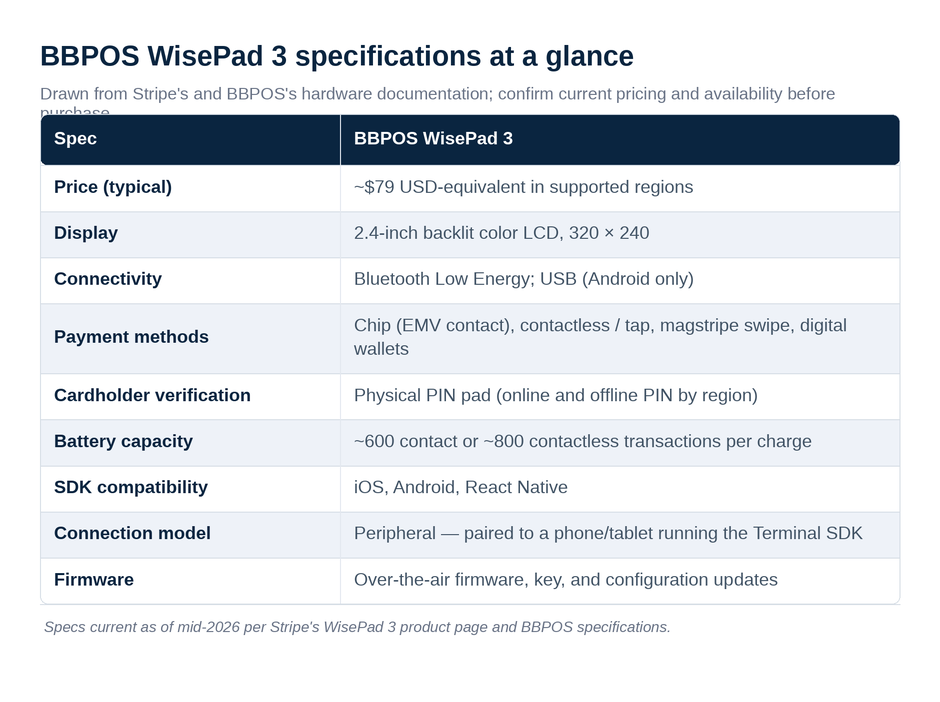
Here are the specifications at a glance, drawn from Stripe’s and BBPOS’s hardware documentation:
| Spec | BBPOS WisePad 3 |
|---|---|
| Price (typical) | ~$79 USD-equivalent in supported regions |
| Display | 2.4-inch backlit color LCD, 320 × 240 |
| Connectivity | Bluetooth Low Energy; USB (Android only) |
| Payment methods | Chip (EMV contact), contactless/tap, magstripe swipe, digital wallets |
| Cardholder verification | Physical PIN pad (online and offline PIN by region) |
| Battery capacity | ~600 contact or ~800 contactless transactions per charge |
| SDK compatibility | iOS, Android, React Native |
| Connection model | Peripheral — paired to a phone/tablet running the Terminal SDK |
| Firmware | Over-the-air firmware, key, and configuration updates |
Specs and pricing are current as of mid-2026 from Stripe’s WisePad 3 product page, the Stripe WisePad 3 documentation, and the BBPOS WisePad 3 specifications. Hardware pricing and regional availability change, so confirm against Stripe before purchasing.
Is the WisePad 3 a good Stripe reader?
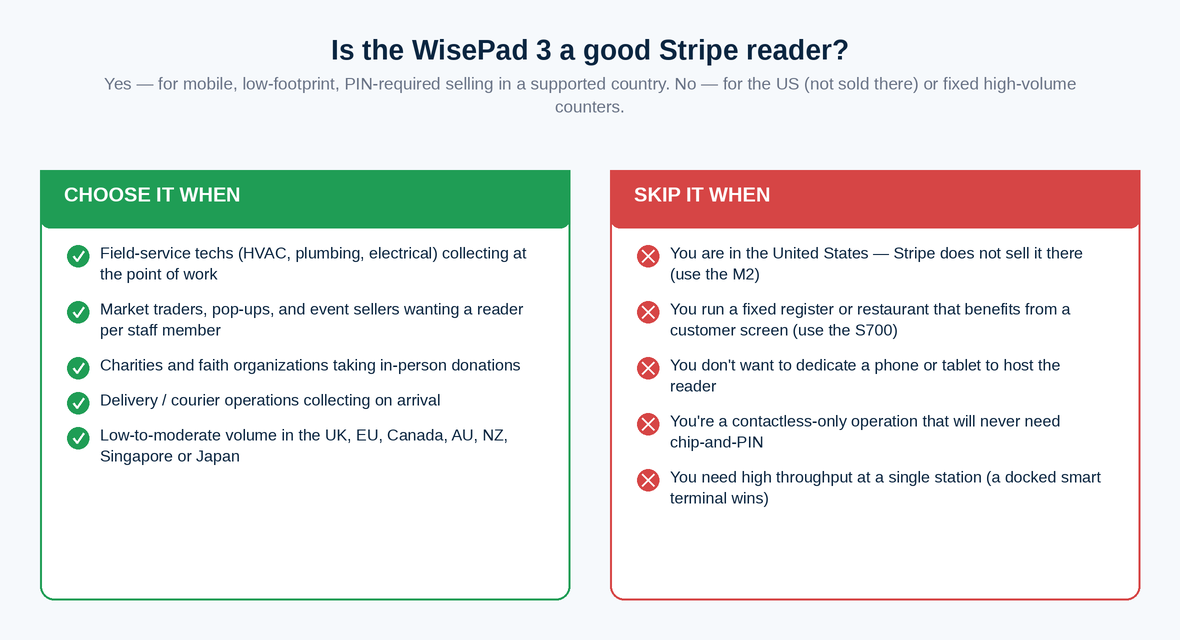
Yes — for mobile, low-footprint, PIN-required selling in a supported country, the WisePad 3 is a good reader and usually the most cost-effective one Stripe offers. It is not a good reader for US merchants (it is not sold there) or for fixed, high-volume counters that would get more from a smart terminal.
The case for the WisePad 3 comes down to three things. It is cheap, so the cost of putting a reader in every field tech’s bag or every market trader’s apron is low. It is small and light, so it travels well and does not demand a counter. And it has a real PIN pad, so it clears chip-and-PIN and high-value contactless transactions that a tap-only reader cannot. For a plumber collecting payment at a kitchen table in Manchester, a charity taking donations at a festival gate in Berlin, or a delivery driver in Toronto, that combination is hard to beat at the price.
The case against it is equally specific, and we cover it in full under “When should you not choose the WisePad 3?” below. In short: no screen worth running a checkout on, a peripheral model that ties up a phone or tablet, and — the big one — no US availability.
Who is the WisePad 3 best for?
The WisePad 3 is best for mobile and field operators in PIN-driven markets who need a low-cost reader and do not need a customer-facing screen. It fits a specific shape of business very well and most others poorly.
It is a strong fit for field-service technicians (plumbing, electrical, HVAC, appliance repair) who collect payment at the point of work and need a device that lives in a van or a toolbag. It suits market traders, pop-up vendors, and event sellers who want a reader per staff member without buying a $300+ terminal for each. It works for charities and faith organizations taking in-person donations, and for delivery and courier operations collecting on arrival. And it is a reasonable choice for any low-to-moderate-volume merchant in the UK, EU, Canada, Australia, New Zealand, Singapore, or Japan who already runs a phone or tablet app and just needs to add card acceptance with PIN.
It is a weak fit for fixed retail counters, restaurants, and any operation where a customer-facing screen, tipping prompts, or an on-device checkout matter — that is S700 territory. And it is simply not an option for US-based merchants.
Where is the WisePad 3 available? (And why not the US)
The WisePad 3 is available in more than 20 countries — including Canada, the UK, Ireland, France, Germany, the Netherlands, Belgium, Austria, Spain, Italy, Switzerland, the Nordics, Singapore, Australia, New Zealand, Malaysia, and Japan — but it is not sold in the United States, where Stripe steers merchants to the screen-prompt Stripe Reader M2 instead.
This trips up a lot of buyers, so it is worth stating plainly: if you are a US merchant searching for a WisePad 3, you cannot order one through Stripe. The reason is structural rather than arbitrary. The WisePad 3’s headline feature is its hardware PIN pad, and the US card-present market is overwhelmingly contactless-and-signature rather than chip-and-PIN. Stripe positions the cheaper, PIN-less M2 as the US mobile reader and reserves the WisePad 3 for the PIN-first regions where that hardware actually earns its keep. The full, current availability list lives on Stripe’s WisePad 3 documentation page; check it before you build a regional rollout plan around the device.
We have had clients design an entire multi-country field-payments program assuming one reader model everywhere, only to discover the US arm needs a different SKU. If you operate across the US and PIN markets, plan for a mixed fleet from the start.
How do you set up the WisePad 3? (Step by step)
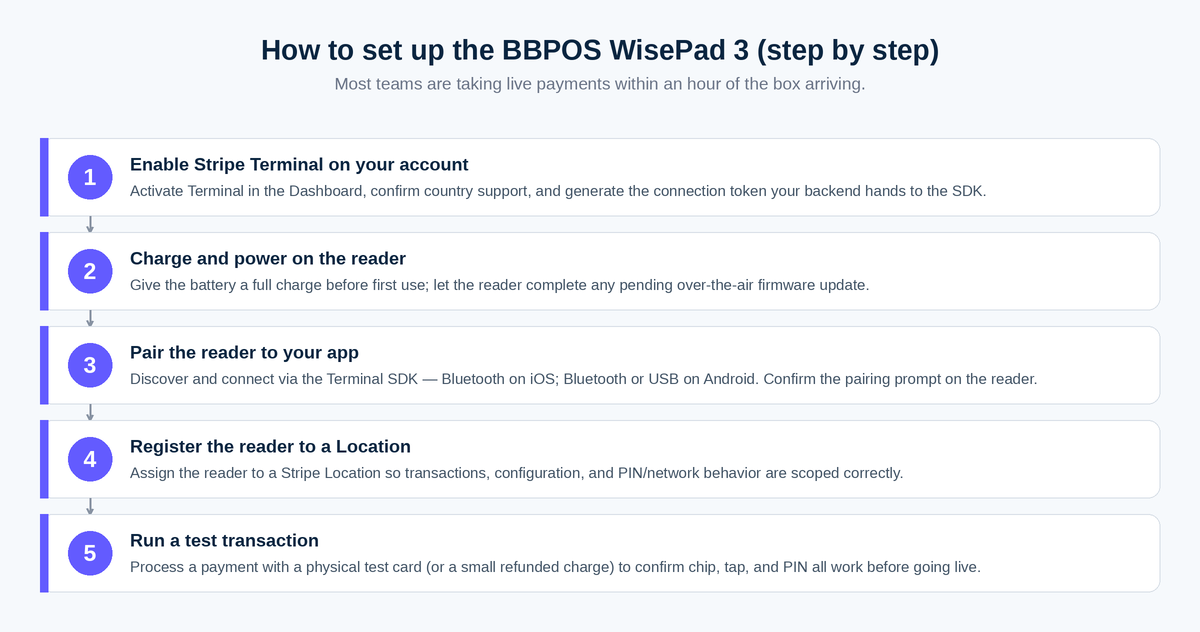
Setting up the WisePad 3 is a four-step process: enable Terminal in your Stripe account, charge and power the reader, connect it to your app over Bluetooth or USB, and register it to a Stripe Location. Most teams are taking live payments within an hour of the box arriving.
- Enable Stripe Terminal on your account. In the Stripe Dashboard, activate Terminal and confirm your account is supported in the country where you will use the reader. Generate the connection token your app’s backend will hand to the SDK.
- Charge and power on the reader. The WisePad 3 ships with a battery; give it a full charge before first use. Power it on and let it complete any pending over-the-air firmware update — the reader pulls firmware, configuration, and key updates automatically, and it will not behave predictably mid-update.
- Pair the reader to your app. Using the Stripe Terminal SDK, discover and connect to the reader. On iOS, that means Bluetooth; on Android you can use Bluetooth or a USB cable. The reader’s display shows a pairing prompt; confirm it.
- Register the reader to a Location. Assign the reader to a Stripe Location so transactions, configuration, and reporting are scoped correctly. This matters more than it looks: Location drives the regional configuration (PIN behavior, supported networks) the reader loads.
- Run a test transaction. Process a payment with a physical test card (or a small real charge you refund) to confirm chip, tap, and — where applicable — PIN entry all work before you put the device in front of a customer.
Stripe’s own walkthrough, Set up BBPOS WisePad 3, is the canonical reference and worth keeping open during your first integration.
How does the WisePad 3 connect — Bluetooth vs USB?
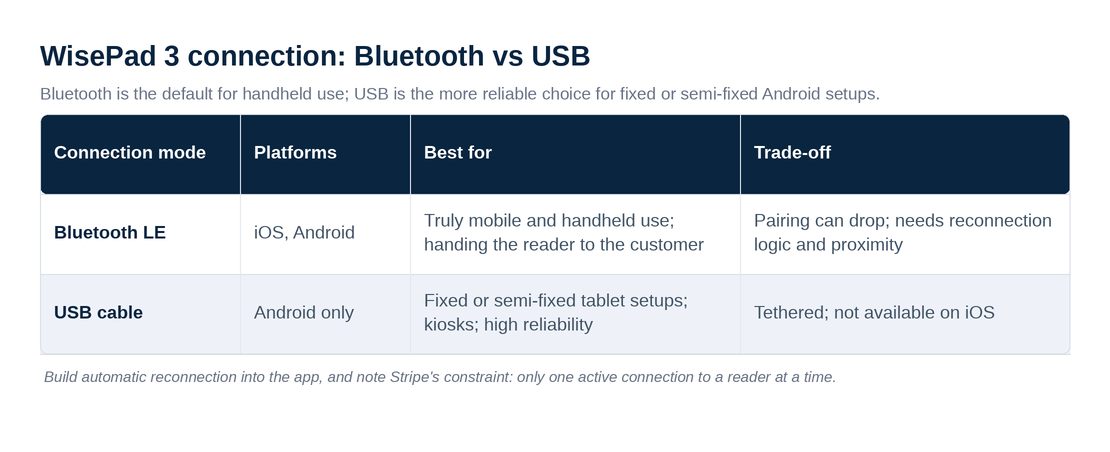
The WisePad 3 connects to your mobile app two ways: Bluetooth Low Energy on both iOS and Android, and a USB cable on Android only. Bluetooth is the default for handheld use; USB is the more reliable choice for fixed or semi-fixed Android setups.
Bluetooth Low Energy is what makes the WisePad 3 a genuinely mobile reader — no cable, the reader in one hand and the phone in the other, or the reader handed to the customer for PIN entry while the staff member keeps the device. The trade-off is the usual Bluetooth one: pairing can drop if the reader sleeps, if the phone’s Bluetooth stack gets confused, or if the two drift out of range. In practice we tell field teams to keep the reader and phone within a meter or two and to build automatic reconnection into the app so a dropped link recovers without a staff member fiddling with settings.
USB (Android only) trades mobility for stability. If the WisePad 3 lives on or near a fixed Android tablet — a reception desk, a kiosk-style setup, a market stall with a powered tablet — a USB connection removes the Bluetooth variability entirely and keeps the reader charged at the same time. It is the connection mode we reach for whenever the deployment is “mostly stationary but using a cheap reader.”
| Connection mode | Platforms | Best for | Trade-off |
|---|---|---|---|
| Bluetooth LE | iOS, Android | Truly mobile and handheld use; handing the reader to the customer | Pairing can drop; needs reconnection logic and proximity |
| USB cable | Android only | Fixed or semi-fixed tablet setups; kiosks; high reliability | Tethered; not available on iOS |
How reliable is the WisePad 3 in real-world use?
In the field, the WisePad 3 is reliable enough for mobile and low-to-moderate-volume selling, with battery life and Bluetooth stability as the two things that actually determine your day-to-day experience. It is a workhorse, not a thoroughbred.
Battery is the headline. Stripe rates the WisePad 3 at roughly 600 contact or 800 contactless transactions per charge — comfortably a full day for almost any mobile operator, and often several days for low-volume sellers. The practical advice is boring and correct: charge it nightly, and for all-day events bring a power bank. A reader that dies at 2pm at a festival gate is a worse problem than any spec sheet suggests.
Bluetooth is the second variable. The connection itself is fine; the failure mode is almost always the app, not the radio. Apps that do not implement reconnection, that let the reader sleep aggressively, or that try to juggle more than one reader connection at once are where we see “the reader keeps disconnecting” complaints. Note Stripe’s own constraint here: you can only have one active connection to a reader at a time. Build for that and the WisePad 3 behaves.
Firmware updates are automatic and over-the-air, which is a reliability win — Stripe pushes security and bug-fix firmware (the device received routine firmware updates as recently as 2026) without you managing it. The only catch is to let an update finish before expecting normal operation, and not to hand a customer a reader that is mid-update.
The display is small (2.4 inches) and purely functional. It does its job of prompting the cardholder, but do not expect to run anything resembling a checkout UI on it — that is by design.
When should you not choose the WisePad 3?
You should not choose the WisePad 3 if you are a US merchant (it is not sold there), if you run a fixed counter that benefits from a customer-facing screen, or if you want an all-in-one device that does not tie up a phone or tablet. In those cases a different Stripe reader is the better answer, and we will tell you so.
- You are in the United States. Stripe does not offer the WisePad 3 in the US. Use the Stripe Reader M2 for mobile, or the S700 for a counter.
- You run a fixed register or restaurant. A reader that needs a paired phone and shows a 2.4-inch prompt is the wrong shape for a counter. The S700’s on-device screen, tipping prompts, and self-contained checkout pay for themselves quickly at a stationary point of sale.
- You don’t want to dedicate a phone or tablet. The WisePad 3 is a peripheral. Every reader needs a host device running your app. If buying and managing that host fleet is a burden, a smart terminal removes it.
- You’re a contactless-only operation. If you will never need chip-and-PIN, you are paying (in device choice and pairing complexity) for a PIN pad you won’t use. A tap-only or screen-prompt reader may be simpler.
- You need high throughput at one location. For volume at a single station, a docked smart terminal with Ethernet beats a battery reader on both speed and reliability.
This is the platform-neutral part of the review: the WisePad 3 is excellent at its job and a poor fit outside it. Matching the reader to the job is most of what we do when we plan a hardware rollout, and the WisePad 3 earns its place in roughly the situations described under “Who is the WisePad 3 best for?” and few others.
Frequently asked questions
Is the WisePad 3 a good Stripe reader? Yes, for mobile or low-volume card-present selling in a PIN-driven market. It is the cheapest Stripe Terminal reader (~$79 where sold), it is pocket-sized, and it has a real PIN pad. It is a poor choice for fixed counters and is not available in the US.
How much does the WisePad 3 cost? About $79 (USD-equivalent) in the regions where Stripe sells it, making it Stripe’s lowest-cost Terminal reader. Pricing varies by country and changes over time; confirm on Stripe’s WisePad 3 page.
Can I use the WisePad 3 in the United States? No. Stripe does not sell the WisePad 3 in the US. US merchants use the Stripe Reader M2 for mobile card acceptance or the S700 for a countertop. The WisePad 3 is available in 20+ other countries, including the UK, Canada, the EU, Australia, New Zealand, Singapore, and Japan.
Does the WisePad 3 have a PIN pad? Yes. A physical PIN pad is its defining feature, supporting both online and offline PIN depending on the region’s card configuration. That is why Stripe targets it at chip-and-PIN markets rather than the contactless-first US.
Does the WisePad 3 need a phone or tablet? Yes. It is a peripheral reader, not a standalone terminal. It connects to a phone or tablet running your app via Bluetooth (iOS and Android) or USB (Android only), and your app drives the transaction through the Stripe Terminal SDK.
How many transactions does the WisePad 3 do per charge? Roughly 600 contact or 800 contactless transactions per full charge, per Stripe — generally a full day or more of mobile selling. Charge nightly and carry a power bank for all-day events.
Does the WisePad 3 support contactless and digital wallets? Yes. It reads chip, contactless tap, and magstripe, and accepts NFC mobile wallets such as Apple Pay and Google Pay, in addition to PIN-authenticated card transactions.
The bottom line
The WisePad 3 is the reader we recommend when a client needs cheap, portable, PIN-capable card acceptance in a supported country — and the reader we steer clients away from when they are in the US, sitting behind a fixed counter, or hoping for an all-in-one device. Get the fit right and it is one of the best-value devices in the Stripe lineup; get it wrong and you have bought a peripheral that fights your workflow.
If you are planning a hardware rollout — especially a mixed fleet spanning the US and PIN-driven markets, or a field-service operation putting a reader in every technician’s bag — we can help you spec it from devices we have actually deployed. Book a hardware advisory call and we will map the right readers to your workflow before you spend a dollar on the wrong ones.
