
Yes, you can use Stripe Terminal without a point-of-sale system — Terminal is a card-present payment layer, not a checkout product, so a back office can drive a reader (or Tap to Pay) straight from an existing tool to take chip and contactless payments at the in-person rate of 2.7% + 5¢, well below Stripe’s 3.4% + 30¢ rate for manually keyed cards. A POS is one way to put a payment on a Stripe reader; it is not the only way, and for an accounts-receivable desk collecting on overdue invoices, a sales rep closing at a trade show, or a counter that takes phone orders for in-person pickup, a full POS is usually the wrong tool. What these teams need is the card-present rate and a clean record against the right invoice — not a register.
We have shipped Stripe Terminal flows for retail, restaurants, field operations, and B2B sellers across 30-plus countries, and BizSwoop runs its own Stripe Connect platform at payments.bizswoop.app, so the reader-registration, application-fee, and reconciliation mechanics in this guide are ones we operate rather than ones we read about. This is the pillar page for back-office and phone payments: the situations where Terminal is the answer but a POS is not. It is written for the finance leader weighing the cost of keyed-in cards and for the implementer who has to wire a reader into a CRM, an ERP, or an AR workflow, and it cites Stripe’s primary documentation throughout so every claim about rates and behavior is verifiable at the source.
If you are still choosing hardware, start with the Stripe Terminal hardware reader guide. If your finance team books revenue in an ERP, the accounting boundary is covered in the Stripe Terminal ERP integration patterns guide. And if you operate a platform that takes a cut of each transaction, the economics live in the Stripe Connect for platforms using Terminal pillar. The cluster pieces under this pillar are linked in each section below.
Can I use Stripe Terminal without a POS?
Yes — Stripe Terminal works without any point-of-sale software, because a POS is just one application that can drive a reader, and Stripe gives you the payment primitives to drive it from whatever tool you already use.
It helps to be precise about what Stripe Terminal actually is, because the word “terminal” makes people picture a countertop register. Terminal is three layers: the reader (the physical device — a Stripe Reader S700, a BBPOS WisePad 3, a Stripe Reader M2 — or Tap to Pay on a phone), the Terminal SDK (the iOS, Android, React Native, or JavaScript library your application uses to discover and drive the reader), and your backend (which creates and confirms the PaymentIntent). A POS is simply one kind of application sitting on top of that stack. Nothing in Stripe’s architecture requires it. Stripe documents the full model in its Terminal overview, and the design point is that the readers and SDK are generic — Stripe expects you to wire them to your own business systems.
That is exactly why the back office is fair game. An accounts-receivable application that already knows which customer owes what can connect to a reader and collect the payment without ever pretending to be a register. A CRM that holds the deal can launch a Tap to Pay flow on the rep’s phone. A custom internal tool can present a “collect payment” button next to an open invoice. In each case the payment is card-present — the card is physically tapped or inserted — so it earns the card-present rate, and the record carries whatever invoice or customer metadata your tool attaches.
What is a back-office payment, exactly?
A back-office payment is a card-present transaction taken away from a sales counter — by a finance, sales, or operations team — where the goal is collecting against a known invoice or customer, not ringing up a walk-in sale.
The defining feature is that the customer relationship and the amount owed already exist before the payment happens. A retail POS sale starts blank: the customer walks up, you build a cart, you take the money. A back-office payment starts with context: there is an invoice number, a customer record, a deal, or a deposit schedule, and the payment is the act of closing it out. That difference is why a POS is poorly suited to the job — a POS is optimized for building a sale from scratch and is overhead you do not need when the sale already exists in your ERP, CRM, or AR ledger.
When should you use Stripe Terminal instead of a POS?
Use Stripe Terminal without a POS whenever the payment is card-present but there is no counter, no walk-in foot traffic, and the amount owed is already known from another system.
Three patterns cover the overwhelming majority of back-office scenarios, and they map directly to the cluster pieces under this pillar:
B2B accounts receivable. A finance team collecting on open invoices — a wholesaler chasing a net-30 that went net-60, a service firm taking payment when the client is finally in the office. The card is present (the customer hands it over or reads the number while present), the invoice exists in the ERP or accounting system, and the only question is which reader and how the payment posts back. We go deep on this in Stripe Terminal in B2B accounts receivable.
Field sales and trade shows. A rep closing a deal at a booth, a route salesperson collecting at delivery, a demo that converts on the spot. Here Tap to Pay on the rep’s phone or a pocket reader turns a CRM opportunity into a paid order without carrying a register. The deposit-collection variant — taking a partial payment to lock an order — is its own discipline, covered in collecting deposits at trade shows and Tap to Pay for sales reps.
Phone-order to in-person pickup. A customer orders by phone and pays when they arrive — common for parts desks, bakeries, specialty retail, and trade counters. The order is taken over the phone; the payment is deliberately deferred to pickup so it can be card-present rather than keyed-in over the phone. That single design choice is the difference between the 2.7% + 5¢ rate and the 3.4% + 30¢ keyed rate, and we lay out the workflow in phone order to in-person pickup with Stripe Terminal.
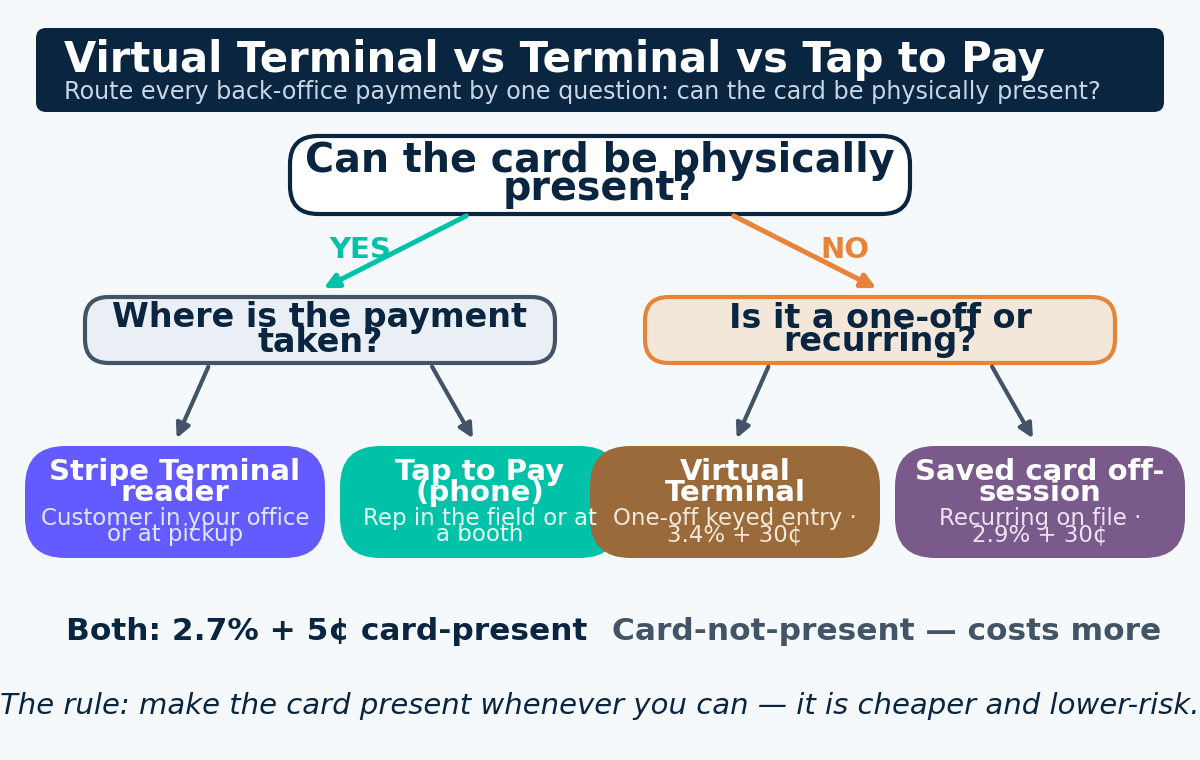
The decision tree across these patterns — and the choice between Terminal, Tap to Pay, and Stripe’s Virtual Terminal — is its own piece: Stripe Terminal vs Virtual Terminal vs Tap to Pay. The short version is in the table below.
| Scenario | Card physically present? | Best tool | US rate |
|---|---|---|---|
| Customer reads card number to you over the phone | No | Virtual Terminal (Dashboard) / keyed entry | 3.4% + 30¢ |
| Customer is in your office, hands you the card | Yes | Stripe Terminal reader | 2.7% + 5¢ |
| Rep is at a customer site or trade show with a phone | Yes | Tap to Pay on iPhone/Android | 2.7% + 5¢ |
| Phone order, customer pays at pickup | Yes (at pickup) | Stripe Terminal reader or Tap to Pay | 2.7% + 5¢ |
| Recurring B2B charge, card on file | No | Saved card / off-session PaymentIntent | 2.9% + 30¢ |
The pattern is consistent: whenever you can make the card physically present, you should, because it is both cheaper and lower-risk. The rest of this guide is about how to do that without a POS.
How much do you save with card-present rates vs keyed-in payments?
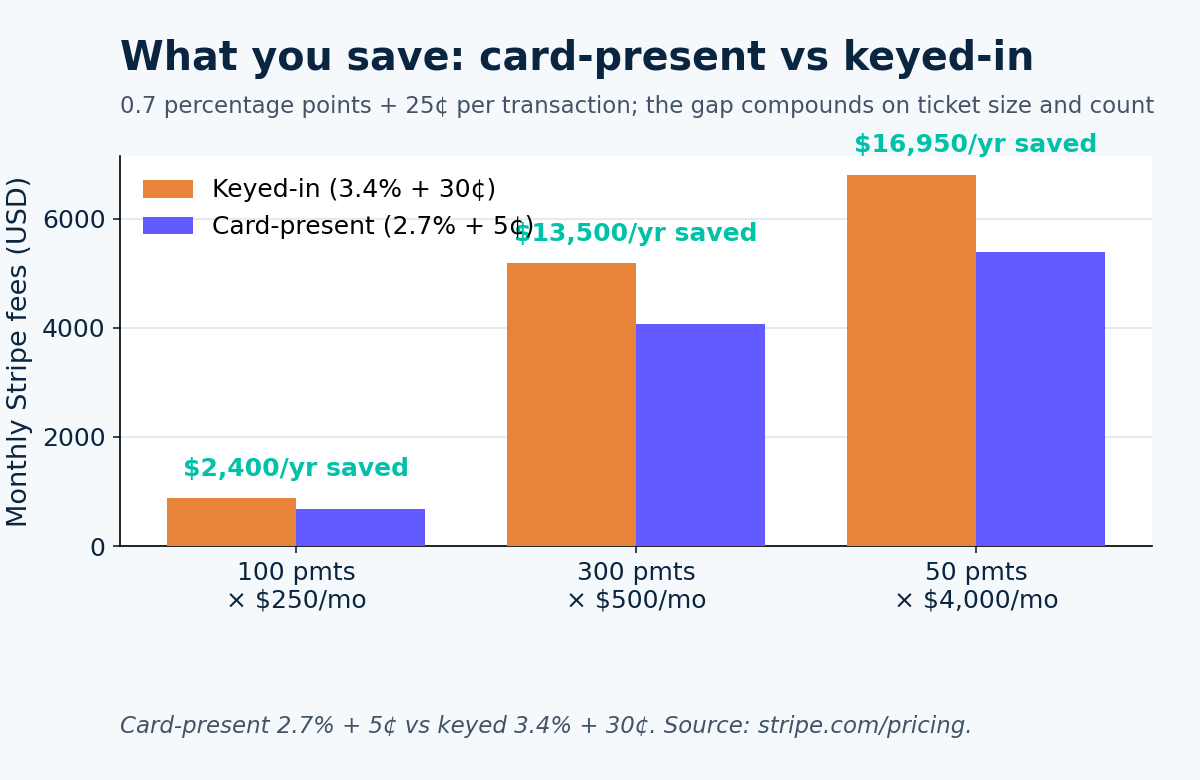
You save 0.7 percentage points plus 25¢ per transaction by taking a card in person rather than keying it in — Stripe charges 2.7% + 5¢ for card-present Terminal payments versus 3.4% + 30¢ for manually entered cards in the US.
This is the single most important number in the back-office case, so it is worth stating plainly with sources. Per Stripe’s pricing page, in-person card-present transactions on Terminal run 2.7% + 5¢ in the United States. Manually keyed cards — typed into the Dashboard, the Virtual Terminal, or via Terminal’s keyed-entry MOTO path — run 3.4% + 30¢, as Stripe documents in its manually entered card payments support article. Standard online payments sit between them at 2.9% + 30¢. The card-present rate is lower because a physically present chip or contactless transaction carries far less fraud risk than a card-not-present one, and Stripe prices that risk difference directly.
The gap compounds in two ways that finance leaders should model explicitly. First, the percentage difference (0.7%) scales with ticket size, so it dominates on large B2B invoices. Second, the per-transaction difference (25¢) scales with transaction count, so it dominates on high-volume, low-ticket back offices. The worked numbers:
| Monthly volume | Keyed-in (3.4% + 30¢) | Card-present (2.7% + 5¢) | Monthly saving | Annual saving |
|---|---|---|---|---|
| 100 payments averaging $250 | $880 | $680 | $200 | $2,400 |
| 300 payments averaging $500 | $5,190 | $4,065 | $1,125 | $13,500 |
| 50 payments averaging $4,000 | $6,815 | $5,402.50 | $1,412.50 | $16,950 |
A back office processing 300 mid-size invoices a month leaves roughly $13,500 a year on the table by keying cards instead of making them card-present. Against that, a fleet of WisePad 3 or M2 readers at $59 each, or Tap to Pay at zero hardware cost, pays for itself almost immediately. We build the full model — including the case where deferring a phone payment to in-person pickup is worth the friction — in MOTO payments vs Stripe Terminal: which saves more and card-present rates explained.
Does Stripe Terminal really cost less than the Virtual Terminal?
Yes, for any card you can make physically present — the Virtual Terminal keys the card in at 3.4% + 30¢, while a Stripe reader or Tap to Pay processes the same card present at 2.7% + 5¢.
The honest caveat, in keeping with how we write: the Virtual Terminal is the right tool when the card genuinely cannot be present — a one-off phone payment from a customer who will never visit, an emergency collection where waiting for in-person is not viable. The savings only materialize when in-person is actually achievable. For a true phone-only relationship, the Virtual Terminal or a saved card on an off-session PaymentIntent is the correct, if slightly pricier, answer. The skill is recognizing which payments can be made present and routing those to a reader.
Which Stripe Terminal hardware is best for a back office?
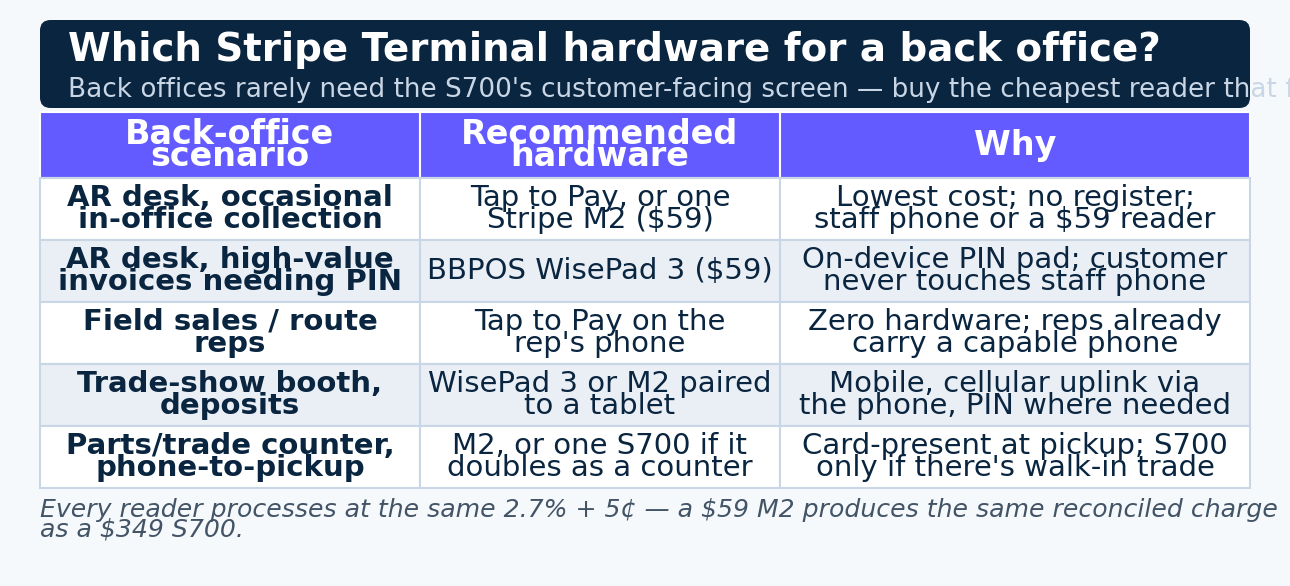
For most back-office use, the best hardware is the cheapest reader that supports your PIN requirements — a $59 BBPOS WisePad 3 if customers must enter a PIN, a $59 Stripe Reader M2 if they don’t, or Tap to Pay at zero hardware cost for phone-based collection.
Back offices rarely need the customer-facing screen, tipping prompts, and standalone design that justify the $349 Stripe Reader S700 at a retail counter. The payment is a discrete event handled by a staff member, not a self-service checkout. That changes the hardware calculus toward small, mobile, inexpensive devices:
| Back-office scenario | Recommended hardware | Why |
|---|---|---|
| AR desk, occasional in-office collection | Tap to Pay on iPhone/Android, or one M2 | Lowest cost; no register needed; staff phone or a $59 reader |
| AR desk, high-value invoices needing PIN | BBPOS WisePad 3 ($59) | On-device PIN pad; customer never touches staff phone |
| Field sales / route reps | Tap to Pay on the rep’s phone | Zero hardware; reps already carry a capable phone |
| Trade-show booth, deposits | WisePad 3 or M2 paired to a tablet | Mobile, cellular uplink via the phone, PIN where needed |
| Parts/trade counter, phone-to-pickup | M2 or a single S700 if it doubles as a counter | Card-present at pickup; S700 only if there’s also walk-in trade |
The architectural reason this works is that every reader processes at the identical 2.7% + 5¢ card-present rate — the intelligence lives in the Stripe platform, not the hardware — so a $59 M2 produces the same fully reconciled charge as a $349 S700. You choose for fit, not for processing power. The full comparison is in the Stripe Terminal hardware reader guide, and the Tap-to-Pay-only path for reps is in Tap to Pay for sales reps.
One genuine constraint to flag: if your customers need to enter a PIN on the device — common in Europe and for higher-value transactions everywhere — you need a reader with a physical PIN pad (the WisePad 3 or S700), not the M2 and not Tap to Pay’s contactless path. Confirm your market’s and your card mix’s PIN requirements before standardizing on hardware-free acceptance.
How do you implement Stripe Terminal in a back office?
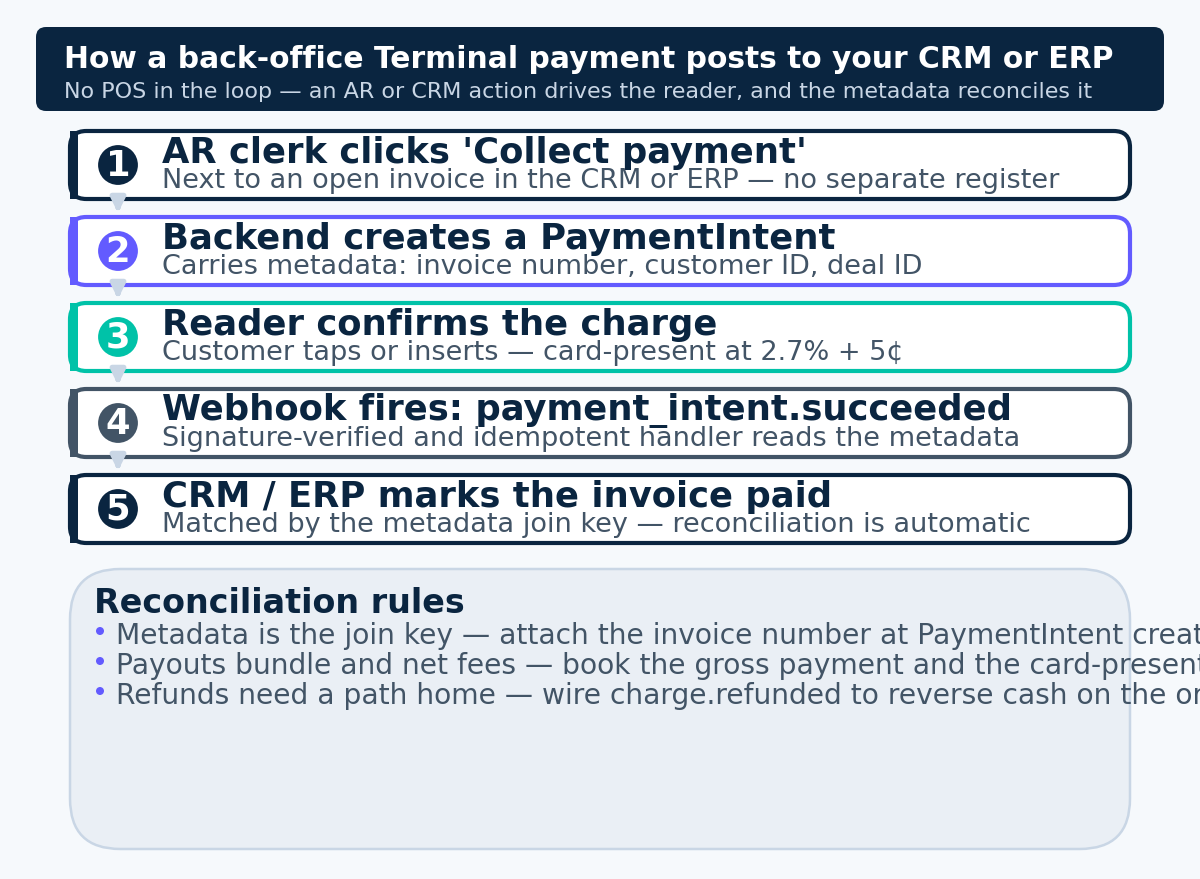
You implement back-office Terminal by connecting your existing tool — an AR application, a CRM, or a small internal app — to the Terminal SDK, creating a PaymentIntent that carries the invoice or customer reference, and confirming it on the reader.
There is no “POS” step in this flow because there is no register. The implementation reduces to four moves, and Stripe documents each primitive:
- Register the reader to a Location. Even a single back-office reader belongs to a Terminal Location, which is how Stripe groups readers and how multi-office finance teams keep their devices organized. Registration is a one-time step per device.
- Issue a connection token. Your backend creates a connection token that the SDK uses to talk to the reader. This is the security boundary — the token is short-lived and minted server-side.
- Create a PaymentIntent with your reference. When the AR clerk or rep clicks “collect,” your backend creates a PaymentIntent for the amount owed and attaches
metadata— the invoice number, customer ID, deal ID — so the payment is self-describing. Stripe’s collect a payment guide covers the SDK call sequence. - Confirm on the reader and post the result. The customer taps or inserts; the SDK confirms the PaymentIntent on the reader; your application reads the success event and updates the invoice or deal as paid.
The whole thing can live inside an existing screen — a “Take payment” button next to an open invoice in your ERP, or a payment action on a CRM deal. There is no separate POS application to buy, deploy, or train staff on. For a server-driven option that avoids embedding the SDK in your front end at all, Stripe also offers a server-driven integration where your backend drives the reader directly over the network — well suited to internet-connected readers like the S700 sitting at a fixed AR desk.
How do you connect Stripe Terminal to a CRM or ERP without a POS?
You connect it the same way you connect any payment to a system of record — the PaymentIntent carries an identifier (invoice number, deal ID, customer ID) in metadata, and your CRM or ERP reconciles against that identifier when the payment succeeds.
The pattern is identical to the one we describe for full ERP integrations, minus the register: the payment moment lives in Stripe, the financial record lives in your system, and the integration is the wire between them. For an AR collection, the wire is usually a webhook — Stripe emits payment_intent.succeeded, your handler reads the invoice number from metadata and marks the invoice paid. The non-negotiables, straight from Stripe’s webhook documentation, are idempotent handlers and signature verification. The complete treatment of the accounting boundary — where the PaymentIntent becomes a customer payment, how refunds find their way back, how the bank deposit reconciles — is in the Stripe Terminal ERP integration patterns guide. For lighter-weight CRM and SaaS embeds, the embedding card-present payments into SaaS platforms pillar covers the same wiring against tools like Salesforce and HubSpot.
If you operate a platform that puts other merchants on Terminal and takes a fee, the back-office collection rides on top of Stripe Connect, and the application-fee mechanics are in Stripe Connect for platforms using Terminal.
How do you reconcile back-office Terminal payments?
You reconcile back-office Terminal payments by matching each payout line in your bank to the underlying transactions via the metadata you attached, then applying each payment to its invoice — exactly as you would for any Stripe payment, with the advantage that card-present charges carry no chargeback-prone keyed-entry ambiguity.
Reconciliation is where back-office payments either save time or quietly waste it, and the determining factor is whether you attached a usable reference at payment time. Three considerations matter:
Metadata is the join key. If every PaymentIntent carries the invoice number, reconciliation is automatic — the webhook applies cash to the invoice, and the month-end check becomes “does the Stripe payout total match the sum of applied payments.” If you skip metadata, you are back to reverse-engineering a lump-sum deposit, which is the exact pain the integration exists to remove. Attach the reference at creation, every time.
Payouts bundle and net fees. Stripe deposits a netted lump sum on its payout schedule, with the card-present fee already deducted. Your reconciliation has to book the gross payment and the fee separately so revenue and processing cost are both visible. Stripe’s reporting and Balance transactions expose the per-transaction fee for this purpose.
Refunds need a path home. A refunded back-office payment has to reverse the cash application against the original invoice, not just appear as a negative deposit line. Build the refund webhook (charge.refunded) into the same reconciliation engine so a counter refund finds its original invoice. The refunds workflow for recurring and pickup scenarios is covered in the cluster pieces.
For B2B teams running this at volume against an ERP, the multi-step reconciliation — deposit matching, fee booking, AR application — is the same machinery described in the ERP integration patterns guide. The back-office difference is only that there is no POS feeding the PaymentIntent; an AR or CRM action does.
What about recurring and subscription back-office payments?
For recurring back-office charges where the customer is not present, you save a card on file and charge it off-session at 2.9% + 30¢ — but the first, in-person collection should be card-present at 2.7% + 5¢ whenever the customer is physically there.
This is a common back-office hybrid: a B2B customer signs up in person (card-present, cheap), then is billed monthly off-session against the saved card (card-not-present, standard online rate). Stripe supports saving cards collected on Terminal for exactly this — capture the payment method present, reuse it later. The renewal and subscription-pickup patterns, including in-person renewals where the customer returns, are detailed in Stripe Terminal for subscription pickups and renewals. The principle holds throughout the back office: make the card present whenever you can, and only fall back to card-on-file billing when the customer genuinely is not there.
When is a back-office Terminal flow the wrong choice?
A back-office Terminal flow is the wrong choice when the card can never be physically present, when you have genuine walk-in retail traffic that needs a real checkout, or when your volume is so low that the hardware and integration effort outweigh the rate savings.
In the spirit of advising honestly rather than selling, here are the cases where we tell teams not to put a reader on the desk:
The customer is never in the room. A pure remote B2B relationship — invoices paid by a customer two states away who will never visit — cannot be made card-present. Forcing a reader into that flow accomplishes nothing. Save the card on file and bill off-session at 2.9% + 30¢, or use the Virtual Terminal for one-offs. The card-present rate is only reachable when in-person is genuinely achievable.
You actually have a counter. If walk-in customers build carts and pay on the spot, you have retail, not back-office, and you want a real point-of-sale experience — cart building, tipping prompts, a customer-facing screen, receipt printing. That is the Stripe Terminal as a POS pillar, and an S700 with proper POS software will serve you far better than an AR tool with a “collect payment” button bolted on.
Volume is too low to matter. If you take a handful of in-person payments a month at small ticket sizes, the rate delta may be a few dollars — not worth a custom integration. In that case Stripe’s hosted Virtual Terminal, or even a saved-card flow, is the pragmatic answer. Run the MOTO vs Terminal math before you build anything; the savings have to clear the build cost.
PIN-first markets without PIN-capable hardware. If you operate where chip-and-PIN is mandatory and you have only Tap to Pay or M2 readers, you will hit declines on transactions that require on-device PIN entry. Match the hardware to the market (WisePad 3 or S700) before committing, as covered in the hardware reader guide.
The authority here comes from the honesty: Stripe Terminal is the right answer for back-office card-present collection a large fraction of the time, but not all of the time, and a team that knows the boundary spends its integration effort where the rate savings actually land.
Frequently asked questions
Can Stripe Terminal be used without any POS software?
Yes. Stripe Terminal is a card-present payment layer made of a reader, the Terminal SDK, and your backend — a POS is just one optional application on top of it. A back office can drive a reader directly from an AR tool, a CRM, or a small internal app, with no register involved, per Stripe’s Terminal overview.
What does Stripe charge for in-person card payments?
Stripe charges 2.7% + 5¢ per successful card-present transaction in the US on Terminal, compared with 3.4% + 30¢ for manually keyed cards and 2.9% + 30¢ for standard online payments, per Stripe’s pricing page.
Is Stripe Terminal cheaper than the Virtual Terminal?
Yes, for any card you can make physically present. The Virtual Terminal keys the card in at 3.4% + 30¢; a Stripe reader or Tap to Pay processes the same card present at 2.7% + 5¢. The Virtual Terminal only wins when the card genuinely cannot be present.
What hardware does a back office need for Stripe Terminal?
The minimum is none — Tap to Pay on an iPhone or Android phone takes card-present payments with no reader. If you want a dedicated device, a $59 Stripe Reader M2 (no PIN pad) or $59 BBPOS WisePad 3 (with PIN pad) covers nearly every back-office case. The $349 S700 is overkill unless the desk also handles walk-in trade.
Can I take a card-present payment for a phone order?
Not over the phone — a card read aloud over the phone is card-not-present and bills at the keyed rate. The back-office workaround is phone-order-to-pickup: take the order by phone but collect the payment in person at pickup on a reader or Tap to Pay, which makes it card-present at 2.7% + 5¢.
How do back-office Terminal payments post to my accounting system?
Attach the invoice number or customer ID to the PaymentIntent’s metadata, then reconcile on the payment_intent.succeeded webhook by applying the payment to that invoice. This is the same wire used for full ERP integrations, documented in our ERP integration patterns guide and Stripe’s webhook documentation.
Does Stripe Terminal work for B2B accounts receivable?
Yes, and it is one of the strongest back-office cases. When a B2B customer is in your office, collecting the open invoice on a reader earns the 2.7% + 5¢ card-present rate and lets you apply cash to the exact invoice via metadata, instead of keying the card at 3.4% + 30¢. See Stripe Terminal in B2B accounts receivable.
The bottom line
Stripe Terminal without a POS is not a workaround — it is the intended use for an entire class of payments. Any time you have a known customer, a known amount, and a way to make the card physically present, you should be collecting on a reader or Tap to Pay at 2.7% + 5¢ rather than keying it in at 3.4% + 30¢. For a back office doing a few hundred mid-size collections a month, that single discipline is worth five figures a year, and it requires no register, no checkout software, and often no hardware beyond a phone.
We have built these flows for B2B sellers, field teams, and counter operations, and we run our own Stripe Connect platform at payments.bizswoop.app. If your finance or sales team is keying cards today, the savings are usually larger than expected and the implementation is smaller than feared. Book a back-office payment review with BizSwoop and we will map your collection volume against card-present rates and tell you honestly whether Terminal, Tap to Pay, or a saved-card flow is the right answer for each payment type you run.
Primary sources: Stripe pricing · Stripe Terminal overview · Manually entered card payments · Collect a Terminal payment · Connection tokens · Terminal Locations · Saving cards on Terminal · Webhooks
