
Yes — a Stripe Terminal SaaS integration is fully supported, because you can embed Stripe Terminal in a SaaS app and the Stripe Terminal SDK is explicitly designed for it: any application that can reach a backend to mint a connection token can discover a reader, drive a card-present payment, and book the result, whether that application is a retail POS or a CRM, a scheduling tool, or a vertical SaaS product. Stripe Terminal is not a point-of-sale product with an API bolted on; it is a payment-acceptance toolkit, and “POS” is just its most common deployment. The moment your software has users who occasionally need to take a physical card — a salesperson closing a deal at a trade show, a clinic collecting a copay, a field rep taking a deposit — Terminal belongs inside your product, not beside it.
We have shipped Terminal flows across more than 30 countries and we operate our own Stripe Connect platform at payments.bizswoop.app, so the connection-token, reader-registration, and tenant-isolation patterns in this guide are ones we run in production. This is the architecture playbook for the implementer or product engineer who has decided Terminal belongs in their SaaS and now has to choose how to embed it without compromising security or multi-tenant isolation. It cites Stripe’s primary documentation throughout.
This is the SaaS pillar in a broader Stripe Terminal library. If you have not chosen reader hardware, start with the hardware reader guide. If your platform takes a fee on each transaction, the economics live in Stripe Connect for platforms using Terminal. For ERP rather than SaaS systems of record, see the ERP integration patterns guide.
Can you embed Stripe Terminal in your SaaS app?
Yes. The Terminal SDK exists precisely so that any application — not just a dedicated POS — can connect to a reader and accept card-present payments, provided your backend can issue the short-lived connection token the SDK needs.
The architecture that makes this possible is the same three layers that govern every Terminal deployment. There is the reader (the physical device, or Tap to Pay on a phone), the Terminal SDK or server-driven API (the client-side or backend code that discovers and drives the reader), and your backend (which mints connection tokens and creates the PaymentIntent). Stripe supports this through SDKs for JavaScript, iOS, Android, and React Native, plus a server-driven mode that drives readers directly from the Stripe API (Terminal documentation). For a SaaS product, the JavaScript SDK embedded in your web app and the server-driven API are the two most common choices, because they avoid shipping a separate mobile app.
The only hard requirement is the connection token. To connect to a reader, the SDK needs permission to use your Stripe account, and it gets that permission from a short-lived connection token your backend creates and returns. Stripe is explicit that you must not cache or hardcode it — the SDK manages its lifecycle, and your backend simply mints a fresh one on request (connection token API). If your SaaS can stand up one authenticated endpoint that returns a connection token, you can embed Terminal. Everything else is product design.
What are the four ways to embed Stripe Terminal in a SaaS platform?
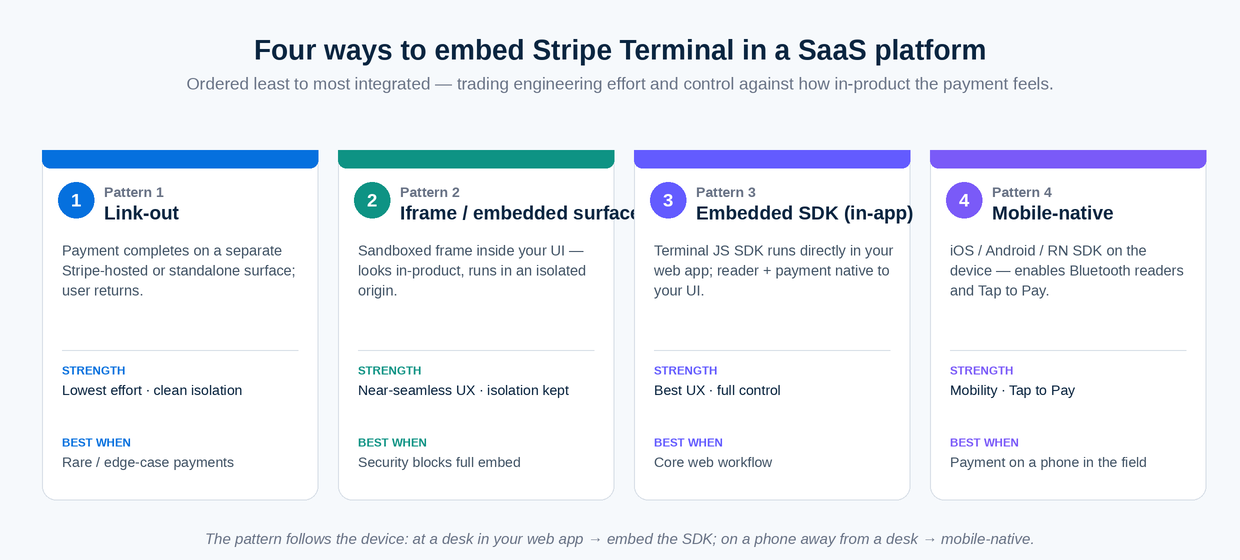
There are four embed patterns — link-out, iframe, embedded SDK, and mobile-native — and they differ in how tightly the payment experience lives inside your product versus inside Stripe’s or a companion app’s.
These four are the full menu. Every SaaS Terminal integration we have built or reviewed is one of them. They are ordered roughly from least to most integrated, and the right choice trades integration depth against engineering effort and control.
Pattern 1: Link-out
In the link-out pattern, your SaaS hands the payment off to a separate Stripe-hosted or standalone surface — your user clicks a button and completes the card-present payment somewhere outside your app’s own UI, then returns.
This is the lowest-effort pattern and sometimes the right one. If card-present payments are rare in your product, or you do not want to own the reader-connection UX at all, you can route the user to a lightweight standalone collection app (even a separate single-purpose page that uses the SDK) and bring them back when done. The strength is minimal engineering and a clean security boundary — the payment surface is isolated from your main app. The weakness is a disjointed experience and weaker context-passing; you have to carry the invoice and customer identifiers across the hand-off and back. Link-out suits products where in-person payment is an occasional edge case rather than a core flow.
Pattern 2: Iframe / embedded surface
In the iframe pattern, you embed a payment surface inside your SaaS UI in a sandboxed frame, so it looks in-product but runs in an isolated browser context.
This gives users the feeling of staying inside your app while keeping the payment code in a separate, narrowly-scoped origin — useful when your main app’s security review does not want the Terminal SDK running in the same context as the rest of your code. The strength is a near-seamless UX with a maintained isolation boundary. The weakness is the usual iframe friction: messaging between the frame and the host app, styling consistency, and the reality that reader discovery (especially Bluetooth) can behave differently inside a frame. Iframe is a reasonable middle ground when full embedding is blocked by security constraints but link-out feels too clunky.
Pattern 3: Embedded SDK (in-app)
In the embedded pattern, the Stripe Terminal JavaScript SDK runs directly inside your SaaS web application, so reader connection and payment collection happen natively in your own UI with no hand-off.
This is the pattern most product teams ultimately want, because it makes card-present payment a first-class feature of the app rather than a detour. Your front end loads the SDK, calls your connection-token endpoint, discovers and connects to the reader, and drives the PaymentIntent — all inside your own components, with your own styling and your own error handling. The strength is the best possible UX and full control. The weakness is that you own all of it: the reader-connection states, the retry logic, the messaging when a reader drops off Wi-Fi mid-payment. For a web-based SaaS where in-person payment is a real workflow, embedded SDK is the default recommendation.
Pattern 4: Mobile-native
In the mobile-native pattern, your SaaS ships (or extends) a mobile app that uses the iOS, Android, or React Native Terminal SDK, enabling Bluetooth readers and Tap to Pay on the device itself.
This is the pattern you need when the payment happens on a phone in someone’s hand — a field rep, a delivery driver, a roving salesperson — because Tap to Pay and Bluetooth readers like the WisePad 3 and M2 require a native SDK. The strength is mobility and access to Tap to Pay’s no-hardware acceptance. The weakness is that you now maintain a mobile app and its release cycle, plus the platform requirements Tap to Pay imposes (device and OS minimums, entitlement provisioning). Mobile-native suits field-sales and service SaaS where the counter does not exist.
Which Stripe Terminal embed pattern should you use? (decision matrix)
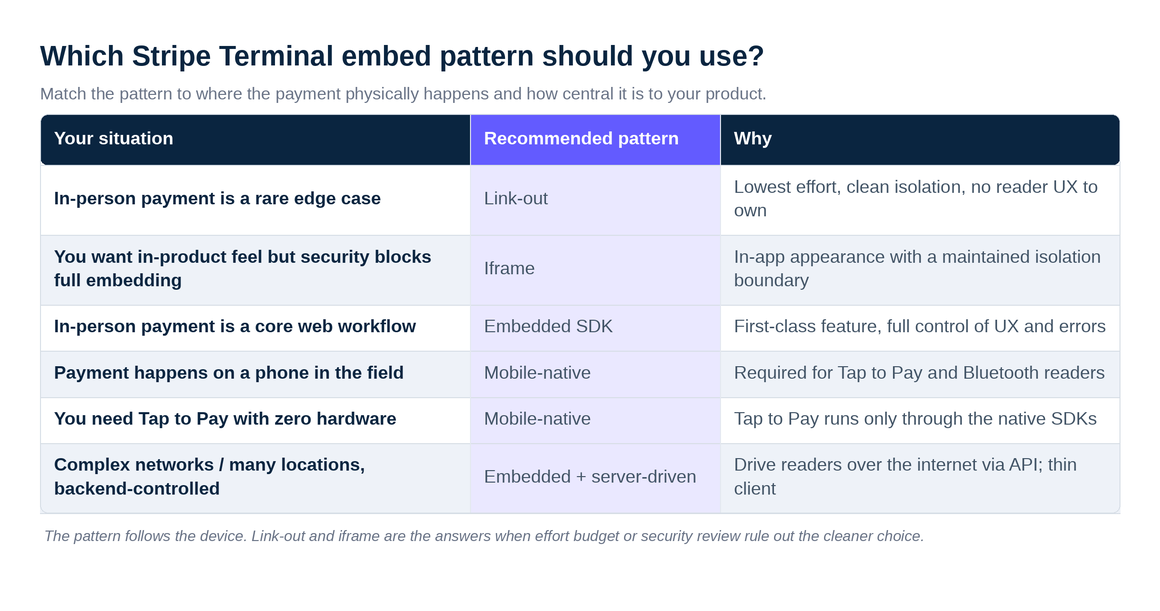
Match the pattern to where the payment physically happens and how central it is to your product.
| Your situation | Recommended pattern | Why |
|---|---|---|
| In-person payment is a rare edge case | Link-out | Lowest effort, clean isolation, no reader UX to own |
| You want in-product feel but security blocks full embedding | Iframe | In-app appearance with a maintained isolation boundary |
| In-person payment is a core web workflow | Embedded SDK | First-class feature, full control of UX and errors |
| Payment happens on a phone in the field | Mobile-native | Required for Tap to Pay and Bluetooth readers |
| You need Tap to Pay with zero hardware | Mobile-native | Tap to Pay runs only through the native SDKs |
| Complex networks / many locations, backend-controlled | Embedded + server-driven | Drive readers over the internet via API; thin client |
The rule of thumb: the pattern follows the device. If the payment happens at a desk inside your web app, embed the SDK. If it happens on a phone away from a desk, go mobile-native. Link-out and iframe are the answers when organizational constraints — effort budget or security review — rule out the cleaner choice.
How does connection-token architecture work for a SaaS embed?
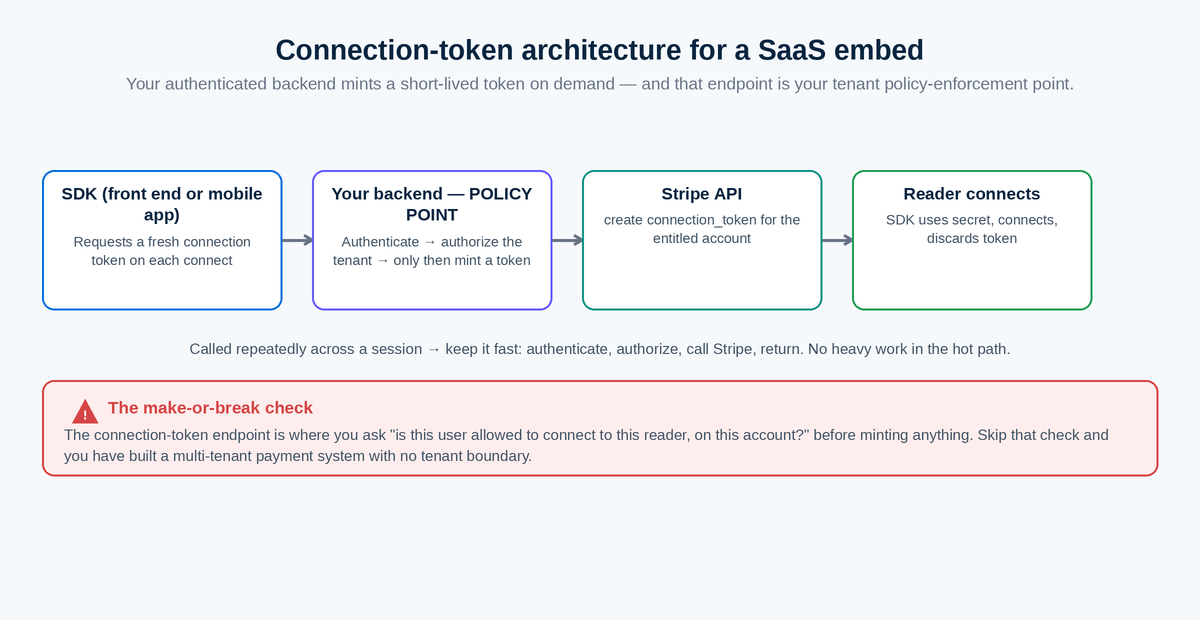
Connection-token architecture works by having your authenticated backend mint a short-lived token on demand, which the SDK exchanges for permission to connect a reader — and in a SaaS, that endpoint is also where you enforce which tenant is allowed which readers.
This is the security spine of the whole integration, so it is worth being precise. The flow is: your front end (or mobile app) asks your backend for a connection token; your backend authenticates the request, decides which Stripe account and which readers this user is entitled to, calls Stripe to create a connection token, and returns the token’s secret to the SDK; the SDK uses it to connect and then discards it. Stripe is emphatic on two points: do not cache or hardcode the token, and let the SDK manage its lifecycle. Your job is purely to mint-on-request behind authentication.
The reason this matters more in SaaS than in a single-merchant POS is that the connection-token endpoint is your policy enforcement point. A single retail store has one Stripe account and a closet of readers; a SaaS has many tenants who must never see each other’s readers or charge to each other’s accounts. The connection-token endpoint is exactly where you check “is this user allowed to connect to this reader, on this account?” before you mint anything. Skip that check and you have built a multi-tenant payment system with no tenant boundary — the most dangerous mistake in this entire domain.
A practical detail teams miss: the SDK does not ask for a token once and keep it. It requests a fresh token whenever it needs to connect, which means your endpoint will be called repeatedly across a session, and it must be fast and resilient. Build it to authenticate, authorize against the tenant, call Stripe, and return — with no heavy work in the hot path — because a slow token endpoint shows up to the user as a slow reader connection. And because the endpoint is called often, it is also the natural place to log connection attempts for audit, which pays off the first time you need to prove which user connected which reader on which account.
For the deeper code-level treatment, including token-refresh handling and SDK-specific provider patterns, see OAuth and connection-token patterns for SaaS Terminal integrations.
How do you handle authentication and tenant isolation when embedding Terminal?
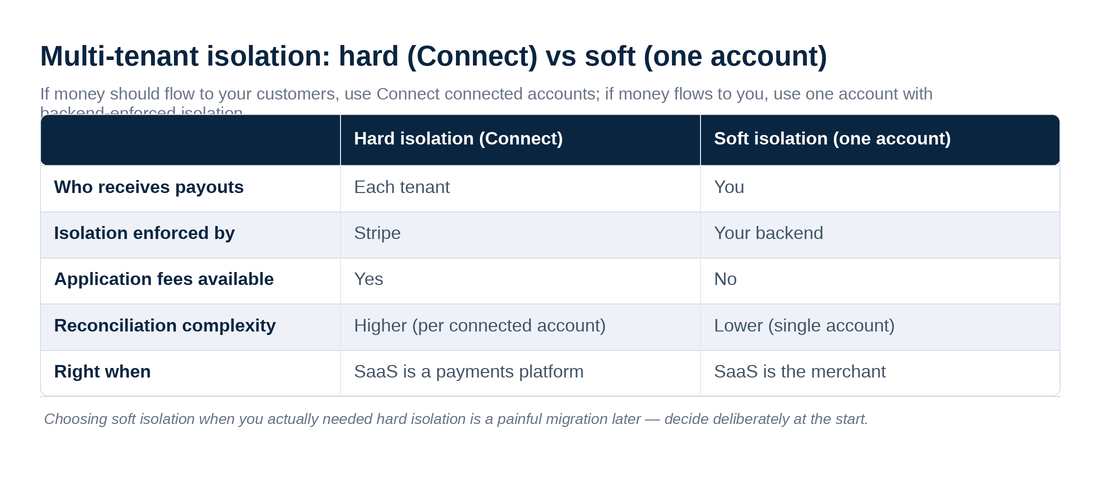
You handle it by scoping every connection token and every reader to a tenant — using Stripe Connect connected accounts for hard isolation, or Locations and strict metadata plus backend authorization for softer isolation within one account.
Multi-tenant isolation is the make-or-break design decision for a SaaS Terminal embed, and there are two structurally different ways to achieve it. The right one depends on whether your tenants need their own funds and payouts or merely their own data separation.
Hard isolation with Stripe Connect. If each tenant is a distinct merchant who should receive their own payouts, you make each tenant a Stripe connected account and register their readers under that account. Terminal works with Connect through connected-account reader registration (Terminal with Connect), and the isolation is enforced by Stripe itself: a connection token minted for tenant A’s connected account cannot touch tenant B’s readers or funds. This is the correct model for any SaaS that is effectively a payments platform for its customers, and it also unlocks application-fee economics — covered in the Connect platform economics pillar.
Soft isolation within one account. If all in-person payments belong to you (your SaaS is the merchant, and tenants are just internal divisions or users), you can run a single Stripe account and isolate tenants logically: model each tenant’s physical footprint with the Locations API, register readers to the right Location, and enforce at your connection-token endpoint that a user may only connect to readers belonging to their tenant’s Locations. Isolation here is your responsibility, not Stripe’s, so the backend authorization check is non-negotiable.
The decision rule: if money should flow to your customers, use Connect connected accounts. If money flows to you, use one account with Location-scoped, backend-enforced isolation. Choosing soft isolation when you actually needed hard isolation is a painful migration later — decide deliberately at the start.
| Hard isolation (Connect) | Soft isolation (one account) | |
|---|---|---|
| Who receives payouts | Each tenant | You |
| Isolation enforced by | Stripe | Your backend |
| Application fees available | Yes | No |
| Reconciliation complexity | Higher (per connected account) | Lower (single account) |
| Right when | SaaS is a payments platform | SaaS is the merchant |
How do you embed Stripe Terminal in Salesforce, HubSpot, Monday, and Airtable?
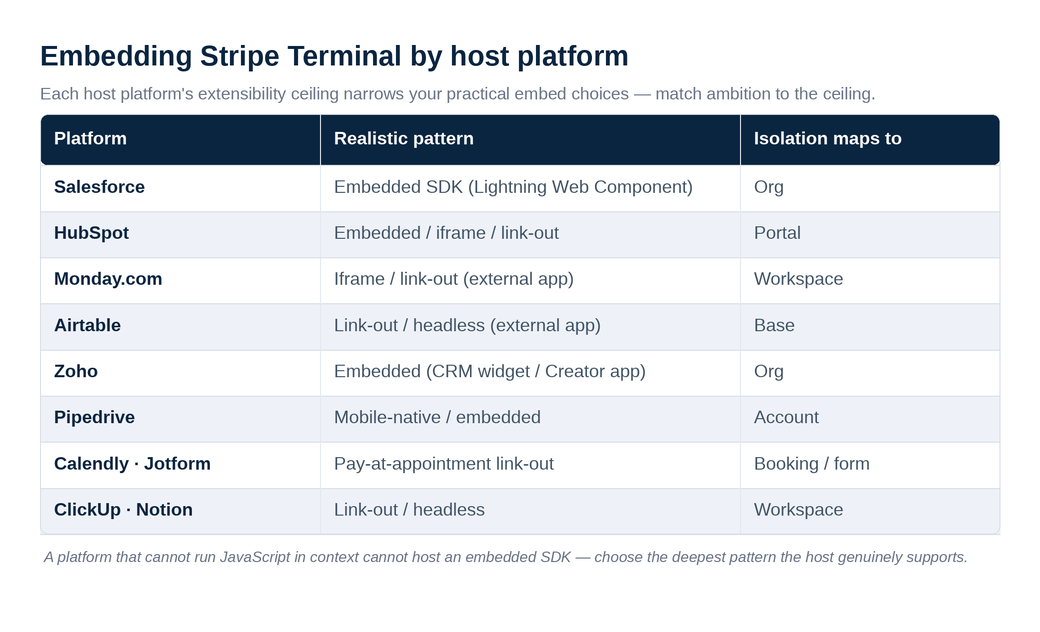
Each major SaaS platform constrains which embed pattern is realistic — Salesforce and HubSpot favor embedded web components or link-outs from a record, while low-code tools like Monday and Airtable usually require an external app the platform links to.
The pattern menu is universal, but each host platform’s extensibility model narrows your practical choices. Here is the per-platform reality and the cluster piece that goes deep on each.
Salesforce. Salesforce’s Lightning Web Components let you embed the Terminal JavaScript SDK directly on a record page — a salesperson on an Opportunity or Order can collect a card-present payment in context. Your connection-token endpoint lives in an Apex callout or an external service, and tenant isolation maps naturally to Salesforce orgs. This is a genuine embedded-SDK integration, not a link-out. Deep dive: Salesforce + Stripe Terminal: field sales card-present payments.
HubSpot. HubSpot’s CRM cards and UI extensions support embedding interactive surfaces on a deal or contact record, making an embedded or iframe pattern workable for an in-person deal payment. Where extension constraints bite, a link-out from a deal record to a collection surface is the reliable fallback. Deep dive: HubSpot + Stripe Terminal for in-person deal payments.
Monday.com. Monday’s apps framework supports embedded views and integrations, but for card-present payment the common shape is an external app that Monday links to, passing the item context across — closer to link-out or iframe than full embedding. Deep dive: Monday.com + Stripe Terminal for service businesses.
Airtable. Airtable is the most constrained: as a low-code database, it has no real surface for running the Terminal SDK in context, so the realistic pattern is a lightweight external app (or an Airtable extension) that drives the reader and writes the result back via the Airtable API — a link-out or headless shape. Deep dive: Airtable + Stripe Terminal: lightweight POS.
| Platform | Realistic pattern | Isolation maps to |
|---|---|---|
| Salesforce | Embedded SDK (Lightning Web Component) | Org |
| HubSpot | Embedded / iframe / link-out | Portal |
| Monday.com | Iframe / link-out (external app) | Workspace |
| Airtable | Link-out / headless (external app) | Base |
The honest read: the more code a platform lets you run in context, the deeper you can embed. Salesforce sits at the deep end; Airtable at the shallow end. Match your ambition to the host platform’s ceiling rather than fighting it.
What about Zoho, Pipedrive, Calendly, Jotform, ClickUp, and Notion?
The same ceiling rule decides the rest of the SaaS landscape: CRMs with real extensibility (Zoho, Pipedrive) support deeper embeds, scheduling and form tools (Calendly, Jotform) lend themselves to pay-at-appointment link-outs, and project tools (ClickUp, Notion) are usually link-out or headless because they were never designed to run a payment SDK in context.
These platforms round out Pillar 5, and each has a dedicated cluster piece, but the pattern logic is identical to the four above — so here is the short version and the link to go deeper.
Zoho spans CRM, Books, and a full app-building platform (Creator), which makes it one of the more flexible hosts: you can embed a payment surface in a Zoho CRM widget or build a Creator app that drives the reader, with isolation mapped to the Zoho org. Deep dive: Zoho + Stripe Terminal integration.
Pipedrive is a sales-first CRM, and the highest-value scenario is a rep taking a deposit at a trade show from inside a deal — a mobile-native or embedded pattern depending on whether the rep is on a phone or a laptop. Deep dive: Pipedrive + Stripe Terminal at trade shows.
Calendly has no surface to run a payment SDK, so the realistic shape is a pay-at-appointment link-out: the booking confirmation routes the customer (or the front desk) to a collection surface keyed to the appointment. Deep dive: Calendly + Stripe Terminal pay-at-appointment.
Jotform is form-first and a natural fit for event registration where a card is taken at a check-in desk — a link-out or lightweight embedded surface keyed to the form submission. Because this is an events use case, it lives on our customer-experience property. Deep dive: Jotform + Stripe Terminal for event registration.
ClickUp and Notion are work-management and docs tools, not payment hosts, so both are link-out or headless: an external app drives the reader and writes the result back through the platform’s API. Notion in particular has a limited app surface, and we are candid about what is and is not possible. Deep dives: ClickUp + Stripe Terminal for field operations and Notion + Stripe Terminal: what’s possible.
The pattern, once more, follows the platform’s extensibility ceiling — not your preference. A platform that cannot run JavaScript in context cannot host an embedded SDK no matter how much you want it to, and forcing the issue produces a brittle integration. Choose the deepest pattern the host genuinely supports, and use a clean link-out everywhere else.
What reader hardware fits an embedded SaaS integration?
The hardware that fits a SaaS embed is whichever reader matches where the payment happens — Tap to Pay or a Bluetooth WisePad 3/M2 for mobile and field SaaS, and the S700 or a smart reader for desk-bound web SaaS.
This is worth a paragraph because product teams sometimes choose an embed pattern before checking that it can drive the reader they have in mind, and the two decisions are linked. Tap to Pay and the Bluetooth readers (WisePad 3, M2) require a native SDK, so they only pair with the mobile-native pattern. The S700 and other internet-connected smart readers work with the JavaScript SDK and especially well with server-driven mode, so they fit embedded web SaaS and headless designs. If your product is browser-based and your customers sit at a desk, plan around an internet reader; if your users are mobile, plan around Tap to Pay or Bluetooth and accept that you need a mobile app. The full reader trade-offs live in the hardware reader guide; the point here is simply to choose the reader and the embed pattern together, not in sequence.
What are the most common mistakes embedding Stripe Terminal in SaaS?
The most common mistakes are minting connection tokens without a tenant-authorization check, choosing soft isolation when the business actually needed Connect, and picking an embed pattern the host platform cannot support.
We see the same handful of failures repeatedly, and all of them are cheap to avoid up front and expensive to fix after launch. First and most dangerous: a connection-token endpoint that authenticates the user but does not verify which account and readers that user is entitled to. That turns your minting endpoint into a way to charge to the wrong tenant — the cardinal sin of multi-tenant payments. Second: building on soft, single-account isolation and only later discovering that tenants need their own payouts, which forces a migration to Connect connected accounts that touches every reader and every token. Third: committing to an embedded SDK on a platform (Airtable, Notion, Calendly) that cannot run it, then fighting the platform instead of accepting a link-out. Fourth, more subtle: forgetting that reader connection is stateful, so a SaaS embed must handle a reader dropping off the network mid-payment gracefully rather than leaving the user staring at a spinner. None of these are exotic; they are simply the decisions that are invisible in a demo and unavoidable in production. Designing for them — authorization at the token endpoint, the right isolation model, an honest pattern choice, and explicit reader-state handling — is what separates a SaaS Terminal embed that survives its first busy day from one that does not.
Should you use the JavaScript SDK or server-driven mode for a SaaS embed?
Use the JavaScript SDK when the payment happens in a browser your code controls and you want rich reader UX; use server-driven mode when you operate across complex networks or many locations and prefer driving readers from your backend over the internet.
This choice sits underneath the embed-pattern choice and is easy to defer until it bites. Server-driven integration lets you build in-person payment experiences using the Stripe API instead of a client SDK, which Stripe positions as simpler in complex network environments because it routes reader communication over the internet rather than the local network (server-driven integration). For a SaaS with tenants on networks you do not control, that is a real advantage: you avoid debugging each customer’s LAN and DNS. The trade is that server-driven supports a subset of readers and offers less on-device UX richness than the client SDKs.
For most browser-based SaaS where in-person payment is a deliberate, staffed workflow, the JavaScript SDK gives the better experience. For platforms managing many merchants across unpredictable networks — the classic ISV situation — server-driven is often the more robust foundation. We compare these in depth, including the mobile dimension, in mobile vs web SDK for Stripe Terminal in SaaS and in custom SaaS + Stripe Terminal SDK choices.
When should you not embed Stripe Terminal in your SaaS?
Do not embed Terminal when in-person payment is genuinely peripheral to your product, when your customers would be better served by an existing purpose-built POS, or when you cannot commit to owning the security and reconciliation surface that comes with handling payments.
The honest position — and the one that earns trust — is that embedding Terminal is not always the right call. If your SaaS only occasionally brushes against a physical card, a clean link-out to a standalone surface, or simply recommending a customer use a dedicated POS alongside your tool, may serve everyone better than a half-maintained embed. If your customers are full retail merchants who need inventory, receipts, tipping, and multi-station management, they want a real point-of-sale system — for WooCommerce stores that is where a product like Jovvie fits, and pointing them there is more useful than bolting a thin register onto your CRM. And if your team cannot own a connection-token endpoint, tenant isolation, webhook reconciliation, and the on-call that comes with moving money, that is a reason to delay, not to ship something fragile.
Embedding is the right answer when in-person payment is a real, recurring workflow inside your product and routing users elsewhere would break the experience you are selling. It is the wrong answer when payment is incidental, when a finished POS already does the job better, or when you are not resourced to own a payments surface. Being clear-eyed about that boundary is exactly the kind of judgment that makes an embed succeed — and it is why the decision deserves a scoping conversation before a sprint.
Frequently asked questions
Can I embed Stripe Terminal in my SaaS app?
Yes. The Stripe Terminal SDK and server-driven API are designed for any application, not only dedicated POS systems. As long as your backend can mint a short-lived connection token behind authentication, your SaaS can discover readers, drive card-present payments, and book the results. The main design work is choosing an embed pattern and enforcing tenant isolation.
Do I need a mobile app to use Stripe Terminal in a SaaS product?
Only if payments happen on a phone or you need Tap to Pay. Browser-based SaaS can embed the JavaScript SDK or use server-driven mode with no mobile app. But Tap to Pay on iPhone and Android, and Bluetooth readers like the WisePad 3 and M2, require the native iOS, Android, or React Native SDK — so field and mobile scenarios need a mobile app.
How do I keep tenants isolated when embedding Stripe Terminal?
Scope every connection token and reader to a tenant. For tenants who should receive their own payouts, make each a Stripe Connect connected account so Stripe enforces isolation (Terminal with Connect). For tenants that are internal divisions of one merchant, use the Locations API and enforce at your connection-token endpoint that a user can only connect to their tenant’s readers. Never mint a token without that authorization check.
Is the connection token a security risk if exposed?
The connection token is short-lived and single-purpose, but you should still treat your minting endpoint as a security boundary. Stripe instructs you never to cache or hardcode tokens and to let the SDK manage their lifecycle. The real risk in a SaaS is not the token itself but an endpoint that mints tokens without verifying which tenant and account the requester is entitled to.
What is the difference between embedding Terminal and using a hosted POS?
A hosted POS is a finished product you adopt; embedding Terminal makes card-present payment a native feature of software you already own. Embedding suits products with their own workflows — a CRM, a scheduling tool, a vertical SaaS — where sending users to a separate POS would break the experience. If you only need a register, a pre-built POS is simpler; if payment must live inside your product, embed Terminal.
Which embed pattern is best for Salesforce or HubSpot?
For Salesforce, an embedded SDK inside a Lightning Web Component on the record page is the strongest pattern. For HubSpot, an embedded or iframe surface on a deal or contact record works, with a link-out fallback where UI-extension constraints apply. Both map tenant isolation to their native account boundary (org or portal).
Ready to embed Stripe Terminal in your SaaS?
We have built embedded, mobile-native, and Connect-based Terminal integrations, and we run our own Stripe Connect platform — so we can help you choose the embed pattern, design the connection-token endpoint, and get tenant isolation right before it becomes a migration. Book a SaaS integration call and we will map your platform, your hosting model, and your isolation requirements to a concrete architecture.
Primary sources cited: Stripe Terminal documentation, Connection Tokens API, create a connection token, Terminal with Connect, Locations API, and server-driven integration.
