
A Stripe Terminal ERP integration connects in-person card payments — taken on a Stripe reader like the S700, WisePad 3, or M2, or via Tap to Pay — to the system of record where your finance team books revenue, applies cash, and reconciles deposits, and in practice it always resolves to one of three architectures: an in-process integration written directly against your ERP, a middleware or iPaaS layer that brokers between Stripe and the ERP, or a headless pattern where a lightweight payment application drives the reader and posts results to the ERP through its API. The reader hardware is never the hard part of an ERP integration. The hard part is the accounting boundary: where the PaymentIntent becomes a customer payment, how a reader maps to a subsidiary or location, and how a refund on the counter finds its way back to the right invoice and the right GL account.
We have built and scoped Stripe Terminal integrations against ERPs for retail chains, field-service operators, and B2B sellers, and BizSwoop runs its own Stripe Connect platform at payments.bizswoop.app, so the application-fee and reader-registration mechanics in this guide are ones we operate, not ones we read about. This is the patterns guide we wish existed when a controller first asked us “can we just take a card at the counter and have it land in NetSuite correctly?” It is written for the implementer who has to ship the integration and the finance or operations leader who has to sign off on it, and it cites Stripe’s primary documentation throughout so every architectural claim is verifiable against the source.
This is the ERP pillar in a broader Stripe Terminal library. If you have not yet chosen reader hardware, start with the Stripe Terminal hardware reader guide. If your platform takes a cut of each transaction, the economics live in the Stripe Connect for platforms using Terminal pillar. Per-ERP deep dives are linked in each section below.
What is a Stripe Terminal ERP integration?
A Stripe Terminal ERP integration is the set of connections that lets a card-present payment taken on a Stripe reader post automatically into an ERP as a customer payment, applied against the correct invoice, location, and general-ledger accounts, with fees and payouts reconciled to the bank deposit.
It is useful to separate the two systems by what each one is actually responsible for, because the integration is really just the contract between them. Stripe Terminal owns the payment moment: the reader, the connection token the SDK uses to talk to the reader, the PaymentIntent that authorizes and captures the charge, and the card-present processing itself. The ERP owns the financial record: the customer, the invoice or sales order, the revenue recognition, the AR aging, the cash application, and the deposit reconciliation. Neither system is trying to be the other. Stripe is not your ledger, and your ERP is not a payments processor. The integration is the wire between the payment moment and the financial record.
That framing matters because it tells you exactly where the work is. Almost every difficult decision in an ERP integration is a question about that wire: when does the payment cross over (real-time at capture, or batched at end of day), what identifier carries across so the two systems agree on which invoice was paid, and who owns the failure case when a charge succeeds in Stripe but the ERP write fails. Get those three answers right and the hardware — whether it is one Stripe Reader S700 at a counter or fifty WisePad 3 readers across field trucks — is interchangeable.
Stripe documents the payment side of this boundary in its Terminal overview and the API-only path in its server-driven integration guide. The ERP side is documented by each vendor. The integration patterns below are how you join the two.
Why does Stripe Terminal need an ERP integration at all?
Because without one, in-person revenue arrives in your ERP as an undifferentiated bank deposit days after the sale, forcing manual cash application that breaks at any volume.
Consider what happens with no integration. A customer taps a card. Stripe captures the payment, nets out the card-present fee, and two business days later deposits a lump sum into your bank account. Your ERP sees a single deposit line that bundles dozens of unrelated transactions, minus fees, with no link to the invoices those transactions paid. Someone in finance now has to reverse-engineer which payments made up that deposit, apply each to the right invoice, and book the fees separately. At ten transactions a day that is annoying; at a thousand it is a full-time job that still produces errors. The integration exists to make cash application automatic and the deposit reconciliation a check rather than a chore.
How do you integrate Stripe Terminal with an ERP?
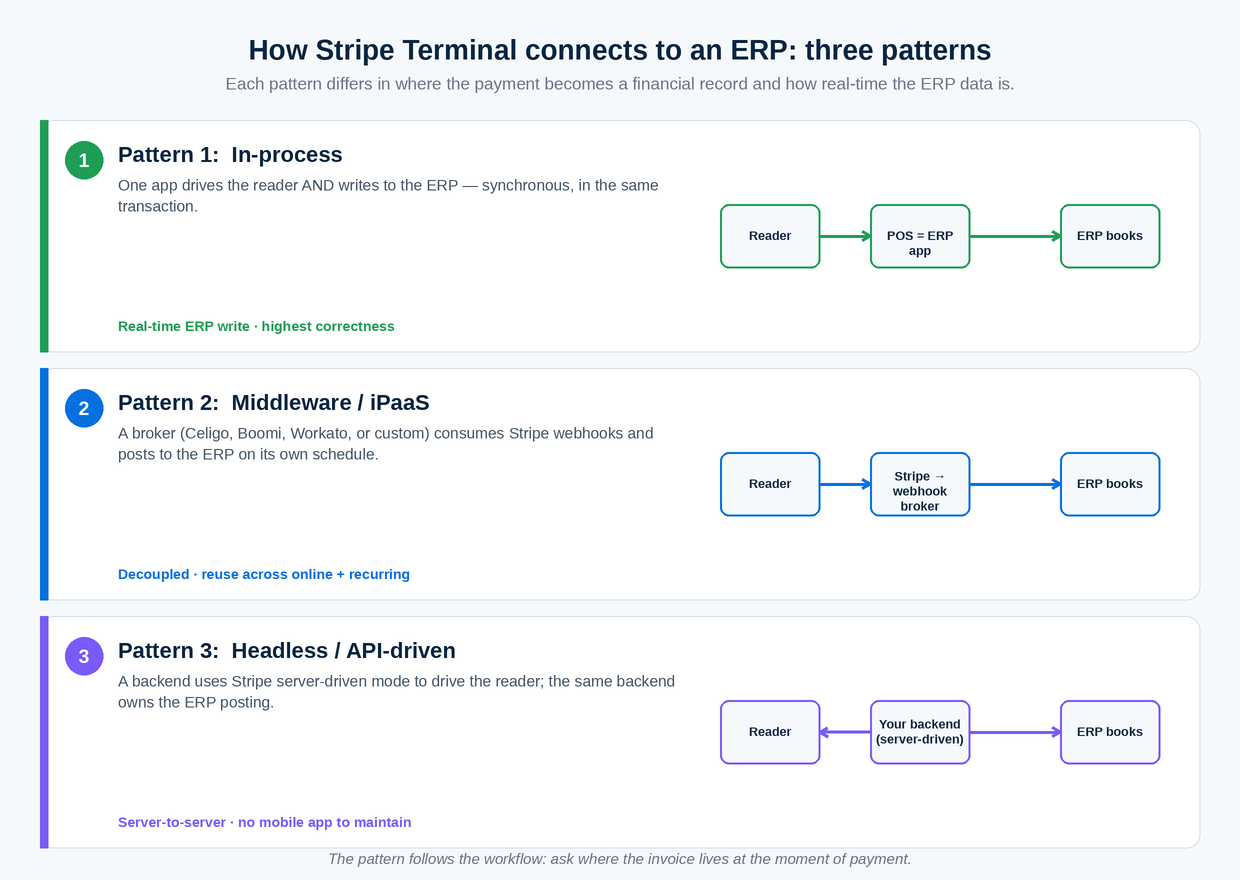
You integrate Stripe Terminal with an ERP using one of three patterns — in-process, middleware, or headless — chosen by where your point-of-sale logic already lives and how real-time your finance team needs the data to be.
There is no single “Stripe Terminal connector” for ERPs the way there is for, say, an e-commerce cart, because the readers, the SDK, and the connection-token endpoint are all generic — Stripe gives you the payment primitives and expects you to wire them to your business systems. That is a feature, not a gap: it means you are never locked into one vendor’s idea of how your ERP should book a payment. The three patterns below are exhaustive. Every real Stripe Terminal ERP integration we have seen or shipped is one of them, or a hybrid of two.
Pattern 1: In-process integration
In an in-process integration, the application that drives the reader and the application that writes to the ERP are the same application, or share the same runtime, so the payment result is written to the ERP synchronously in the same transaction.
This is the cleanest pattern when your ERP already has a point-of-sale surface or a custom front end you control — a NetSuite SuiteApp, a Dynamics 365 page extension, an Odoo POS module. The Stripe Terminal SDK (JavaScript in a browser-based ERP screen, or a native mobile SDK in a companion app) discovers and connects to the reader, your code creates and captures the PaymentIntent, and the same code path immediately posts the customer payment to the ERP. There is no queue, no broker, no eventual consistency. The cashier sees “paid” and the ERP already knows.
The strength is correctness: there is exactly one place where the payment becomes a financial record, so there is exactly one place to get the mapping right. The weakness is coupling. Your payment availability is now tied to your ERP’s availability, and a slow ERP write makes the cashier wait. In-process suits lower-volume, high-value, counter-bound scenarios — a showroom, a parts desk, a clinic front office — where correctness matters more than throughput and the reader sits next to an ERP screen anyway.
Pattern 2: Middleware / iPaaS integration
In a middleware integration, a broker sits between Stripe and the ERP — an iPaaS platform like Celigo, Boomi, or Workato, or a small custom service — consuming Stripe webhooks and transforming them into ERP API calls on its own schedule.
Here the point-of-sale application talks only to Stripe. It creates and captures the PaymentIntent and is done. Stripe emits events — payment_intent.succeeded, charge.refunded, payout.paid — and the middleware subscribes to them, enriches them with the metadata your POS attached (invoice number, location, subsidiary), and writes the corresponding records into the ERP. This is the pattern most native “Stripe connector” products for NetSuite and Acumatica actually implement under the hood, and it is the right answer when in-person payments are one of several channels (online, recurring, invoiced) all flowing into the same ERP and you want one reconciliation engine for all of them.
The strength is decoupling and reuse: the payment surface stays fast and simple, and the same middleware handles your online and subscription revenue too. The weakness is latency and operational surface — you now own (or rent) a broker, its webhook endpoint, its retry logic, and its error queue. Stripe’s webhook documentation is the primary source for building this reliably; the non-negotiable rules are idempotent handlers and signature verification, which we cover in the reconciliation section.
Pattern 3: Headless / API-driven integration
In a headless integration, a thin payment application — often using Stripe’s server-driven Terminal mode rather than a client SDK — drives the reader entirely from your backend, and that same backend owns the ERP posting.
Server-driven mode lets you control the reader through the Stripe API instead of an on-device SDK, which Stripe positions as simpler in complex network environments because it routes reader communication over the internet rather than the local network (server-driven integration). For an ERP shop this is attractive: your integration becomes pure server-to-server API calls — Stripe API on one side, ERP API on the other — with no mobile app to maintain and no LAN discovery to debug. It pairs especially well with smart readers like the S700 that can run a payment collection flow without a tethered phone.
The strength is operational simplicity in distributed environments and a single language (HTTP) on both sides. The weakness is that you give up some of the rich on-device UX the SDKs provide, and server-driven mode supports a subset of readers and flows, so confirm reader compatibility before committing. Headless suits back-office and field scenarios — B2B accounts receivable, route-based collections — more than fast retail counters.
Which Stripe Terminal ERP integration pattern should you use? (decision matrix)
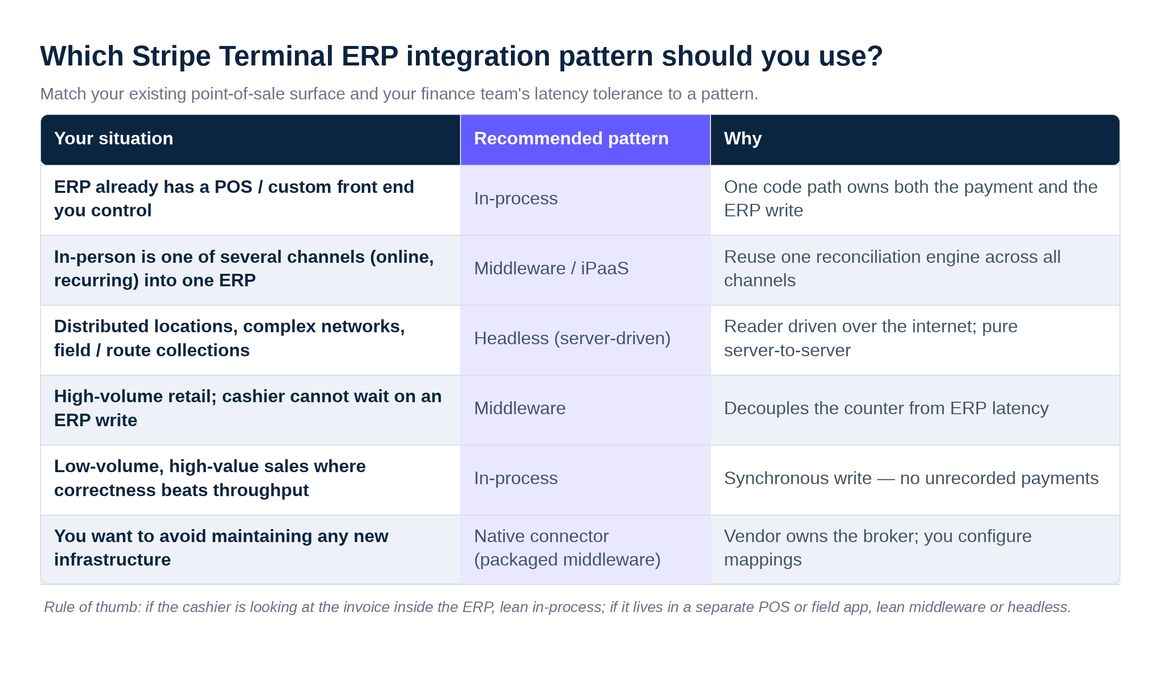
The fastest way to choose is to match your existing point-of-sale surface and your finance team’s latency tolerance to a pattern.
| Your situation | Recommended pattern | Why |
|---|---|---|
| Your ERP already has a POS or custom front end you control | In-process | One code path owns both the payment and the ERP write; mapping lives in one place |
| In-person is one of several revenue channels (online, recurring) into the same ERP | Middleware / iPaaS | Reuse one reconciliation engine across all channels; payment surface stays fast |
| Distributed locations, complex networks, or field/route collections | Headless (server-driven) | Reader driven over the internet via API; pure server-to-server, no mobile app to maintain |
| High-volume retail where the cashier cannot wait on an ERP write | Middleware | Decouples the counter from ERP latency; ERP catches up asynchronously |
| Low-volume, high-value counter sales where correctness beats throughput | In-process | Synchronous write means the cashier never leaves an unrecorded payment |
| You want to avoid maintaining any new infrastructure | Native connector (a packaged middleware) | Vendor owns the broker; you configure mappings instead of building them |
A rule of thumb from doing this repeatedly: start by asking where the invoice lives at the moment of payment. If the cashier is looking at the invoice inside the ERP, lean in-process. If the cashier is looking at it in a separate POS or field app and the ERP is a downstream record, lean middleware or headless. The pattern follows the workflow, not the other way around.
How the three patterns compare on the dimensions that matter
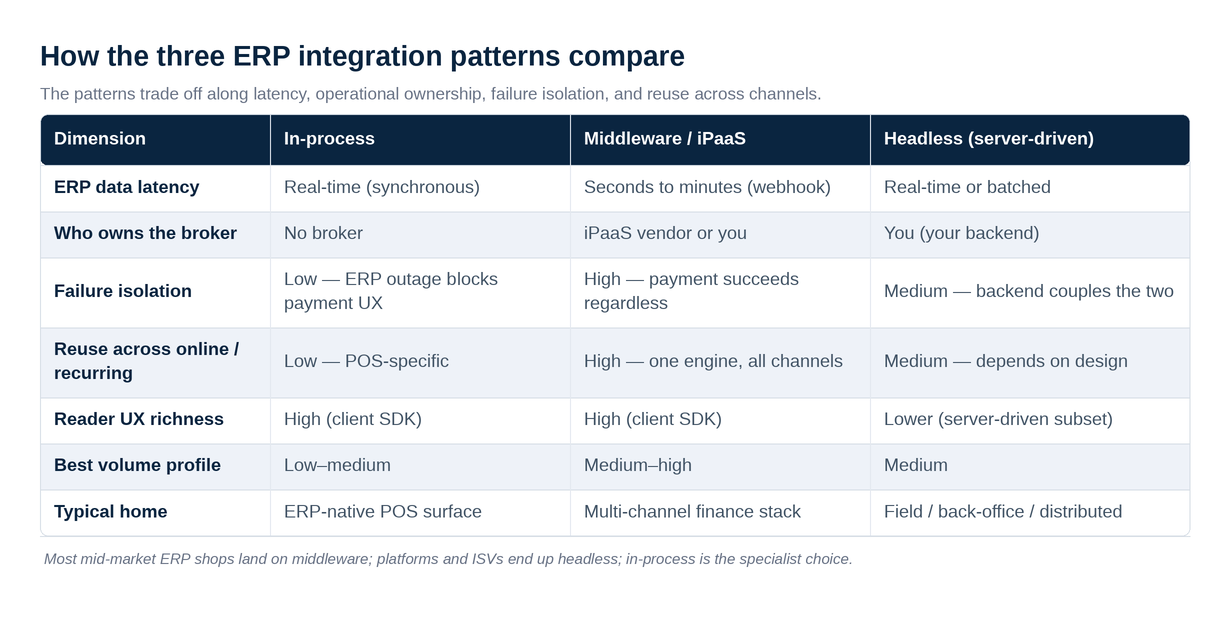
The three patterns trade off along four axes — latency to the ERP, operational ownership, failure isolation, and reuse across channels — and there is no universally best choice, only a best fit.
| Dimension | In-process | Middleware / iPaaS | Headless (server-driven) |
|---|---|---|---|
| ERP data latency | Real-time (synchronous) | Seconds to minutes (webhook-driven) | Real-time or batched (your choice) |
| Who owns the broker | No broker | iPaaS vendor or you | You (your backend) |
| Failure isolation | Low — ERP outage blocks payment UX | High — payment succeeds regardless of ERP | Medium — backend couples the two |
| Reuse across online/recurring | Low — POS-specific | High — one engine, all channels | Medium — depends on your design |
| Reader UX richness | High (client SDK) | High (client SDK) | Lower (server-driven subset) |
| Best volume profile | Low–medium | Medium–high | Medium |
| Typical home | ERP-native POS surface | Multi-channel finance stack | Field / back-office / distributed |
The honest read: most mid-market ERP shops end up on middleware, because in-person is rarely their only revenue channel and they would rather configure mappings than maintain a payment app. Most platforms and ISVs building a product on top of Terminal end up headless, because they want server control and Connect economics. In-process is the specialist choice — excellent when the workflow genuinely lives inside the ERP, overkill when it does not.
What data must cross the wire between Stripe Terminal and your ERP?
At minimum, four things have to travel from the payment moment to the financial record: a stable invoice or order key, the location or subsidiary the payment belongs to, the gross amount and currency, and a Stripe object reference that lets you trace the ERP record back to the charge.
This is worth pinning down explicitly because the integration’s reliability is decided here, not in the choice of pattern. The mechanism Stripe gives you is PaymentIntent metadata — a set of key-value pairs you attach at the counter that ride along with the charge and surface again in webhooks and the dashboard. Treat that metadata as the contract between the two systems and write it down before you build anything.
A workable minimum metadata model looks like this: erp_invoice_id (the join key for cash application), erp_location_id and, where relevant, erp_subsidiary_id or erp_entity_id (so the payment posts to the right books), erp_customer_id (so you never create duplicate customers), and a free channel tag set to terminal (so your reconciliation can separate in-person from online revenue). On the return trip, you store Stripe’s payment_intent and charge IDs on the ERP payment record so an auditor can walk from a journal entry back to the exact card-present charge. That bidirectional trace — ERP key on the Stripe object, Stripe key on the ERP object — is what makes a reconciliation defensible at quarter close.
The discipline that separates durable integrations from fragile ones is deciding this model once and enforcing it at capture, rather than letting each point-of-sale surface invent its own keys. If a counter app, a field app, and an online checkout all attach different metadata, your reconciliation engine has to special-case each one, and the special cases are where money goes missing. One metadata schema, applied everywhere a payment is created, is the single highest-leverage decision in the whole project — and it costs nothing but a half-day of agreement up front.
How do you connect Stripe Terminal to NetSuite?
You connect Stripe Terminal to NetSuite by attaching invoice, subsidiary, and location identifiers as PaymentIntent metadata at the counter, then posting customer payments into NetSuite — either through the native Stripe Connector for NetSuite or a custom SuiteApp — and reconciling the Stripe payout against a NetSuite bank deposit.
NetSuite is the most-requested ERP integration we see, and also the one with the most accounting nuance, because NetSuite OneWorld introduces subsidiaries. The official Stripe Connector for NetSuite synchronizes Stripe data — payments, refunds, fees, payouts — into NetSuite and automates cash reconciliation, creating customer payment, credit memo, and bank deposit records and applying payments to the matching invoices. For a single-subsidiary business taking card-present payments, the native connector plus reader-to-location mapping is often enough.
The complexity arrives with multi-subsidiary structures. A reader physically lives in one place, but in OneWorld that place belongs to a subsidiary with its own currency, chart of accounts, and tax registration. The integration has to know that reader R is subsidiary S so the customer payment posts to the right books. The clean approach is to use Stripe’s Locations API and reader registration to model your physical footprint, then map each Stripe Location to a NetSuite subsidiary-and-location pair in your integration’s configuration. Attach the subsidiary internal ID to the PaymentIntent metadata at capture so the downstream write is unambiguous. We go deep on this in multi-subsidiary Stripe Terminal in NetSuite and on the cash side in Stripe Terminal reconciliation in NetSuite.
A hands-on caution: NetSuite’s SuiteTalk and REST APIs enforce governance limits, and a busy retail day can generate enough payment events to bump into them if you write naively one record per webhook with no batching. Design for bulk where you can, and respect the rate ceilings — see Stripe Terminal API rate limits in ERP bulk operations. For the full build, the companion piece is connecting NetSuite to Stripe Terminal: architecture.
When NetSuite is not the right home for the integration logic — for example, when you want the payment app to stay fast and NetSuite to catch up asynchronously — push the middleware pattern and let the connector consume Stripe webhooks. When the cashier is working inside a NetSuite SuiteApp anyway, in-process is cleaner. Both are legitimate; the choice is the workflow question above.
How do you integrate Stripe Terminal with SAP?
You integrate Stripe Terminal with SAP through the SAP Digital Payments Add-on for S/4HANA, or through a middleware service for Business One, mapping the captured PaymentIntent to a payment document against the customer’s open AR.
SAP is two very different products wearing one name, and the integration pattern differs accordingly. For S/4HANA and the larger SAP estate, the supported route is the SAP Digital Payments Add-on, which abstracts payment service providers (Stripe among them) behind a standard interface so the core SAP modules — FI-CA, SD, AR — work with a payment without each one knowing the PSP’s API directly. In that model your Terminal capture flows into the DPA, and the DPA owns the posting into SAP. This is effectively SAP’s own middleware layer, and it is the path of least resistance for enterprises that already license it.
For SAP Business One, the small-and-mid-market product, there is no DPA equivalent and you build the wire yourself, almost always as the middleware pattern: a service consumes Stripe webhooks, looks up the matching Business One business partner and invoice via the Service Layer (Business One’s REST API) or DI API, and posts an incoming payment. The metadata discipline is identical to NetSuite — carry the invoice key on the PaymentIntent so the cash application is deterministic. We document the Business One build in Stripe Terminal + SAP B1 integration guide.
Be honest with yourself about which SAP you have before scoping. Teams routinely assume “SAP integration” is one project and discover mid-flight that S/4 and B1 share almost no integration surface. They are different builds with different costs.
How do you integrate Stripe Terminal with Acumatica?
You integrate Stripe Terminal with Acumatica using its contract-based REST API to post payments against AR documents, typically via the middleware pattern, with Acumatica and Stripe kept in sync so neither requires double data entry.
Acumatica is a friendlier integration target than the legacy ERPs because it was built API-first: its contract-based REST API exposes Payments, Invoices, and Customers as first-class endpoints, and you can push a card-present payment as a Payment record applied to an open Invoice or Sales Order cleanly. The common architectures, as integration teams describe them, are a native or marketplace connector, a REST-API integration on a scheduled or webhook-driven sync, and a fully custom build for unusual workflows. For card-present specifically, real-time webhook-driven middleware beats scheduled sync — you want the payment in Acumatica before the customer is out the door, not in tonight’s batch.
The one Acumatica-specific gotcha is processing-center configuration. Acumatica has its own native payment-processing plugin model, and if you let Acumatica think it is the processor you create a reconciliation conflict with Stripe, which actually processed the card. The clean pattern is to treat Stripe as the source of truth for the charge and Acumatica as the recipient of an already-settled payment record — do not double-authorize. The full walkthrough is in Stripe Terminal + Acumatica: card-present integration.
How do you integrate Stripe Terminal with Microsoft Dynamics 365 Business Central?
You integrate Stripe Terminal with Dynamics 365 Business Central by extending it with an AL extension or connecting through Power Automate, posting cash receipts against customer ledger entries when a Stripe PaymentIntent is captured.
Business Central rewards the in-process pattern more than most ERPs because its extensibility model (AL extensions, page and table extensions) lets you put a payment-collection action right on the sales document inside BC itself. A staff member working a sales order can trigger reader collection from the BC page; the extension creates and captures the PaymentIntent through your backend, then posts a cash receipt journal line applied to the customer ledger entry — all in one flow. For shops that prefer low-code, Power Automate plus the Business Central connector can drive the middleware pattern instead, reacting to Stripe webhooks delivered through a custom connector.
Either way, the BC-specific consideration is dimensions. Business Central uses dimensions (department, project, location) for analytical posting, and your integration should stamp the right dimension values on the cash receipt so finance’s reporting holds together. Carry those dimension codes as PaymentIntent metadata at the counter. The build is detailed in Microsoft Dynamics 365 Business Central + Stripe Terminal.
How do you integrate Stripe Terminal with Sage, QuickBooks, Odoo, and ERPNext?
For Sage Intacct, QuickBooks Enterprise, Odoo, and ERPNext the pattern choice is the same three options, with each ERP’s API maturity nudging you toward middleware or in-process.
These four cover most of the remaining mid-market, and the right pattern follows the same logic as above — so rather than repeat it, here is the per-ERP nuance and the cluster piece that goes deep on each.
Sage Intacct has a strong dimensional accounting model and a capable API, and is best served by the middleware pattern feeding a cash-receipt entry tagged with Intacct dimensions. Intacct’s multi-entity structure raises the same subsidiary-mapping question NetSuite does, so model your Stripe Locations to entities deliberately. Deep dive: Sage Intacct + Stripe Terminal.
QuickBooks Enterprise (the desktop product, distinct from QuickBooks Online) has a more constrained integration surface — the QuickBooks Web Connector or a third-party sync service — which pushes most teams to middleware with a sync agent rather than real-time webhooks. Expect near-real-time, not instant. Deep dive: QuickBooks Enterprise + Stripe Terminal integration.
Odoo is the standout for the in-process pattern, because Odoo’s own POS module is open source and extensible — you can add a Stripe Terminal payment method directly inside Odoo POS and have the payment and the accounting entry created in the same Odoo transaction. For Odoo this is often the least-effort, most-correct route. Deep dive: Odoo + Stripe Terminal: open-source ERP integration.
ERPNext, also open source, behaves much like Odoo: its REST API and server scripts make either in-process (via a custom POS profile) or middleware viable, and the choice usually comes down to whether your team is comfortable writing Frappe framework code. Deep dive: ERPNext + Stripe Terminal integration.
| ERP | API maturity | Multi-entity nuance | Leans toward |
|---|---|---|---|
| NetSuite | High (SuiteTalk/REST) | OneWorld subsidiaries | Middleware or in-process |
| SAP S/4HANA | High (via DPA) | Company codes | DPA middleware |
| SAP Business One | Medium (Service Layer) | Multi-company add-on | Middleware |
| Acumatica | High (contract REST) | Branches/companies | Middleware |
| Dynamics 365 BC | High (AL/REST) | Dimensions | In-process or low-code |
| Sage Intacct | High | Multi-entity | Middleware |
| QuickBooks Enterprise | Low–medium (Web Connector) | Classes | Middleware (sync agent) |
| Odoo | High (open source) | Multi-company | In-process |
| ERPNext | High (open source) | Multi-company | In-process or middleware |
Where does Stripe Connect fit in an ERP integration?
Stripe Connect fits when a platform or reseller sits between the merchant and Stripe and wants to earn an application fee on each Terminal transaction or manage many merchants’ readers from one account.
Most single-company ERP integrations do not need Connect at all — they are one Stripe account, one ERP, one set of books. Connect enters the picture in two situations. First, when you are an ISV or platform putting your customers on Stripe Terminal and taking a cut: Connect’s application-fee model lets every card-present transaction compensate the integrator, and Terminal works with Connect through connected-account reader registration (use Terminal with Connect). Second, when a reseller or franchise manages hardware for many locations or entities and needs clean separation of funds and reporting per merchant.
The ERP consequence is that with Connect you are now reconciling not just gross payments and fees but also application fees and the resulting payouts to each connected account — a materially more complex reconciliation than a single-account setup. If that describes you, the economics and architecture live in our Stripe Connect for platforms using Terminal pillar, with the fee mechanics in application fees with Stripe Terminal. For an ERP reseller specifically, model the application fee as a separate income line in the ERP so margin is visible per location.
If you are a single merchant and someone is steering you toward Connect “to be safe,” push back — it adds reconciliation surface you do not need. Connect is the right answer for platforms, not for ordinary merchants taking their own payments.
Should you build a Stripe Terminal ERP connector or buy one?
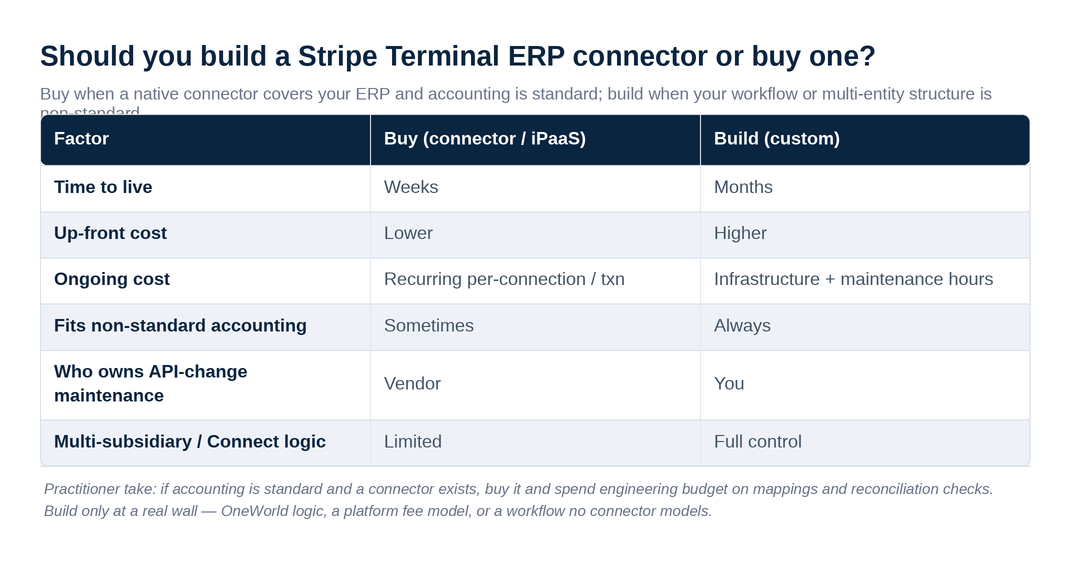
Buy when a native connector covers your ERP and your accounting is standard; build when your workflow, multi-entity structure, or margin model is non-standard enough that a packaged connector would fight you.
This is the highest-stakes decision in the project, so be deliberate. The honest trade-off:
Buy (native connector or iPaaS). Strengths: someone else owns the broker, the webhook reliability, and the API-change maintenance; you configure mappings instead of writing them; time-to-live is weeks, not months. Weaknesses: you inherit the connector’s opinions about how payments map to records, which may not match your chart of accounts or your multi-subsidiary logic; per-connection or per-transaction fees recur; and you are exposed to the vendor’s roadmap. Industry setup costs for native connectors commonly land in the low five figures, with iPaaS subscriptions on top.
Build (custom integration). Strengths: it does exactly what your books require, with no per-transaction tax beyond infrastructure, and you own the roadmap. Weaknesses: you now own webhook reliability, idempotency, signature verification, API-version changes on both Stripe and ERP sides, and the on-call when a payout reconciliation breaks at quarter close. Custom builds commonly run materially higher up front and carry ongoing maintenance hours every month.
| Factor | Buy (connector/iPaaS) | Build (custom) |
|---|---|---|
| Time to live | Weeks | Months |
| Up-front cost | Lower | Higher |
| Ongoing cost | Recurring per-connection/txn | Infrastructure + maintenance hours |
| Fits non-standard accounting | Sometimes | Always |
| Who owns API-change maintenance | Vendor | You |
| Multi-subsidiary / Connect logic | Limited | Full control |
Our take: if your accounting is standard and a native connector exists for your ERP, buy it and spend your engineering budget on the mappings and reconciliation checks instead. Build only when you have hit a real wall — multi-subsidiary OneWorld logic, a platform application-fee model, or a workflow no connector models. The full framework, with a scoring rubric, is in build vs buy: Stripe Terminal ERP connectors.
How do you reconcile Stripe Terminal payments in an ERP reliably?
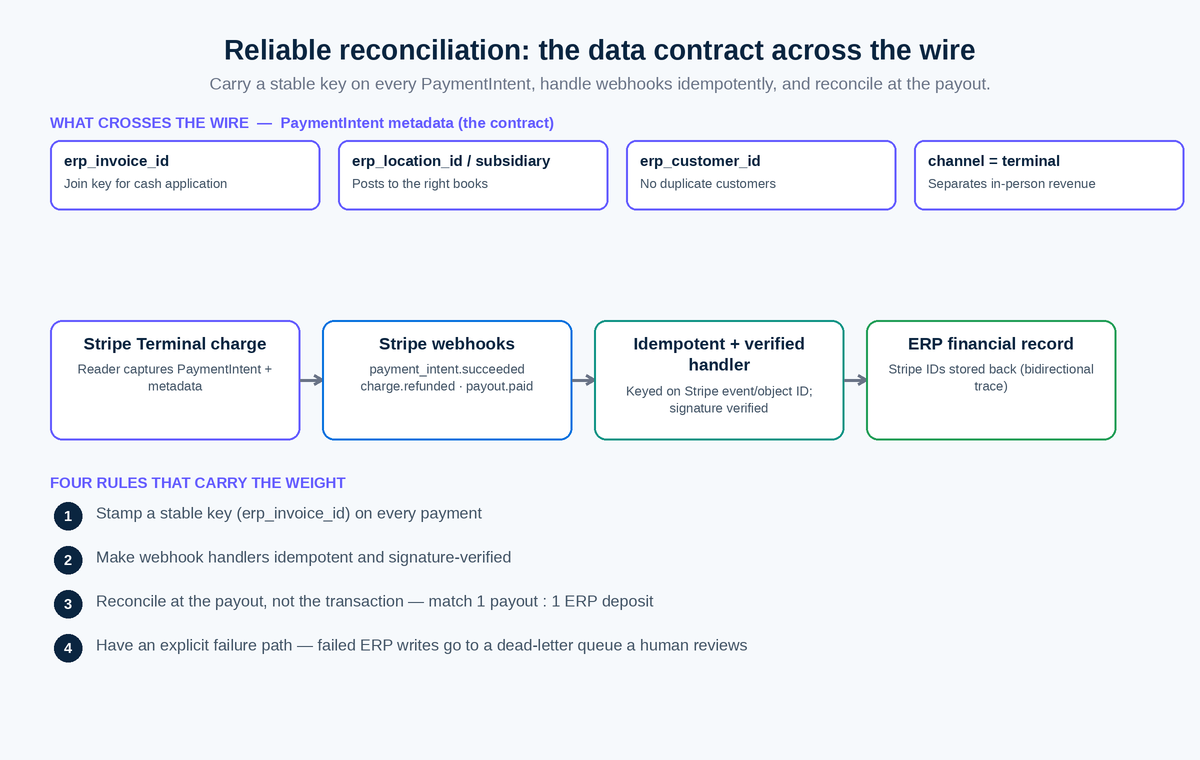
You reconcile reliably by treating Stripe as the source of truth for the charge, carrying a stable identifier on every PaymentIntent, handling webhooks idempotently with signature verification, and matching the Stripe payout to a single ERP deposit record.
Reconciliation is where ERP integrations quietly fail months after launch, so it deserves its own discipline. Four rules carry most of the weight, and they apply across every pattern and every ERP above.
- Stamp a stable key on every payment. At capture, attach the ERP invoice or sales-order identifier to the PaymentIntent metadata. This is the join key that makes cash application deterministic. Without it, you are matching on amount and timestamp, which collides the moment two customers pay the same amount.
- Make webhook handlers idempotent and verified. Stripe may deliver the same event more than once, so your handler must produce the same ERP state whether it runs once or five times — key your writes on the Stripe event or object ID. And verify the webhook signature on every request, per Stripe’s webhook security guidance, so a forged payload can never post a fake payment into your books.
- Reconcile at the payout, not the transaction. Stripe deposits net of fees on a payout schedule. Match each Stripe payout to one ERP bank-deposit record, with the constituent charges and fees itemized beneath it, so the bank line ties out to the penny. Booking fees as a separate expense line here is what keeps gross revenue honest.
- Have an explicit failure path. When a charge succeeds in Stripe but the ERP write fails, that payment must land in a dead-letter queue a human reviews — never silently dropped. This single safeguard prevents the worst ERP-integration outcome: money taken, no record.
The deep treatments are Stripe Terminal webhook patterns for ERP sync and, for high-volume shops, Stripe Terminal API rate limits in ERP bulk operations.
How do field-service and order-flow ERP integrations differ?
Field-service ERP integrations differ because the payment happens away from any counter, often on a route, so they lean headless or mobile-SDK and tie the payment to a work order rather than a retail invoice.
If your in-person payments are collected by a technician at a customer site — HVAC, plumbing, electrical — the integration’s join key is a work order or service ticket, and the reader is a Bluetooth WisePad 3 or Tap to Pay on the tech’s phone, not a counter terminal. The ERP or field-service platform owns the work order; the Terminal capture closes it out and posts the payment against it. This is the order-flow specialization, and because it spans field-service software as much as ERP, it lives on our operations-focused property. See ServiceTitan vs custom Stripe Terminal integration for the build-vs-buy decision in a field-service context, and the broader field-service-ERP discussion linked from there.
Two field-specific realities reshape the architecture. First, connectivity is unreliable in vans, basements, and rural sites, which is why field collections lean on Tap to Pay and Bluetooth readers that pair to a phone’s cellular connection rather than smart readers that expect a stable network — and why server-driven mode, which routes reader traffic over the internet, can be fragile exactly where field work happens. Second, the technician is not finance: the person taking the card has no view of the chart of accounts and should not need one, so the integration must stamp the work order’s pre-assigned location, customer, and GL coding automatically rather than asking the tech to choose. Get those two right and a route-based business reconciles as cleanly as a counter — the difference is entirely in how the metadata is pre-populated, not in the payment itself.
Frequently asked questions
Does Stripe Terminal have a built-in ERP integration?
No. Stripe Terminal provides the readers, SDKs, connection-token endpoint, and PaymentIntent API, but not a packaged ERP connector. You either build the integration against your ERP’s API, buy a native connector or iPaaS connection, or use server-driven mode to drive readers from a backend that also posts to the ERP. Stripe’s Terminal documentation covers the payment side; the ERP side is yours to wire.
Can Stripe Terminal post payments to NetSuite automatically?
Yes. With the Stripe Connector for NetSuite or a custom SuiteApp, captured Terminal payments post automatically as customer payments applied to the matching invoices, with fees and payouts reconciled to bank deposits. Multi-subsidiary OneWorld setups require mapping each Stripe Location to a subsidiary so payments hit the right books.
Do I need Stripe Connect to integrate Terminal with my ERP?
Only if you are a platform or reseller taking an application fee or managing many merchants’ readers. A single company taking its own card-present payments integrates Terminal with its ERP without Connect. Connect adds application-fee and payout reconciliation that an ordinary merchant does not need.
What is the hardest part of a Stripe Terminal ERP integration?
Reconciliation, not hardware. The difficult work is carrying a stable identifier from the counter to the ERP, handling webhooks idempotently, matching Stripe payouts to ERP deposits net of fees, and defining the failure path when a charge succeeds but the ERP write fails. The reader is interchangeable; the accounting boundary is where projects succeed or fail.
How long does a Stripe Terminal ERP integration take to build?
A native connector for a supported ERP with standard accounting can be live in weeks. A custom build — particularly with multi-subsidiary logic or a Connect application-fee model — typically runs months and carries ongoing maintenance hours for API changes on both the Stripe and ERP sides. Scope the reconciliation and failure handling, not just the happy path, before estimating.
Which ERPs work best with Stripe Terminal?
API-first ERPs — Acumatica, Dynamics 365 Business Central, Odoo, ERPNext, and NetSuite — integrate most cleanly because they expose payments, invoices, and customers as first-class API resources. Desktop QuickBooks Enterprise is the most constrained, usually requiring a sync agent rather than real-time webhooks. SAP splits into S/4HANA (via the Digital Payments Add-on) and Business One (custom middleware).
Ready to scope your Stripe Terminal ERP integration?
We have built these integrations across NetSuite, Acumatica, Dynamics, and custom ERPs, and we operate our own Stripe Connect platform — so we can tell you, honestly, whether to buy a connector or build one, and which of the three patterns fits your books. Book an integration scoping call and we will map your ERP, your reader footprint, and your reconciliation requirements to a concrete architecture before you write a line of code.
Primary sources cited: Stripe Terminal documentation, Terminal with Connect, Connection Tokens API, Locations API, server-driven integration, Stripe webhooks, Stripe Connector for NetSuite, and SAP Digital Payments Add-on.
