
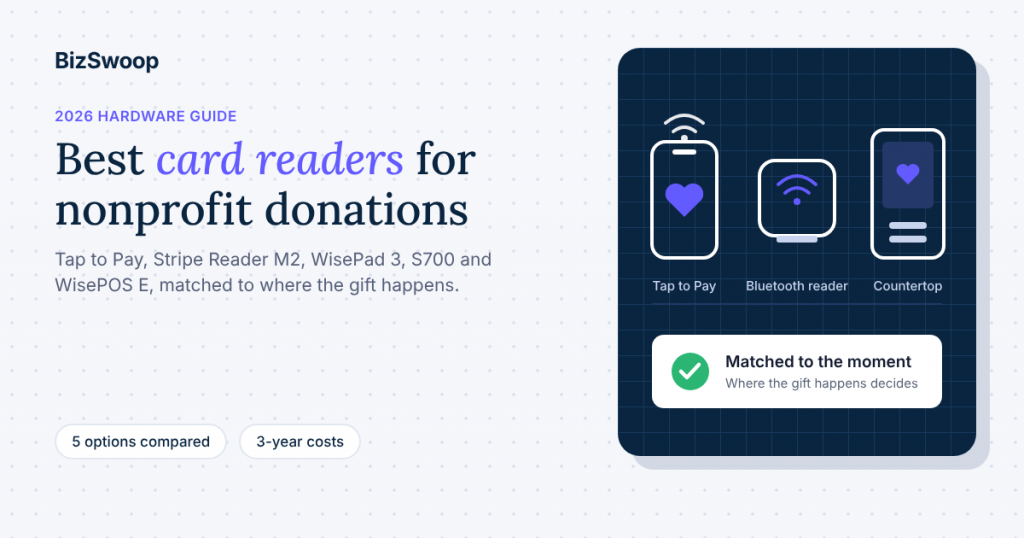
The best card reader for nonprofit donations is often no reader at all: Tap to Pay on the phones your volunteers already carry. Add a Bluetooth reader (the Stripe Reader M2 in the U.S., the BBPOS WisePad 3 elsewhere) for staffed tables where donors want to insert a chip card, and a countertop smart reader (the Stripe Reader S700 or BBPOS WisePOS E) for a front desk or a self-serve kiosk. The right card reader for nonprofit donations depends on where the gift happens, not on which device has the longest feature list.
This guide is for development directors, operations leads and finance staff choosing donation hardware for the year ahead, with GivingTuesday on Tuesday, December 1, 2026 as the first deadline. It compares the five Stripe Terminal options that work with Give (formerly GiveWP) through Tap To Donate for Give by Jovvie, maps each one to real donation scenarios, sets out three-year costs using Stripe’s published prices, and says plainly when a different platform’s hardware is the better fit. BizSwoop has been in business since 2016 and a Stripe Partner since 2020. We make Jovvie, so the recommendations below favor what keeps donations in your own Stripe account and your own donor database.
Key Takeaways
- Start with Tap to Pay. A compatible iPhone or Android phone accepts contactless cards and digital wallets with no reader to buy, which covers most roaming and pop-up donation moments.
- Buy a reader for chip cards and staffed tables. Tap to Pay can’t read an inserted chip card. A $59 Stripe Reader M2 (U.S.) or a BBPOS WisePad 3 (outside the U.S.) covers donors who don’t tap.
- Use a countertop smart reader for fixed stations. The Stripe Reader S700 or BBPOS WisePOS E suits a welcome desk, gift shop counter or lobby kiosk on Wi-Fi or Ethernet.
- Hardware is the smallest cost line. Over three years, card processing and platform fees usually dwarf a few hundred dollars of readers.
- Every device needs a connection. There’s no offline mode for donations taken through Jovvie, so plan Wi-Fi or mobile data for every venue.
- Buy readers from your own Stripe account. Readers are ordered in your organization’s Stripe Dashboard, and donations settle to the same account as your online Give gifts.
Which card reader is best for nonprofit donations?
The best card reader for nonprofit donations is the one that matches the way a gift is given: Tap to Pay for volunteers on the move, a Bluetooth reader for staffed tables, and a countertop smart reader for fixed or self-serve stations. Most organizations end up with two of the three.
Here’s the short verdict by scenario:
- GivingTuesday pop-ups, walks, festivals and door-to-door: Tap to Pay on volunteers’ phones. No hardware cost and nothing to charge or pair beyond the phone itself.
- Gala tables, registration desks and church welcome tables: a Bluetooth reader paired with a phone or tablet. Stripe Reader M2 in the U.S.; BBPOS WisePad 3 in other supported countries.
- Front desk, office or gift-shop counter: a Wi-Fi or Ethernet smart reader. Stripe Reader S700 or BBPOS WisePOS E.
- Unattended lobby or sanctuary kiosk: a tablet on a locking stand running your Give form in kiosk mode, with a Stripe Reader S700.
All five options are supported by Tap To Donate for Give by Jovvie, according to its WordPress.org listing. The rest of this guide explains why, and where each one falls short.
Which card readers work with GiveWP and Stripe?
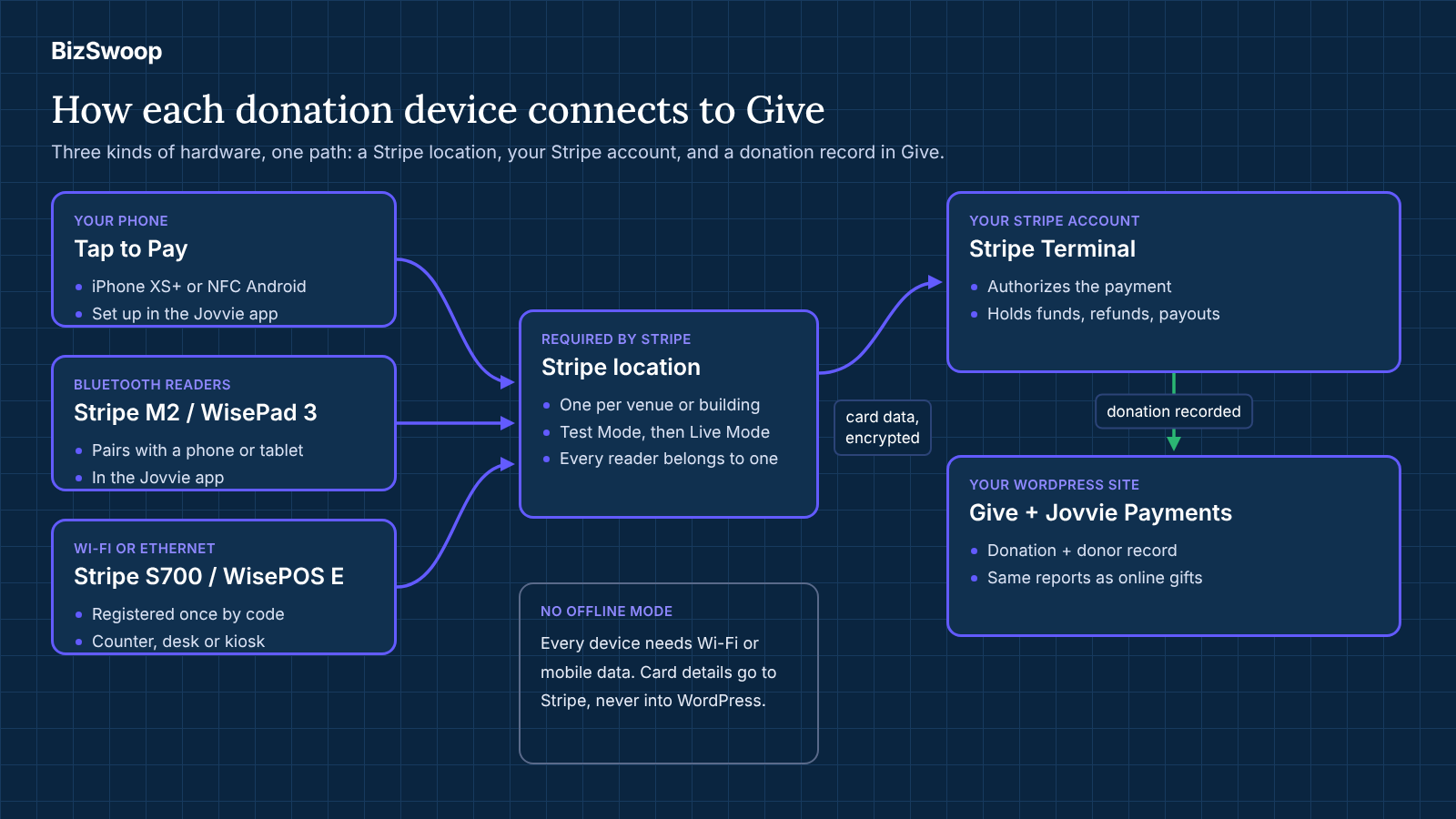
Five Stripe Terminal options work with Give through Jovvie: Tap to Pay on iPhone and Android, the Stripe Reader M2, the BBPOS WisePad 3, the Stripe Reader S700 and the BBPOS WisePOS E. They connect in two different ways, which matters more than any other spec.
| Option | Type | Connection to Give | Card types (per Stripe) | Where it’s sold | U.S. list price |
|---|---|---|---|---|---|
| Tap to Pay on iPhone or Android | Your phone or tablet | Jovvie app on the device | Contactless cards and digital wallets only | Uses devices you own | $0 |
| Stripe Reader M2 | Screenless mobile reader | Bluetooth, paired in the Jovvie app | Contactless, chip, swipe | U.S. only | $59 |
| BBPOS WisePad 3 | Mobile reader with display and PIN pad | Bluetooth, paired in the Jovvie app | Contactless, chip | Outside the U.S. | Set in your Stripe Dashboard shop |
| Stripe Reader S700 | Smart countertop/handheld terminal with touchscreen | Wi-Fi or Ethernet, registered with a one-time code | Contactless, chip, swipe | U.S. and many other countries | $299 |
| BBPOS WisePOS E | Smart terminal with touchscreen | Wi-Fi or Ethernet, registered with a one-time code | Contactless, chip, swipe | U.S. and many other countries | Set in your Stripe Dashboard shop |
_Sources: supported readers and connection methods from the Jovvie WordPress.org listing and Jovvie setup documentation; card types and country availability from Stripe’s reader selection guide; U.S. prices from Stripe pricing, checked October 13, 2026._
A few notes the table can’t hold:
- Two connection families. Bluetooth readers and Tap to Pay pair in the free Jovvie app on a phone or tablet. Internet readers (S700 and WisePOS E) register from the Jovvie dashboard with a one-time code shown on the reader, and the app is optional for them (Jovvie setup documentation).
- Magstripe. The Jovvie listing describes chip, swipe and contactless across its Bluetooth readers. Stripe’s own capability table lists magstripe as unsupported on the WisePad 3, so treat it as a chip-and-contactless reader. Swipe-only cards are rare in the U.S. and much of Europe.
- Newer Stripe readers. Jovvie also works with the Stripe Reader T600, an 8-inch countertop reader, and with Verifone readers (P630, UX700, V660p and M425). On the T600, S700, S710 and Verifone readers, the Jovvie app can run directly on the reader through Stripe’s Apps on Devices, so one device takes the donation. Availability varies by country, and Verifone readers are ordered through Stripe’s sales team.
- Where you buy. Stripe Terminal readers are ordered from your organization’s own Stripe Dashboard and shipped to the address you choose (Stripe docs). Each reader is assigned to a Stripe location, which you create in Jovvie during setup.
For model-by-model detail (screens, batteries, accessories and every Stripe reader, not only the ones Jovvie supports), our Stripe Terminal hardware guide goes deeper.
When is Tap to Pay enough for donations?
Tap to Pay is enough when most of your donors tap a contactless card, phone or watch, and your volunteers carry compatible phones. That describes many GivingTuesday pop-ups, walks, festivals and street or door-to-door fundraising.
Tap to Pay turns a phone into the payment terminal. The donor taps on the back of the volunteer’s phone, Stripe authorizes the gift, and Give records the donation. There’s nothing to charge, pair or lose beyond the phone. Device requirements apply: Stripe’s Tap to Pay needs an iPhone XS or later on a current iOS version, or an NFC-equipped Android phone that meets Stripe’s security requirements. Our jovvie.com guide to Tap to Pay donations on iPhone and Android lists the current requirements, and BizSwoop’s Tap to Pay on iPhone setup guide covers the phone side in detail.
Where Tap to Pay falls short:
- No chip insert or swipe. Stripe lists EMV chip and magstripe as unsupported for Tap to Pay. A donor whose card isn’t contactless can’t give this way.
- Volunteer phones are personal devices. Some volunteers won’t want to install an app or take payments on their own phone. Budget for one or two organization-owned phones if that matters.
- Battery and signal. A phone running the donation form all afternoon drains faster than usual, and it needs mobile data or Wi-Fi for every gift.
When should a nonprofit buy a Bluetooth card reader?
A nonprofit should buy a Bluetooth card reader when donors need to insert a chip card, or when a staffed table takes gifts from a steady line of people. Bluetooth readers are small, cheap and pair with the same phone or tablet a volunteer is already using.
Stripe Reader M2 (U.S.). A screenless reader for contactless, chip and swipe, listed at $59 on Stripe’s pricing page. It pairs with a phone or tablet over Bluetooth in the Jovvie app, and the donor sees the amount on that device’s screen. It’s the simplest way to add chip acceptance to a Tap to Pay setup, and it’s what we’d buy first for most U.S. event tables.
BBPOS WisePad 3 (outside the U.S.). A mobile reader with its own display and PIN pad, sold by Stripe in Canada, the U.K., the E.U., Australia, New Zealand, Singapore and other supported countries (Stripe reader availability). In markets where cardholders routinely enter a PIN, it’s the better handheld choice. Check your Stripe Dashboard shop for the local price.
Practical points for event teams:
- One reader per active device. A Bluetooth reader connects to one phone or tablet at a time, so plan a reader for each staffed station.
- Charge everything the night before. Readers and phones both need power; a short USB cable and a power bank per table avoids a dead station mid-event.
- Label readers. A small sticker (“Gala table 1”) makes pairing and troubleshooting faster when there are several readers in one room.
When does a countertop smart reader make sense?
A countertop smart reader makes sense for a fixed station that takes gifts every day or every week: a front desk, a museum or zoo admissions counter, a church welcome desk, a gift shop or a self-serve kiosk. These readers have their own touchscreen and connect over Wi-Fi or Ethernet, so they don’t depend on a volunteer’s phone.
Stripe Reader S700. A smart reader with a large touchscreen that accepts contactless, chip and swipe, listed at $299 on Stripe’s pricing page. It registers to a location in the Jovvie dashboard with a one-time code. The Jovvie listing names it, alongside a tablet or kiosk stand, for unattended kiosk use.
BBPOS WisePOS E. A smaller smart terminal with a touchscreen, also registered with a one-time code. It suits a counter where space is tight. Stripe lists it as available in the U.S. and most supported countries, but it isn’t on Stripe’s public pricing page, so check the current price in your Dashboard shop.
Smart readers need a stable connection. A wired Ethernet connection (using Stripe’s Ethernet accessories for the reader) is the most reliable choice for a permanent counter. Wi-Fi works well where the signal is strong and the network doesn’t block devices; test it before the day you need it.
Which reader should you use for each donation scenario?
Use the scenario, not the spec sheet, to choose. The decision matrix below covers the situations nonprofits ask us about most. For running the stations on the day, see Jovvie’s event fundraising guide for GiveWP.
| Donation scenario | First choice | Add or switch to | Why |
|---|---|---|---|
| GivingTuesday pop-up or watch party | Tap to Pay on volunteer phones | One M2 (U.S.) or WisePad 3 for chip cards | Zero hardware cost; covers the few donors who don’t tap |
| Gala or auction tables | M2 (U.S.) or WisePad 3 per table | Tap to Pay for roaming “fund-a-need” volunteers | Steady lines, older donors with chip cards, quick pairing |
| 5K, walk or festival | Tap to Pay | Power banks and a hotspot | Volunteers move through crowds; nothing to carry but a phone |
| Door-to-door or field fundraising | Tap to Pay | M2 or WisePad 3 for chip cards | Lightest kit; mobile data is the connection |
| Church service or weekly gathering | Lobby kiosk (tablet + S700) | Tap to Pay for ushers | Self-serve before and after services; staff aren’t needed at the kiosk |
| Front desk, admissions or office | S700 or WisePOS E | — | A permanent station on Ethernet or reliable Wi-Fi |
| Gift shop or thrift store counter | S700 or WisePOS E | — | Counter use all day; consider a full POS if you also sell goods |
| Unattended lobby kiosk | Tablet on a locking stand + S700 in kiosk mode | — | Form resets after each gift; registered once to the location |
Kiosk mode is a setting, not a separate product. With Jovvie, a device left unattended runs your Give form, and after each donation the form resets automatically so the next donor can start (WordPress.org listing). Since version 1.1.3, kiosk redirects are stored in the database rather than PHP sessions, which keeps kiosks working on cached pages and on managed hosts that disable sessions. For setup and placement, see the GiveWP donation kiosk guide on Jovvie.
Planning devices for GivingTuesday and the year ahead? A Jovvie advisor can map readers to your event calendar, set up Stripe locations and Give forms, and walk your finance team through fees and payouts before December 1.
What does donation card reader hardware cost over three years?
Donation card reader hardware typically costs between $0 and a few hundred dollars over three years, and it’s usually the smallest line in the total cost of taking gifts in person. Card processing and any platform fee on in-person gifts are larger and recur with every donation.
The illustration below uses Stripe’s published U.S. prices and its standard U.S. in-person rate of 2.7% + 5¢ per successful card-present transaction for domestic cards (international cards add 1.5%) (Stripe pricing, checked October 13, 2026). It assumes $30,000 a year in in-person gifts at an average of $50, or 600 gifts a year. Your own rate, card mix and volume will differ; ask Stripe about nonprofit pricing.
| Three-year line item | Phones only | Event kit (2 × M2) | Event kit + front desk (2 × M2 + 1 × S700) |
|---|---|---|---|
| Reader hardware (one-time) | $0 | $118 | $417 |
| Stripe processing (3 years, illustrative) | About $2,520 | About $2,520 | About $2,520 |
| Jovvie platform fee (3 years, 0.5%–2% by volume) | $450–$1,800 | $450–$1,800 | $450–$1,800 |
| Software subscription | $0 | $0 | $0 |
| Hardware as a share of the total | 0% | About 3%–4% | About 9%–12% |
_How the processing line is calculated: 600 gifts × $50 × 2.7% = $810, plus 600 × 5¢ = $30, so $840 a year, or about $2,520 over three years. The platform-fee range applies Jovvie’s published 0.5%–2% range to $90,000 of in-person gifts over three years; your actual percentage depends on your donation volume._
What this means for budgeting:
- Don’t over-economize on hardware. Saving $59 by skipping a chip reader can cost more in missed gifts at a single gala than the reader costs over its life.
- Watch the recurring layers. Processing and platform fees scale with every gift, so they deserve more scrutiny than the one-time hardware purchase.
- Add the extras. A locking tablet stand, a tablet, power banks and a hotspot are real costs for kiosk and outdoor setups. Price them alongside the readers.
What does Jovvie cost on top of the hardware?
Tap To Donate for Give by Jovvie is free: free plugin, free Jovvie account, and no monthly fees or contracts. The platform fee is a small percentage on in-person donations only, 0.5% to 2% depending on your donation volume, in addition to Stripe’s processing rate. There’s no per-reader charge, and online Give donations are unaffected. The current terms are on the WordPress.org listing and at jovvie.com/checkout/givewp/.
For the wider picture of processing rates, platform fees and donor-covered fees, the Liquid Web partner post on how tap to donate works explains the technology for non-technical readers; use the WordPress.org listing above for Jovvie’s current fee terms.
Hardware is usually the smallest line in the budget. To see how it fits with processing rates, platform fees and donor-covered fees, read nonprofit payment processing fees explained.
Do you need a card reader for GivingTuesday?
No. You don’t need a card reader for GivingTuesday on December 1, 2026: Tap to Pay on a compatible phone can take contactless donations with no hardware at all. Order a reader only if you expect donors with chip-only cards or you’re running a staffed table with a steady line.
If you’re starting from scratch this month, a workable plan is:
- This week: install Tap To Donate for Give by Jovvie, connect Stripe, create a location and run test donations in Test Mode with Stripe test cards. The Jovvie setup documentation walks through each screen, and the step-by-step GiveWP Tap to Donate setup guide on jovvie.com shows it end to end.
- By early November: decide whether any GivingTuesday station needs a reader. If it does, order from your Stripe Dashboard so shipping isn’t cutting it close.
- The week before: pair readers in the Jovvie app or register internet readers with their codes, run a test gift on every device, and check signal at each venue.
- The day before: switch the location to Live Mode.
The GivingTuesday in-person donations playbook on jovvie.com has the full six-week countdown, event formats and volunteer briefing.
Can donation card readers work offline?
No, not for donations taken through Jovvie. Tap To Donate for Give by Jovvie has no offline mode: the phone, tablet or reader needs Wi-Fi or mobile data so Stripe can authorize each gift (WordPress.org listing).
This is worth stating clearly because Stripe’s own documentation lists offline payments as a reader capability for apps built on its mobile SDK. That’s an option for developers building their own point-of-sale app, not something Jovvie offers for Give donations today. Plan connectivity instead:
- Test venue signal a week ahead, on the carrier your volunteers use.
- Bring a mobile hotspot for outdoor, basement or rural venues, and keep it charged.
- Prefer Ethernet for permanent smart-reader stations.
- Keep a fallback: a QR code to the same Give form lets donors give online on their own phones if a device loses signal.
How do you set up a reader with GiveWP?
You set up a reader with Give by connecting Jovvie, creating a Stripe location, and then either registering an internet reader with its one-time code or pairing a Bluetooth reader or Tap to Pay in the Jovvie app. The steps below follow the Jovvie setup documentation.
- Install Tap To Donate for Give by Jovvie from WordPress.org and activate it.
- Connect Jovvie and Stripe under Give › Settings › Payment Gateways › Jovvie Payments by selecting Connect with Jovvie Payments. Create your free Jovvie account and connect your Stripe account.
- Create a location in Location Management. Stripe requires every reader to belong to a location.
- Register internet readers (S700, WisePOS E) under the location in Test Mode, using the one-time code the reader shows, and give each one a clear label.
- Pair Bluetooth readers and Tap to Pay in the Jovvie app: set the app’s Home URL to your donation form, link your payment account, add a credit card gateway, choose Bluetooth or Tap to Pay, and paste your Stripe Location ID.
- Enable the Jovvie gateway on the Give forms you’ll use in person. It works with the Visual Form Builder and the option-based form editor.
- Run test donations with Stripe test cards on every device, then switch to Live Mode before the event.
What about Square, Zeffy and Givebutter hardware?
Other platforms offer good in-person options, and some will suit your organization better. The honest trade-off is that each one keeps donations and donor records in its own system rather than in Give.
- Givebutter builds Tap to Pay and a card reader into its free app and sells an optional physical reader. Its own guide to the best card readers for nonprofits describes a model that is free with donor tips enabled and charges a 3% platform fee if tips are turned off. A good fit if Givebutter is already your fundraising platform.
- Zeffy offers tap to pay on iPhone and doesn’t sell a card reader. It’s free to the nonprofit and funded by optional donor contributions, according to its guide to accepting in-person donations without a card reader. A reasonable choice for a group with no website or donor database.
- Square sells its own readers and terminals, which work with Square’s processing and apps. If your café, thrift store and events already run on Square, its hardware may fit your operations better than a second processor.
- Donorbox offers a live kiosk and tap-to-donate within its own platform. If Donorbox runs your online forms, use its in-person tools so your donors stay in one place.
When does Stripe Terminal through Jovvie make more sense? When your online fundraising already runs on Give. Then the reader is just another way to pay on the same form, the gift lands in the same donor record and campaign as your online donations, and payouts arrive in the same Stripe account. That’s the decision to make first. The hardware choice follows from it. Our nonprofit in-person payments strategy guide walks through that decision in full.
How should finance teams manage donation card readers?
Finance teams should treat donation readers like any other asset that touches money: assign each one to a location, label it, track who has it, and reconcile what it took against Stripe payouts. A little process keeps a growing reader fleet from becoming a month-end headache.
- One Stripe location per site. Create a location for each building or recurring venue so reports show where gifts were taken.
- Asset list. Keep a simple register of each reader’s label, serial number, location and the staff member responsible.
- Refund procedure. Refunds for in-person donations are issued from the Stripe dashboard, not from inside Give, according to the WordPress.org listing. Decide who can issue them.
- Reconciliation. In-person and online gifts appear together in Give and in your Stripe dashboard, so month-end is a single-system check: Give campaign totals against Stripe payouts.
- Retire and replace. Stripe pushes required software updates to readers; a reader that misses a required update may stop accepting payments (Stripe docs). Power readers on and connect them before each event so updates install ahead of time.
Frequently asked questions
Which card reader is best for nonprofit donations?
For most nonprofits, start with Tap to Pay on volunteers’ phones, then add a Stripe Reader M2 (U.S.) or BBPOS WisePad 3 (outside the U.S.) for staffed tables and chip cards, and a Stripe Reader S700 for fixed counters or kiosks. Choose by donation scenario rather than by specs.
Do I need a card reader to accept donations in person?
No. Tap to Pay on a compatible iPhone or Android phone accepts contactless cards and digital wallets without a reader. You need a reader only for donors who want to insert a chip card or swipe, or for a fixed counter or kiosk.
How much does a card reader for nonprofit donations cost?
Stripe lists the Stripe Reader M2 at $59 and the Stripe Reader S700 at $299 in the U.S.; Tap to Pay needs no hardware. WisePad 3 and WisePOS E prices are shown in your Stripe Dashboard shop and vary by country. Processing and platform fees are separate.
Where do I buy a Stripe card reader for donations?
Order Stripe Terminal readers from your organization’s own Stripe Dashboard. They ship to the address you choose, and you assign each one to a Stripe location when you register or pair it with Jovvie.
Which readers work with GiveWP?
Through Tap To Donate for Give by Jovvie, Give supports Tap to Pay on iPhone and Android, the Stripe Reader M2 and BBPOS WisePad 3 (Bluetooth, paired in the Jovvie app), and the Stripe Reader S700 and BBPOS WisePOS E (Wi-Fi or Ethernet, registered with a one-time code).
Can a donation card reader work without Wi-Fi?
Not with Jovvie. There’s no offline mode, so every device needs Wi-Fi or mobile data for Stripe to authorize each gift. Bluetooth readers use the paired phone’s connection, so mobile data works; bring a hotspot where signal is weak.
What hardware do I need for a donation kiosk?
A tablet on a locking stand, mains power, a reliable connection and a way to take the card. The Jovvie listing names a tablet, a kiosk stand or a Stripe Reader S700 for unattended kiosk use. The form resets after each donation.
Does Jovvie charge per reader?
No. The plugin and Jovvie account are free, with no monthly fees, contracts or per-reader charges. A platform fee of 0.5% to 2% applies to in-person donations only, depending on donation volume, in addition to Stripe’s processing rate.
Talk to a Jovvie advisor about donation hardware
If your organization already raises money with Give, the right reader setup is usually smaller and cheaper than you’d expect: phones for most moments, a chip reader for each staffed table, and a smart reader where gifts happen every day. A Jovvie advisor can help you choose devices for each event, set up locations and Give forms, and walk your finance team through fees, payouts and refunds, in time for GivingTuesday on December 1.
Sources and primary documentation: Tap To Donate for Give by Jovvie on WordPress.org, Jovvie for Give, Jovvie setup documentation, How Tap to Donate Technology Works and What It Costs (Liquid Web), Stripe: select a reader, Stripe pricing, Stripe Terminal, Stripe for nonprofits, Givebutter: best card readers for nonprofits, Zeffy: accept in-person donations without a card reader.
