
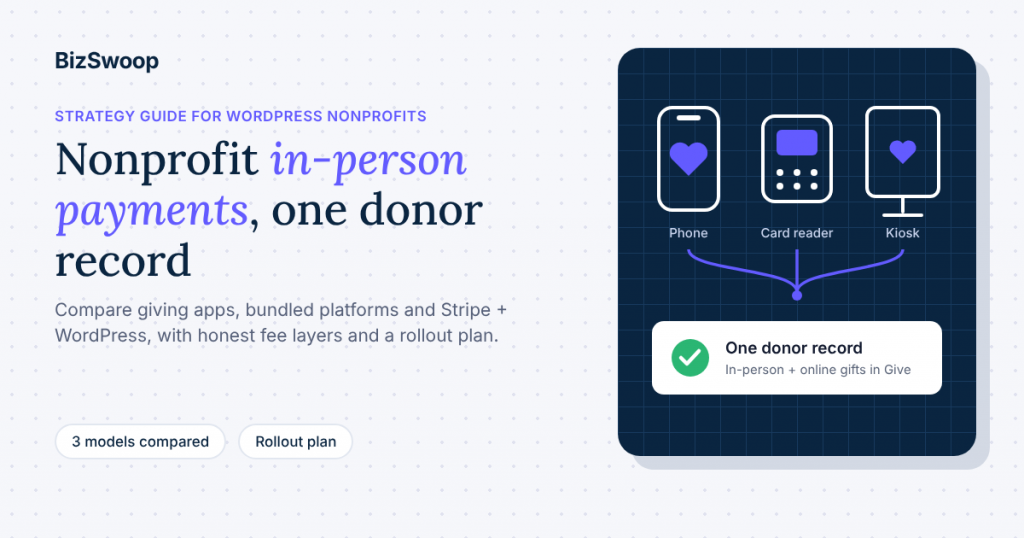
The best way for a nonprofit to accept card donations in person is to keep them in the same donor database and payment account as your online gifts. For an organization that already raises money on WordPress with Give (formerly GiveWP), that means taking cards on a phone, reader or kiosk that posts straight into Give and your own Stripe account, instead of adding a separate giving app with its own donor list and fee model. Nonprofit in-person payment processing is less about picking the cheapest card reader and more about choosing a model that doesn’t split your donor records in two.
This guide is written for executive directors, development leads and finance or operations staff who own that decision. It compares the three models nonprofits actually use, shows where in-person donations leak out of your records, lays out what each fee layer really costs, and ends with a rollout plan you can finish before GivingTuesday on Tuesday, December 1, 2026. BizSwoop has been in business since 2016 and a Stripe Partner since 2020. We make Jovvie, so we’ll also say plainly when a different tool is the better fit.
Key Takeaways
- Choose a model, not a card reader. Nonprofits take in-person payments through a standalone giving app, a bundled fundraising platform, or Stripe connected to their own donation system. The model decides where donor data lives and how fees work.
- Split donor records cost more than processing fees. A second app means a second donor list, manual imports and receipts that don’t match your online program.
- Fees come in layers. Card processing, any platform fee, and donor-covered fees or tips are separate decisions. Compare them separately, not as a single “rate”.
- WordPress organizations already have the hard part. If you run Give, your forms, campaigns, receipts and donor records are in place. In-person giving can be an extra payment option on the same forms.
- There’s no offline mode for card-present donations on Stripe Terminal through Jovvie. Every device needs Wi-Fi or mobile data, so connectivity is part of event planning.
- GivingTuesday is a good forcing date. Set up in Test Mode now, pick devices by event type, and go live before December 1.
What is the best way for a nonprofit to accept card donations in person?
The best way is the one that records each in-person gift in your main donor database automatically, with the same receipt and campaign attribution as an online gift. Everything else (reader hardware, the processing rate, the look of the app) is secondary to that.
Most “best nonprofit payment processor” lists rank tools by rate or feature count. That framing misses why in-person giving goes wrong in practice. Organizations rarely lose money because their rate was 0.2 points too high. They lose donors because the people who gave at the gala never made it into the CRM, never got a proper tax receipt, and never received the follow-up that turns a one-time gift into a relationship.
So the useful question isn’t “which processor is best?” It’s “which model keeps in-person donors in the same system as everyone else?” The answer depends on what you already run:
- You run Give on WordPress: add in-person payments to Give. Tap To Donate for Give by Jovvie is the integration built for this, and it’s free to install.
- You use an all-in-one fundraising CRM with integrated payments: use that platform’s own in-person tools, so gifts stay in its donor records.
- You have no website or donor database yet: a standalone giving app is a reasonable place to start, as long as you plan how its data will move later.
What are the three ways nonprofits take in-person payments?
Nonprofits take in-person payments in one of three ways: a standalone giving app, a bundled fundraising platform, or a payment processor connected directly to their own donation system. Each one makes a different trade-off between setup speed, donor-data ownership and cost structure.
| Model | Examples | Best for | Where donor data lives | How fees typically work |
|---|---|---|---|---|
| Standalone giving app | Zeffy, Givebutter, Donorbox Live Kiosk, Square | Groups without a website or CRM; one-off events | In the app’s own donor list, separate from your website | Tip-funded “free”, a platform percentage, or a flat processing rate |
| Bundled fundraising platform | Bloomerang, CharityEngine, Fundraise Up | Organizations already running that platform as their CRM | In the platform’s CRM | Platform subscription and/or transaction fees, set by the vendor |
| Your own system + direct Stripe | Give (formerly GiveWP) + Tap To Donate for Give by Jovvie, on your Stripe account | WordPress organizations already fundraising online with Give | In Give, next to your online donors, and in your Stripe account | Stripe’s processing rate plus a disclosed platform fee on in-person gifts only |
When does a standalone giving app make sense?
A standalone app makes sense when you don’t have a website or donor database to protect. Zeffy, for example, positions itself as free for nonprofits and funds itself through optional donor contributions, and its guide to accepting in-person donations without a card reader covers the phone-only setup. Givebutter, Donorbox and Square all offer tap-to-pay or reader options too.
The cost is structural. Every donor collected in the app lives in that app. If you later move to a WordPress site or a CRM, you’re exporting and reconciling lists, and your online and in-person donors may never line up into one history.
When does a bundled platform make sense?
A bundled platform makes sense when it’s already your system of record. If your organization runs Bloomerang or a similar CRM with integrated payments, use its in-person tools so gifts land in the same donor profiles. Fundraise Up, for instance, describes in-person gifts landing in the same donor record as online gifts in its In-Person Giving FAQ. It also notes that the feature is currently limited to existing customers in the United States.
The trade-off is lock-in and price. You’re adopting the vendor’s fee model and its roadmap, which is fine if you’ve already committed to that platform and expensive if you haven’t.
When does Stripe plus your own WordPress system make sense?
This model makes sense when your donation forms, campaigns and receipts already run on WordPress with Give. Instead of adding a second platform, you add an in-person payment option to the forms you already have. Tap To Donate for Give by Jovvie connects Give to Stripe Terminal, so volunteers can take donations with Tap to Pay on a phone, a Stripe card reader or a self-serve kiosk. Each gift appears in Give alongside your online donations, with the donor record intact, and in your Stripe dashboard.
Give itself is distributed by Liquid Web after its acquisition, and Give’s own documentation (now hosted by Nexcess) includes a guide to accepting in-person donations with Jovvie and Give. The Liquid Web partner post on how tap to donate works explains the underlying technology for non-technical readers.
Where do in-person donations leak out of your donor database?
In-person donations leak out of your donor database wherever a gift is collected in one system and recorded in another. The four most common leaks are cash jars, separate apps, manual “offline” entry and shared volunteer devices with no donor capture.
- Cash and check jars. Anonymous by default. Unless someone fills in a pledge card, you get a total, not donors.
- A second giving app. Card gifts are captured, but in the app’s own list. Someone has to export, clean and import them, and receipts come from the app, not your organization.
- Manual “offline donation” entry. Give’s offline donations feature records a pledge to pay by check, money order or another non-digital method, and staff mark it complete when the payment arrives. It collects contact details but never charges a card (Give offline donations docs). Typing in event gifts by hand afterward is slow and error-prone, and you’re keying in names and amounts from paper.
- A borrowed card reader with no form. Running donations through a generic point-of-sale app gets the money, but often without a donor email, campaign or receipt.
A connected in-person setup closes these leaks by charging the card on the same Give form that collects the donor’s details. That’s the core argument for keeping in-person and online giving on one system. It isn’t about any single feature. It’s about having one donor record, one receipt flow and one campaign total.
What does a split donor database actually cost?
A split database costs staff time every event and donor revenue every year. The direct cost is the hours spent exporting, de-duplicating and importing donors after each event. The larger, slower cost is follow-up that never happens: in-person donors who don’t get a thank-you from your normal stewardship sequence, or a monthly-giving ask, because they aren’t in your main list.
Finance teams feel it at month end too. When in-person gifts settle through one processor and online gifts through another, reconciling deposits to campaign totals becomes a two-system job.
What do in-person donations actually cost a nonprofit?
In-person donations cost a nonprofit card processing plus any platform fee, minus whatever donors choose to cover. Those are three separate layers, and the right comparison sets them out separately instead of collapsing them into one headline rate.
| Fee layer | What it is | Typical range or example | Who decides it |
|---|---|---|---|
| Card processing | What the processor charges per card transaction | Stripe’s standard U.S. in-person rate is 2.7% + 5¢; its standard online card rate is 2.9% + 30¢ (Stripe pricing). Stripe also invites nonprofits to ask about nonprofit pricing | The processor, sometimes negotiable at volume |
| Platform fee | What the software charges on top of processing | Varies by model: tip-funded, a percentage per gift, or a subscription | The software vendor |
| Donor-covered fees or tips | An optional amount the donor adds | Depends on your form settings and donors | Your organization and your donors |
| Hardware | Readers and kiosks, if you use them | Optional: Tap to Pay needs no reader at all | Your organization |
The U.S. Chamber of Commerce puts typical nonprofit credit card processing fees at roughly 2.2% plus 30 cents to 3.5% plus 30 cents (U.S. Chamber of Commerce). Use that range as context, not a quote: your actual rate depends on your processor and card mix.
For every fee layer in detail, including Stripe’s online and in-person rates, the nonprofit discount and donor-covered fees, see nonprofit payment processing fees explained.
What does Jovvie cost for Give organizations?
Tap To Donate for Give by Jovvie is a free plugin with a free Jovvie account and no monthly fees or contracts. The platform fee is a small percentage on in-person donations only (0.5% to 2%, depending on your donation volume), in addition to Stripe’s processing rate. Online Give donations are unaffected. The current terms are on the WordPress.org listing and at jovvie.com/checkout/givewp/.
Two practical notes for finance leads:
- The fee applies only to donations taken through the Jovvie gateway. Your online Give forms keep whatever gateway and fees you already have.
- Funds settle to your own Stripe account. Stripe Terminal readers, if you use them, are also bought from your organization’s own Stripe account.
How should you compare “free” giving apps?
Compare “free” apps by asking who pays and where the donor data goes. Tip-funded models are free to the organization because donors are asked to add a contribution to the platform at checkout. That can work well, but it’s still a cost borne by your supporters, and it shapes the checkout experience. Other platforms charge a percentage only if you turn tips off. Givebutter, for example, describes a 3% platform fee when tips are disabled in its nonprofit card reader guide.
None of this makes those tools a bad choice. It means the right comparison is total cost to donors and the organization, plus the cost of a separate donor list. Headline rates alone don’t capture that.
Planning in-person giving across several events or locations? A Jovvie advisor can map devices, locations and Give forms to your event calendar, and walk your finance team through the fee and settlement flow.
Which hardware do you need: a phone, a card reader or a kiosk?
Most nonprofits can start with phones they already own and add readers or a kiosk only where an event needs them. The hardware decision follows the event format, not the other way round.
| Event situation | Recommended device | Why |
|---|---|---|
| Volunteers moving through a crowd (walks, festivals, door-to-door) | Tap to Pay on volunteers’ phones | No hardware to buy; donors tap a card or phone |
| Staffed table at a gala, open house or check-in desk | Bluetooth reader (Stripe Reader M2 or BBPOS WisePad 3) | Accepts chip cards as well as tap; pairs with a phone or tablet |
| Fixed counter or welcome desk | Wi-Fi/Ethernet reader (Stripe Reader S700 or BBPOS WisePOS E) | A stable station that registers to your location once |
| Lobby, sanctuary or exhibit with no staff | Kiosk mode on a tablet | The form returns to the start after each gift, so donors can give unaided |
All of these are supported by Tap To Donate for Give by Jovvie, according to its WordPress.org listing. Tap to Pay and Bluetooth readers pair in the free Jovvie app; Wi-Fi readers register with a one-time code from the Jovvie dashboard (Jovvie setup documentation).
For model-by-model detail on Stripe’s readers, prices and connectivity, see our Stripe Terminal hardware guide. For phone-only setups, our Tap to Pay on iPhone setup guide covers device requirements and setup. To match readers to specific donation scenarios, see our nonprofit card reader guide.
What about connectivity at events?
Connectivity is a hard requirement: there’s no offline mode, so the device taking the donation needs Wi-Fi or mobile data for Stripe to authorize the payment. Treat venue signal as part of event planning. Test it the week before, bring a hotspot for outdoor or basement venues, and keep a QR code to your online donation form as a fallback.
How do donor data and receipts work when gifts are taken in person?
When in-person gifts run through Give, they create the same donation and donor records as online gifts, so your existing receipts, reports and follow-up apply. According to the Jovvie listing, in-person donations appear in Give alongside online donations, with the same donor and reporting tools, and in your Stripe dashboard.
What this means in practice:
- One donor history. A supporter who gives online in March and at your gala in November has both gifts under one donor record.
- One campaign total. If the in-person form is attached to your GivingTuesday or year-end campaign, the event total and the online total roll up together.
- Your receipts, not a vendor’s. Donors get your organization’s Give receipt flow, not a third-party app’s email.
- Recurring gifts in person. Monthly, quarterly and annual recurring donations are supported on in-person transactions, so an event conversation can start a monthly gift. This uses the recurring options on your Give form, which come from Give’s Recurring Donations add-on.
- Refunds. Refunds for in-person donations are issued from the Stripe dashboard, not from inside Give, according to the WordPress.org listing. Build that into your finance team’s procedure.
Capturing donor details at a busy table is its own discipline. Which fields to require, and how to get a usable email from a donor in a hurry, is something to settle per form before the event.
How should a WordPress nonprofit roll out in-person giving before GivingTuesday?
Roll it out in five stages over about six weeks: decide the model, set up in Test Mode, pick devices per event, train volunteers, then go live and reconcile. GivingTuesday on Tuesday, December 1, 2026 gives you a natural deadline.
- Confirm the model (week 1). If your online fundraising runs on Give, decide to keep in-person giving there. Write down which events in the next 90 days will take in-person gifts.
- Install and connect in Test Mode (week 1). Install Tap To Donate for Give by Jovvie, connect Stripe through a free Jovvie account, create a location, and register a device in Test Mode. The Jovvie setup documentation lists each screen. Run test donations with Stripe test cards; they don’t move real money.
- Build event forms (week 2). Create or duplicate a Give form for in-person use: short, mobile-friendly, attached to the right campaign, with recurring options turned on if you’ll ask for monthly gifts.
- Choose devices per event (weeks 2–3). Use the hardware table above. Start with Tap to Pay; order Stripe readers from your own Stripe account only for events that need them.
- Train volunteers and test the venue (weeks 4–5). Give each volunteer a two-minute run-through, a script and a backup plan. Check signal at each venue.
- Go live and reconcile (week 6 onward). Switch the location to Live Mode before the event. Afterwards, compare the Give campaign total with your Stripe payouts and send your normal thank-you sequence.
For the day-of plan (countdown, event formats and volunteer briefing), the GivingTuesday in-person donations playbook on jovvie.com goes deeper.
Can nonprofits use Stripe for payments?
Yes. Nonprofits can use Stripe to accept online, recurring and in-person donations, and Stripe has a dedicated nonprofit solutions page that covers in-person collection with card readers or Tap to Pay. Many donation tools, including Give, already use Stripe as their payment processor.
The strategic point is where Stripe sits. In the standalone and bundled models, Stripe (or another processor) usually runs inside the vendor’s account structure. In the direct model, your organization holds the Stripe account. Payouts, disputes and refunds are in your own dashboard, and your software (Give plus Jovvie) records the donation.
How should finance teams reconcile in-person and online donations?
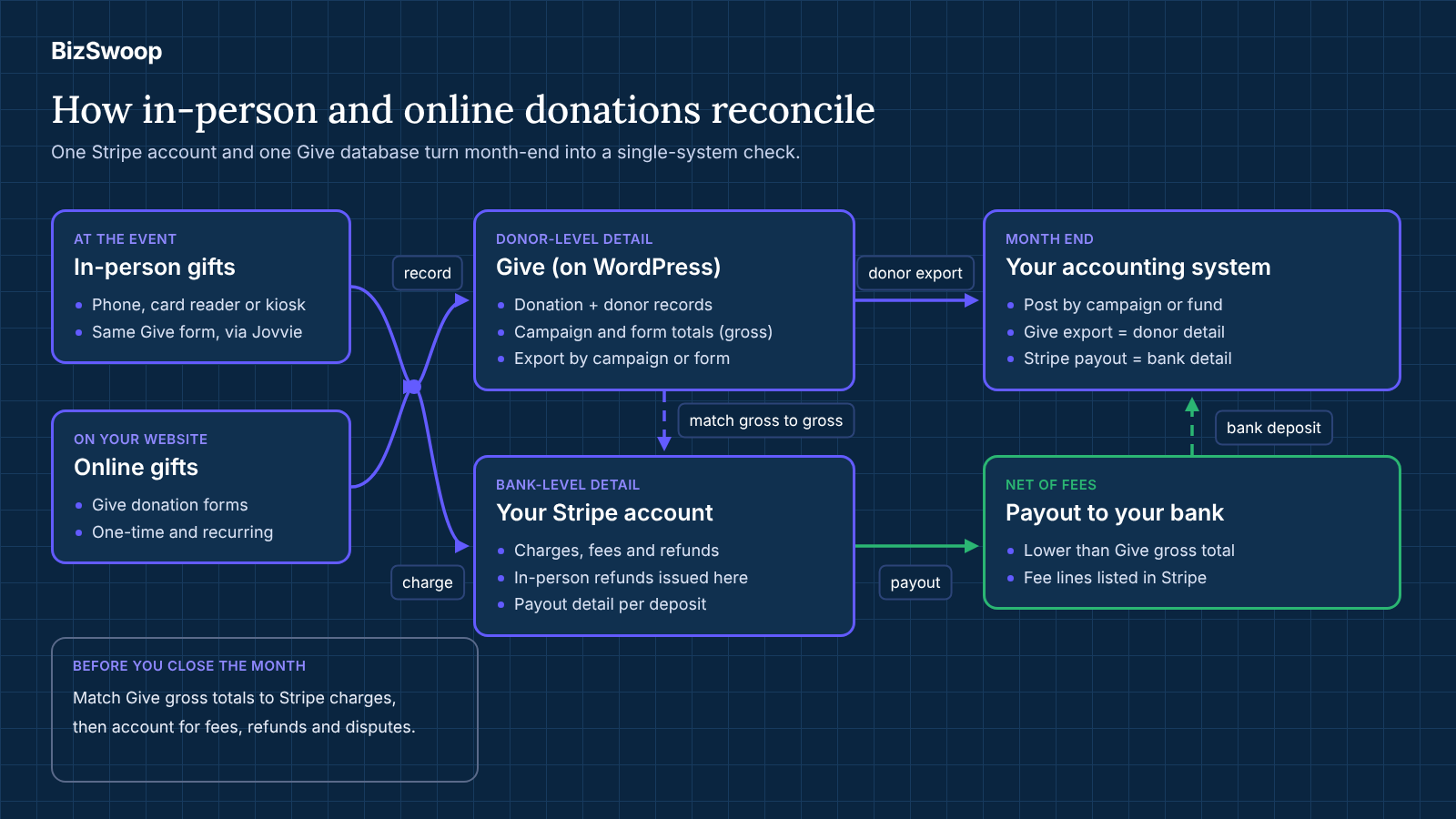
Finance teams should reconcile in-person and online donations by matching Stripe payouts to Give campaign totals on a regular schedule, ideally weekly during event season and monthly otherwise. When both channels settle into one Stripe account and record into one Give database, that’s a single-system check, not a cross-platform one.
A simple monthly routine:
- Export the period’s donations from Give, filtered by campaign or form, so in-person event forms and online forms are visible side by side.
- Pull the matching payouts from your Stripe dashboard. Each payout lists the charges, refunds and fees it includes.
- Match gross donations to gross charges, then account for fees. Stripe deducts its processing fees before paying out, so net deposits will be lower than the Give gross total. Use the payout detail in Stripe to see each fee line, including any platform fee on in-person gifts.
- Check refunds and disputes in Stripe. In-person refunds are issued from the Stripe dashboard, so confirm each one is also reflected in Give before closing the month.
- Post to your accounting system by campaign or fund, using the Give export as the donor-level detail and the Stripe payout as the bank-level detail.
What changes when donors cover fees or give recurring gifts?
Donor-covered fees increase the gross gift without changing the processing cost, so record them consistently: either as part of the donation or as a separate line, according to your accounting policy. Recurring gifts started in person renew automatically through Give’s recurring donations, so after the first charge they reconcile exactly like online subscriptions.
What should you decide before your first event?
Decide three things before your first live event: which Give forms and campaigns event gifts will use, who on staff owns the Stripe dashboard (including refunds), and how often you’ll reconcile. Write them down in a one-page procedure. It’s the difference between a clean year-end and a week of detective work in January.
When is a standalone giving app the better choice?
A standalone giving app is the better choice when you don’t have a donor system to protect, or when the event is genuinely one-off. We’d recommend one in these cases:
- No website and no donor database. A small group raising money at a single community event doesn’t need WordPress. An app such as Zeffy or Givebutter gets you taking cards quickly.
- Not on WordPress. Tap To Donate is built for Give on WordPress. If your donation forms live on another platform, use that platform’s in-person tools so your data stays in one place.
- Everything already runs through Square. If your thrift store, café and events all run on Square, its hardware may fit your existing operations better.
- Mostly cash crowds. Card tools don’t replace a donation box. Keep both where your supporters prefer cash.
If none of these apply, and your fundraising already lives in Give, adding a second platform mostly adds a second donor list.
How do the three models compare on the questions finance leads ask?
The direct model generally wins on data ownership and reconciliation, standalone apps on speed to first donation, and bundled platforms on all-in-one convenience if you’ve already adopted them.
| Question | Standalone app | Bundled platform | Give + Jovvie + Stripe |
|---|---|---|---|
| Who holds the payment account? | Usually the app | Usually the platform | Your organization |
| Where do in-person donors live? | In the app | In the platform CRM | In Give, with online donors |
| Do receipts match the online program? | Usually the app’s receipts | Yes, within the platform | Yes, Give’s receipt flow |
| How do you reconcile payouts? | App payouts vs your records | Platform reports | Stripe payouts vs Give campaigns |
| Time to first donation | Minutes | Depends on platform setup | About five minutes if Give is already running |
| Recurring gifts in person | Varies by app | Varies by platform | Monthly, quarterly, annual supported |
| Offline mode | Varies by app | Varies | None: device needs Wi-Fi or mobile data |
Frequently asked questions
What is the best payment processing tool for nonprofits?
The best tool is the one that records every gift (online and in person) in your main donor database. For WordPress organizations on Give, that’s usually Stripe connected through Give, with Tap To Donate for Give by Jovvie for in-person gifts. Organizations without a website may be better served by a standalone giving app.
Can nonprofits use Stripe for payments?
Yes. Stripe supports online, recurring and in-person donations, and offers a nonprofit solutions page with contact for nonprofit pricing. Give uses Stripe as a payment gateway, and Jovvie connects Give to Stripe Terminal for in-person gifts.
What is the best payment gateway for donations?
There’s no single best gateway; choose the one your donation system integrates with most fully, so receipts, donor records and recurring gifts work without manual steps. For Give users, Stripe covers online, recurring and in-person donations in one account.
What is the cheapest way to accept credit card payments in person?
The cheapest hardware option is Tap to Pay on phones you already own, which needs no card reader. Total cost still includes card processing and any platform fee, so compare the full set of fee layers, not the hardware alone.
Do in-person donations show up in Give with online gifts?
Yes. With Tap To Donate for Give by Jovvie, in-person donations appear in Give alongside online donations, with the same donor and reporting tools, and in your Stripe dashboard.
Is there an offline mode for in-person donations?
No. The device taking the donation needs Wi-Fi or mobile data so Stripe can authorize the payment. Plan connectivity for each venue and bring a hotspot where signal is weak.
What does Tap To Donate for Give by Jovvie cost?
The plugin and Jovvie account are free, with no monthly fees or contracts. A platform fee of 0.5% to 2% applies to in-person donations only, depending on donation volume, in addition to Stripe’s processing rate. Online Give donations are unaffected.
How are refunds handled for in-person donations?
Refunds for in-person donations are issued from your Stripe dashboard, not from inside Give. Include that step in your finance procedures before your first event.
Talk to a Jovvie advisor about in-person giving
If your organization already fundraises with Give, in-person giving doesn’t need a second platform, a second donor list or a second monthly bill. A Jovvie advisor can help you map devices to events, set up locations and forms, and walk your finance team through fees, payouts and refunds, in time for GivingTuesday on December 1.
Sources and primary documentation: Tap To Donate for Give by Jovvie on WordPress.org, Jovvie for Give, Jovvie setup documentation, How Tap to Donate Technology Works and What It Costs (Liquid Web), How to Accept In-Person Donations with Jovvie and Give (Nexcess docs), Give offline donations (Nexcess docs), Give Recurring Donations (Nexcess docs), Stripe pricing, Stripe for nonprofits, Stripe Terminal, U.S. Chamber of Commerce: Best Credit Card Processors for Nonprofits, Fundraise Up In-Person Giving FAQ, Givebutter: best card readers for nonprofits, Zeffy: accept in-person donations without a card reader.
