
Buy a Stripe Terminal ERP connector when your reader fleet is small and your ERP is mainstream; build when scale, custom posting logic or several subsidiaries make a connector cost more than a maintained build over three years. Either way, “buy” for card-present payments still means building a thin capture layer. Reconciliation connectors, including Stripe’s own Connector for NetSuite, book Stripe charges, fees and payouts into the ERP, Terminal payments included, but none of them create connection tokens, drive a reader or create the in-person PaymentIntent. Generic build-vs-buy guides price a data-sync problem; a Terminal rollout is a card-present operations problem with a reconciliation problem attached.
Jovvie, an official Stripe Partner, has built in-person Stripe Terminal payments for WooCommerce merchants since 2016. Stripe mechanics below were re-checked against Stripe’s documentation in November 2026. This is a cluster piece under the Stripe Terminal ERP integration patterns guide; for the reference build this cost model assumes, see Connecting NetSuite to Stripe Terminal: Architecture Patterns. Platforms reselling Terminal should also read the Stripe Connect platform economics guide.
Key Takeaways
- “Buy” still includes a capture layer. ERP connectors reconcile payments; taking the card on a reader needs your own token service and PaymentIntent logic.
- Price three options, not two. Compare a connector plus capture layer, an iPaaS or middleware build, and a full custom build.
- Stripe’s processing fees cancel out. The 2.7% + 5¢ US card-present rate is the same in every option, so leave it out of the comparison.
- Maintenance is the hidden line. Plan on roughly 10–15 developer-hours a month for a live custom card-present connector.
- Custom only wins past a crossover. In our worked example (15 readers, one ERP, no subsidiaries), the connector route costs less than half of a full build over three years.
- Multi-subsidiary and custom logic tip it to build. One row, like per-entity accounting, can decide the whole question.
Should you build or buy a Stripe Terminal ERP connector?
Buy when three things are true at once: a commercial connector already supports your ERP, your card-present footprint is small and standard, and you’d rather pay a predictable license than staff maintenance. Build when the opposite dominates: a large or fast-growing fleet, custom card-present logic (deposits against sales orders, split tenders, subsidiary-specific GL mapping), several legal entities, or connector pricing that compounds past a maintained build over 36 months.
There are three options, not two:
- Commercial or native connector. A supported product, such as Stripe’s Connector for NetSuite or a third-party ERP connector, that reconciles Stripe activity into the ERP. Quick to stand up, ongoing license, and you add a thin Terminal capture layer on top.
- iPaaS or middleware. A broker such as Celigo, Workato or MuleSoft that maps Stripe events to ERP records, and can host the token endpoint and post back through ERP APIs. Medium effort, recurring platform fee, mapping logic you own in the broker.
- Custom build. Your own backend against the Stripe Terminal API and the ERP’s API. Highest upfront effort, full control of the accounting boundary, and a permanent maintenance obligation.
Our opening heuristic on scoping calls: if a spreadsheet with your real reader count, volume, subsidiary structure and connector quote doesn’t clearly favor buying, you’re probably a build. The rest of this guide is that spreadsheet.
What does a custom Stripe Terminal + ERP build involve?
A custom connector isn’t “call the Stripe API when a payment happens”; it’s a small distributed system with four parts, three of which a reconciliation connector never touches.
- A token or reader-control service. With a Terminal SDK, readers connect using short-lived connection tokens your backend creates; with Stripe’s server-driven integration, your backend drives smart readers over the API. Either way it’s a service you host, secure and monitor.
- PaymentIntent orchestration against the ERP document. When a clerk or rep takes a card, your code creates a PaymentIntent tied to a specific sales order or invoice, collects the payment and sets the metadata that lets finance trace the charge back.
- Post-back and reconciliation. The payment must land in the ERP as a customer payment, deposit or applied invoice, with fees broken out and payouts matched. This is where commercial connectors are strong; Stripe’s NetSuite connector, for example, links your payments to invoices through metadata keys like
netsuite_invoice_id. - Offline, retries and edge cases. Dropped connections, partial authorizations, refunds at the counter, reader disconnects, multi-location device management. This long tail turns a two-week prototype into a multi-month project and a permanent maintenance line.
That’s why the comparison is lopsided when done naively: a reconciliation connector covers item 3 and none of items 1, 2 or 4. An honest comparison prices “connector plus thin capture layer” against “full custom build”, not “connector” against “everything”.
Build vs buy vs iPaaS: which model fits which situation?
The rows that generic Stripe-to-ERP comparisons omit are the card-present ones: reader fleet and capture.
| Dimension | Connector plus capture layer | iPaaS / middleware | Custom build |
|---|---|---|---|
| Best fit | Mainstream ERP, small standard fleet, reconciliation first | Several systems, near-real-time sync, no deep ERP developers | Large or growing fleet, custom logic, several subsidiaries |
| Card-present capture | You build a thin layer (tokens and PaymentIntents) | Broker can host tokens and post back; you own the mapping | You own the whole flow |
| Upfront effort | Low (connector) plus small (capture) | Medium (mapping and broker setup) | High (weeks to a few months) |
| Ongoing cost shape | Predictable license | Recurring platform fee, often volume-based | Developer hours plus hosting |
| Customization ceiling | Low to medium (fixed conventions) | Medium (logic lives in the broker) | High |
| Maintenance owner | Vendor for the connector; you for the capture layer | Vendor platform; you for the flows | You, entirely |
| Multi-subsidiary handling | Depends on the connector (Stripe’s needs one Stripe account per NetSuite subsidiary) | Workable with per-entity flows | First-class if you design for it |
| Breaks when | The connector lags a Stripe or ERP change | A broker connector deprecates a trigger or pricing jumps | Your team doesn’t track Stripe or ERP API changes |
Read it as weighting, not a scorecard. A NetSuite OneWorld company with five subsidiaries and custom GL rules is a build almost regardless of fleet size; a single-location retailer with three readers and standard AR is a buy almost regardless of everything else.
What does each option cost over three years?
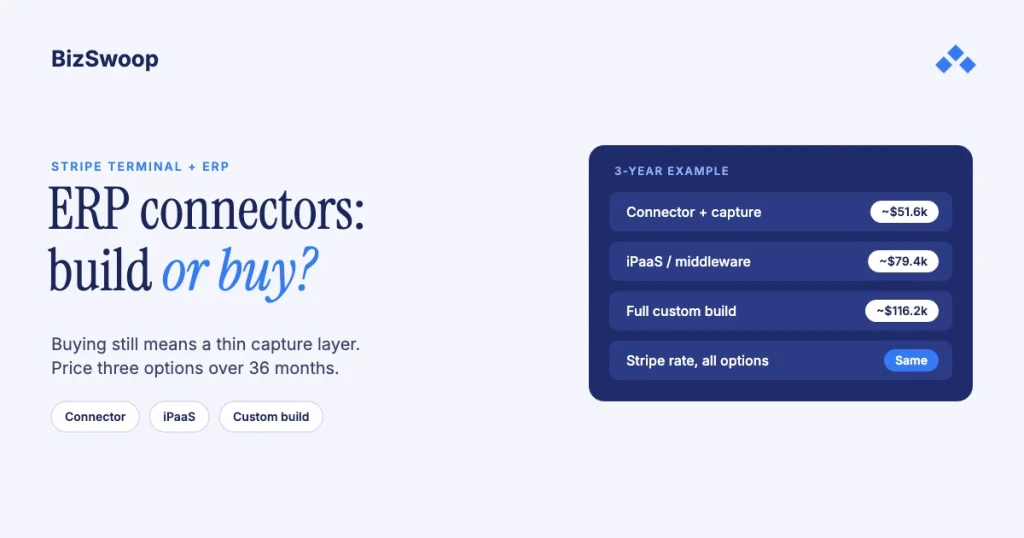
For the mid-market example below (15 readers across 4 locations, about 40,000 card-present payments a year, one mainstream ERP, no subsidiaries), the connector route comes to about $51,600 over 36 months, iPaaS about $79,400 and a full custom build about $116,200.
These are illustrative planning assumptions, not vendor list prices; replace every input with your own quotes and rates. Stripe’s processing fees are excluded because they’re the same in every column (see card-present rates on Stripe).
| Line item (36 months) | Connector plus capture layer | iPaaS / middleware | Custom build |
|---|---|---|---|
| Initial build or setup | $8,000 (capture layer only) | $15,000 (flows and configuration) | $55,000 (full build) |
| License or platform fees | $18,000 (assumed $500/month) | $36,000 (assumed $1,000/month) | $0 |
| Hosting (token service, jobs) | $3,600 ($100/month) | $1,800 ($50/month) | $7,200 ($200/month) |
| Maintenance hours | $18,000 (about 5 hours/month at $100) | $21,600 (about 6 hours/month) | $45,000 (about 12.5 hours/month) |
| API-change and upgrade buffer | $4,000 | $5,000 | $9,000 |
| 3-year total | about $51,600 | about $79,400 | about $116,200 |
| Per year | about $17,200 | about $26,500 | about $38,700 |
Two things this makes visible that a cost range hides:
- The capture layer never goes away. Even the “buy” column carries an $8,000 build and about 5 maintenance hours a month, because the reader fleet needs a token service and PaymentIntent logic no connector supplies. A quote for a connector license alone under-prices the project.
- Custom wins only past a crossover. For this profile, buying is cheaper. Custom crosses under the connector line only when license fees scale hard with your fleet or entities (for example per-location pricing on a 60-reader, multi-subsidiary estate), or when your logic makes the connector unusable and you’d pay for it and build around it anyway.
Running in-person payments for WooCommerce stores? Jovvie runs on Stripe Terminal readers and Tap to Pay out of the box.
What does maintaining a custom connector really cost?
Plan on roughly 10–15 developer-hours a month for a live custom card-present connector, about $12,000–$18,000 a year at a $100 blended rate, because two sets of APIs underneath it change on their own schedules.
- Stripe API versions and Terminal SDK updates. Stripe pins your integration to an API version and ships new ones regularly; the Terminal SDKs get updates that sometimes carry breaking changes or new device requirements you must adopt to keep readers connecting.
- ERP releases. NetSuite ships two major releases a year and Business Central has two release waves; cloud ERPs can change endpoints, fields or authentication, and your post-back is exposed to each one.
- Card-present edge cases. Offline recovery, partial authorizations, GL mapping changes, a new reader model, a new location. Each is small; together they’re the monthly hours.
- Monitoring and exceptions. Someone has to watch for failed payments and payments that didn’t post, and clear them. That’s operations time, and it exists in the “buy” column too, just on a smaller surface.
A connector moves much of this onto the vendor’s roadmap: you pay a license so their team tracks the changes. That’s a legitimate reason to buy even when the totals are close. The risk is a connector that lags a Stripe or ERP change while your payments back up; make sure the support terms cover it.
When is building the right call, and when is it a trap?
Build when the reader fleet or the accounting logic is the point. A large or multi-location fleet makes per-location or per-seat fees compound past a maintained build; custom card-present logic (deposits against sales orders, split tenders, subsidiary-specific GL routing, unusual refund rules) makes a connector something you fight; and several legal entities with per-entity reconciliation are often first-class only in a build designed for it. If two or more are true, build.
Building is a trap when the motivation is “we can do it ourselves.” Stripe’s Terminal quickstart makes a demo look like a weekend, but the demo is item 2 of four. The token service, reconciliation, the offline and edge-case tail, and 10–15 maintenance hours a month are the real project. If your ERP is mainstream, your fleet is small and you have no one to carry the on-call, buy the connector, build only the capture layer, and spend engineering on what makes your business different.
If you’re a platform embedding Terminal for merchants, start over: your economics are application fees and per-account connection tokens, not a single-company license, and the Connect platform economics guide is the right starting point.
Frequently asked questions
Should I build or buy a Stripe Terminal ERP integration?
Buy when your ERP is mainstream, your reader fleet is small and standard, and a predictable license beats staffing maintenance. Build when a large or growing fleet, custom card-present logic or several legal entities make a connector’s fees or limits exceed a maintained build over three years. Most single-ERP, single-location businesses should buy reconciliation and build only a thin capture layer.
How much does a custom Stripe ERP integration cost?
In our illustrative mid-market example, a full custom card-present build costs about $55,000 upfront and about $116,000 over three years including roughly $45,000 of maintenance, against about $51,600 for a connector plus a thin capture layer. Your numbers move with fleet size, subsidiaries, rates and how much custom logic you need.
What is the maintenance cost of a custom connector?
Plan on 10–15 developer-hours a month for a live card-present Stripe-to-ERP connector, about $12,000–$18,000 a year at a $100 blended rate. The hours come from Stripe API and SDK updates, ERP releases, card-present edge cases and exception handling. A connector shifts most of that to the vendor, but you still maintain the capture layer.
How long does a Stripe ERP connector take to build vs buy?
A connector plus a thin capture layer can typically go live in two to four weeks. A full custom card-present build usually takes eight to twelve weeks: a demo works in days, but the token service, ERP post-back, offline handling and device management take the rest. Middleware usually lands in between, at three to six weeks.
When is it worth building a custom integration?
When at least two of these are true: your fleet is large or growing fast enough that per-location or per-seat fees compound past a maintained build; your card-present logic is custom enough that a connector fights you; or you run several legal entities that need per-entity accounting. Otherwise, buy the connector and build only the capture layer.
Do Stripe ERP connectors handle card-present Terminal payments?
They reconcile them, but they don’t take them. Stripe’s Connector for NetSuite books any Stripe charge, Terminal payments included, with fees and payouts, and links it to an invoice through metadata. Creating connection tokens, connecting the reader and creating the in-person PaymentIntent still need your own capture layer.
Deciding build vs buy for your reader fleet?
Bring your connector quote, reader count and subsidiary structure, and we’ll model the 36-month cost with you and say plainly when the connector wins. Talk to a Jovvie advisor. If you sell through WooCommerce too, a POS for Stripe like Jovvie covers the in-person side.
Sources: Stripe Connector for NetSuite · Custom payment application · Multiple subsidiaries · Set up your Terminal integration · Create a connection token · API versioning · Stripe Terminal pricing.
