
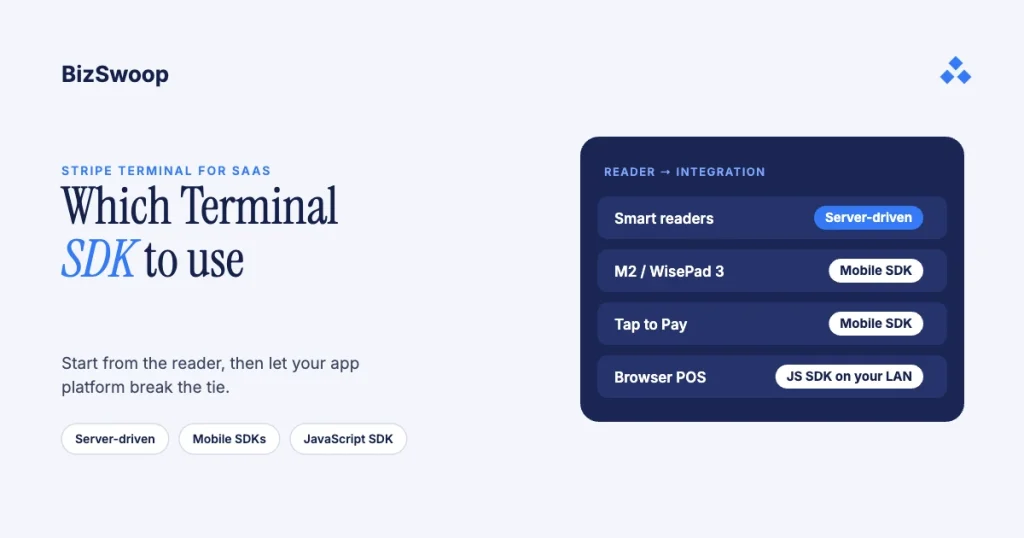
Your reader type decides the Stripe Terminal integration more than your app platform does. For smart readers (Stripe Reader T600, S700/S710, BBPOS WisePOS E and Verifone), Stripe recommends the server-driven integration instead of the JavaScript SDK. For mobile readers (the Stripe Reader M2 in the US, BBPOS WisePad 3 elsewhere) and Tap to Pay, you need the iOS, Android or React Native SDK, because the JavaScript SDK and server-driven integration only work with smart readers. The JavaScript SDK is the browser option, and it needs your point of sale and reader on the same local network with working local DNS. Everything else refines those facts. Stripe’s docs describe every SDK accurately but don’t tell you which one to pick for your app and hardware, and the gotchas that decide real projects are spread across several pages. This guide puts them in one place.
Jovvie, an official Stripe Partner, has built in-person Stripe Terminal payments for WooCommerce merchants since 2016, across web and mobile clients. Every requirement below was re-checked against Stripe’s documentation in November 2026. This guide sits under the Stripe Terminal SaaS embedding guide; if you embed Terminal for downstream merchants, the fee and tenancy side is in the Connect for Terminal platforms guide and multi-tenant Terminal architecture.
Key Takeaways
- Start from the reader, not the app. Smart readers work with every integration; mobile readers and Tap to Pay work only with the iOS, Android and React Native SDKs.
- Smart readers: server-driven first. Stripe recommends it over the JavaScript SDK because it goes through the Stripe API instead of your local network.
- The JavaScript SDK supports smart readers only. It needs the POS and reader on the same LAN with working local DNS, and Chrome 142+ asks for local-network permission.
- Tap to Pay and offline payments need a mobile SDK. There’s no browser Tap to Pay, and the server-driven integration doesn’t support offline collection.
- React Native is still public preview. It wraps the native SDKs, so you inherit their requirements (iOS 16+, Android minSdk 26, location permission).
- Platforms lean server-driven. Connection tokens, PaymentIntents and application fees already live on your backend.
Which Stripe Terminal SDK should you use?
Let the reader route the decision: smart readers point to the server-driven integration, mobile readers and Tap to Pay point to a native or React Native SDK, and a web POS uses the JavaScript SDK only when it can meet the local-network condition.
Stripe Terminal’s integration options are the JavaScript, iOS, Android and React Native SDKs, the server-driven integration that drives readers from the Stripe API with no client SDK, and Apps on Devices, where your Android or React Native app runs on the smart reader itself (Select a reader). The usual mistake is starting from “we’re a web app, so we’ll use the JS SDK.” The reader type is the stronger constraint, so start there and let your app platform break ties.
What does the reader × platform decision matrix look like?
Find your reader in the left column and your app platform across the top; the cell is the recommended path.
| Reader ↓ / App platform → | Web app | iOS app | Android app | Cross-platform (React Native) |
|---|---|---|---|---|
| Smart readers (T600, S700/S710, WisePOS E, Verifone) | Server-driven (recommended); JS SDK if you control the LAN | Server-driven, or the iOS SDK | Server-driven, the Android SDK, or Apps on Devices | Server-driven, or the React Native SDK |
| Mobile readers (M2 in the US, WisePad 3 outside the US) | Not supported: use a mobile client | iOS SDK | Android SDK (Bluetooth or USB) | React Native SDK (public preview) |
| Tap to Pay (phone NFC) | Not supported | iOS SDK (Tap to Pay on iPhone) | Android SDK (Tap to Pay on Android) | React Native SDK |
Two rules hide in that matrix. First, smart readers are the only hardware a browser or a backend can drive; the JavaScript SDK and the server-driven integration both list “smart readers only.” Second, Tap to Pay is mobile-only, so a browser POS that wants “tap on the phone, no hardware” doesn’t exist; you need a native or React Native client on that phone.
What criteria actually decide the Stripe Terminal SDK choice?
Beyond reader type, five criteria decide the path. Rank them in this order when the matrix leaves more than one option:
- Reader type (the strongest signal). Smart reader → server-driven is the default. Mobile reader or Tap to Pay → a mobile SDK.
- App platform. Native iOS or Android apps use the matching SDK; cross-platform teams use React Native; a browser POS uses the JavaScript SDK, subject to the network constraint below. Platform breaks ties; it doesn’t set the rule.
- Tap to Pay or offline payments. Both require a mobile SDK. Offline mode needs a Terminal mobile SDK, and the server-driven integration doesn’t support it.
- Network control. If you control the LAN at every site, the JavaScript SDK is viable. If you ship to merchants whose networks you don’t control, route smart readers through the server-driven integration.
- Self vs platform. Taking payments for yourself is simpler. Embedding Terminal for other merchants adds Stripe Connect, connection-token scoping and application fees, which favor a backend-centric design.
When should you skip the SDK and go server-driven?
Use the server-driven integration whenever you’re deploying smart readers and want the payment logic in your backend: your server creates the PaymentIntent and tells a registered reader to collect it, and the reader talks to Stripe over its own internet connection (Stripe support: server-driven integration).
For a SaaS platform that has three consequences:
- A thinner client. Your web or mobile app becomes a control surface (“charge $42 on reader X”) and reader orchestration lives server-side, so you don’t carry an SDK in every client.
- It’s Stripe’s recommendation for smart readers. Stripe’s JavaScript setup guide recommends server-driven instead of the JS SDK for the WisePOS E, S700/S710 and Verifone readers, and the T600 supports it too. The reader responds to SDK and server-driven integrations at the same time, so you can mix them.
- It doesn’t cover mobile readers, Tap to Pay or offline payments. A Bluetooth reader pairs to a device and Tap to Pay uses the phone’s own NFC, so those stay on a client SDK.
The practical rule: smart readers → server-driven; mobile readers and Tap to Pay → a mobile SDK. A platform with smart readers at fixed stations and Tap to Pay for roving staff runs both, and that’s normal.
When is the JavaScript (web) SDK the right call?
Choose the JavaScript SDK for a browser-based POS only when the computer running it and the smart reader share a local network with working local DNS, and you can keep it that way.
The JavaScript SDK talks to the reader over the local network. On locked-down corporate networks, guest Wi-Fi that isolates clients, or networks without working local DNS, the browser can’t reach the reader and failures look intermittent (Set up your integration: JavaScript). There’s a newer wrinkle too: Chrome 142 and later ask the user for explicit permission before a website can reach local network devices like Terminal readers, so plan the prompt into onboarding and support docs. And the JS SDK supports smart readers only; it can’t drive an M2 or WisePad 3.
So the decision is simple. If you control the network (your own stores, a dedicated line), the JS SDK is fine. If you’re a SaaS vendor shipping to merchants whose networks you don’t control, use the server-driven integration for smart readers and put mobile readers and Tap to Pay on a native or React Native client. Assuming “web app → JS SDK” without checking the network is the most common architecture mistake we see.
Running in-person payments for WooCommerce stores? Jovvie runs on Stripe Terminal readers and Tap to Pay out of the box.
What do the iOS and Android SDKs require?
Use the native iOS or Android SDK when your app is native and you’re driving a mobile reader or Tap to Pay. They also support smart readers, and the Android SDK powers Apps on Devices. Budget for a few platform rules:
- iOS: location access is mandatory. Stripe needs to know where payments happen; if the SDK can’t determine the device’s location, payments are disabled until access is restored. Explain the permission in your onboarding copy.
- Android: mind the API-level floor. Stripe’s current guides require
minSdkVersion26 or later, so check merchants’ older Android hardware before you promise support. Tap to Pay on Android has its own device requirements. - Both: track major versions. Stripe ships breaking changes across major releases with migration guides, and its current guides already reference Terminal Android SDK 6.0. Pin your version, read the release notes (Android, iOS) before upgrading, and treat the SDK as a moving dependency.
For a single-platform native app taking mobile-reader or Tap to Pay payments, the matching native SDK is the right call. The friction appears when you want both platforms from one codebase.
What does React Native’s public preview mean for your roadmap?
Choose the React Native SDK when you want one cross-platform codebase for mobile readers or Tap to Pay, but plan for its status: Stripe labels it public preview and in active development (Set up your integration: React Native).
- Preview status. APIs can change, so pin versions, track the GitHub releases and test upgrades deliberately.
- Native requirements still apply. It wraps the native SDKs, so you inherit them: React Native 0.83+ with the New Architecture, an iOS deployment target of 16.0+, Android
minSdkVersion26, and the iOS location requirement. It doesn’t run in Expo Go; you need a development build. - Hybrid approaches are legitimate. Two patterns work well: run smart readers server-driven and use React Native purely as the control surface, which keeps preview code out of most of the payment path; or ship React Native for the common case and keep a native module ready for anything the RN SDK hasn’t exposed yet.
If cross-platform reach matters more than stability, React Native is a reasonable bet; just make sure preview code isn’t the only thing between your merchants and a completed payment.
How does embedding Terminal in a SaaS platform change the choice?
If you embed Terminal for your merchants, the SDK choice couples with your Stripe Connect architecture. The per-reader rule still holds, but your backend now creates connection tokens and PaymentIntents for connected accounts and sets an application fee on each payment. That backend-centric flow pairs naturally with the server-driven integration, which doesn’t need connection tokens at all.
Tenant isolation, making sure merchant A’s reader can never take a payment for merchant B, isn’t something the SDK solves; it’s Location-scoped connection tokens and reader-registration discipline on your backend. The details are in multi-tenant Stripe Terminal architecture and OAuth and connection token patterns for SaaS embeds. For the web-vs-mobile client decision itself, see mobile vs web SDK for Stripe Terminal in SaaS.
Frequently asked questions
Which Stripe Terminal SDK should I use?
Decide by reader type first. For smart readers (T600, S700/S710, WisePOS E, Verifone), use the server-driven integration, which Stripe recommends over the JavaScript SDK. For mobile readers (M2, WisePad 3) and Tap to Pay, use the iOS or Android SDK, or React Native for cross-platform. Use the JavaScript SDK only for a browser POS on a network you control.
What is the difference between the Stripe Terminal SDK and the server-driven integration?
The client SDKs connect to a reader from the device running your app. The server-driven integration drives smart readers from your backend through the Stripe API, with no client-side reader code and no connection tokens. It doesn’t support Bluetooth readers, Tap to Pay or offline payments.
Does Stripe Terminal have a JavaScript SDK?
Yes. It runs in a browser-based POS and supports smart readers only. The POS and reader must be on the same local network with working local DNS, and Chrome 142+ asks for permission to reach local network devices. Where you can’t guarantee that, use the server-driven integration.
Can I use Stripe Terminal with React Native?
Yes, with Stripe’s React Native SDK, which is in public preview. It wraps the native SDKs, so it needs iOS 16+, Android minSdk 26, React Native 0.83+ with the New Architecture and location permission. Pin versions and keep a native fallback for critical paths.
Do Stripe smart readers need an SDK?
No. Smart readers can run entirely on the server-driven integration, which Stripe recommends over the JavaScript SDK. The mobile SDKs and the JavaScript SDK also support smart readers if you prefer a client-driven integration.
Can a web app use the Stripe Reader M2?
No. The M2 is a Bluetooth/USB mobile reader and needs the iOS, Android or React Native SDK; the JavaScript SDK and server-driven integration support smart readers only.
Choosing an integration path for your SaaS?
Get the reader-to-integration mapping, the connection-token design and the network gotchas settled once for your stack. Talk to a Jovvie advisor and we’ll turn this matrix into an integration plan for your app and hardware. If your merchants sell through WooCommerce, a POS for Stripe like Jovvie already runs on these readers.
Sources: Select a reader · Set up your integration: JavaScript · Set up your integration: React Native · Server-driven integration (Stripe support) · Stripe Terminal smart readers · Use Terminal with Connect · Terminal Android SDK releases.
