
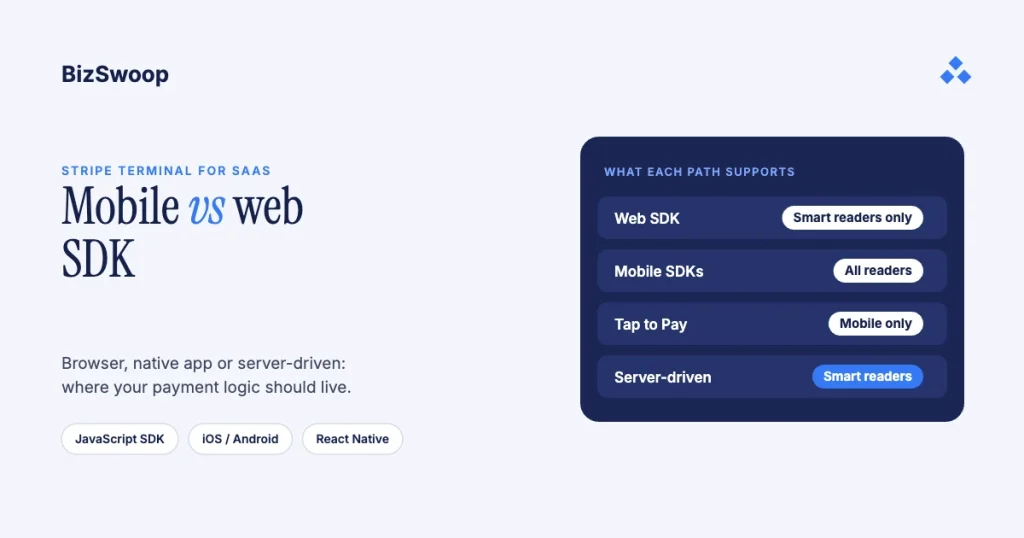
For a SaaS app, choose the Stripe Terminal web or mobile SDK by your client and your reader. Use the JavaScript (web) SDK for a browser-based POS with smart readers on a local network you control, with working local DNS. Use the iOS, Android or React Native (mobile) SDK for a native app, for mobile readers like the Stripe Reader M2, and for Tap to Pay. For smart readers (Stripe Reader T600, S700/S710, BBPOS WisePOS E and Verifone), evaluate the server-driven integration first: Stripe recommends it over the JavaScript SDK because it drives the reader through the Stripe API instead of your local network. “Mobile vs web” is where most teams start, but the decision that shapes a SaaS architecture is SDK vs server-driven, so this guide keeps the comparison you came for and adds the axis that decides real projects.
Jovvie, an official Stripe Partner, has built in-person Stripe Terminal payments for WooCommerce merchants since 2016, across browser and native clients. Every requirement below was re-checked against Stripe’s documentation in November 2026. This guide sits under the Stripe Terminal SaaS embedding guide; for the reader-by-reader version of the decision, read which Stripe Terminal SDK to use.
Key Takeaways
- Web SDK = browser POS + smart readers + a LAN you control. It supports smart readers only and needs the POS and reader on the same local network with working local DNS.
- Mobile SDKs cover everything else. iOS, Android and React Native support smart readers, mobile readers (M2, WisePad 3) and Tap to Pay.
- Server-driven is the SaaS default for smart readers. Stripe recommends it over the JavaScript SDK, and it removes the same-network requirement.
- Tap to Pay is mobile-only. There’s no browser Tap to Pay; a “no hardware” pitch needs a native or React Native client.
- You can mix paths on one fleet. A smart reader responds to an SDK and a server-driven integration at the same time.
- Connect platforms lean server-side. Connection tokens, reader registration and application fees all live on your backend.
Should my SaaS app use the web or mobile SDK?
Use the web (JavaScript) SDK for a browser POS with smart readers on a network you control; use a mobile SDK for native apps, mobile readers and Tap to Pay; and for smart readers, consider the server-driven integration instead of either.
Stripe Terminal’s options are the JavaScript, iOS, Android and React Native SDKs, plus a server-driven integration that controls smart readers from your backend with no client SDK (Select a reader; Stripe support: server-driven integration). The common mistake is starting from the app platform (“we’re a web app, so JS SDK”) when the reader you deploy is the stronger constraint.
Why is SDK vs server-driven the real decision?
Because that choice decides where your payment logic lives, which network conditions you depend on, and how the integration behaves across tenants whose networks you don’t control.
A client SDK runs inside your app on the point-of-sale device: it discovers the reader, connects and drives the transaction. A server-driven integration inverts that: your backend calls the Stripe API to control the reader, and your POS app is a thin client that asks your server to “collect $42 on reader X.” Stripe’s JavaScript setup guide says that for smart readers such as the WisePOS E, S700/S710 and Verifone readers it recommends the server-driven integration instead of the JavaScript SDK, because the JS SDK needs the POS and reader on the same local network with working local DNS, while server-driven uses the Stripe API (Set up your integration: JavaScript). The T600 supports server-driven too.
For a SaaS builder that lands harder than for a single store. You deploy into networks you don’t own, across tenants whose IT varies, often next to a .NET or Java backend you already run. Server-driven keeps payment orchestration on infrastructure you control and removes the local-network dependency that breaks browser deployments in the field.
When is the JavaScript (web) SDK the right call?
Use the JavaScript SDK when your product is a browser-based POS, your readers are smart readers, and you control the network the browser and reader share.
It’s the only Terminal SDK that runs in a browser, so it suits a web register: nothing to install, no app-store review, and updates ship when you deploy. The catch is the network requirement: the POS device and reader must be on the same local network with working local DNS. You can even run it in a mobile browser, as long as the phone is on the reader’s network and devices there can talk to each other directly. Two more constraints: it supports smart readers only (no M2 or WisePad 3), and Chrome 142 and later ask for explicit permission before a site can reach local network devices like Terminal readers.
On one well-run store LAN that’s fine. Across merchant sites with guest Wi-Fi, VLAN isolation, captive portals or DNS you don’t control, it’s a support burden. If any of those are shaky, keep your browser UI and drive the readers server-driven instead; being a web app doesn’t force you onto the JS SDK.
When should you use the iOS, Android or React Native SDK?
Use a mobile SDK when you ship a native app, use mobile readers such as the Stripe Reader M2 (US) or BBPOS WisePad 3 (outside the US), or need Tap to Pay; the web path can’t do the last two.
The mobile SDKs are the right answer in three situations:
- A native app. You want the reader driven from the device your users already hold. Mobile SDKs also support smart readers.
- Mobile readers. The M2 and WisePad 3 connect over Bluetooth (or USB on Android) to a phone or tablet, so they need a native client.
- Tap to Pay on iPhone or Android. It’s mobile-only, so a browser POS that wants “tap on the phone, no hardware” can’t deliver it.
Cross-platform teams use the React Native SDK, which is still in public preview and wraps the native SDKs (iOS 16+, Android minSdk 26). The trade-off against the web path is the usual native one: app-store review, per-platform builds and slower updates. You accept it when Tap to Pay, mobile readers, offline payments or a polished native register are the point.
When does the server-driven integration win for SaaS?
It wins when you deploy smart readers, run your own middleware or a .NET/Java backend, operate on networks you don’t control, or embed Terminal for downstream merchants, which describes most SaaS deployments.
Your backend mediates every request: the POS asks your server to collect a payment, your server calls the Stripe API, and Stripe sends the instruction to the reader. The advantages compound for a platform:
- No same-LAN requirement, so it survives messy merchant networks.
- Reuses your middleware. Reader logic lives in the service layer you already run instead of a client you ship to every device.
- Centralized orchestration that’s easier to monitor, log and reconcile across tenants.
- Fits Stripe Connect, where you register and drive readers for connected accounts from your backend, and server-driven integrations don’t need connection tokens (Use Terminal with Connect).
The limits to plan for: server-driven supports smart readers only and doesn’t support offline payment collection. A pocket M2 or Tap to Pay puts you back on a mobile SDK for that flow, and many SaaS products run both.
Running in-person payments for WooCommerce stores? Jovvie runs on Stripe Terminal readers and Tap to Pay out of the box.
Can you run an SDK and server-driven integration together?
Yes. A smart reader responds to an SDK integration and a server-driven integration without extra configuration, so for many SaaS products a hybrid is the right architecture, not a compromise. Two patterns recur:
- Server-driven at the counter, mobile SDK on the floor. Smart readers at fixed registers run server-driven from your backend, while roaming staff use a native app with Tap to Pay or an M2 for line-busting and curbside.
- Server-driven core with a browser front end. Your web POS UI stays in the browser, but it calls your server, not the reader, so you keep the web’s distribution advantages without the JS SDK’s network constraint.
Pick the primary path for your dominant surface, then add the second only where a specific flow (Tap to Pay, a pocket reader, offline payments) demands it. Note that a reader connects to one SDK instance at a time.
How does a Connect platform model affect the choice?
If your SaaS embeds Terminal for downstream merchants through Stripe Connect, that pushes you toward a backend-centric, server-driven design. You create connection tokens for the right account and Location, register and manage readers for merchants, and set application fees on each payment; all of that is server-side (Use Terminal with Connect). Treat server-driven as the default for smart readers and add client SDKs only for the mobile and Tap to Pay surfaces that need them. The fee and tenancy architecture is in the Connect for Terminal platforms guide, multi-tenant Stripe Terminal architecture and OAuth and connection token patterns for SaaS embeds.
What does the decision matrix look like for SaaS?
Match your client and reader to a row; the last column is the recommendation.
| Integration path | Client type | Network requirement | Readers | Tap to Pay | Offline payments | Connect / platform fit | Recommendation |
|---|---|---|---|---|---|---|---|
| JavaScript (web) SDK | Browser POS | POS + reader on the same LAN with working local DNS | Smart readers only | No | No | Workable, but PaymentIntents must be created server-side | Only when you control the LAN |
| iOS SDK | Native iOS app | Bluetooth or LAN to the reader | All readers | Yes (iPhone) | Yes | Client-side token handling | Native iOS and Tap to Pay |
| Android SDK | Native Android app or Apps on Devices | Bluetooth, USB or LAN | All readers | Yes (Android) | Yes | Client-side token handling | Native Android and Tap to Pay |
| React Native SDK (public preview) | Cross-platform app | Bluetooth or LAN | All readers | Yes | Yes | Client-side token handling | Cross-platform native |
| Server-driven | Any (thin client) | Stripe API: no same-LAN requirement | Smart readers only | No | No | Best fit: tokens not needed, fees server-side | Recommended for smart readers |
Two rules sit inside that table. For smart readers, server-driven is the safest default across every client, web or native. And Tap to Pay is mobile-only, so any product whose pitch is “no hardware, tap on the phone” needs a mobile SDK whatever the rest of the app is built in.
What’s the recommendation?
Default to server-driven for smart readers, use a mobile SDK for native apps, mobile readers and Tap to Pay, and keep the web SDK for a browser POS on a network you control.
If you deploy smart readers, build server-driven and put the reader logic in your existing backend; it’s Stripe’s recommendation over the JS SDK and it removes the network fragility that sinks browser rollouts across tenants. If your product’s value is a native experience or Tap to Pay, use the iOS, Android or React Native SDK. Choose the JavaScript SDK only for a browser POS on a LAN you can guarantee. When one product spans a fixed counter and a roaming floor, run both paths side by side. The keyword asks “mobile vs web SDK”; for most SaaS builders the honest answer is “start server-driven, and add a client SDK where the surface demands it.”
Frequently asked questions
Can I use the Stripe Terminal JavaScript SDK on mobile?
Yes, in a mobile browser, as long as the phone is on the same local network as the smart reader and devices on that network can talk to each other directly. It can’t use Tap to Pay or mobile readers like the M2; for those, use the iOS, Android or React Native SDK.
What is Stripe Terminal server-driven integration?
It drives smart readers from your backend through the Stripe API, with no client-side Terminal SDK. Your POS asks your server to collect a payment, your server calls Stripe, and Stripe sends the request to the reader. Stripe recommends it over the JavaScript SDK for smart readers; it doesn’t support Bluetooth readers or offline payments.
Does Stripe Terminal require the reader on the same network?
Only for SDK connections over the local network, most notably the JavaScript SDK, which needs the POS and reader on the same LAN with working local DNS. The server-driven integration uses the Stripe API instead, which is why Stripe recommends it for smart readers in complex networks.
Which Stripe Terminal SDK should I use for a web app vs a native app?
For a web app with smart readers, use the server-driven integration, or the JavaScript SDK if you control the local network. For a native app, use the iOS, Android or React Native SDK, especially for mobile readers or Tap to Pay, which are mobile-only.
Can I use an SDK integration and server-driven integration together?
Yes. A smart reader responds to both without extra configuration, so you can run server-driven at fixed counters and a mobile SDK with Tap to Pay or an M2 for roaming staff on the same fleet.
Does the JavaScript SDK work with the Stripe Reader M2?
No. The JavaScript SDK supports smart readers only. The M2 connects over Bluetooth or USB and needs the iOS, Android or React Native SDK.
Want a second opinion on your integration path?
Your readers, network topology, middleware and Connect model decide the right path more than any SDK feature list. Talk to a Jovvie advisor and we’ll map your constraints to an integration plan. If your merchants sell through WooCommerce, a Stripe POS like Jovvie covers browser and mobile checkout out of the box.
Sources: Select a reader · Set up your integration: JavaScript · Set up your integration: React Native · Server-driven integration (Stripe support) · Stripe Terminal smart readers · Use Terminal with Connect.
