
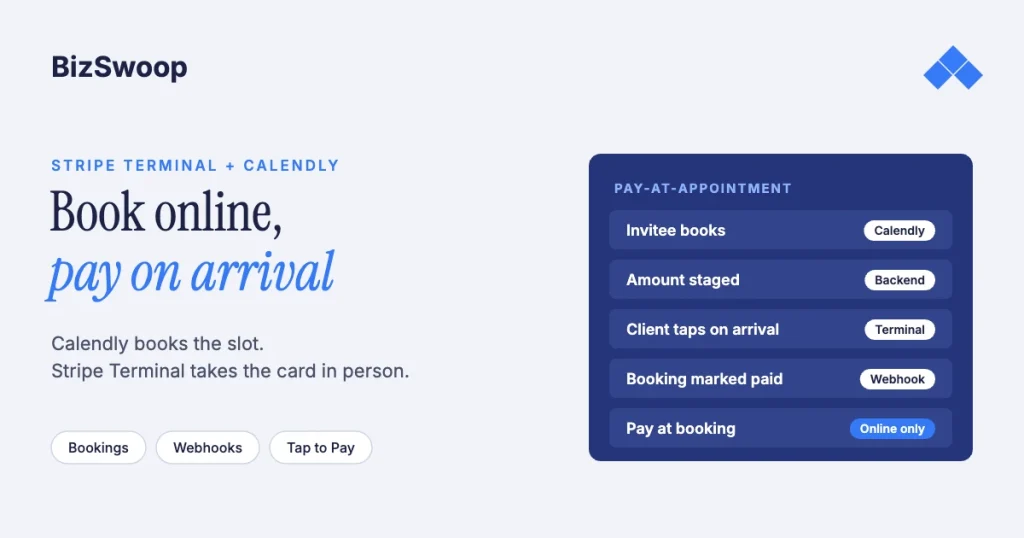
Calendly can’t take a card-present payment at the appointment, but you can add one with Stripe Terminal. Calendly’s Stripe integration charges online when someone books: cards, Apple Pay, Google Pay, Link and, where available, Affirm or Klarna. To collect in person when the client arrives, treat the Calendly booking as a trigger that stages the amount due, and take the card on a Stripe Terminal reader or Tap to Pay at the appointment.
Jovvie, an official Stripe Partner, has built in-person Stripe Terminal payments for WooCommerce merchants since 2016. The Calendly and Stripe details below were re-checked against both vendors’ documentation in November 2026. This guide sits in the SaaS pillar, Stripe Terminal beyond POS: embedding card-present payments into SaaS platforms. For payments taken without a register, see the back-office and phone payments guide.
Key Takeaways
- Calendly’s Stripe integration is pay-at-booking only. It requires an online payment to confirm the meeting and has no card reader or in-person option.
- Card-present at the appointment needs Stripe Terminal or Tap to Pay. An in-person tap costs 2.7% + 5¢ in the US, versus 2.9% + 30¢ for the online booking charge.
- The booking is the trigger. A Calendly
invitee.createdwebhook (or a Zapier trigger) tells your backend who is coming and what to collect. - Deposit plus balance means two payments. Tag both with the same appointment ID so reporting pairs them.
- Staff still start the capture. The amount is staged, but someone taps Collect when the client arrives.
- Clean up no-shows. Cancel PaymentIntents for appointments that never happen.
Can you take a card-present payment at a Calendly appointment?
Not with Calendly alone, but yes with a thin automation layer. Calendly is a scheduling tool. With Stripe connected, it can require payment to book, and that payment is an online charge the invitee enters on their own device. Calendly has no concept of a card reader at your front desk, and no “charge on arrival” option.
So you split the jobs. Calendly owns scheduling, Stripe Terminal owns the in-person payment, and an automation connects them when a booking happens. The booking becomes a signal: this client is coming Tuesday at 2 pm, expect to collect $X. The money moves through a reader or Tap to Pay at the appointment.
What does Calendly’s native Stripe integration support?
It collects an online payment when someone books, and that’s all. According to Calendly’s Stripe help article, you connect Stripe, turn on “Require payment to book this meeting” for an event type, and set the amount. Invitees can pay with most credit and debit cards, Apple Pay, Google Pay, Link instant bank payments, and Affirm or Klarna where available. Calendly supports USD, CAD, EUR, GBP and AUD, doesn’t calculate tax, and leaves refunds to you.
What it doesn’t do:
- Start a payment when the client arrives.
- Talk to a Stripe reader or Tap to Pay.
- Run a native “deposit now, balance in person” flow.
- Get in-person pricing: the booking charge is an online payment.
That last point matters at volume. An in-person tap costs 2.7% + 5¢ on Stripe Terminal in the US; an online card payment costs 2.9% + 30¢. The card-present rates guide explains why.
How does the Calendly + Stripe Terminal architecture work?
Calendly booking, then an automation, then a Stripe PaymentIntent, then Tap to Pay or reader capture at the appointment, then a write-back.
- Trigger: the booking. Calendly sends an
invitee.createdevent when someone books. Subscribe with a Calendly webhook or a Zapier trigger so your system learns who is coming, for which event type and at what price. - Automation: stage the amount. A Zap or a small serverless function records the appointment and amount due. Create the PaymentIntent then, or when the client arrives; either way, put the Calendly event and invitee IDs in metadata (PaymentIntents API).
- Capture at the appointment. Staff open the appointment and collect on a smart reader (Stripe Reader S700 or S710, $299 each, or BBPOS WisePOS E), a Stripe Reader M2 ($59) paired with a mobile app, or Tap to Pay on iPhone or Android. The PaymentIntent succeeds at the in-person rate.
- Write the result back. On
payment_intent.succeeded, mark the appointment collected in your CRM, booking record or calendar note.
| Layer | Tool | Role |
|---|---|---|
| Scheduling and trigger | Calendly | Sends invitee.created when someone books |
| Automation | Zapier or a serverless function | Stages the amount and creates the PaymentIntent |
| Payment capture | Stripe Terminal or Tap to Pay | Takes the card in person |
| Reconciliation | Stripe webhook | Marks the appointment paid |
Should you use Zapier or a direct webhook?
Use Zapier to get running this week, and move to a direct webhook when volume, reliability or logic outgrow it. A Zap is quick to build and alerts you to errors, but task-based pricing, limited branching and silent failures show up at scale. A Calendly webhook posting to your own function costs more engineering up front and gives you control over retries, idempotency keys, metadata and deposit-plus-balance logic. Either way, make it idempotent: a webhook can arrive more than once, and one appointment should never get two PaymentIntents.
Taking in-person payments in a WooCommerce store too? Jovvie runs on Stripe Terminal readers and Tap to Pay out of the box.
What does the customer experience look like?
Book online, pay on arrival. The client picks a slot in Calendly and gets the usual confirmation and reminders, with no card needed unless you take a deposit. When they arrive, staff pull up the appointment with the amount already staged, the client taps a card or phone, gets a receipt, and leaves.
How do you handle a deposit at booking and the balance in person?
Plan it as two separate payments on one appointment. The deposit is an online charge through Calendly’s Stripe integration; the balance is a card-present payment at the appointment, possibly on a different card and at a different rate.
- Tag both payments with the same appointment ID in metadata so reporting can pair them. Calendly’s deposit is created by Calendly, so match it by invitee email and time, or look it up from the Calendly event.
- Set the refund policy up front (for example, a no-show forfeits the deposit; a cancellation refunds it) and decide who can issue refunds in Stripe.
- Reconcile the pair on your backend so a collected deposit with an uncollected balance is flagged, not lost.
What are the limitations?
This is glue code, not a Calendly feature.
- No native reader hook. If the automation fails, the appointment still happens but nothing is staged to collect.
- Staff start the capture. It isn’t unattended.
- No-shows leave open PaymentIntents. Cancel them rather than letting them linger.
- Refunds follow Stripe’s rules. Refunds go back to the card that paid and usually take 5 to 10 business days to appear.
- Card data stays on the device. The reader or phone keeps card numbers out of your systems; never collect card numbers in the automation.
Who is this for?
Any business that books online and collects on arrival: consultants and coaches, clinics and wellness practices, salons and studios where the total isn’t final until the end, and field technicians who book visits through Calendly. A mobile technician whose final price depends on the job can confirm the amount on site and take it with Tap to Pay, and the office sees the job paid before the van leaves.
Frequently asked questions
Does Calendly integrate with Stripe?
Yes. Calendly’s Stripe integration collects an online payment when someone books, with cards, Apple Pay, Google Pay, Link, and Affirm or Klarna where available. It doesn’t take card-present payments at the appointment.
Can you take payment at the time of a Calendly appointment?
Not with Calendly alone. Use the booking as a trigger that stages the amount due in Stripe, then capture it card-present on a Stripe Terminal reader or Tap to Pay when the client arrives.
Can Calendly charge a card in person?
No. Calendly has no card reader support. Add Stripe Terminal or Tap to Pay and connect it to Calendly with Zapier or a webhook.
Does Calendly support Tap to Pay or a card reader?
Not directly. Tap to Pay and Stripe readers are Stripe features. Calendly handles scheduling, Stripe Terminal handles the in-person payment, and an automation connects them.
How do I collect payment for a booked meeting in Calendly?
For prepayment, turn on “Require payment to book this meeting” with Stripe in the event type. For payment on arrival, use the pattern in this guide: Calendly booking, automation, Stripe PaymentIntent, then Tap to Pay or reader capture at the appointment.
Is an in-person payment cheaper than Calendly’s online payment?
Usually. In the US, Stripe Terminal charges 2.7% + 5¢ per in-person payment (plus 10¢ for Tap to Pay), while an online card payment is 2.9% + 30¢.
Building pay-at-appointment for your business?
Bring your booking flow and how you collect today, and we’ll map the Calendly, automation and Stripe Terminal layers. If you also sell through WooCommerce, a Stripe POS like Jovvie handles the counter.
Sources: Calendly + Stripe · Calendly API · PaymentIntents API · Tap to Pay · Stripe Terminal pricing · Stripe pricing.
