
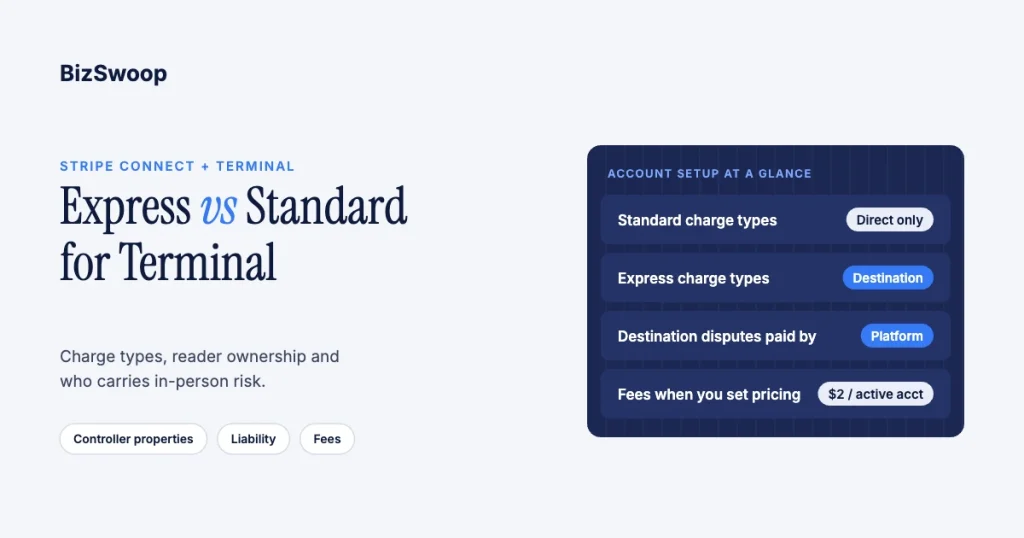
Most platforms that run Stripe Terminal for their merchants should use Express-style connected accounts with destination charges. That pairing lets your platform own the reader fleet, control pricing and run the checkout. Standard-style accounts fit platforms whose merchants are established businesses that want their own full Stripe account, their own readers and their own Stripe relationship. Generic “Express vs Standard” comparisons are written for online marketplaces; for an in-person platform the decision turns on three questions: which charge types you can use, who owns the readers, and who carries losses from disputes and refunds.
One thing has changed since most of those comparisons were written: Stripe now calls Standard, Express and Custom legacy account types and recommends configuring new connected accounts with controller properties or its Accounts v2 API (connected account types). The trade-offs below still apply; they’re just set property by property. Jovvie, an official Stripe Partner, has built in-person Stripe Terminal payments for WooCommerce merchants since 2016, and every mechanic here was re-checked against Stripe’s documentation in November 2026. This is a cluster piece under the Stripe Connect for Terminal platforms guide.
Key Takeaways
- Standard accounts support direct charges only. That means the merchant is the merchant of record and its readers are registered to its own account, never to a shared platform pool.
- Express accounts unlock destination charges. The platform owns Locations and readers on its own account, so one reader can serve many merchants and you control pricing.
- Liability follows the charge type and loss settings. On destination charges the platform always pays disputes and refunds; Express and Custom also make the platform responsible for negative balances.
- Express costs more when you handle pricing. Connect charges $2 per monthly active account plus 0.25% + 25¢ per payout; Standard accounts, where Stripe handles pricing, carry no Connect fees.
- Application fees work the same on both. You set
application_fee_amounton the PaymentIntent either way; what changes is who pays Stripe’s 2.7% + 5¢. - Build with controller properties. Model fee payer, loss liability and dashboard type directly instead of hard-coding “Express” or “Standard”.
How do Express and Standard compare for a Terminal platform?
Express suits platforms that operate the in-person payment experience; Standard suits platforms that connect merchants who should run their own Stripe accounts. Here is the comparison on the axes that matter for card-present payments.
| Criterion | Standard | Express | Custom (for reference) |
|---|---|---|---|
| Supported charge types | Direct only | Destination, separate, direct | Destination, separate, direct |
| Where readers and Locations live | Connected account | Platform (destination charges) | Platform (destination charges) |
| Fraud and dispute liability | Connected account on direct charges | Platform | Platform |
| Negative balances covered by | Stripe | Platform | Platform |
| Who pays Stripe’s fees | Connected account | Platform | Platform |
| Merchant dashboard | Full Stripe Dashboard | Express Dashboard | None (you build it) |
| Onboarding and verification | Stripe | Stripe | Platform or Stripe |
| Connect fees | None | $2 per active account + 0.25% + 25¢ per payout | Same as Express |
| Integration effort | Lowest | Low | Significantly higher |
Liability, charge types, dashboard and effort come from Stripe’s connected account types page; fee payer and loss settings from controller properties; fees from Connect pricing.
Should my Terminal platform use Express or Standard?
Use Express if your platform deploys the hardware, sets the price and runs the checkout; use Standard if your merchants are independent businesses that should own their Stripe account and their risk.
A card-present integration is usually platform-operated: your software drives a reader on the merchant’s counter. Express is built for that. Stripe handles onboarding and identity verification, while the platform sets charge types and payout timing and, typically, handles disputes and refunds, though you can let merchants manage both in the Express Dashboard. Standard gives the merchant a direct relationship with Stripe and the full Dashboard, which suits store-builder-style platforms whose merchants already run their business on Stripe.
Who owns the readers under each account type?
Reader ownership follows the charge type, and the account type limits which charge types you can use: Standard means direct charges and merchant-owned readers; Express usually means destination charges and a platform-owned fleet.
- Direct charges (the only option on Standard). You create the connected account’s Locations, register its readers and create its connection tokens with your platform key plus the
Stripe-Accountheader. A Standard merchant can also register readers from its own Dashboard; Stripe notes that if a merchant registers a reader itself for Stripe’s ready-made Standalone apps, those payments run as its own regular charges rather than direct charges from your platform (Use Terminal with Connect). - Destination charges (Express and Custom). Locations and readers live on your platform account, and connection tokens are created without the
Stripe-Accountheader. Stripe suggests one Location per connected account; a reader can then take a payment for any merchant you route it to. This is what makes a managed hardware program or a shared counter workable.
If several readers share one store, the mechanics are covered in pairing multiple Stripe readers to one location.
Who carries dispute and loss liability in person?
The charge type decides which balance Stripe debits for a dispute, and the loss setting decides who covers it when a merchant can’t pay.
Per Stripe’s disputes on Connect platforms:
- Destination charges and separate charges and transfers: Stripe debits the disputed amount and fees from the platform, with or without
on_behalf_of. You can reverse the transfer to recover funds from the merchant. - Direct charges: Stripe debits the connected account first. If it can’t, the party responsible for negative balances pays: Stripe for Standard-style accounts, the platform for Express and Custom.
Card-present payments help. A properly completed chip or contactless transaction shifts most counterfeit-fraud liability away from the merchant, so in-person disputes are rarer than online ones, but “I didn’t authorize this” and service disputes still happen. Choosing Express with destination charges means underwriting your merchants’ in-person risk; it’s a reasonable trade for the control and revenue, and one your finance team should sign off on. Stripe recommends platforms that carry this risk set trust thresholds before offering features like Instant Payouts.
How do application fees and Connect costs differ?
Application fees work identically: you set application_fee_amount on the Terminal PaymentIntent under either account type. What differs is who pays Stripe’s processing fee and whether Connect charges your platform.
- Express with destination charges. The platform pays Stripe’s 2.7% + 5¢ in-person fee on every payment, so your application fee must exceed it. Because your platform handles pricing, Connect charges $2 per monthly active account (active means it received a payout that month) and 0.25% + 25¢ per payout.
- Standard with direct charges. The connected account pays Stripe’s fees directly, your application fee is pure platform revenue, and there are no Connect platform fees because Stripe handles pricing.
- Express with direct charges. Possible, but Stripe warns that direct charges on legacy Express or Custom accounts bill the connected account at standard rates; use destination charges if you want pricing control.
The money flow on a real Terminal charge is walked through in how application fees work on Stripe Terminal, and pricing strategy in Stripe application fee best practices.
Want in-person payments for WooCommerce without building the Connect layer yourself? Jovvie runs on Stripe Terminal readers and Tap to Pay out of the box.
What are controller properties, and should I use them instead?
Controller properties are the individual settings the legacy types bundled together, and Stripe recommends using them for new connected accounts; migrating existing accounts is optional and backward compatible.
| Property | Standard maps to | Express maps to | What it decides |
|---|---|---|---|
fees.payer | account | application | Who pays Stripe’s fees |
losses.payments | stripe | application | Who covers negative balances |
requirement_collection | stripe | stripe | Who collects verification updates |
stripe_dashboard.type | full | express | Which dashboard the merchant sees |
Stripe notes that accounts created with type=express get fees.payer=application_express rather than application, which changes fee billing on direct charges, and that a dashboard type can’t be changed after an account is created (controller properties). If you’re building new, model your requirements as these properties so your integration doesn’t depend on legacy names.
How do onboarding and the merchant experience differ?
Both use Stripe-hosted onboarding; the difference is what the merchant ends up with: a light Express Dashboard for payouts, or a full Stripe account and Dashboard.
For a clinic, food truck or field-service contractor who just wants to take a card today, Express keeps your platform front and center and asks only what’s needed. Standard suits established, multi-location retailers that want to own their Stripe relationship, manage their own Radar rules and see everything in the full Dashboard.
Which account type fits multi-location and franchise platforms?
Express-style accounts with destination charges fit platforms that run a hardware program across many merchants, because readers, payouts and pricing stay under one roof; Standard fits only when each franchisee is a substantial, independent Stripe customer.
With Express, your platform registers every Location and reader, controls payout timing and offers one branded onboarding to every franchisee. With Standard, each franchisee owns its account and readers, which fragments fleet control and reconciliation. If payments also post to an ERP across subsidiaries, plan it alongside the Stripe Terminal ERP integration patterns guide.
Which should you choose? Recommendation by platform type
The account setup follows from your role: a platform that operates the payment experience wants Express-style accounts; a platform that connects independent businesses wants Standard-style ones.
- Vertical SaaS or ISV embedding Terminal (salon, clinic, field-service software): Express with destination charges.
- Marketplace with a shared in-person counter or kiosk: Express with destination charges, or separate charges and transfers if one sale splits across vendors.
- Franchise or multi-subsidiary platform: Express, for central fleet and payout control.
- Platform connecting large merchants who already run on Stripe: Standard with direct charges.
- Platform needing full control of onboarding and merchant UX: Custom-style settings, or Express-style accounts with embedded components, only if you can support the build.
Frequently asked questions
Who is responsible for disputes with Stripe Express accounts?
The platform. Stripe lists Express and Custom accounts as platform-liable for fraud and disputes, and on destination charges Stripe debits disputes from the platform’s balance. You can let Express merchants manage disputes and issue refunds in the Express Dashboard, but the liability stays with you.
Is there a monthly fee for Stripe Express accounts?
When your platform handles pricing, which is how Express accounts work, Connect charges $2 per monthly active account plus 0.25% + 25¢ per payout. An account is active in any month it receives a payout. Standard accounts, where Stripe handles pricing, have no Connect fees.
Can Standard connected accounts use destination charges with Terminal?
No. Stripe lists Standard accounts as supporting direct charges only. Their readers are registered to their own account, so a Standard merchant can’t share a platform-owned reader pool.
Can connected accounts register their own Stripe Terminal readers?
A Standard merchant can register readers in its own Dashboard. On Express with destination charges, readers are registered to your platform account and assigned to merchants by Location, so the merchant doesn’t manage the fleet.
Does account type change how application fees work on Terminal?
No. You set application_fee_amount on the Terminal PaymentIntent either way. Account type changes who pays Stripe’s 2.7% + 5¢ fee, whether Connect charges your platform, and who carries losses.
Should new platforms still choose between Express and Standard?
Stripe now treats the types as legacy and recommends controller properties or the Accounts v2 API. The same trade-offs apply, set individually: fee payer, loss liability, requirement collection and dashboard type.
Want a second opinion on your account setup?
The account choice decides who owns the readers, who carries in-person risk and how your fees work per merchant, and a dashboard type can’t be changed later. Talk to a Jovvie advisor and we’ll map your account settings, reader ownership and fee model against your platform. If your merchants sell through WooCommerce, a POS for Stripe like Jovvie handles the in-person side.
Sources: Connected account types · Controller properties · Use Terminal with Connect · Disputes on Connect platforms · Recommended Connect configurations · Connect pricing · Stripe Terminal pricing.
