
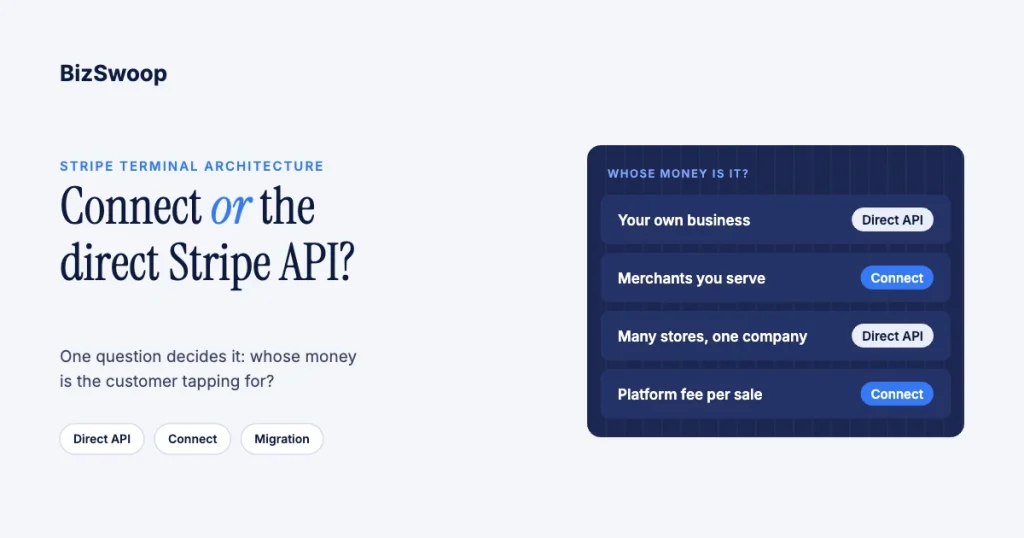
Use the direct Stripe API with Terminal when one business is taking its own in-person payments; use Stripe Connect only when you take payments on behalf of other merchants. That covers reselling readers to sub-merchants, onboarding businesses that sell through your software, and paying out third parties. One legal entity collecting its own money never needs Connect; the moment money is destined for someone else’s bank account, you do. Charge types, reader ownership and dispute liability all follow from that first fork. This guide gives the verdict, a decision matrix in business terms, and how to move from the direct API to Connect later without replacing your readers.
Jovvie, an official Stripe Partner, has built in-person Stripe Terminal payments for WooCommerce merchants since 2016. Every mechanic below was re-checked against Stripe’s documentation in November 2026. For the full economics of Terminal on Connect, see the Stripe Connect for Terminal platforms guide; if you already know you need Connect, see Express vs Standard for Terminal. For tenant isolation on a platform, see multi-tenant Stripe Terminal architecture.
Key Takeaways
- Ask whose money it is. If every in-person payment belongs to your own business, use Terminal with the direct Payments API; if it belongs to merchants you serve, use Connect.
- Size doesn’t force Connect. Many locations, many readers and high volume all work on one Stripe account; only routing money to other businesses does.
- Application fees only exist in Connect. If you want a cut of each merchant’s in-person sale, you need a Connect platform.
- Reader ownership follows the charge type. Destination charges keep Locations and readers on the platform; direct charges put them on each connected account.
- Migration doesn’t mean new hardware. Smart readers are re-registered to the account that should own them, and Bluetooth readers connect with a token from the new account.
- Choose the charge type before migrating. It decides where readers live, who pays Stripe’s fees and how your finance team reconciles.
When should I use Stripe Connect vs the direct Stripe API for Terminal?
Use the direct Stripe API when your own business is the only party being paid; use Connect when payments are collected for other merchants who each need their own payouts.
Connect isn’t a “more powerful” version of Terminal that bigger companies graduate to. It is the tool for routing money to parties other than yourself. A chain of your own stores under one company collects every payment into your account, and Terminal plus the Payments API is the whole toolkit. A software platform putting readers on its customers’ counters, where each customer is a separate business needing its own funds and liability, needs Connect, because there is no other way to settle an in-person payment to a merchant who isn’t you.
Do you need Stripe Connect for Terminal? The three-question test
You need Connect for Terminal only if you take in-person payments on behalf of other businesses.
- Are the payments yours or someone else’s? Your own revenue means the direct API; revenue belonging to merchants you serve means Connect.
- Does anyone else need a payout? Splitting funds or paying out third parties from in-person sales requires Connect.
- Does anyone else need to carry the tax, dispute or compliance responsibility for the sale? Sub-merchants who must own their own chargebacks and tax reporting need their own connected accounts.
Three “no” answers mean the direct API is enough. Any “yes” means Connect.
When is the direct Stripe API enough?
The direct API is enough whenever one legal entity collects, owns and is liable for every in-person payment it takes.
That covers a retailer, restaurant group, clinic or field-service company running Terminal for its own business, across any number of locations and readers. You register your own Locations and readers, own the PaymentIntents, receive the funds and pay your own fees and disputes. There’s no application fee, no connected account and no Stripe-Account header. You’re correctly on the direct API if:
- Every reader collects into the same company’s account.
- You aren’t splitting funds or paying out third parties.
- Finance reconciles one set of payouts to one company’s bank accounts.
- You have no plans to let other businesses take payments through your software.
When is Connect required?
Connect is required when your in-person payments are collected on behalf of other merchants.
- You’re a software platform or ISV embedding Terminal so your customers take card-present payments as their own businesses.
- You run a marketplace where in-person sales belong to independent vendors who each need payouts.
- You manage a reader fleet for merchants and route each merchant’s money to its own account.
- You want an application fee, your platform’s cut of each in-person payment; application fees exist only within Connect.
Every connected account that takes Terminal payments needs the card_payments capability (Use Terminal with Connect).
How do direct, destination and separate charges differ for Terminal?
The charge type decides where the money first lands, who owns the readers and who pays Stripe’s fees, refunds and disputes (how charges work in a Connect integration).
| Criterion | Direct charges | Destination charges | Separate charges and transfers |
|---|---|---|---|
| Where the payment lands | Connected account | Platform, transferred to the connected account automatically | Platform, then you create transfers |
| How you drive the reader | Platform key plus Stripe-Account header | Platform key; connected account identified in metadata and on the PaymentIntent | Platform key, charges on the platform |
| Locations and readers owned by | Connected account | Platform | Platform |
| Stripe fees, refunds, disputes | Connected account by default (fee payer set on the account) | Platform, always | Platform, always |
| Reconciliation | Money lands where it belongs | Platform is an intermediary | Platform plus per-transfer allocation |
| Best fit | Merchants who should own their Stripe relationship and liability | Platforms that control pricing and the experience | One payment split across several parties |
Stripe pairs direct charges with Stripe covering negative balances, and destination or separate charges with the platform covering them and collecting fees (recommended configurations). Stripe also has a private preview that lets a platform own smart readers while using direct charges, limited to server-driven integrations. In short: direct charges push settlement and liability to the merchant; destination charges keep control, pricing and liability with the platform; separate charges and transfers are for splitting a sale. The money side of each is in how application fees work on Stripe Terminal.
Selling in person on WooCommerce? Jovvie runs on Stripe Terminal readers and Tap to Pay, with no Connect build required.
How do you migrate from the direct API to Connect without new readers?
Decide the charge type, turn your Stripe account into the platform, onboard connected accounts, then move readers only if the charge type requires it; the physical hardware stays.
- Decide the charge type first. With destination charges your existing account becomes the platform and your Locations and readers can stay where they are. With direct charges each merchant’s readers move to its connected account.
- Onboard connected accounts. Configure them with controller properties (fee payer, loss liability, dashboard), and request the
card_paymentscapability. - Move readers only where needed. For direct charges, register each smart reader to the connected account with the
Stripe-Accountheader (using the registration code shown on the reader). Bluetooth and mobile readers aren’t tied to an account the same way: the account is set by the connection token your backend creates, so you clear the SDK’s cached credentials and connect with a token from the new account (switch a reader between Stripe accounts). - Change how you create PaymentIntents. Direct charges: create them with the
Stripe-Accountheader. Destination charges: addtransfer_data[destination],application_fee_amountand, for cross-border accounts,on_behalf_of. Scope connection tokens to a Location. - Repoint settlement and reporting. Funds now land on connected accounts or flow through the platform; brief finance before cutover.
- Cut over one location at a time. Run a full day of settlement on a pilot location before rolling out, and keep the old path as a rollback.
The cost of moving from the direct API to Connect is in code and reconciliation, not hardware. That is often what makes teams comfortable starting lean on the direct API.
The decision in one paragraph
If you’re one business collecting your own in-person payments, use the direct Stripe API with Terminal and don’t add Connect. If you take payments for other merchants, use Connect: direct charges when they should own settlement and liability, destination charges when your platform should control pricing and the experience, and separate charges and transfers when a sale must be split. If you start direct and later become a platform, keep your readers; only their account registration moves, and with destination charges often not even that.
Frequently asked questions
Do I need Stripe Connect to use Stripe Terminal?
No, not if you’re a single business taking your own payments. You use Terminal with the direct Payments API and own the readers, PaymentIntents and funds. You need Connect only when payments are collected for other merchants who need their own payouts.
When is the direct Stripe API enough for in-person payments?
Whenever one legal entity collects, owns and is liable for every payment, however many locations or readers it runs. Volume and store count don’t require Connect; routing money to other businesses does.
Direct charges vs destination charges for Terminal: which should I use?
Use direct charges when your merchants should own their Stripe relationship, fees and chargebacks; payments land on their connected accounts. Use destination charges when the platform should control pricing and the checkout; payments land on the platform, which pays Stripe’s fees and disputes, and are transferred to the merchant.
Who owns the reader under Connect?
It depends on the charge type. On destination charges and separate charges and transfers, the platform owns the Locations and readers. On direct charges, each connected account owns its own, apart from a Stripe private preview for platform-owned smart readers.
How do I migrate from the direct API to Connect later?
Choose the charge type, onboard connected accounts, then move readers only if needed: smart readers are registered to the connected account for direct charges, and Bluetooth readers connect with a token from the new account. Change PaymentIntent creation, update reconciliation and cut over one location at a time.
What is the Stripe-Account header and when do I use it?
It’s the header your platform sends to act on behalf of a connected account. With direct charges you use it to create Locations, register readers, create connection tokens and create PaymentIntents on the connected account. With destination charges you don’t; everything is created on the platform.
Not sure which side of the line you’re on?
Adding Connect when you don’t need it buys months of avoidable complexity; skipping it when you’re really a platform forces a migration later. Talk to a Jovvie advisor for a straight answer on whether you need Connect, which charge type fits, and how to set up readers so a later move is painless. If you sell through WooCommerce, a Stripe POS like Jovvie runs Terminal without a Connect build.
Sources: Use Terminal with Connect · Charge types · Recommended Connect configurations · Switch a reader between Stripe accounts · Controller properties · Stripe Terminal docs.
