
On a Connect platform running Stripe Terminal, your revenue is the application fee you set on each in-person payment, and who pays Stripe’s 2.7% + 5¢ depends on the charge type. On destination charges the platform always pays Stripe; on direct charges the fee payer is set when the connected account is created. After that, funds pay out on each account’s schedule, and when your platform handles pricing Connect adds its own per-account and per-payout fees. Every clause hides a decision that affects your margin, your reconciliation workload and who files the 1099-K. Generic Stripe fee articles cover one merchant paying its own fees; the platform mechanics are spread across a dozen Stripe pages, and this guide puts them together for in-person payments.
Jovvie, an official Stripe Partner, has built in-person Stripe Terminal payments for WooCommerce merchants since 2016. Every mechanic below was re-checked against Stripe’s documentation in November 2026. If you haven’t chosen an account setup or charge type yet, start with the Stripe Connect for Terminal platforms guide.
Key Takeaways
- Destination charges: the platform pays Stripe. Stripe takes its fees, refunds and disputes from the platform balance, so your application fee must cover the 2.7% + 5¢ before you earn anything.
- Direct charges: the fee payer is an account setting. The connected account pays Stripe by default; set
fees.payer=applicationwhen you create the account if your platform should. - Your revenue is the application fee. Set
application_fee_amountin cents on the PaymentIntent; it’s separate from Stripe’s processing fee, not a share of it. - Connect adds costs when you handle pricing. $2 per monthly active account and 0.25% + 25¢ per payout, plus 1% for Instant Payouts; none of the per-account or per-payout fees apply when Stripe handles pricing.
- Reconcile from the payout down. The payout reconciliation report lists every charge, refund and fee in each payout; the NetSuite connector can post it automatically.
- The 1099-K follows the fee payer. Stripe files 1099-Ks for connected accounts that pay Stripe directly; when the platform pays the fees or controls pricing, the platform is responsible for filing.
How do payouts and fee extraction work on a Connect Terminal platform?
It’s a four-stage flow: an in-person payment is created, its charge type decides where the funds land and who pays Stripe, your application fee moves into the platform balance, and each account pays out on its own schedule.
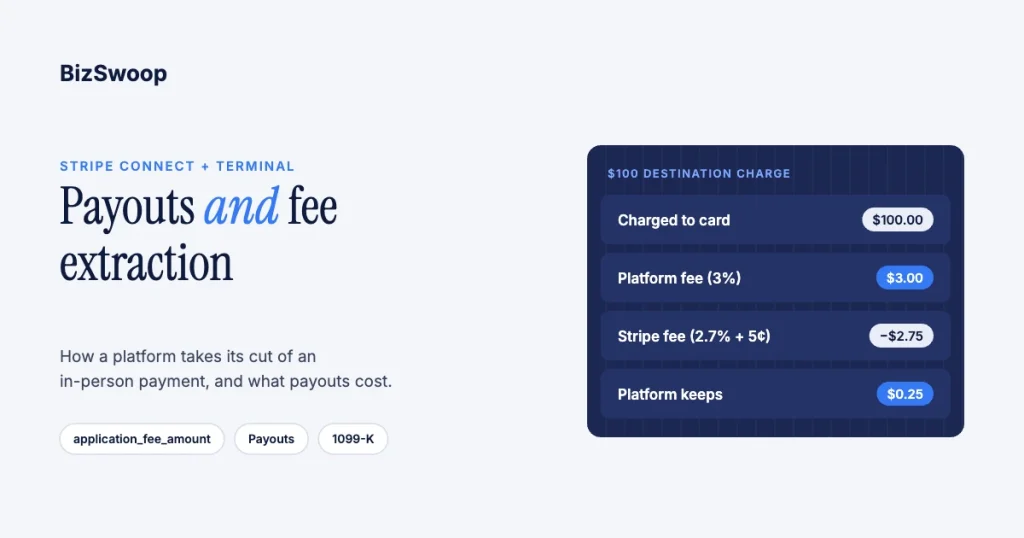
Here’s a $100 in-person sale on destination charges with a 3% application fee:
| Line | Amount | Who bears it |
|---|---|---|
| Charged to the card | $100.00 | Customer |
| Stripe fee (2.7% + 5¢) | $2.75 | Platform |
| Application fee (3%) | $3.00 | Kept by the platform |
| Platform net on the sale | $0.25 | Platform |
| Transferred to the connected account | $97.00 | Merchant |
At a 2% fee the platform would lose $0.75 on this sale. On a direct charge where the connected account pays Stripe, the same 2% would be $2.00 of platform revenue, and the merchant would net $95.25. Stripe documents the fee payer in fee behavior on connected accounts and the Terminal setup in Use Terminal with Connect.
Who pays the Stripe fee, and where do funds settle?
The charge type decides both: destination charges settle on the platform, which pays Stripe and transfers the rest to the merchant; direct charges settle on the connected account, and the account’s fee payer setting decides who pays Stripe.
| Dimension | Direct charges | Destination charges |
|---|---|---|
| Where the payment is created | Connected account (Stripe-Account header) | Platform |
| Funds land in | Connected account | Platform, then transferred automatically |
| Stripe’s processing fee paid by | Fee payer set on the account (connected account by default) | Platform, always |
| Refunds and disputes debited from | Connected account first | Platform |
| Fee mechanism | application_fee_amount | application_fee_amount plus transfer_data[destination] |
| Locations, readers, connection tokens | Connected account | Platform |
| One reader for many merchants | No | Yes |
| Best fit | Merchants with their own Stripe relationship | Embedded SaaS platforms controlling pricing |
Most embedded Terminal platforms choose destination charges: one platform-owned reader fleet serves every merchant, and the platform controls pricing. Direct charges suit merchants that want their own Stripe account and payout control. If your platform pays Stripe’s fees on direct charges, set it when you create the account; Stripe warns that direct charges on legacy Express or Custom accounts bill connected accounts at standard rates (connected account types). The account side is covered in Stripe Connect Express vs Standard for Terminal, and whether you need Connect at all in Stripe Terminal vs the direct Stripe API.
When do funds pay out?
Each account pays out on its own schedule from its own balance. US accounts on Stripe’s standard automatic schedule typically receive funds about two business days after a payment, and platforms can set per-account schedules or trigger manual payouts through the API. With hundreds of connected accounts you’re managing hundreds of payout streams, which is why reconciliation is the real work.
How do you take your platform fee on an in-person payment?
Set application_fee_amount on the PaymentIntent when you create the card-present payment; on destination charges also set transfer_data[destination], and add on_behalf_of when the connected account is in a different country (collect application fees).
Destination charge (platform-owned reader, most common). Created on the platform account:
POST /v1/payment_intents
  amount = 10000                          # $100.00 in cents
  currency = usd
  payment_method_types[] = card_present
  capture_method = manual
  application_fee_amount = 300            # $3.00 to the platform
  transfer_data[destination] = acct_CONNECTED
  on_behalf_of = acct_CONNECTED           # required for Terminal if countries differ
Direct charge (merchant-owned reader). Created on the connected account:
POST /v1/payment_intents
  Stripe-Account: acct_CONNECTED
  amount = 10000
  currency = usd
  payment_method_types[] = card_present
  capture_method = manual
  application_fee_amount = 300            # $3.00 to the platform
Two notes that save reconciliation pain. application_fee_amount is an amount in cents, not a percentage, so your rounding rule is part of your revenue model. And the JavaScript Terminal SDK requires creating the PaymentIntent on your server. The fee mechanics and refund behavior are covered in how application fees work on Stripe Terminal, and pricing strategy in Stripe application fee best practices.
Running in-person payments for WooCommerce stores? Jovvie runs on Stripe Terminal readers and Tap to Pay out of the box.
What does Connect add to payouts?
When your platform handles pricing for its connected accounts, Connect charges a monthly fee per active account and a fee per payout, and Instant Payouts add a percentage; when Stripe handles pricing, there are no Connect platform fees.
| Cost (US, November 2026) | Amount | Applies to |
|---|---|---|
| In-person processing | 2.7% + 5¢ (+1.5% international cards, +10¢ Tap to Pay) | Every card-present payment |
| Active account (you handle pricing) | $2 per monthly active account | Each account that receives a payout that month |
| Payouts (you handle pricing) | 0.25% + 25¢ per payout | Each payout to a connected account |
| Instant Payouts | 1% of payout volume (US minimum $0.50 per payout) | Optional payouts that typically arrive within 30 minutes |
| Cross-border payouts | From 0.25% of payout volume | Payouts to accounts in other countries |
Figures come from Stripe Connect pricing and Instant Payouts for Connect. Because an account is active in any month it gets a payout, a long tail of small merchants costs $2 each month; some platforms use weekly payouts for small accounts to cut per-payout fees. Stripe charges the platform for every Instant Payout regardless of whether you pass it on; you can charge merchants an application fee on Instant Payouts through the Platform Pricing Tool. If you’re liable for negative balances, set trust thresholds (processing volume, days active, chargeback rate) before offering Instant Payouts, since the money leaves before the dispute window closes.
How do you reconcile in-person volume against Connect payouts?
Start from each payout and work down: the payout reconciliation report lists every charge, refund and fee in it, your own records tie each payment to a reader and connected account, and an ERP connector can post the result.
- Start from the payout, not the sale. Pull the payout reconciliation report, which itemizes every transaction included in each payout. It’s the bridge between the bank deposit and the sales at the reader.
- Separate gross, Stripe fees and your fees. Application fees land in your platform balance as Application Fee objects you can list and total; connected accounts with the full Dashboard can use the Balance summary report to see how fees split between Stripe and the platform (calculate Stripe and platform fees).
- Store the money map at the tap. Record the PaymentIntent ID, connected account, reader, Location, gross amount and application fee when the payment happens, so payouts can be rolled back to a site or device.
- Automate the ERP posting. The Stripe Connector for NetSuite creates a NetSuite bank deposit for each payout with fees as line items, and can break Connect transfers and application fees out per connected account. It requires automatic payouts. For the in-person capture side, see NetSuite + Stripe Terminal architecture patterns.
With hundreds of merchants, manual reconciliation doesn’t scale, and a gap between the gross sale at the reader and the net deposit is the most common support question a Terminal platform gets. Build the payout-to-transaction bridge early. The wider reporting picture is in Stripe Terminal for back-office payments.
Who gets the 1099-K, and how do you book platform fees?
Stripe issues 1099-K forms for connected accounts that pay Stripe’s fees directly; when the platform pays the fees or controls pricing, the platform is responsible for filing them (US tax reporting for Connect).
In controller-property terms, Stripe files when fees.payer is account. It doesn’t file when the fee payer is application, or for legacy Express and Custom accounts; those are your platform’s forms to file, and Stripe’s 1099 product can help. A US connected account needs a 1099-K when it had more than $20,000 in gross volume and more than 200 transactions in the calendar year.
For your own books, model platform revenue as the sum of application fees, not a share of gross volume; funds you collect and transfer to merchants are pass-through. If your platform pays Stripe’s fees, book them as a platform expense that offsets fee revenue. This isn’t tax or legal advice; confirm treatment with your accountant, because thresholds and rules change.
Frequently asked questions
Who pays the Stripe fee on a Connect Terminal payment?
On destination charges and separate charges and transfers, the platform always pays Stripe’s fees. On direct charges it depends on the fee payer set when the connected account was created: the connected account by default, or the platform with fees.payer=application.
How do I take a platform fee on a Stripe Terminal payment?
Set application_fee_amount in cents on the PaymentIntent. On destination charges also set transfer_data[destination], plus on_behalf_of when the connected account is in another country. On direct charges, create the PaymentIntent with the Stripe-Account header. The fee lands in your platform balance when the payment succeeds.
What’s the difference between direct and destination charges for payouts?
With direct charges the payment and funds sit on the connected account, which pays out from its own balance. With destination charges the payment lands on the platform, which pays Stripe’s fee and automatically transfers the rest, minus your application fee, to the connected account.
How much does Connect add to payouts?
When your platform handles pricing: $2 per monthly active account and 0.25% + 25¢ per payout. Instant Payouts cost 1% of payout volume, with a $0.50 minimum in the US. When Stripe handles pricing, there are no per-account or per-payout Connect fees. In-person processing is 2.7% + 5¢ in the US either way.
How do I reconcile Connect payouts against in-person sales?
Pull the payout reconciliation report for each payout, list your Application Fee objects for platform revenue, and match payments to readers and Locations using the IDs you stored at the tap. NetSuite users can automate deposits with Stripe’s NetSuite connector.
Does the platform or the connected account get the 1099-K?
The connected account receives it, but who files depends on fees. Stripe files for accounts that pay Stripe directly; when your platform pays Stripe’s fees or controls pricing, including legacy Express and Custom accounts, your platform is responsible for filing. The federal threshold is more than $20,000 and more than 200 transactions a year.
Need help mapping your platform’s money flow?
Payouts, fee extraction, reconciliation and tax reporting decide whether a Terminal platform is profitable and auditable, and they’re hard to unwind once merchants are onboarded on the wrong charge type. Talk to a Jovvie advisor and we’ll map your money flow from tap to payout. If your merchants sell through WooCommerce, a POS for Stripe like Jovvie handles the in-person side.
Sources: Use Terminal with Connect · Fee behavior on connected accounts · Connected account types · Collect application fees · Connect pricing · Instant Payouts for Connect · Payout reconciliation report · Stripe Connector for NetSuite · US tax reporting for Connect · Stripe Terminal pricing.
