
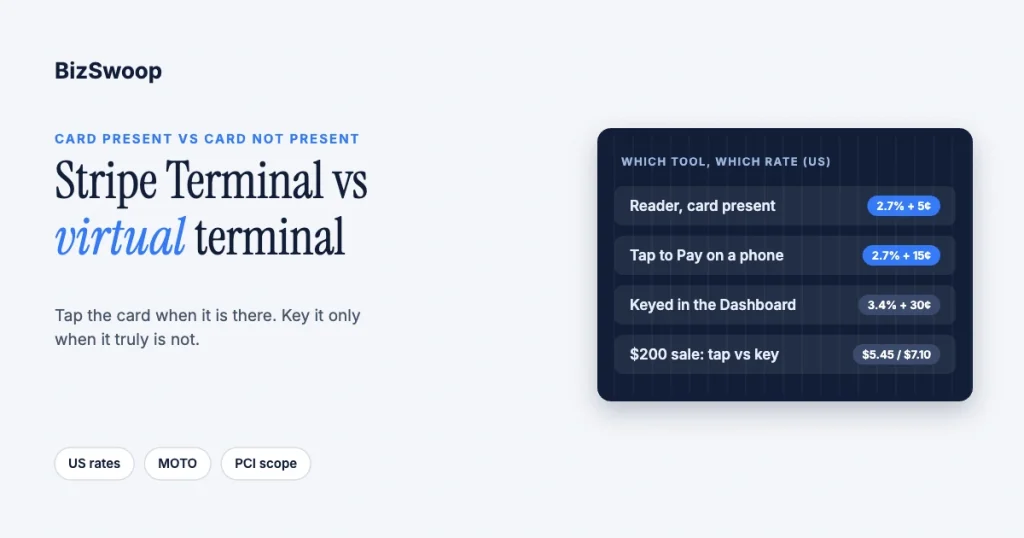
Use Stripe Terminal when the card is physically present and keyed (manual) card entry only when it isn’t. Terminal reads the card on a reader or with Tap to Pay at Stripe’s US in-person rate of 2.7% + 5¢, while a card typed into the Stripe Dashboard is a manually entered, card-not-present payment that Stripe prices at 3.4% + 30¢ in the US. They serve different moments in the same business, and the costly mistake is keying a card that is sitting right in front of you.
BizSwoop runs its own Stripe Connect platform at payments.bizswoop.app, and Jovvie has shipped Stripe Terminal flows for retail, restaurants, field sales and back-office collections since 2016, so the rates and rules below are ones we work with every day. Every figure was re-checked against Stripe’s pricing and support pages in November 2026.
Key Takeaways
- Card present → Stripe Terminal. If the customer or their card is with you, tap or insert it on a reader for 2.7% + 5¢ in the US (2.7% + 15¢ with Tap to Pay).
- Card not present → keyed entry. Phone and mail orders typed into the Dashboard are manually entered payments at 3.4% + 30¢ in the US.
- Keying needs to be switched on. Stripe says you must contact Stripe to enable phone and mail (MOTO) payments through the Dashboard, API or Terminal.
- The rate gap is the decision. On a $200 sale, card-present costs $5.45 and a keyed payment costs $7.10, before counting higher fraud and dispute exposure on keyed cards.
- Don’t key a card that’s in front of you. It costs more, gives up chip and contactless authentication, and changes your PCI paperwork.
- You can run both on one Stripe account. Counter sales and phone orders reconcile in the same Dashboard and payouts.
What is the difference between Stripe Terminal and a virtual terminal?
Stripe Terminal reads a physical card; a virtual terminal is a screen where staff type card details in by hand. That one fact decides the rate, the risk and the compliance work.
- Stripe Terminal is card-present. The customer taps, inserts or swipes on a Stripe reader such as the S700, S710, T600 or M2, or taps their card or phone on Tap to Pay on iPhone or Android. The card is authenticated by its chip or contactless credential (see Stripe’s Terminal docs).
- A virtual terminal is card-not-present. Stripe’s own virtual terminal explainer describes software for accepting a payment by entering card details manually, with no hardware. On Stripe, the built-in route is entering a card in the Dashboard, which Stripe calls a manually entered card payment.
One nuance: Stripe’s explainer says a full virtual terminal is not part of Stripe’s out-of-the-box products and is usually set up through the API, which is why some businesses use a third-party virtual terminal app on top of Stripe. Either way, a typed-in card is a manually entered payment, and Stripe applies the same pricing and rules.
Does Stripe let you key in cards in the Dashboard?
Yes, but not by default. Stripe’s manually entered card payments page says that to process phone and mail payments through the Dashboard, API or Terminal, you must contact Stripe to enable the feature. Once it’s on, Stripe marks these payments as MOTO, and they don’t require 3D Secure authentication.
That page also lists alternatives where the customer enters their own card details, such as Payment Links and hosted invoices, which keep card numbers off your staff’s screens.
How much more does keying a card cost than tapping it?
In the US, a card-present Terminal payment costs 2.7% + 5¢, while a manually entered card costs 3.4% + 30¢ (Stripe’s standard 2.9% + 30¢ online rate plus a 0.5% manual-entry surcharge), according to Stripe pricing and Stripe’s manual-entry support page. Both the percentage and the fixed fee are higher.
| Sale amount | Stripe Terminal, card present (2.7% + 5¢) | Keyed in the Dashboard (3.4% + 30¢) | Extra cost of keying |
|---|---|---|---|
| $15 | $0.46 | $0.81 | $0.35 |
| $50 | $1.40 | $2.00 | $0.60 |
| $100 | $2.75 | $3.70 | $0.95 |
| $200 | $5.45 | $7.10 | $1.65 |
| $1,000 | $27.05 | $34.30 | $7.25 |
Scale it up. A back office keying 200 payments a month at an average of $120 pays about $10,512 a year in fees; taking the same payments card-present costs about $7,896, a difference of roughly $2,600 a year. Tap to Pay adds 10¢ per authorization, so it costs 2.7% + 15¢, still well below keyed entry. International cards add 1.5% on either route.
Against that, a Stripe Reader M2 is $59 and an S700 or S710 is $299 in the US (Stripe Terminal pricing). Whenever the cards really are present, the reader pays for itself quickly. Our card-present rates guide works through the break-even in detail.
When should you use Stripe Terminal?
Use Stripe Terminal whenever the customer or their card is with you at the moment of payment. A tapped or inserted card is authenticated by the chip or contactless credential, which is cheaper and lower-risk than a typed number.
- A counter or register: retail, hospitality or a service desk.
- A field visit: a technician or delivery driver collecting on-site with Tap to Pay or an M2.
- A trade show or pop-up: a booth closing sales or taking deposits.
- A pickup window: a phone order paid when the customer collects, so the payment is card-present rather than keyed. Our back-office payments guide covers this workflow.
When should you key a card instead?
Key a card only when it genuinely can’t be present: a phone order that will ship, a mail-order form, or a remote customer reading you their number.
- Phone orders you can’t defer, such as shipped products or deposits taken sight unseen.
- Mail orders returned with card details.
- Occasional remote collections, although a Payment Link or hosted invoice often works better because the customer types their own card details.
Taking card-present payments at a WooCommerce counter? Jovvie runs on Stripe Terminal readers and Tap to Pay, so in-person sales get the in-person rate.
Why shouldn’t you key a card that’s in front of you?
Keying a present card costs more, removes card-present protections and widens your compliance work, with nothing gained in return.
- You pay the higher rate. 3.4% + 30¢ instead of 2.7% + 5¢ in the US.
- You lose chip and contactless authentication. Stripe attributes the higher manual-entry fee to higher fraud rates on cards collected by phone or other unencrypted methods; see Stripe’s card-present vs card-not-present explainer for the risk difference.
- Your PCI scope grows. Card numbers typed by staff pass through your people and devices. Stripe’s PCI guide lists SAQ C-VT for cards keyed into the Dashboard, instead of the SAQ C that Terminal-only merchants use.
The practical rule: if the card can be present, make it present. Keying exists for when the customer truly isn’t there, not as a way to avoid a $59 reader.
Can you use Stripe Terminal and keyed payments on one account?
Yes. One Stripe account can take card-present payments on readers and manually entered payments for phone orders, and both land in the same Dashboard, reports and payouts. Stripe’s omni virtual terminal explainer describes this pattern of connecting a virtual terminal to your other sales channels.
| Situation | Card present? | Use | US rate |
|---|---|---|---|
| Walk-up counter sale | Yes | Stripe Terminal reader | 2.7% + 5¢ |
| Field visit or on-site collection | Yes | Tap to Pay or M2 | 2.7% + 15¢ (Tap to Pay) / 2.7% + 5¢ |
| Trade-show sale or deposit | Yes | Reader or Tap to Pay | 2.7% + 5¢ / 2.7% + 15¢ |
| Phone order, paid at pickup | Yes, at pickup | Stripe Terminal reader | 2.7% + 5¢ |
| Phone order, shipped | No | Keyed entry, or a Payment Link | 3.4% + 30¢ keyed |
| Mail-order form | No | Keyed entry | 3.4% + 30¢ |
Run down the “card present?” column and the tool and rate follow. If you are comparing software, a POS for Stripe keeps counter sales on Terminal while phone orders go through your normal online checkout.
Is keying cards into Stripe PCI compliant?
It can be, but it puts more of the work on you. Stripe is a PCI Level 1 service provider, yet Stripe’s manual-entry page notes that it can’t verify how card data is kept secure outside Stripe, so you are responsible for protecting card data under PCI rules. That covers who can key cards, whether numbers are ever written down, and the devices staff use.
Terminal is simpler: card data is encrypted inside the reader, and Stripe says merchants who collect card data only through Terminal can validate with SAQ C (Stripe Terminal and PCI compliance). Our Stripe Terminal PCI compliance guide explains the options. This is general information, not compliance advice.
Frequently asked questions
Does Stripe have a virtual terminal?
Stripe lets you key card details into the Dashboard as a manually entered payment once Stripe enables it on your account. Stripe says a full virtual terminal isn’t an out-of-the-box product and is usually set up through the API or a third-party app.
How much does Stripe charge for manually entered cards?
In the US, 3.4% + 30¢ per payment on standard pricing: the 2.9% + 30¢ card rate plus 0.5% for manual entry. A card-present Terminal payment is 2.7% + 5¢.
Can I use a card reader and keyed payments on the same Stripe account?
Yes. Card-present payments on Terminal and manually entered phone or mail payments post to the same Dashboard and payouts. Route each payment by whether the card is physically present.
Is it wrong to key in a card that is physically in front of me?
It isn’t automatically fraud, but it is a poor practice. You pay 3.4% + 30¢ instead of 2.7% + 5¢, lose chip and contactless authentication, and take on more PCI work. If the card is there, use a reader or Tap to Pay.
Do I need to ask Stripe to enable manual card entry?
Yes. Stripe’s support page says you must contact Stripe to enable phone and mail payments through the Dashboard, API or Terminal.
Which PCI questionnaire applies to keyed Dashboard payments?
Stripe’s PCI guide lists SAQ C-VT for cards keyed into the Dashboard. Merchants who take cards only through Stripe Terminal readers can use SAQ C.
Mapping card acceptance across a back office?
If you take payments at a counter, in the field, by phone and at pickup, talk to a Jovvie advisor. We will route each payment type to the cheapest, lowest-risk option it qualifies for and set up reconciliation in one Stripe account.
Sources: Stripe pricing · Manually entered card payments · Stripe Terminal · What is a virtual terminal · Card-present vs card-not-present · Omni virtual terminal · Stripe Terminal and PCI compliance · Stripe PCI guide. This article is educational and is not legal or compliance advice.
