
An application fee is your platform’s cut of a card-present payment it facilitates for a connected account, and it is separate from Stripe’s processing fee. Stripe charges 2.7% + 5¢ in the US to process an in-person card payment; the application fee is what your platform adds, set with application_fee_amount on the Terminal PaymentIntent. Which account pays Stripe’s fee depends on the charge type, so model the two together or your margin will be wrong from day one. This guide follows the money through an actual Stripe Terminal charge, the part most “Stripe fees” explainers skip because they only describe online payments.
Jovvie, an official Stripe Partner, has built in-person Stripe Terminal payments for WooCommerce merchants since 2016. Every mechanic below comes from Stripe’s Connect and Terminal documentation, re-checked in November 2026. For the full picture of in-person pricing, see our Stripe Terminal fee structure for 2026. For charge types, reader ownership and account setup end to end, see the Stripe Connect for Terminal platforms guide.
Key Takeaways
- Two fees, two parties. Stripe’s processing fee (2.7% + 5¢ in person in the US) pays for running the card; the application fee is your platform’s revenue on top.
- Destination charges: the platform pays Stripe. Stripe debits its fees, refunds and chargebacks from the platform balance, so the application fee has to cover Stripe’s fee before you earn anything.
- Direct charges: you choose the payer when you create the account. If the connected account pays Stripe’s fees, set the application fee to your cut only; if the platform pays, set it to cover both.
- The reader setup follows the charge type. Destination charges use platform-owned Locations and readers; direct charges put Locations, readers and connection tokens on the connected account.
- Refunds don’t return your fee by default. The platform keeps the application fee unless you set
refund_application_fee, and on destination charges you must also reverse the transfer. - Every fee is reportable. Each one creates an Application Fee object you can list in the Dashboard, through the API or in Sigma.
What is the difference between an application fee and Stripe’s processing fee?
The processing fee is Stripe’s charge for running the card; the application fee is your platform’s charge for the software and service you provide, and the two are paid to different parties.
| Processing fee | Application fee | |
|---|---|---|
| Who charges it | Stripe | Your platform |
| Who receives it | Stripe | Your platform account |
| US in-person amount | 2.7% + 5¢ (plus add-ons such as +1.5% for international cards) | Whatever you set: a percentage, a flat amount or both |
| How it is set | Stripe’s pricing (or your negotiated pricing) | application_fee_amount on the PaymentIntent |
| Record | Fee on the balance transaction | An Application Fee object |
| Purpose | Cost of running the card | Your platform’s revenue |
The trap is real money. If you price your application fee at 1.5% assuming that is your margin, but your platform pays Stripe’s 2.7% + 5¢, you lose money on every payment. Stripe’s own guidance to marketplaces is blunt: Stripe fees are debited from your balance, so charge a large enough application fee to keep a healthy margin (collect application fees).
How does an application fee flow through a card-present Terminal charge?
On a destination charge, the customer is charged the full amount at the reader, the full amount goes to the connected account, your application fee comes back to the platform, and Stripe’s fee is debited from the platform balance. The fee math is the same as online; what is specific to Terminal is the reader setup around it.
- Set up Locations and readers for the charge type. With destination charges, the platform creates Locations (one per connected account is Stripe’s suggestion) and registers readers to its own account, and creates connection tokens with the platform key. With direct charges, you create them on the connected account using the
Stripe-Accountheader (Terminal with Connect). - Create the PaymentIntent with your fee. Set
application_fee_amountin the smallest currency unit (300for $3.00). For destination charges also settransfer_data[destination]and, when the connected account is the business of record or is in another country,on_behalf_of. - Collect at the reader. The customer taps or inserts their card, and you process and capture the payment.
- The money splits. Stripe transfers the full amount to the connected account, transfers the application fee back to the platform, and debits its processing fee from the platform balance (destination charges).
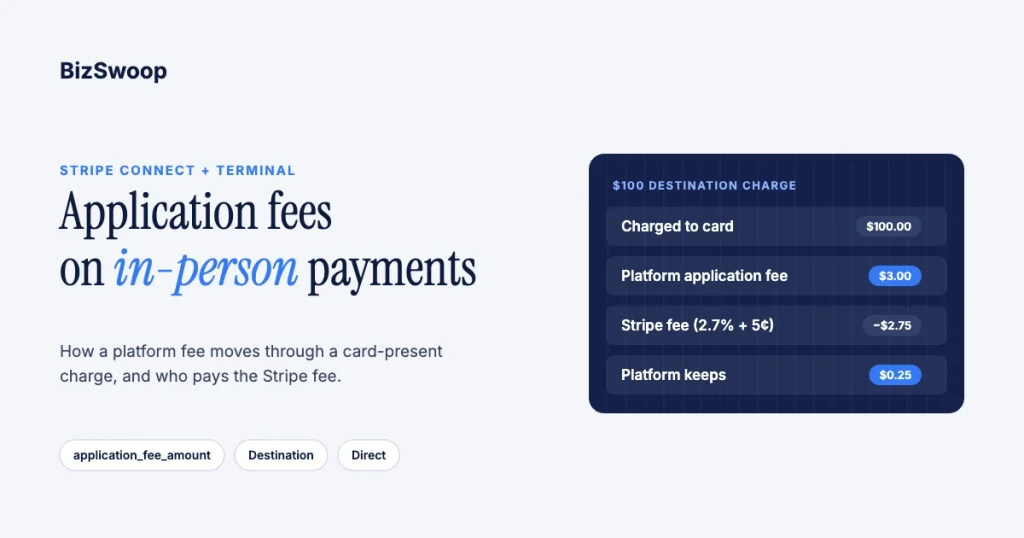
Here is a $100.00 card-present destination charge with a $3.00 application fee at the standard US rate:
| Step | Amount | Where it lands |
|---|---|---|
| Customer’s card is charged | $100.00 | — |
| Application fee | $3.00 | Platform balance |
| Stripe processing fee (2.7% + 5¢) | −$2.75 | Debited from the platform |
| Net to the connected account | $97.00 | Connected account balance |
| Platform net | $0.25 | Platform balance |
That $0.25 is the warning. To run destination charges profitably, price the application fee above your blended Stripe cost per payment, including add-ons like international cards and Tap to Pay’s extra 10¢. Stripe’s Dashboard also has a Platform Pricing Tool for setting fee rules without code.
Which charge type should a Terminal platform use?
Use destination charges when customers are buying from your platform and you want to control the payment; use direct charges when each connected account is its own business and the customer may not know your platform exists. Stripe’s charge-type guide frames it this way:
| Direct charges | Destination charges | Separate charges and transfers | |
|---|---|---|---|
| Charge created on | Connected account | Platform | Platform |
| Business of record | Connected account | Platform (connected account with on_behalf_of) | Platform (connected account with on_behalf_of) |
| Stripe fees paid by | Connected account or platform, set per account | Platform | Platform |
| Refunds and chargebacks debited from | Connected account | Platform (reverse the transfer to recover) | Platform (reverse transfers to recover) |
| Your fee | application_fee_amount | application_fee_amount or a smaller transfer_data[amount] | Whatever you don’t transfer |
| Terminal readers and Locations | On the connected account | On the platform | On the platform |
| Typical fit | SaaS for independent businesses | A platform-branded service | One sale split across several parties |
Two Terminal-specific notes: connected accounts need the card_payments capability to take Terminal payments, and Stripe says to set on_behalf_of whenever the platform and connected account are in different countries. Stripe also offers platform-owned readers with direct charges as a private preview for smart readers on a server-driven integration.
Who pays the Stripe fee: the platform or the connected account?
For destination charges and separate charges and transfers, the platform always pays Stripe’s fees. For direct charges it depends on the fee payer you choose when you create the connected account, and you can’t change it afterwards (fee behavior on connected accounts). How this plays out by account type is covered in Stripe Connect Express vs Standard for Terminal.
- Connected account pays (fee payer
account, including Standard accounts). Stripe deducts its processing fee and your application fee from the payment and pays you your share. Setapplication_fee_amountto your cut only. Stripe charges no Connect fees on these accounts. - Platform pays (fee payer
application). The platform pays Stripe’s payment fees and Connect fees. Setapplication_fee_amounthigh enough to cover Stripe’s fee and your cut. - Legacy Express and Custom accounts. Stripe doesn’t recommend direct charges for these; it recommends destination charges instead.
Stripe’s example: if the processing fee is 1.00 and your fee is 1.50, set the application fee to 1.50 when the connected account pays Stripe, or to 2.50 when your platform does. Decide who pays before you price, because the two fees together are your real margin.
Taking in-person payments for WooCommerce merchants? Jovvie runs on Stripe Terminal readers and Tap to Pay out of the box.
Where do your application fees show up?
Every application fee creates an Application Fee object, and you can see collected fees in the Dashboard’s application fees list, through the API or in Sigma (Application Fee API). For reconciliation:
- Application fees in the Dashboard. Lists each fee with its originating charge and connected account, and whether it was refunded.
- The Application Fee object. Carries the
amount, the originating charge and refund status; use it for itemized fee reporting. - Payout reconciliation report. Matches each automatic payout to the payments, refunds, disputes and fees it contains, and can include your PaymentIntent metadata (payout reconciliation).
- Sigma. SQL access to charges, fees and application fees, for margin by connected account, Location or reader.
For Terminal specifically, stamp a job, order or reader reference into the PaymentIntent metadata at checkout so you can trace any fee back to the in-person sale that produced it, including payments collected offline and forwarded later.
What happens to the application fee when you refund?
By default the platform keeps the application fee when a charge is refunded. To return it to the connected account, set refund_application_fee=true on the refund; on a destination charge you must also set reverse_transfer=true, and a partial refund returns a proportional share of the fee.
On destination charges, Stripe debits the refund from the platform balance, and the connected account keeps the transferred funds unless you reverse the transfer. Disputes work the same way: Stripe debits the disputed amount and fee from the platform, and you recover from the connected account by reversing the transfer. Set your refund and dispute policy for connected accounts before launch, not during your first chargeback.
Who should own the Terminal readers?
Reader ownership follows the charge type. With destination charges the platform owns the Locations and readers, which suits a platform that supplies hardware and wants a consistent in-person experience and fee across every merchant. With direct charges the connected account owns its readers and pays for them, which suits merchants who run their own business on your software.
Whichever you choose, price the application fee against your true blended Stripe cost per payment, not the headline rate, so a low-ticket, high-volume connected account doesn’t quietly erode your margin. For fee models and a worked example, see our application fee best practices for Terminal platforms. Reader costs belong in the same model; see Stripe Terminal hardware costs explained.
What compliance obligations come with taking application fees?
Taking application fees makes you a platform facilitating payments for other businesses, which brings obligations beyond the one API parameter.
- Business of record follows the charge type. With destination charges and no
on_behalf_of, your platform is the business of record and absorbs refunds and disputes; with direct charges it is the connected account. - Connected accounts must be verified. Stripe requires identity and business verification before connected accounts can receive payouts, through Stripe-hosted, embedded or API onboarding.
- PCI scope shrinks but doesn’t disappear. Stripe’s readers keep card data off your systems, but you still own the surfaces you control, such as your connection-token endpoint, stored metadata and receipts. See PCI compliance with Stripe Terminal.
The application fee is the easy, one-parameter part. Being a platform, with its refunds, disputes, onboarding and residual PCI scope, is the part to plan for.
Frequently asked questions
What is a Stripe application fee?
It is the amount a Connect platform takes from a payment it facilitates for a connected account. On a Terminal payment you set it with application_fee_amount on the PaymentIntent, and Stripe creates an Application Fee object in your platform account. It is separate from Stripe’s processing fee.
Who pays the Stripe fee on a Connect Terminal payment?
On destination charges and separate charges and transfers, the platform pays Stripe’s fees. On direct charges it depends on the fee payer chosen when the connected account was created: either the connected account or the platform.
How do I set an application fee on a Terminal payment?
Set application_fee_amount, in the smallest currency unit, when you create the PaymentIntent. For destination charges also set transfer_data[destination], plus on_behalf_of when the connected account is in another country. The JavaScript Terminal SDK requires creating the PaymentIntent on your server.
Is the application fee refunded when I refund a Terminal payment?
Not by default. The platform keeps the application fee unless you set refund_application_fee=true; on destination charges you must also reverse the transfer. Partial refunds return a proportional share.
Where can I see the application fees I’ve collected?
In the Dashboard’s application fees list, through the Application Fees API and in Sigma. The payout reconciliation report ties fees to each payout.
Is the application fee the same as the Stripe Terminal processing fee?
No. The processing fee (2.7% + 5¢ in person in the US) is what Stripe charges to run the card. The application fee is what your platform charges and keeps. Model them together to know your real margin.
Need help modeling your platform fees?
The fee parameter is simple; choosing the charge type, fee payer and reader ownership is where platforms win or lose margin. Talk to a Jovvie advisor and we’ll walk through how in-person payments fit your platform. If your merchants sell through WooCommerce, a POS for Stripe like Jovvie handles the Terminal side.
Sources: Terminal with Connect · Charge types · Destination charges · Collect application fees · Fee behavior on connected accounts · Application Fee API · Payout reconciliation report · Stripe Terminal pricing.
