
Set application fees on Stripe Terminal with application_fee_amount on each PaymentIntent, or with Stripe’s Platform Pricing Tool if your platform pays Stripe’s fees. That is the mechanic. The best practice is what the mechanic doesn’t tell you: on in-person volume your fee sits next to Stripe’s 2.7% + 5¢ card-present rate, so size it against what the connected account keeps, especially on its smallest common sale. This guide covers who carries fees, refunds and disputes under each charge type, the fee models platforms use, a worked Terminal example and a checklist.
Jovvie, an official Stripe Partner, has built in-person Stripe Terminal payments for WooCommerce merchants since 2016. Stripe’s documentation is canonical for how fees behave; it doesn’t tell you how much to charge. Every mechanic below was re-checked against Stripe’s Connect docs in November 2026. For the object-level walkthrough, start with Application Fees with Stripe Terminal: How They Work. For the wider architecture, see the Stripe Connect for Terminal platforms guide, Express vs Standard for Terminal and Stripe Terminal vs Direct Stripe API: When to Use Connect.
Key Takeaways
- Pick the charge type before the fee. It decides who pays Stripe’s fees and who absorbs refunds and disputes.
- On destination charges, the fee must cover Stripe’s cost first. Stripe debits its fees from the platform, so a $0.40 margin on a $40 sale needs a $1.53 application fee.
- On direct charges, the fee payer is fixed at account creation. If the connected account pays Stripe, set the fee to your cut; if the platform pays, include Stripe’s fee.
- Size against the smallest common sale. A fixed cents component that is invisible on $40 can push total fees past 7% on a $4 coffee.
- Use the Platform Pricing Tool where it applies. It sets fee rules without code, but only for payments where Stripe charges fees to your platform.
- Disclose the rate and an example. Show connected accounts the rate, a worked sale and who carries disputes, and keep dated records of what each agreed to.
How do application fees work on Stripe Terminal payments?
On a Terminal payment, the application fee is the amount your platform collects from a card-present charge for a connected account, set with application_fee_amount on the PaymentIntent and moved to your platform balance.
The mechanic matches online Connect payments; what differs on Terminal is the reader setup and the economics of small, frequent sales. With destination charges, the platform registers readers and Locations and creates the PaymentIntent with transfer_data[destination]; with direct charges, readers, Locations and PaymentIntents live on the connected account (Terminal with Connect). Three rules from Stripe’s docs constrain every fee:
- It can’t exceed the charge.
application_fee_amountis capped at the total transaction amount. - It is in the charge’s currency. The fee is always computed in the same currency as the payment.
- Stripe adds no fee on top of it. Stripe says no additional Stripe fees are applied to the application fee amount (destination charges).
You can set the fee per payment in your code, or with the Platform Pricing Tool, which applies fee rules by transaction properties and pricing groups without code. The tool only applies when Stripe charges fees to your platform rather than the connected account, and an explicit application_fee_amount on a payment overrides it. If only part of a charge is captured, the tool calculates the fee on the captured amount.
Who carries Stripe’s fees, refunds and disputes under each charge type?
The charge type decides who is the business of record and therefore who pays Stripe’s fees and absorbs refunds and disputes, so choose it before you set a fee. This is how Stripe’s charge-type guide splits it:
| Direct charge | Destination charge | Separate charges and transfers | |
|---|---|---|---|
| Business of record | Connected account | Platform (connected account with on_behalf_of) | Platform (connected account with on_behalf_of) |
| Where the charge is created | On the connected account | On the platform, with transfer_data[destination] | On the platform, transfers created separately |
| Who pays Stripe’s processing fee | Connected account or platform, set when the account is created | Platform | Platform |
| How your platform earns | application_fee_amount | application_fee_amount or a smaller transfer_data[amount] | The amount you don’t transfer |
| Refunds debited from | Connected account | Platform (reverse the transfer to recover) | Platform (reverse transfers to recover) |
| Disputes debited from | Connected account | Platform (reverse the transfer to recover) | Platform (reverse transfers to recover) |
| Typical Terminal fit | Software for merchants who run their own business | Platform-branded in-person service | One sale split across several parties |
The practical takeaway: on destination charges or separate charges and transfers, your platform is debited for disputes and their fees. Card-present payments generally carry less fraud risk than online ones, but disputes still happen, so if you are the business of record, keep some headroom in your fee or a clear policy for recovering disputed amounts from connected accounts. Stripe also notes that legacy Express and Custom accounts leave the platform responsible for disputes and fraud.
How does the fee payer change the number you set?
For direct charges, Stripe applies the fee payer you chose when creating the connected account, and you can’t change it later (fee behavior on connected accounts).
- Connected account pays Stripe (fee payer
account, including Standard accounts). Stripe deducts its fee and yours from the payment. Setapplication_fee_amountto your cut only. - Platform pays Stripe (fee payer
application). Your platform pays Stripe’s payment fees and Connect fees. Setapplication_fee_amountto cover Stripe’s fee plus your cut. - Destination charges. The platform pays Stripe’s fees whatever the account setting, so the fee always has to cover Stripe’s cost.
Stripe’s own example: with a 1.00 processing fee and a 1.50 platform fee, set the application fee to 1.50 when the connected account pays Stripe, or 2.50 when your platform does. Changing your pricing model later can over- or under-charge connected accounts, so review fees before you change who pays.
Serving WooCommerce merchants? Jovvie runs in-person payments on Stripe Terminal readers and Tap to Pay, ready to go.
How much should a platform charge?
Stripe sets no range for application fees. The right fee is the one that leaves the connected account comfortably profitable on its typical and smallest sales after Stripe’s fee and yours, while covering your own costs.
There are three common fee models; the trade-off is predictability versus fairness across sale sizes.
| Fee model | How it works | Pros | Cons | Best for |
|---|---|---|---|---|
| Flat (e.g. 10¢ per payment) | Same cents on every charge | Predictable, easy to explain | Heavy on small sales, trivial on large ones | Uniform, higher ticket sizes |
| Percentage (e.g. 1%) | Scales with the sale | Fair across sale sizes | Large tickets can feel expensive | Variable basket sizes |
| Percentage + fixed (e.g. 0.75% + 10¢) | Mirrors how card pricing works | Covers per-payment cost and scales | Two numbers to disclose | Most mixed-basket Terminal platforms |
What does a worked Terminal example look like?
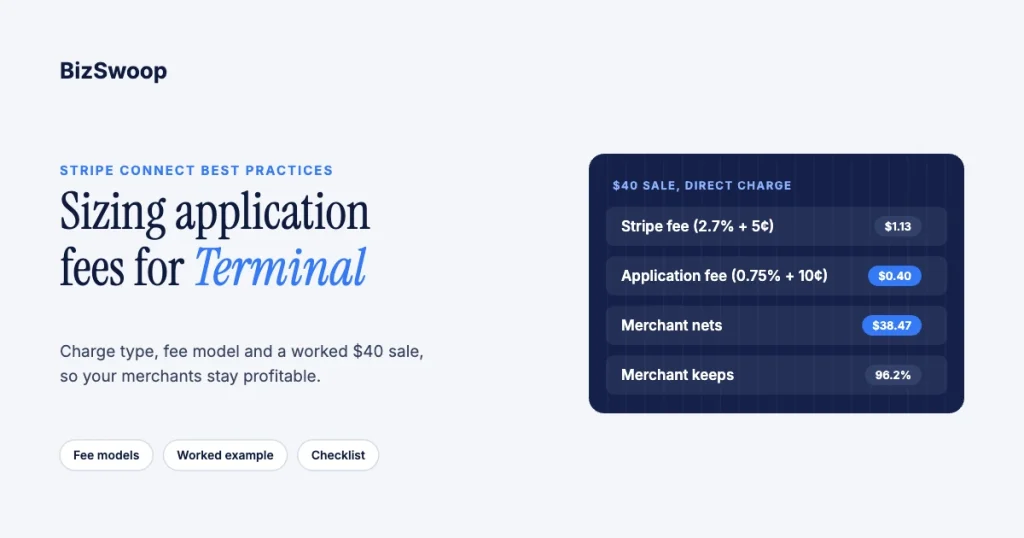
Take a $40.00 card-present sale on a Stripe Reader S700 with a 0.75% + 10¢ platform fee, at Stripe’s standard US rate of 2.7% + 5¢.
| Direct charge, connected account pays Stripe | Destination charge, platform pays Stripe | |
|---|---|---|
| Stripe processing fee | $1.13, paid by the connected account | $1.13, paid by the platform |
application_fee_amount you set | $0.40 | $1.53 (your $0.40 plus Stripe’s $1.13) |
| Connected account receives | $38.47 | $38.47 |
| Platform keeps | $0.40 | $0.40 |
Either way the merchant nets $38.47 (96.2%) and you keep $0.40; what changes is the number you put in application_fee_amount. Setting $0.40 on a destination charge by mistake would leave the merchant $39.60 and your platform $0.73 in the red on every $40 sale.
Now stress-test it on a $4.00 coffee: Stripe takes about $0.16 (2.7% + 5¢), you take $0.13 (0.75% + 10¢), and the merchant nets about $3.71, a total take of roughly 7.25%. Through Tap to Pay, Stripe’s extra 10¢ per authorization pushes that above 9%. That is the number to watch: size your fee against the merchant’s smallest common sale, not the average. If the coffee case is too heavy, cut the fixed component or move to a pure percentage, and use pricing groups to set different fees for different kinds of merchants.
Three sizing rules fall out of this:
- Size against what the merchant keeps. A fee that looks small next to the sale can be large next to the merchant’s margin.
- Keep headroom if you are the business of record. On destination charges you absorb disputes and refunds first.
- Include Stripe’s add-ons in your blended cost. International cards (+1.5%), Tap to Pay (+10¢) and P2PE (+5¢) all raise the cost your fee has to cover on destination charges (Stripe Terminal pricing).
How should you disclose application fees?
Disclose your fee clearly to every connected account before it transacts, and keep a record of what each agreed to. Stripe’s Connect terms and your own merchant agreement govern the details, so check with Stripe before launching an unusual fee structure or charging in new countries; the Platform Pricing Tool, for example, only applies where your platform is permitted to charge application fees in the connected account’s country.
- Show the rate and a worked example. “0.75% + 10¢, which is $0.40 on a $40 sale” prevents confusion later.
- Say who carries disputes and refunds. If your platform absorbs them on destination charges, that is a selling point, not fine print.
- Version your fee terms. Keep a dated record whenever you change a rule or a pricing group.
- Give notice before changes. Raising a fee without notice is the fastest way to lose a connected account.
- Make refunds predictable. By default the platform keeps the application fee on a refund; decide whether you’ll return it with
refund_application_feeand say so.
What is the application fee best-practices checklist?
A summary you can act on:
- Pick the charge type first: direct if merchants should own fees and disputes; destination if your platform is the business of record.
- Confirm the fee payer on direct-charge accounts before you price, because it can’t be changed later.
- Choose a fee model: percentage plus fixed suits most Terminal platforms with mixed sale sizes.
- Size against the smallest common sale, including Tap to Pay and international-card add-ons.
- Set fees centrally with the Platform Pricing Tool where it applies, or in one pricing service in your code.
- Keep the fee well below the charge, with headroom for disputes you own.
- Disclose the rate, an example and your refund policy, and version those terms.
Frequently asked questions
What is a Stripe application fee?
It is the amount a Connect platform collects from a payment it facilitates for a connected account. On Terminal you set it with application_fee_amount on the PaymentIntent, or with the Platform Pricing Tool where it applies. It is per payment, not a signup or monthly fee.
How much can a platform charge in application fees?
Stripe caps the fee at the charge amount and sets no other range. In practice, size it so the connected account still nets a healthy share of its smallest common sale after Stripe’s 2.7% + 5¢ in-person fee and yours.
Who pays Stripe’s fees on a Connect Terminal payment?
On destination charges and separate charges and transfers, the platform pays. On direct charges it depends on the fee payer set when the connected account was created: either the connected account or the platform.
What’s the difference between direct and destination charges?
A direct charge is created on the connected account, which is the business of record and absorbs refunds and disputes. A destination charge is created on the platform with a transfer to the connected account, so the platform pays Stripe’s fees and is debited for refunds and disputes.
Does Stripe charge extra on the application fee itself?
No. Stripe says no additional Stripe fees are applied to the application fee amount. On destination charges your platform pays Stripe’s fee on the whole charge, which is why the application fee must cover it.
Is the application fee refunded when a payment is refunded?
Not by default. The platform keeps it unless you set refund_application_fee=true; on destination charges you must also reverse the transfer, and partial refunds return a proportional share.
Want to pressure-test your fee model?
Application-fee economics on card-present hardware punish guesswork: a fee that looks fine against the sale can erode merchants’ margins on the low-ticket volume they run most. Talk to a Jovvie advisor and we’ll walk through how in-person payments fit your platform. If your merchants sell through WooCommerce, a Stripe POS like Jovvie covers the counter.
Sources: Terminal with Connect · Charge types · Destination charges · Fee behavior on connected accounts · Platform pricing tool · Collect application fees · Stripe Terminal pricing.
