
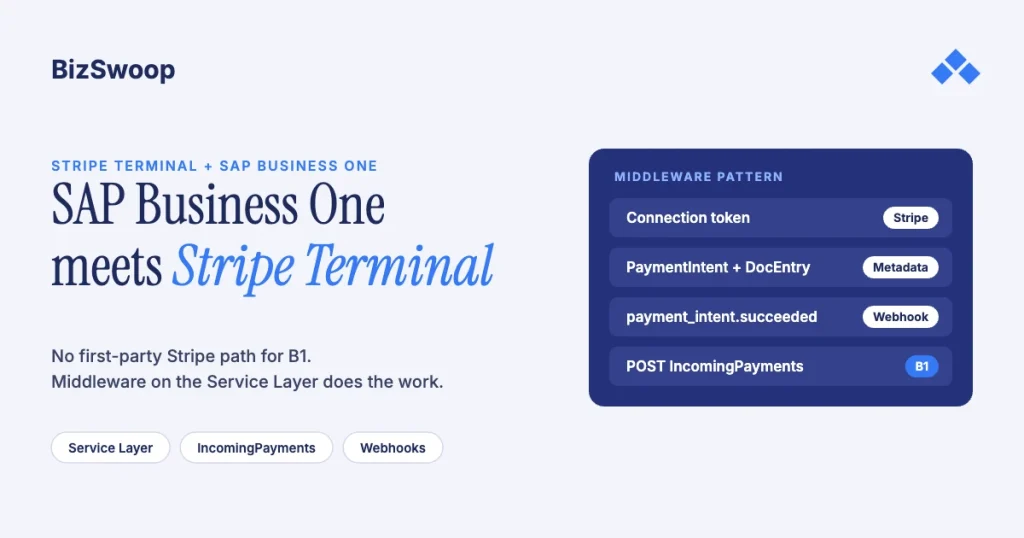
You integrate Stripe Terminal with SAP Business One through a middleware service you own, sitting between the reader and the ERP. The middleware creates Stripe connection tokens, creates a PaymentIntent keyed to the B1 invoice, captures the card on a reader or with Tap to Pay, consumes the payment_intent.succeeded webhook, and posts an incoming payment against the open A/R invoice through the SAP Business One Service Layer. Stripe’s supported SAP integration is an adapter for the SAP Digital Payments Add-on, which serves S/4HANA, not Business One, so on B1 the wire is yours to build. Most “SAP Stripe” connectors you’ll find sync card-not-present invoices and payments; none of them drive a card reader.
Jovvie, an official Stripe Partner, has built in-person Stripe Terminal payments for WooCommerce merchants since 2016. The Stripe and SAP mechanics below were re-checked against both vendors’ documentation in November 2026. This is the SAP Business One piece in the ERP pillar; for the cross-ERP view, start with the Stripe Terminal ERP integration patterns guide. The closest sibling is Connecting NetSuite to Stripe Terminal, the same capture-versus-reconciliation split on a different API. The same pattern on Acumatica’s REST API is covered in Acumatica + Stripe Terminal.
Key Takeaways
- Business One has no first-party Stripe path. Stripe’s SAP adapter is for the Digital Payments Add-on on S/4HANA; B1 integrations are middleware builds or third-party connectors.
- Connectors solve reconciliation, not capture. A complete deployment is a capture layer plus a posting layer; for B1 you build or buy a product for the first.
- Build on the Service Layer, not the DI API. It’s SAP’s REST/OData API for B1, runs server-side, and
/b1s/v2/(OData v4) is the version for new work. - Post from the webhook, never the client callback. A durable queue between
payment_intent.succeededand the Service Layer means an ERP outage never drops a payment. - Land payments in a clearing account. Post
IncomingPaymentsto a Stripe clearing G/L account and book one journal entry per payout: gross, fee, net. - Carry the PaymentIntent ID everywhere. It’s the join key for idempotency, payout reconciliation, refunds and disputes.
How do I integrate Stripe Terminal with SAP Business One?
Use the middleware pattern: a service you own brokers between Stripe’s Terminal APIs and B1’s Service Layer, because B1 has no native card-present capability and SAP’s Digital Payments Add-on, which Stripe supports, isn’t a Business One product.
First, confirm which SAP you run. On S/4HANA, Stripe offers a certified Stripe Adapter for the SAP Digital Payments Add-on, which supports more than 40 payment methods through Stripe’s Payment Element; read the S/4 section of the ERP patterns guide instead of this piece. On Business One, on HANA or SQL Server, there’s no DPA and no Stripe-built app; Stripe’s own ERP apps cover NetSuite and SAP DPA only. Third-party B1 connectors sync card-not-present activity (invoices, payment links, checkout sessions and payment records); they don’t drive a physical reader.
That leaves three realistic shapes for card-present capture in a B1 shop:
| Option | What it is | Card-present capture | Post-back to B1 | Best fit |
|---|---|---|---|---|
| Connector + separate capture app | A marketplace connector for invoice and payment sync, plus a standalone Terminal app such as a POS | The capture app drives the reader | The connector posts payments from Stripe records | Shops already licensing a connector; lowest engineering lift; two vendors |
| Custom middleware on the Service Layer (recommended) | A service you own: Stripe on one side, the Service Layer on the other | Middleware creates connection tokens and PaymentIntents and handles webhooks | Middleware POSTs IncomingPayments with PaymentInvoices lines | Most B1 shops taking cards at a counter or in the field |
| In-client add-on (DI API / UI API) | A traditional B1 add-on inside the client | The add-on calls Stripe from the workstation | Direct DI API posting | Estates standardized on client add-ons; hardest to maintain |
The connectors you can buy solve reconciliation, not capture. For Business One today, you build the capture layer or deploy a product that embeds it.
Which architecture should a B1 shop choose?
For most mid-market B1 shops, custom middleware on the Service Layer wins on control, maintainability and cost.
Connector plus a capture app. The connector syncs customers, invoices and Stripe payment records into B1, and a separate Terminal app creates the PaymentIntent with the B1 invoice number in metadata. It’s fast, with no custom code, but the connector’s mapping decides how payments post; if it can’t read your metadata or book partial payments the way finance does, you’re filing feature requests instead of editing your own code.
Custom middleware on the Service Layer. A small Node.js or .NET service owns both conversations. Stripe side: connection tokens, PaymentIntents, reader assignment, webhooks. B1 side: OData calls to the Service Layer (see SAP’s Working with the Service Layer) for business-partner lookup, open invoices and IncomingPayments. It’s the pattern this guide details, and it survives B1 upgrades best because the Service Layer is SAP’s strategic API for B1, while the DI API is a COM-era surface.
An in-client add-on. A DI API/UI API add-on puts a “Take payment” button in the B1 client and posts synchronously. It works, but it ties capture to the client (no field capture, no Tap to Pay), multiplies deployments across workstations and inherits per-version DLL maintenance. Choose it only when IT policy rules out a hosted service.
Ask one question before choosing: does capture need to live inside B1 at all? The person taking the card (a counter clerk, a will-call desk, a field tech) usually isn’t the person working in the B1 client. A smart reader or phone wired to B1 through middleware serves them better.
How does the Service Layer and Stripe flow work end to end?
Middleware authenticates to both sides, the capture surface gets a connection token, a PaymentIntent carries the B1 DocEntry in metadata, the card is captured, and the webhook triggers the Service Layer post. Eight steps, all standard Stripe Terminal or standard OData:
- Open a B1 session. The middleware logs in to the Service Layer (
POST /b1s/v2/Loginwith CompanyDB, UserName and Password) and keeps the session cookie. Use the/b1s/v2/OData v4 endpoints for new work;/b1s/v1/(OData v3) is considered deprecated from Feature Package 2405. - Create a connection token. The capture surface asks the middleware for a connection token, which the middleware creates with its secret key. The middleware is the only holder of Stripe credentials. (Server-driven smart readers don’t need one.)
- Look up the invoice. The operator selects or scans the invoice; the middleware queries
Invoices(or the business partner’s open items) and returns amount due, currency andDocEntry. - Create the PaymentIntent for the amount with
payment_method_types: ['card_present']and metadata carryingb1_doc_entry,b1_card_codeand your company database, using an idempotency key. - Capture on the device. A smart reader (S700/S710, T600 or WisePOS E) through the server-driven integration, the Bluetooth M2 through a mobile SDK, or Tap to Pay on iPhone or Android with no extra hardware. The flow is the same.
- Receive the webhook. The middleware consumes
payment_intent.succeededfrom Stripe webhooks, verifies the signature and reads its own metadata back. Never post from the client’s success callback; the webhook survives a tablet dying mid-sale. - Post back to
IncomingPayments, applying the payment to the invoice (next section). - Confirm. Stripe can send the card receipt; the middleware can add a remark to the B1 document or notify the operator.
Two production rules. Idempotency on both sides: check for an existing B1 payment with the PaymentIntent ID before posting, because webhooks retry. Location hygiene: register readers under Terminal Locations that mirror your B1 warehouses or branches from day one.
If you’re an ISV or MSP reselling this to several B1-running merchants, the same design runs on Terminal with Connect; see the Stripe Connect platform economics guide.
Running in-person payments for WooCommerce stores? Jovvie runs on Stripe Terminal readers and Tap to Pay out of the box.
How do you post Stripe Terminal payments back to SAP Business One?
Post an IncomingPayments document through the Service Layer, applied to the invoice with a PaymentInvoices line, landing the funds in a Stripe clearing account rather than the bank so the payout can be booked separately.
POST /b1s/v2/IncomingPayments
{
  "CardCode": "C20000",
  "DocDate": "2026-11-18",
  "TransferAccount": "_SYS00000000343",
  "TransferSum": 482.50,
  "TransferReference": "pi_3PqXXXXXXXXXXXXX",
  "Remarks": "Stripe Terminal card-present",
  "PaymentInvoices": [
    {
      "DocEntry": 1234,
      "InvoiceType": "it_Invoice",
      "SumApplied": 482.50
    }
  ]
}
The accounting decisions matter more than the JSON:
- Use a clearing account. Post
TransferSumto a “Stripe clearing” G/L account. Stripe settles net of fees in payouts that bundle many sales; when a payout lands, a journal entry clears the account to the bank and books the fee. Posting card payments straight to the bank breaks reconciliation the first time a payout spans a month end. - Carry the PaymentIntent ID.
TransferReference(or a user-defined field) holdspi_…, the join key for payout reconciliation, refunds, disputes and the idempotency check. - Partial payments are first-class. A
SumAppliedbelow the invoice total leaves the balance open, so deposits fall out naturally. For payments on account, omitPaymentInvoicesand post against theCardCode. - Refunds reverse through the same wire. A Stripe refund event should create a credit memo plus outgoing payment, or cancel the incoming payment, whichever audit trail your controller wants. Decide in scoping.
- Prefer user-defined fields to remarks. UDFs on incoming payments (
ORCT) for PaymentIntent ID, reader Location and channel are filterable.
For payouts, consume payout.paid, list the payout’s balance transactions, and post one JournalEntries document per payout: gross from clearing, fee to expense, net to bank. Stripe’s US in-person rate is 2.7% + 5¢ per successful card transaction (+1.5% for international cards, +10¢ per authorization for Tap to Pay); see Stripe Terminal payouts and fee extraction.
How do you handle multi-currency with Stripe Terminal and B1?
Let B1 own the accounting currency and Stripe own the card-network currency, and reconcile the two in the clearing account. If your B1 localization, customers and Stripe account all use one currency, skip this section.
If you invoice foreign-currency business partners but capture locally, B1 already handles it: the incoming payment books at the posting-date rate and B1 calculates the exchange-rate difference. Create the PaymentIntent in the invoice currency when your Stripe account can charge it, and keep B1’s rate table current.
Cases that need design:
- Charging in a currency you don’t settle in. Stripe converts to your settlement currency with a conversion fee, so the amount charged and the amount paid out differ by Stripe’s fee and the conversion. Book the payment in the invoice currency in B1 and let the payout journal absorb the difference through clearing.
- Several legal entities. B1 multi-company means separate company databases, usually with a Stripe account per entity. The middleware routes by company database (in metadata and in the Service Layer login), and each entity’s Stripe account registers its own readers; a reader belongs to one account at a time.
What does a reference implementation look like?
Four components: an API service, a webhook consumer, a posting module and a capture surface.
- API service (Node.js or .NET): endpoints for connection tokens, an open-invoices proxy to the Service Layer, and PaymentIntent creation with
b1_doc_entrymetadata and an idempotency key. It holds the Stripe secret key and Service Layer credentials; nothing else does. - Webhook consumer: signature checks, event de-duplication, and a durable queue (even a database table) between receipt and posting, for
payment_intent.succeeded,charge.refundedandpayout.paid. - Posting module: the
IncomingPaymentslogic, the payout journal builder, and the idempotency check (look upORCTbyTransferReferencebefore posting). - Capture surface: at a counter, a server-driven smart reader with a thin web page listing open invoices; in the field, Tap to Pay on the tech’s phone through a mobile SDK; for retail-style B1 shops, a POS such as Jovvie in front of the middleware.
Planning estimate (our assumption for a single-entity, single-currency build, not a quote): about a week for the Stripe side, one to two weeks for the B1 side (Service Layer sessions, invoice queries, partial payments, freight and withholding tax), a week of accounting design with your controller, and a week of pilot on one till or truck.
What we wouldn’t do: build new work on the DI API, poll Stripe instead of using webhooks, or post to B1 from the capture app’s success callback.
Frequently asked questions
Does Stripe integrate with SAP Business One natively?
No. Stripe’s supported SAP integration is the Stripe Adapter for the SAP Digital Payments Add-on, which serves S/4HANA. There’s no Stripe-built connector for Business One, so B1 integrations are middleware builds or third-party connectors.
Can marketplace connectors for B1 take card-present payments?
Not the ones that sync Stripe with B1: they handle card-not-present activity such as invoices, payment links, checkout sessions and payment records. They can be the reconciliation layer of a deployment, but they don’t create connection tokens or drive a Terminal reader, so card-present capture is an added layer.
Which Stripe readers work with a SAP B1 integration?
All of them, because the reader never talks to B1; the middleware does. Counters typically use a server-driven smart reader (S700/S710 at $299, T600 at $329, or WisePOS E); field teams use Tap to Pay on iPhone or Android or the $59 Stripe Reader M2 with a phone or tablet. See the 2026 reader guide.
Should I use the Service Layer or the DI API?
The Service Layer, in almost every case. It’s SAP’s REST/OData API for Business One and runs server-side, and the /b1s/v2/ OData v4 endpoints are the version for new development. The DI API is defensible only inside an existing in-client add-on estate.
Does this work on both B1 HANA and B1 on SQL Server?
The Stripe side doesn’t care which database sits under B1. The Service Layer started on HANA and is available for SQL Server in current releases, but confirm availability for your exact version and patch level during scoping.
What happens if the Service Layer is down when a payment succeeds?
The card payment still succeeds because Stripe captured it. That’s why the webhook consumer must queue events durably instead of posting inline: the queue drains when the Service Layer returns, the idempotency check prevents duplicates, and nobody re-keys a payment.
Scoping card-present payments into SAP Business One?
Bring your invoice flow and entity structure, and we’ll review the capture, posting and reconciliation design with you before you build. If you also sell through WooCommerce, a POS for Stripe like Jovvie covers the in-person side.
Sources: SAP B1 Service Layer API reference · Working with the SAP Business One Service Layer · Stripe Adapter for SAP Digital Payments Add-on · Apps from Stripe · Server-driven integration · Connection tokens API · Tap to Pay · Terminal with Connect · Webhooks · Currencies · Stripe Terminal pricing.
