
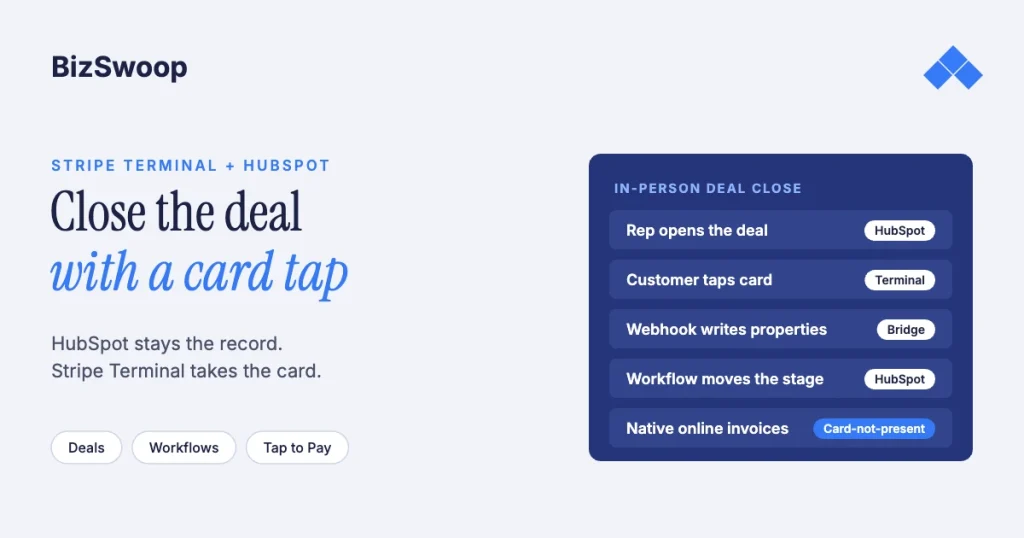
HubSpot can’t take a card-present payment on its own, but you can close HubSpot deals with a card tap by pairing it with Stripe Terminal. HubSpot payments and HubSpot’s Stripe connection collect online payments only: invoices, payment links, quotes, contracts and subscriptions. For a card in hand, a capture app (Tap to Pay on the rep’s phone or a smart reader) takes the payment at Stripe’s in-person rate, and a small webhook service writes the result back onto the HubSpot deal.
Jovvie, an official Stripe Partner, has built in-person Stripe Terminal payments for WooCommerce merchants since 2016. The HubSpot and Stripe details below were re-checked against both vendors’ documentation in November 2026. This is the HubSpot piece in the SaaS pillar; start with Stripe Terminal beyond POS: embedding card-present payments into SaaS platforms. The closest sibling is Salesforce + Stripe Terminal for field sales, which solves the same problem in another CRM.
Key Takeaways
- HubSpot’s payment tools are online only. HubSpot payments and a connected Stripe account cover invoices, payment links, quotes, contracts and subscriptions, not card readers.
- Stripe Terminal is the capture layer. Tap to Pay on the rep’s phone or a smart reader takes the card at 2.7% + 5¢ in the US, versus 2.9% + 30¢ online.
- A webhook service writes the result to the deal. Put the HubSpot deal ID in the PaymentIntent metadata and set deal properties on
payment_intent.succeeded. - Let workflows react to properties. The bridge sets
payment_status; native HubSpot workflows move the stage, create tasks and notify the owner. - Decide the Stripe account first. HubSpot connects one Stripe account per HubSpot account, so choose whether Terminal runs on that account or a separate one.
- Terminal payments stay outside HubSpot’s payments reports. Report on the deal properties you write, and handle refunds and disputes in Stripe.
Can HubSpot take a card-present payment?
No. HubSpot’s payment tools collect online payments, and nothing in them talks to a card reader. Three facts from HubSpot’s own documentation shape the build:
- The Stripe connection is for online payments. Connecting Stripe as a payment processor lets HubSpot collect “online payments” for contracts, invoices, payment links, quotes and subscriptions. HubSpot charges a 0.75% platform fee on top of Stripe’s fees for that option.
- One processor, one Stripe account. HubSpot payments and Stripe can’t both be connected, and a HubSpot account can’t have more than one Stripe account connected. Decide early whether Terminal runs on the same Stripe account (one place to reconcile payouts) or a separate one (keeps HubSpot’s commerce data apart).
- Terminal payments don’t become HubSpot payment records. A charge taken outside HubSpot’s own tools doesn’t appear in HubSpot’s payments area. Invoices can be marked paid with a recorded offline method, but there’s no native link to a Stripe Terminal charge. Teams asking for this in HubSpot’s community end up building the bridge themselves.
So the architecture is a pairing: HubSpot is the system of record and Stripe Terminal is the capture layer. It’s the same shape as the Salesforce build and the ERP post-backs in this library.
When is in-person deal close worth building?
Build it when money changes hands face to face and the deal already lives in HubSpot. Collecting at the close beats sending an invoice the customer pays weeks later on fees, fraud exposure and close rate.
- The field close. A rep quotes at the customer’s site and the customer says yes. “Tap your card” closes it today; “I’ll email an invoice” adds days of receivables and some deals quietly die.
- The trade-show booth. The team creates contacts and deals all day. Taking a deposit at the table, with Tap to Pay, turns intent into revenue before the prospect walks the floor.
- The showroom or consultation close. Design services, med spas and high-ticket retail close across a desk; a smart reader on that desk collects the deposit when the agreement is signed.
The fee math is simple. A tapped or inserted card costs 2.7% + 5¢ on Stripe Terminal in the US. A card typed into an online form costs 2.9% + 30¢, and a manually entered card adds another 0.5% (Stripe pricing). Moving $50,000 a month of keyed-in closes to card-present saves at least $350 a month in Stripe fees, and a card-present payment carries chip or contactless authentication that a keyed one doesn’t. If you use HubSpot’s Stripe option for invoices, its 0.75% platform fee applies there but not to Terminal payments you take outside HubSpot.
What is the architecture for HubSpot + Stripe Terminal?
Three pieces: a capture surface that takes the card, a small backend that holds the Stripe secret key, and a webhook bridge that writes the outcome onto the deal. HubSpot workflows handle everything after the payment.
| Component | What it does | Technology |
|---|---|---|
| Capture surface | Takes the physical card | Tap to Pay on iPhone or Android in your own mobile app, or a smart reader (Stripe Reader S700/S710, BBPOS WisePOS E) driven server-side |
| Backend | Holds the secret key, creates PaymentIntents with the deal ID in metadata, and mints connection tokens for SDK clients | Any small service; serverless works |
| Webhook bridge | Handles payment_intent.succeeded and failures, then updates the deal through the HubSpot deals API | Same service, with a HubSpot private app token |
| HubSpot workflows | Stage moves, tasks, notifications and handoffs | Native workflows; Operations Hub custom code if you have it |
The flow, end to end:
- The rep opens the deal in a simple companion app or web page that lists their open deals.
- The rep taps Collect. The backend reads the deal amount from HubSpot and creates a PaymentIntent with
payment_method_types: ['card_present']and metadata such ashubspot_deal_idandhubspot_owner_id. - The customer taps or inserts their card on the rep’s phone (Tap to Pay) or the desk reader.
- Stripe sends
payment_intent.succeeded. The backend verifies the webhook signature and reads the deal ID from the metadata. - The bridge sets the payment properties on the deal and adds a note or timeline event. A HubSpot workflow does the rest.
Two decisions to make on purpose. Where does the amount come from? Either require the capture to match the deal amount, or let the rep enter the amount collected (deposits are common) and write amount_collected back. Whose Stripe account? If HubSpot already uses Stripe for invoices, running Terminal on the same account keeps payouts in one place. For an agency rolling this out across client portals, it’s a Terminal with Connect build with one connected account per client; see the Stripe Connect platform economics guide.
Selling in person through WooCommerce too? Jovvie runs on Stripe Terminal readers and Tap to Pay out of the box.
How do you build the HubSpot workflow around the payment?
Keep payment capture outside HubSpot and let workflows react to the properties the bridge writes. Enrolling a workflow on a property change is reliable; starting a payment from a workflow isn’t.
- Create deal properties.
payment_status(pending, paid, partial, failed),payment_intent_id(text),amount_collected(number),payment_captured_at(date and time) andcapture_channel(tap_to_pay or smart_reader). - Create a private app with deal read and write scopes (and contact read if the bridge looks up receipt emails). The token lives in the bridge, never in a client.
- Wire the bridge to set those properties on
payment_intent.succeededandpayment_intent.payment_failed. - Build reaction workflows. Paid in full: move to Closed Won, set the close date, notify the owner and start onboarding. Partial: move to a “Deposit collected” stage and create a task to collect the balance, for example with a HubSpot invoice. Failed: task the owner right away, while the customer is still there.
- Use Operations Hub custom code if you have it for logic like recalculating the balance. Without it, the same logic lives in the bridge.
Don’t start the PaymentIntent from a HubSpot workflow webhook action. The CRM would be driving a device it can’t see, and every Stripe timeout becomes a workflow debugging session. Capture starts where the rep and the card are.
How do you post payments back to HubSpot deal records?
Write the payment to the deal as properties for automation and reporting, plus a note or timeline entry for people reading the record.
- Properties. Update the deal with
PATCH /crm/v3/objects/deals/{dealId}and the five properties above. Workflows, lists and reports key off them. - Timeline. A note such as “Collected $2,400.00 via Tap to Pay, card ending 4242, pi_…” is the simple option. Timeline events from your app render as structured entries at scale.
- Contacts. Receipts go to people, so read the deal’s associated contact for the receipt email, or let Stripe send its own receipt.
- Idempotency. Webhooks retry. If the deal’s
payment_intent_idalready matches the incoming PaymentIntent, skip the write, or the deal can move to Closed Won twice and fire every downstream workflow twice. The ERP integration patterns guide uses the same rule.
With those properties, “revenue collected in person, by rep, by month” is a standard HubSpot custom report on deals: filter on capture_channel, sum amount_collected, break down by owner.
What are the limitations of HubSpot + Stripe Terminal?
Terminal payments don’t show in HubSpot’s payments reporting, refunds and disputes are handled in Stripe, the one-account rule limits your setup, and the capture surface is a separate app.
- HubSpot’s payments reporting won’t include Terminal. In-person revenue lives in the deal properties you write and in Stripe. If finance needs one HubSpot report covering both, set that expectation early.
- Refunds and disputes happen in Stripe. The bridge should listen for
charge.refundedandcharge.dispute.createdand update the deal, but you issue the refund in Stripe. - One Stripe account per HubSpot account. If HubSpot invoicing already uses a different Stripe account, Terminal payouts reconcile in a second place.
- You provide the capture app. HubSpot’s mobile app doesn’t host the Stripe Terminal SDK, so reps use a companion app or a web page that drives a smart reader.
- Quotes stay online. A signed HubSpot quote can trigger the collect task, but the quote’s own payment button remains an online payment.
Frequently asked questions
Can HubSpot take a card-present payment natively?
No. HubSpot payments and HubSpot’s Stripe connection collect online payments through invoices, payment links, quotes, contracts and subscriptions. Taking a card in person means pairing HubSpot with Stripe Terminal through a capture app and a webhook bridge.
Does Tap to Pay work for HubSpot deal collection?
Yes. Tap to Pay on iPhone or Android turns the rep’s phone into the reader through Stripe’s Terminal mobile SDK, so there’s no hardware to buy. It runs in your own mobile app, not in HubSpot’s app, and Stripe adds 10¢ per Tap to Pay authorization in the US.
Do I need Operations Hub to build this?
No. You need custom deal properties, a private app token and workflows. Operations Hub custom code makes the follow-up logic tidier, but the payment logic belongs outside HubSpot either way.
Can the payment mark the deal Closed Won automatically?
Yes. The bridge sets payment_status to paid, and a workflow enrolled on that property moves the stage, sets the close date and starts fulfillment. Keeping stage logic in a workflow lets sales ops control it in HubSpot.
Which Stripe readers work with a HubSpot integration?
Any Stripe Terminal option, because the reader talks to Stripe, not HubSpot. Tap to Pay suits field reps and trade shows. A smart reader such as the S700 or S710 ($299 each in the US) suits a fixed desk and can be driven server-side from a web page; the Stripe Reader M2 ($59) pairs with a mobile app.
Can an agency roll this out across many client HubSpot accounts?
Yes, as a Stripe Connect build: the agency’s platform account, a connected account per client, readers and Tap to Pay set up for each connected account, and optional application fees per payment.
Closing deals in person from HubSpot?
Bring a real deal from last month and how your reps collect today, and we’ll map the capture app, the webhook bridge and the workflows it should have used. If you also sell through WooCommerce, a Stripe POS like Jovvie covers the counter.
Sources: Connect Stripe as a payment processor in HubSpot · HubSpot payments FAQ · HubSpot deals API · HubSpot timeline events · Tap to Pay · Server-driven integration · Connection tokens API · Terminal with Connect · Stripe pricing · Stripe Terminal pricing.
