
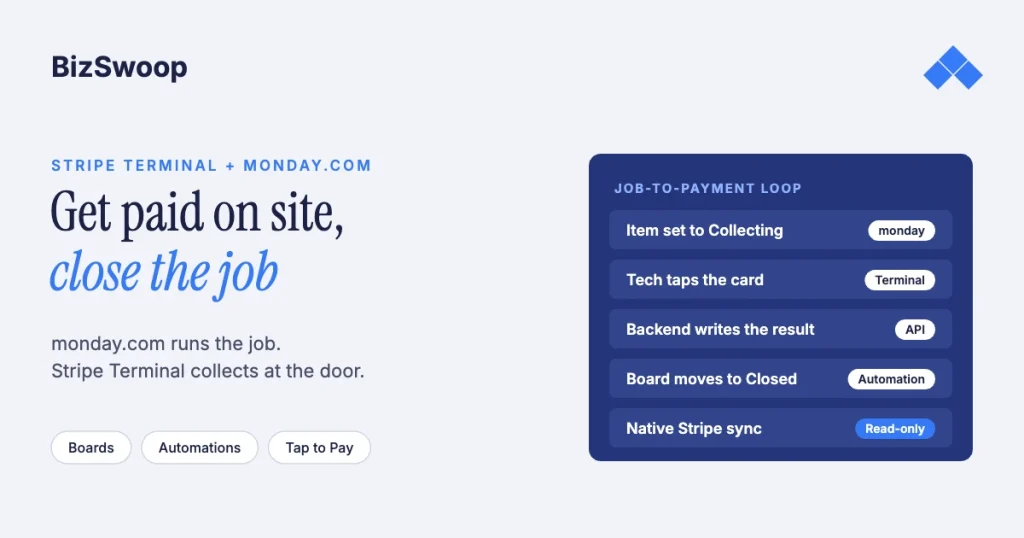
monday.com can’t take a card payment by itself, and its native Stripe integration doesn’t change that. The integration pulls Stripe charge events into a board as new items; it can’t start a payment. To collect a card at a customer’s site from a monday.com job, you add Stripe Terminal or Tap to Pay to capture the payment, plus a small backend that writes the result back onto the item so the board moves the job forward.
Jovvie, an official Stripe Partner, has built in-person Stripe Terminal payments for WooCommerce merchants since 2016. The monday.com and Stripe details below were re-checked against both vendors’ documentation in November 2026. This guide sits in the SaaS pillar, Stripe Terminal beyond POS: embedding card-present payments into SaaS platforms. Its closest siblings are Salesforce + Stripe Terminal for field sales and HubSpot + Stripe Terminal for in-person deal close, which solve the same problem for CRMs.
Key Takeaways
- monday.com’s Stripe integration reads, it doesn’t charge. It creates board items from Stripe charge events (succeeded, failed, refunded, captured and others) and can’t start a payment.
- Card-present collection needs Stripe Terminal or Tap to Pay. A reader or the technician’s phone takes the card at 2.7% + 5¢ in the US.
- A backend sits in the middle. It holds the Stripe secret key, creates the PaymentIntent with the monday.com item ID in metadata, and writes the result back through the monday.com API.
- The board advances itself. A status change to Paid triggers monday.com automations that close the job and notify the office.
- Tap to Pay is the zero-hardware start for field crews. Add a smart reader if you need chip insert, a customer screen or a counter setup.
- Use a real POS for walk-in retail. monday.com fits job-based service work, not a busy register.
Can you take a card payment from a monday.com workflow?
Not with monday.com alone, but yes with a card-present layer added to its automations. monday.com is a work-management platform: it has no card reader support and no payment processing. Its Stripe integration is a data integration. You connect it with a Stripe secret API key, choose a charge event, and map Stripe fields such as amount, Payment Intent ID and receipt URL into board columns.
So the working pattern is a loop. A monday.com item represents the job. When it’s time to collect, Stripe Terminal (a reader, or Tap to Pay on iPhone or Android) captures the card. A backend then writes the result to the item with the monday.com API, and the status change drives the next step.
What does monday.com’s native Stripe integration do?
It creates a monday.com item when a selected Stripe charge event happens. According to monday.com’s documentation, you can pick any charge event, a successful charge, a failed charge, a refund, a charge update, a capture, an expiry or a new pending charge. A charge taken on a Stripe Terminal reader is still a Stripe charge, so the integration can log it, but only as a new item: it doesn’t know which job the payment belongs to.
| Capability | Native monday.com Stripe integration | What an on-site service business needs |
|---|---|---|
| Direction | Stripe to monday.com (event sync) | monday.com starts the charge, then Stripe’s result comes back |
| Can it start a payment? | No | Yes, at the customer’s site |
| Ties the payment to an existing job | No, it creates a new item | Yes, via the item ID in PaymentIntent metadata |
| Card-present capture | No reader or SDK | Stripe Terminal reader or Tap to Pay |
| Setup | Stripe secret key plus field mapping | A small backend plus monday.com automations |
No-code connectors such as Zapier and Make have the same limit: they move Stripe data between clouds and don’t add a card reader.
Why do service businesses want card-present payments tied to a monday.com job?
Because the job, not the transaction, is the unit of work, and the payment should close the job. HVAC contractors, mobile detailers, installers, home-services franchises and B2B field teams run the lifecycle in monday.com: lead, quote, scheduled, dispatched, done, paid, closed. They want payment captured while the technician is with the customer, not emailed as an invoice that’s paid days later or never.
The fees help too. A tapped or inserted card costs 2.7% + 5¢ on Stripe Terminal in the US, versus 2.9% + 30¢ for an online card payment and another 0.5% if a card number is typed in by hand. Collecting at completion also means a job can’t close as “done, unpaid”.
How does the monday.com + Stripe Terminal architecture work?
monday.com holds the job and triggers a collect action, your backend creates the payment with Stripe, the card is captured on a reader or phone, and the backend writes the result to the item. monday.com never touches card data.
There’s a backend in the middle because Stripe calls need your secret key, and monday.com automations aren’t a safe place to keep it. The backend creates PaymentIntents and, for apps using a Terminal SDK, mints connection tokens. With a smart reader, the server-driven integration needs no client SDK: the backend sends the payment to the reader through the Stripe API.
- The technician sets the item to Collecting, and a monday.com automation or webhook sends your backend the item ID and amount.
- The backend creates a PaymentIntent for the amount with the item ID in
metadata. - The card is captured on Tap to Pay or a reader.
- Stripe confirms the payment and sends
payment_intent.succeededto your backend. - The backend updates the item: status Paid, amount, PaymentIntent ID, receipt URL.
- A monday.com automation moves the item to Closed and notifies the office.
Selling in person through WooCommerce as well? Jovvie runs on Stripe Terminal readers and Tap to Pay out of the box.
How do you build the workflow step by step?
Model the payment on the board, stand up a small backend, trigger it from monday.com, capture on site, and write the result back.
- Model the payment on the board. Add a status column (Unpaid, Collecting, Paid, Failed), a number column for the amount due, and text columns for the Stripe PaymentIntent ID and receipt URL.
- Stand up a backend endpoint. A serverless function is enough. It creates a PaymentIntent for the item’s amount with the monday.com item ID in
metadata, and mints connection tokens if your capture app uses a Terminal SDK. - Trigger from monday.com. Use an automation or webhook so that setting the item to Collecting calls your backend with the item ID and amount.
- Capture the card on site. The technician’s app uses Tap to Pay or connects to a reader, and the customer taps, inserts or swipes.
- Write the result back. On success, the backend sets Paid and writes the amount, PaymentIntent ID and receipt URL to the item. On failure, it sets Failed with the decline reason so the technician can retry.
- Let the board advance. An automation watching the status column closes the item, notifies the office and updates any revenue rollups.
The item ID in the PaymentIntent metadata makes reconciliation exact: every Stripe charge maps to one job, and a later refund or dispute can be routed back to the right item. Make the write-back idempotent on the PaymentIntent ID, because Stripe retries webhooks.
How does Tap to Pay work for field crews?
Tap to Pay turns each technician’s iPhone or Android phone into a contactless reader, so there’s nothing to buy, ship or lose. The technician’s app embeds Stripe’s Terminal mobile SDK and accepts contactless cards and mobile wallets on the phone. Stripe adds 10¢ per Tap to Pay authorization in the US. Setup and device requirements are in our guides to Tap to Pay on iPhone and Tap to Pay on Android.
The trade-off: Tap to Pay is contactless only, with no chip insert or swipe, and it depends on the phone’s connection and OS version. If customers still hand over chip-only cards, or you want a customer-facing screen for tips and receipts, put a reader in the truck. The Stripe Reader M2 ($59) pairs with the technician’s app over Bluetooth; the S700 or S710 ($299) is a smart reader with its own screen.
How do application fees work if you run this for several clients?
If you’re an agency or software vendor running this pattern across client monday.com accounts, and each client is paid into their own bank account, you’re on Stripe Connect and can take an application fee on each card-present payment. Reader ownership, the charge type and fee reporting all change the math. The Stripe Connect platform economics guide covers the model, and application fees with Stripe Terminal walks the fee flow. If you run one monday.com account for your own business, skip Connect and use your own Stripe account.
When is monday.com + Stripe Terminal the wrong answer?
When you run a counter-based retail or hospitality business rather than job-based service work. monday.com shines when the job is the unit of work and payment is one step in a longer lifecycle. If you ring up walk-in customers all day, you want a real POS with inventory, tipping and receipts built in. For WooCommerce merchants, that’s what Jovvie does.
Frequently asked questions
Does monday.com integrate with Stripe?
Yes, for charge data. monday.com’s native Stripe integration creates board items when Stripe charge events happen, such as a successful, failed, refunded or captured charge. It doesn’t start payments and has no card reader support.
Can I collect payments through monday.com?
Not with monday.com alone. To collect a payment tied to a monday.com item, add Stripe Terminal or Tap to Pay to capture the card, plus a backend that writes the result back to the item through the monday.com API.
Can monday.com take in-person card payments?
No, not natively. Neither monday.com nor connectors like Zapier and Make add a card reader. In-person capture needs Stripe Terminal on a reader or a Tap to Pay phone, with a backend holding your Stripe keys.
Will the native integration log my Stripe Terminal payments?
It can, because Terminal payments are Stripe charges. But it creates a new item for each charge event rather than updating the job the payment belongs to, so use the item ID in the PaymentIntent metadata and write back to the existing item instead.
How do I post a payment status back to a monday.com item automatically?
Have your backend call the monday.com API after Stripe confirms the payment, setting the status column to Paid and writing the amount, PaymentIntent ID and receipt URL. Put the item ID in the PaymentIntent metadata when you create it so the mapping is exact.
What does it cost to take a card payment on a monday.com job?
Stripe Terminal’s US in-person rate is 2.7% + 5¢ per successful payment, plus 1.5% for international cards and 10¢ per Tap to Pay authorization. Tap to Pay needs no hardware; a Stripe Reader M2 is $59 and an S700 or S710 is $299. Connect platforms add their own application fee on top.
Running jobs out of monday.com?
Tell us how your crews work and how you get paid today, and we’ll map the board, the backend and the reader choice. If you also sell through WooCommerce, a POS for Stripe like Jovvie covers the counter.
Sources: monday.com: Stripe integration · monday.com API · Tap to Pay · Server-driven integration · Connection tokens API · Terminal with Connect · Stripe Terminal pricing · Stripe pricing.
