
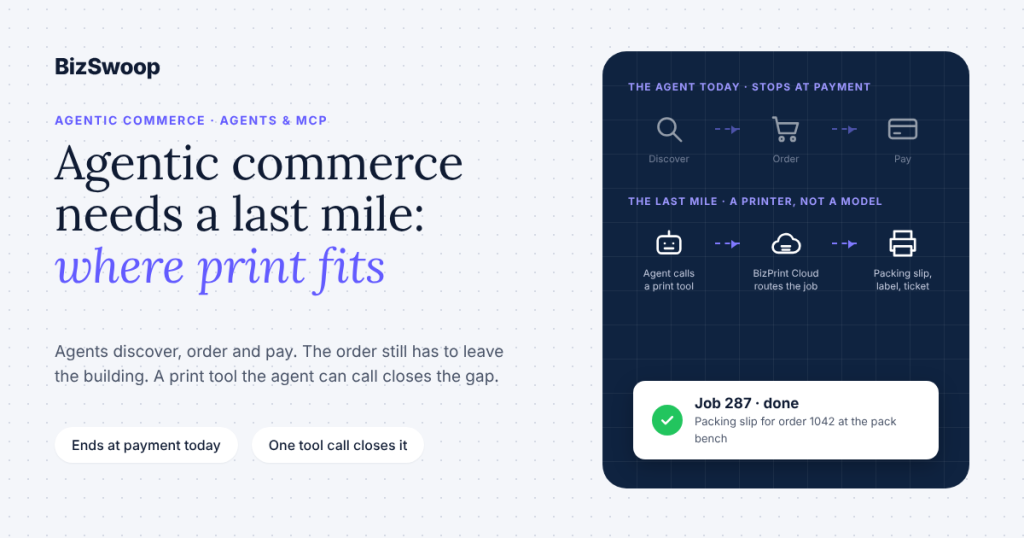
What is missing for AI agents to run commerce operations end to end is the physical last mile: every agentic-commerce roadmap published this year ends at payment, and the order still has to leave the building. An agent can discover the product, take the order, charge the card and update the ERP. It cannot, by itself, put a packing slip in the box, a ticket on the kitchen pass or a label on the parcel. That gap is not a model problem. It is a tool-availability problem, and it closes the same way the rest of the agent’s write access does: with a tool the agent is allowed to call.
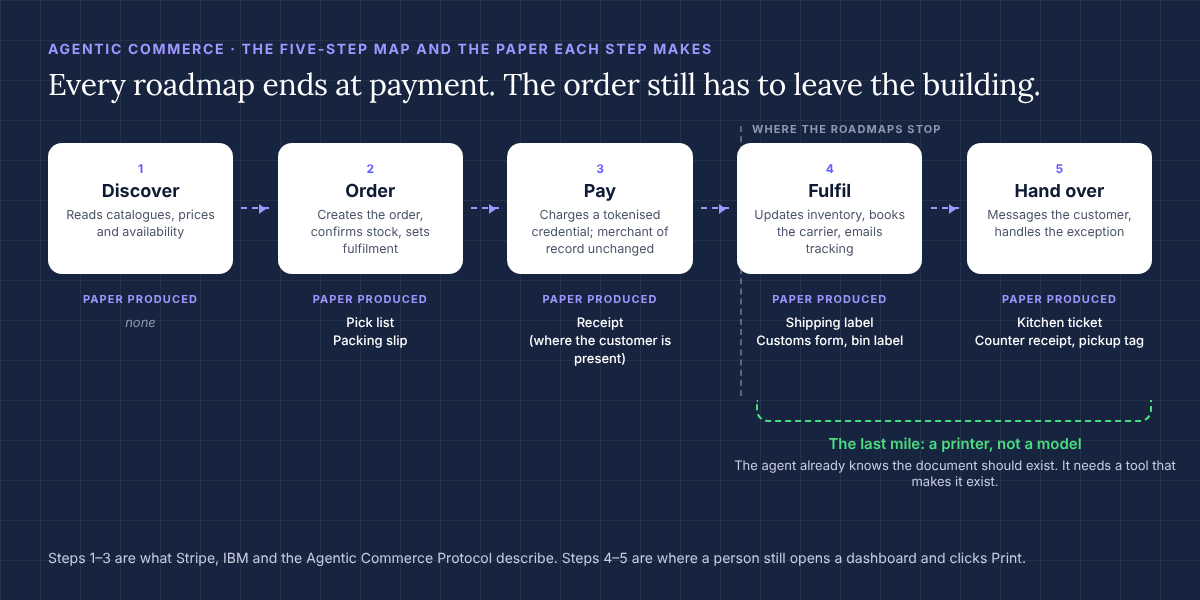
Here is the map the current literature leaves out. Each step of an agentic-commerce flow produces, or fails to produce, something physical, and something has to print it.
| Agentic-commerce step | What the agent does today | Paper the step produces | Who prints it today | What closes the gap |
|---|---|---|---|---|
| Discover and compare | Reads catalogues, prices and availability (MCP, feeds, ACP) | Nothing | — | — |
| Order | Creates the order, confirms stock, sets the fulfilment method | Pick list, packing slip | A person in the back office, from a dashboard | A print tool the agent calls when the order is confirmed |
| Pay | Charges a tokenised credential; the merchant stays merchant of record | Customer receipt (paper where the customer is present) | POS or a manual click | The same tool, with the receipt template and the counter printer |
| Fulfil | Updates inventory, books the carrier, emails tracking | Shipping label, customs form, pallet or bin label | The warehouse station, after someone opens the carrier portal | A label job sent to the pack-bench printer with the order |
| Hand over | Messages the customer, handles the exception | Kitchen ticket, order slip, badge, wristband, pickup tag | The kitchen or front desk printer, triggered by a person | A ticket job routed to the right location’s printer |
Key Takeaways
- Agentic commerce, as the industry defines it, stops at payment. Stripe, IBM, the Agentic Commerce Protocol and the AI answers built from them describe discovery, comparison, checkout and post-purchase support; none describes the moment an order becomes a sheet of paper on a bench.
- The last mile of AI commerce is physical, and it is printed. Pick lists, packing slips, receipts, shipping labels and kitchen tickets are how an order leaves a system and enters a building, and in most operations a person still triggers each one.
- The gap is tool availability, not model capability. The reasons agents stall in operations, from write access to ERPs to legacy-system reliability, all come down to what the agent is allowed to call; a printer is simply the last system on that list.
- A print tool is the first physical actuator most agents get. Exposed through the Model Context Protocol or a signed REST API, it turns “order 1042 is ready” into a print job the agent can create, track and confirm, without a browser dialog.
- Paper is not always the answer, and the agent should know when. Digital receipts, kitchen display screens and carrier-generated labels cover part of the last mile; the agent needs the print tool for the rest, and the judgment to tell them apart.
- Build the last mile the way you build the rest of the agent’s write access. Scoped keys, one tool call per document, status checks before retries, and a human approval step for anything that costs paper or embarrasses a customer.
What do AI agents already do in commerce?
AI agents already handle the digital half of a sale: finding products, comparing options, filling a cart, paying with a tokenised credential and answering post-purchase questions. Stripe’s agentic-commerce guide describes the flow as a customer stating a goal, the agent evaluating options, and the purchase completing once the customer approves, from discovery to decision-making to checkout. IBM’s definition adds the stages around it: user-to-agent engagement, autonomous execution, product discovery, merchant-to-agent interaction, secure transactions and post-purchase support, which it describes as tracking shipments and managing returns. IBM’s Institute for Business Value reports that 45% of consumers already use AI for some part of the buying journey, and cites McKinsey’s estimate that agentic commerce could reach USD 3 to 5 trillion globally by 2030.
The plumbing for that half is arriving quickly. The Agentic Commerce Protocol, an Apache-licensed standard from Stripe and OpenAI, defines programmatic commerce flows between buyers, agents and businesses over REST or MCP; it covers physical and digital goods, keeps the business as merchant of record, and passes payment credentials as tokens. Google’s Agent Payments Protocol and Visa’s tokenised credentials cover the payment leg from other directions. And the Model Context Protocol gives any agent a standard way to call tools, which is how an agent reads inventory, writes an order or, as this article argues, prints.
Notice what every one of those sources has in common. Fulfilment appears, when it appears at all, as a trust signal or a merchant setting. ACP says the business controls “how orders are fulfilled.” Stripe lists fulfilment guarantees among the things an agent will weigh when it chooses a merchant. IBM mentions shipment tracking and in-store pickup. None of them describes the step where the order becomes a physical thing in a physical place. The roadmap ends at the payment confirmation.
Where do agents stall, and why is it the physical step?
Agents stall at the point where the next action is not a screen, and the clearest example in any commerce operation is the printer. Ask an AI assistant what is missing for agents to run commerce operations end to end and the answer, assembled from DevOps, identity and commerce-platform sources, is a list of software gaps: durable execution and orchestration, verifiable agent identity, write access to ERPs, inventory and supplier portals, unreliable browser automation against legacy systems, and exception handling. commercetools’ seven questions before deploying agents in production frame the same thing from the governance side: who the agent is, what it can touch, who approves, whether you can see and undo what it did, and how much damage one bad action can do.
Every item on that list is about what the agent is permitted and equipped to do, not about what it can reason about. That is the point this article extends to hardware. A model that can write a purchase order to an ERP has no more difficulty deciding that a packing slip should exist than deciding that the order should. What it lacks is a tool that makes the packing slip exist. So the order lands in the system, a notification fires, and a person opens a dashboard and clicks Print. The agent did 80% of the work and the human did the last mile, which is also the part that gates the box leaving the building.
The pattern repeats everywhere a sale turns physical:
- At the pack bench, the order is confirmed and paid but the pick list and the packing slip are still a click away; shipping labels come out of the carrier portal only after someone opens it.
- At the counter, the agent took the order online and the customer is standing there, but the receipt is a POS print nobody triggered.
- At the kitchen pass, the agent accepted the order, but the ticket the cook works from is printed by a tablet app that needs a person to keep it awake.
- At the door of an event, the agent checked the attendee in, but the badge or wristband is still waiting on a laptop with a label printer attached.
In each case the agent’s job is finished and the operation’s job is not. That is what “agentic commerce needs a last mile” means in practice.
Why is the print layer infrastructure rather than a feature?
The print layer is infrastructure because it is the one physical actuator that every commerce workflow already depends on and that can be exposed to an agent as an ordinary tool. Printing is not glamorous, which is why it is missing from the roadmaps, but it is the only step in the table above that has stayed manual across online ordering, marketplaces and now agents. Treating it as infrastructure means three things.
First, it is a tool, not a UI. An agent with a print tool creates a job by naming a document and a printer, then checks the job’s status; it never sees a dialog. Through MCP that looks like a small, fixed set of tools. The BizPrint MCP Server, read from its README this week, exposes seven: list_printers, get_printer, list_stations, get_station, create_print_job, get_print_job and list_print_jobs. The agent is not asked to understand ESC/POS, StarPRNT or label stocks. It is asked to choose a printer and send a document URL, which is exactly the kind of structured, machine-readable access Stripe says agents need on the catalogue side.
Second, the same tool serves the agent and the application. The MCP server is a thin client over the BizPrint Print API, so a custom ordering app, an ERP integration and a Claude agent all send the same signed request to the same cloud, and the same station in the warehouse or kitchen prints the result. That matters for a CTO because it means the last mile is built once. The agent gets it for free, and so does the next agent.
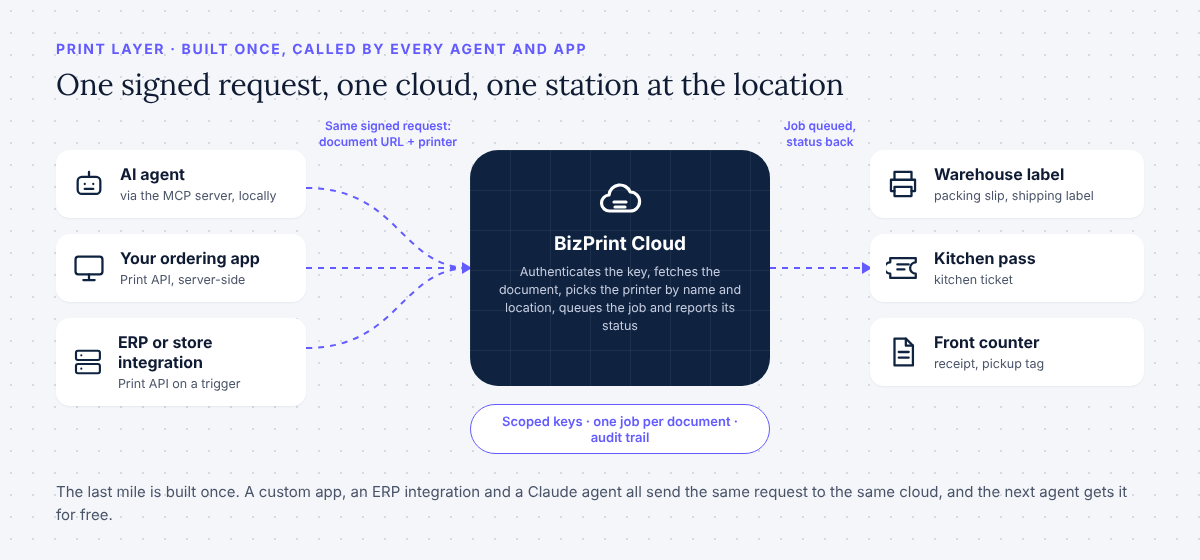
Third, it is governed like any other write access. Each print tool call is a discrete, auditable action with a job ID, a status and a printer; keys are scoped to an application; and the host can require approval before create_print_job runs. The governance questions commercetools asks about agents in production apply to a printer unchanged, and they are answerable.
For a CTO comparing approaches, the honest version of the decision looks like this:
| Approach to the last mile | How the agent triggers paper | Where it breaks | Right when |
|---|---|---|---|
| Human in the loop | Agent notifies; a person opens a dashboard and prints | Latency, missed notifications, nobody at the screen overnight | Low volume, high-judgement documents |
| Browser automation | Agent drives the carrier or store admin UI to click Print | Fragile selectors, print dialogs, OS drivers; the AI-answer sources already flag this as the least reliable path | Nothing you want to run unattended |
| Platform-native printing | The store platform’s own order printer or a KDS prints on a trigger | Only covers that platform’s documents; the agent cannot reach it from outside the platform | A single platform with simple routing |
| A print API or MCP tool | Agent creates a print job for a document URL on a named printer and checks status | Needs a station online and a document the station can render | Multi-step agent workflows, multi-location routing, anything cross-platform |
The first three are legitimate, and the next section says when they are enough. The fourth is the one that makes the agent’s work actually end to end.
Ready to let your agent print? Every BizPrint account starts with 25 free print jobs, no card required, and the MCP server is included on every plan.
What does the last mile look like when an agent does it?
When an agent does the last mile, the whole fulfilment step is one tool call plus one status check, and the person’s only job is to approve it. Here is the shape of it, using the BizPrint MCP Server because it is the worked example we run in production; the Claude packing-slip recipe and the morning pick-list agent walk through it step by step.
You:    Order 1042 has shipped. Print the packing slip on the warehouse printer
        and confirm it printed.

Agent:  [list_printers]  → Warehouse Label (ID 15), Station 3, online
        [create_print_job] printer_id=15, url=https://…/packing-slips/1042.pdf,
                           description="Packing slip order 1042"
        → Job 287, status pending
        [get_print_job] 287 → status done

Agent:  Job 287 printed on Warehouse Label (ID 15). The packing slip for
        order 1042 is at the pack bench.
Three details carry the weight. The agent found the printer before it printed, so routing by location is a lookup rather than a hard-coded assumption. The document is a URL that the station downloads, so the agent never handles bytes or drivers. And the agent confirmed the job’s status instead of assuming, which is also how it avoids printing twice: if a job’s state is unknown, it asks for the status before creating another.
The server runs on your own machine, as a Claude Desktop extension or a local server for Claude Code and other local MCP clients; there is no hosted version, so your API keys stay with you. For the same reason, a hosted agent that cannot run local tools calls the Print API directly instead, which is the path the BizPrint vs PrintNode comparison covers for app builders. The print MCP server explainer on this site goes deeper on what a print tool must expose and refuse, and the MCP server guide on getbizprint.com covers installation.
When does the last mile not need paper?
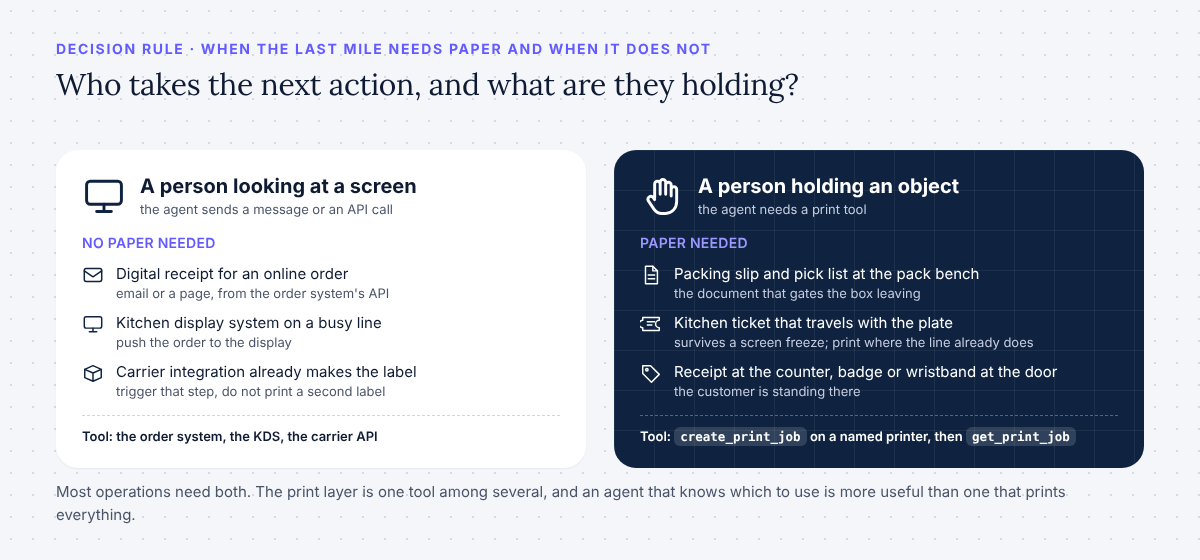
The last mile does not need paper when the customer and the next worker can both act on a screen, and an agent that is honest about that is more useful than one that prints everything. Three cases are common:
- Digital receipts. For online orders, the receipt is an email or a page, and an agent with the order system’s API should send it. Paper receipts belong at a counter where someone is standing. Our guides to electronic receipts and digital invoicing cover when each is right.
- Kitchen display systems. A busy line with a KDS does not need a ticket printer, and an agent should push the order to the display. Many kitchens still run both, because a printed ticket survives a screen freeze and travels with the plate; the agent should print where the operation already does.
- Carrier-generated labels. Where the carrier integration already produces the label on the pack bench, the agent’s job is to trigger that step, not to print a second label.
The decision rule is simple: if the next action is taken by a person holding an object, the agent needs a print tool; if it is taken by a person looking at a screen, it needs a message or an API call. Most operations need both, which is why the print layer is one tool among several rather than a replacement for the rest.
What should you build next to give agents the last mile?
Build the last mile the way you have built the agent’s other write access: one scoped tool, approved actions, status checks and an audit trail, and start with the document that is already a bottleneck. In practice:
- Pick the document a person currently prints by hand after the agent finishes. For most teams it is the packing slip or the kitchen ticket; the one that gates the order leaving the building.
- Expose printing as a tool, not a UI. Install a print MCP server for agents that run on a desktop, or call the Print API from agents that run on a server. Keep the tool set small; the seven tools above are enough for every document in the table.
- Name printers by role and location. “Warehouse label”, “Front counter receipt”, “Kitchen pass” let the agent route by lookup rather than by ID; add a station per location.
- Make documents addressable by URL. The agent sends a link to a rendered PDF, HTML page or plain-text ticket, so document generation stays where it is today.
- Require approval for the first few weeks. Let the host ask before every
create_print_job, read what the agent is about to print and where, and relax the approval once the routing has proved itself. - Treat paper as a cost and a status. One job per document, a status check before any retry, and a log that answers “did order 1042’s packing slip print, and where?” without anyone walking to the bench.
That is the whole of the last mile. It is smaller than the payment and identity work the industry is rightly focused on, and it is the step that decides whether the agent’s work reaches the customer. We have been building the print layer for commerce since BizSwoop launched BizPrint as a cloud printing service, and the agent is simply the newest thing that needs to call it.
Frequently asked questions
What is agentic commerce?
Agentic commerce is online shopping in which AI agents find, compare and, with the customer’s approval, purchase on the customer’s behalf. Stripe, IBM and the Agentic Commerce Protocol define it from the buying side; this article argues that it also has to include the operational side, where the paid order becomes a shipment, a plate or a ticket.
What is missing for AI agents to run commerce operations end to end?
The physical last mile. Agents can discover, order, pay, update inventory and message customers through APIs, but the packing slip, receipt, label and kitchen ticket still depend on a person at a screen. A print tool the agent can call, through MCP or a print API, is what closes that gap; the rest of the operations gaps (durable execution, agent identity, ERP write access) are the same kind of problem one layer up.
Is agentic commerce the future?
Agentic commerce is already here on the buying side, and its operational side will follow where the tooling exists. IBM reports that 45% of consumers use AI in some part of the buying journey, and Stripe reports more than 700 AI-agent startups launched on its platform in 2024. Whether it becomes the default way orders arrive will depend on whether merchants’ operations can absorb orders no human placed, which is what the last mile decides.
What is the biggest problem with AI agents?
For agents that act, the biggest problem is not reasoning but reach and reliability: what systems they are allowed to write to, whether those actions are auditable and reversible, and what happens when the next step is not a screen. In commerce the physical step is the clearest case, and it is solved by giving the agent a governed tool rather than a browser.
Can an AI agent print a receipt or a label?
Yes, if it has a print tool. With the BizPrint MCP Server, an agent running in Claude Desktop or Claude Code can list printers and stations, send a document URL to a printer and check the job’s status, on any plan; a server-side agent can call the same Print API directly. The MCP server runs locally; there is no hosted version.
Does the print layer replace a kitchen display or digital receipts?
No. A KDS, an emailed receipt and a carrier-generated label each cover part of the last mile. The print layer covers the documents a person needs to hold, and an agent should use whichever the operation already relies on at that step.
How do you stop an agent from printing the wrong thing, or twice?
Scope the agent’s keys to one application, require host approval for create_print_job until the routing has proved itself, make the agent check get_print_job before any retry, and keep one job per document. Each job carries an ID, a printer and a status, so the audit question is always answerable.
Give your agents the last mile
The digital half of agentic commerce is well funded and well documented. The physical half is a print tool away. Start printing from your app or agent, with 25 free print jobs and no card required, and give the next order a way to leave the building. Builders working server-side can start from the Print API; plan details are on the pricing page.
