
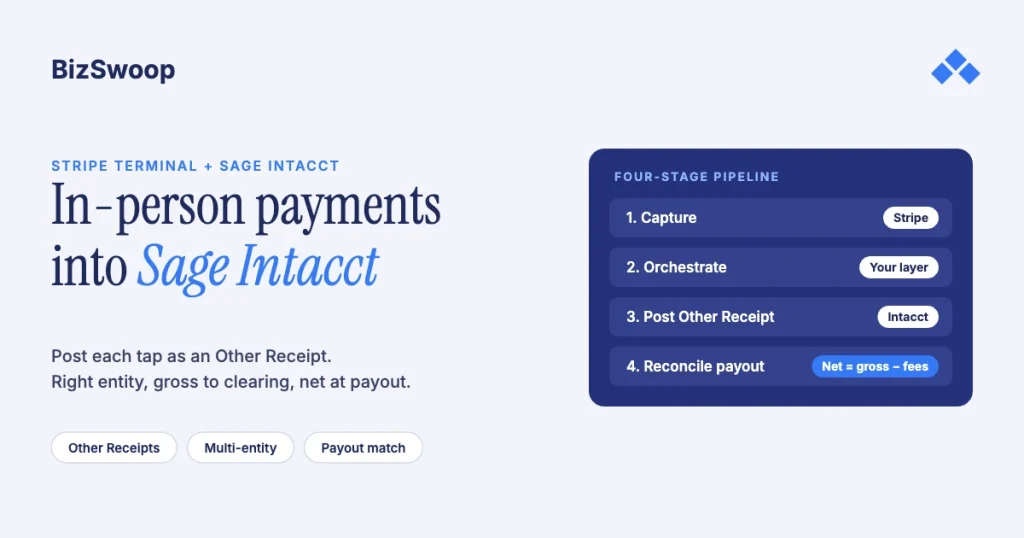
You take Stripe Terminal payments into Sage Intacct by capturing the card on a Stripe reader and posting each in-person charge into Intacct, usually as an Other Receipt in Cash Management. Sage Intacct has no native Stripe connector, and the Stripe-to-Intacct integrations on the market sync online invoices and payments, not a physical reader. The flow is: your backend creates a Stripe connection token and a PaymentIntent and the card is captured on the reader; the backend posts the result into Intacct against the right entity and account; and Stripe’s batched, fee-netted payout is reconciled against the Intacct bank feed. The two hard parts are multi-entity posting and turning a net payout back into gross receipts minus fees.
Jovvie, an official Stripe Partner, has built in-person Stripe Terminal payments for WooCommerce merchants since 2016. The Stripe and Sage Intacct mechanics below were re-checked against both vendors’ documentation in November 2026. This is a cluster piece under the Stripe Terminal ERP integration patterns guide; the closest sibling is Connecting NetSuite to Stripe Terminal: Architecture Patterns, and the same build on a desktop ledger is QuickBooks Enterprise + Stripe Terminal. For Acumatica, where the same middleware posts an applied Payment, see Acumatica + Stripe Terminal.
Key Takeaways
- There’s no native Stripe connector for Sage Intacct. Stripe’s own ERP apps cover NetSuite and SAP’s Digital Payments Add-on; Intacct integrations are third-party or custom.
- Existing integrations handle online payments, not readers. In-person capture is a layer you add: Stripe Terminal for the card, a small backend, and Intacct’s API for posting.
- A walk-up sale posts as an Other Receipt. Sage defines Other Receipts as receipts not tied to a customer or invoice; sales against an open invoice post as AR payments instead.
- Post in the entity that owns the account. In a multi-entity company, the receipt belongs to the entity whose bank or undeposited-funds account the money lands in.
- Receipts are gross, payouts are net. Post gross to undeposited funds, book Stripe’s fees as an expense at payout, and match on the payout ID.
- Tag card-present fees by channel. The US in-person rate (2.7% + 5¢) differs from online card pricing, so a channel dimension shows what counter sales really cost.
How do you take Stripe Terminal payments into Sage Intacct?
You capture the card with Stripe Terminal and post the captured payment into Intacct’s Cash Management as an Other Receipt (or into AR if it settles an invoice), because Intacct is a system of record, not a point of sale. Stripe’s list of its own apps names connectors for NetSuite and SAP only, so there’s no first-party Stripe app for Intacct. Third-party options such as Zapier templates and integration vendors like Codeless Platforms sync Stripe payments, invoices or payment links with Intacct; they don’t drive a card reader.
Decide two accounting boundaries before writing code:
- Does the sale settle an open Intacct invoice? If it does, post it as a payment against that invoice in AR. If it’s a counter sale with no invoice, the common Terminal case, post it as an Other Receipt, which Sage describes as a receipt not associated with a customer or invoice.
- Single entity or multi-entity? A single company posts every receipt into one ledger. A multi-entity company must decide which entity owns the receipt and the account before a dollar posts.
What does the architecture look like?
It’s a four-stage pipeline (capture, orchestrate, post, reconcile) with a backend you control between the Stripe reader and the Intacct API. No single product spans all four stages for in-person payments, so you build the orchestration layer.
| Stage | What happens | System of record | Source |
|---|---|---|---|
| 1. Capture | Backend creates a connection token; the reader connects; a PaymentIntent is created and the customer taps, inserts or swipes | Stripe | Stripe Terminal docs |
| 2. Orchestrate | Backend records the succeeded PaymentIntent and maps it to the Intacct entity, account and GL lines | Your integration layer | Your code |
| 3. Post | Backend creates an Other Receipt (or an AR payment for an invoice) with payment method, account and line detail | Sage Intacct | Other Receipts API |
| 4. Reconcile | When Stripe pays out (batched, net of fees), match the payout to its receipts and clear undeposited funds | Intacct + Stripe | Stripe payouts |
Two design choices define the build. Where does the capture UI live? A POS app (Jovvie or similar) that owns the counter and hands succeeded payments to your posting layer, a purpose-built companion app, or middleware that issues tokens and posts to Intacct. A smart reader can also be driven straight from your server with Stripe’s server-driven integration, with no client SDK. Post one at a time or in a batch? Posting each receipt immediately gives finance real-time visibility; batching at day end cuts API calls. Posting individually and reconciling at payout keeps the audit trail at transaction grain.
Can Sage Intacct process credit card payments?
Intacct records and reconciles card payments, but it doesn’t drive a Stripe reader. The card is taken on Stripe Terminal; Intacct is where the receipt is posted and reconciled. Sage sells its own integrated payment services, which aren’t Stripe.
How do you post an in-person payment as an Other Receipt?
Create an Other Receipt in Cash Management through Intacct’s Other Receipts API. In the XML API that’s the record_otherreceipt function. Map the PaymentIntent onto its fields:
- Payment date and received date — the date the card was captured on the reader. Both are required.
- Payer — a required name; use the customer name, or a generic “Counter sales” payer for walk-ins.
- Payment method — Intacct accepts Printed Check, Cash, EFT or Credit Card here; use Credit Card for Terminal receipts.
- Undeposited GL account or bank account — the API needs one or the other. For Stripe, post to an undeposited-funds (clearing) GL account so the payout can clear it later; a deposit date applies only when you post straight to a bank account.
- Reference ID — store the Stripe PaymentIntent ID so every receipt is traceable to a specific tap.
- Receipt lines — the GL account, amount, and dimensions such as location and department; this is where revenue and tax split out.
The posting procedure:
- Confirm the PaymentIntent succeeded and record its ID, amount, and the Stripe fee from its balance transaction.
- Resolve the context: entity, undeposited-funds account, revenue account and dimensions.
- Build and create the Other Receipt with the fields above for the gross amount.
- Write the Intacct record number back to your integration layer next to the Stripe IDs, so the systems cross-reference both ways.
Post the gross amount and handle the Stripe fee separately at payout, never by netting it into the receipt. That keeps revenue honest and the fee visible. Sage notes its developer documentation is moving to developer.sage.com/intacct with the FY27 R1 release; the XML API itself isn’t changing.
Running in-person payments for WooCommerce stores? Jovvie runs on Stripe Terminal readers and Tap to Pay out of the box.
Which entity owns the receipt in a multi-entity Intacct company?
Post the receipt in the entity that owns the account the money lands in. Cash Management accounts belong to entities, so a receipt posted at the top level or in the wrong entity won’t line up with the bank feed it has to reconcile against.
- Map each Stripe account to an Intacct entity. The cleanest setups run one Stripe account per entity with its own bank; your layer keeps a Stripe-account-to-entity map and routes each receipt. With Stripe Connect, the connected account ID is the routing key (see the Stripe Connect platform economics guide).
- Handle shared bank accounts with a rule. If entities share a bank account, decide once whether receipts post at the owning entity with inter-entity allocations or at the top level with entity dimensions on the lines, and code it.
- Decide the entity at capture time. Use the reader’s Stripe Location or the Stripe account, not guesswork at posting time.
Get the mapping right once and every receipt lands in the correct ledger. Get it wrong and finance finds out at month-end, when an account won’t reconcile.
How do you reconcile Stripe payouts against the Intacct bank feed?
Match each batched, fee-netted payout to the Other Receipts it settles, clearing them from undeposited funds into the bank when the payout lands. Intacct holds gross receipts; Stripe deposits a net payout.
Example: 40 card-present sales totaling $5,000 at the US in-person rate of 2.7% + 5¢ cost $137 in fees ($135 + 40 × 5¢), so the bank sees one deposit of about $4,863 while Intacct holds $5,000 of receipts. To bridge it:
- Post receipts to undeposited funds at gross.
- Book the fees when the payout arrives to a card-processing expense account, so the gap is a real expense, not a plug.
- Deposit the batch from undeposited funds to the bank, so the net deposit matches the bank-feed line.
- Match on the payout ID. The payout’s balance transactions list exactly which charges, refunds and fees it contains; Stripe’s payout reconciliation report shows the same in the Dashboard.
Reconcile at payout grain against the bank and at transaction grain against undeposited funds, and the two tie out. For the Stripe side of fees and payouts, see Stripe Terminal payouts and fee extraction.
How should card-present fees be treated in the GL?
Book them to the same card-processing expense account as online fees, but tag the channel. Stripe’s US in-person rate is 2.7% + 5¢ per successful card transaction, plus 1.5% for international cards and 10¢ per authorization for Tap to Pay, which differs from online card pricing. A channel dimension (in-person vs online) on the fee line lets a controller see what counter sales really cost, which matters when volume shifts between channels and the blended rate shifts with it. See card-present rates explained.
Frequently asked questions
Can you integrate Stripe and Sage Intacct?
Yes, but not with a native connector. For online payments, third-party tools such as Zapier templates and integration vendors sync Stripe activity into Intacct. For in-person Stripe Terminal payments, you build a capture-and-post layer: take the card with Stripe Terminal and post the result through Intacct’s API, usually as an Other Receipt.
Does Sage Intacct natively support Stripe?
No. Stripe’s own ERP apps cover NetSuite and SAP’s Digital Payments Add-on, and there’s no Stripe-built app for Intacct. Every Intacct integration is third-party middleware or a custom build, and in-person card acceptance always needs an added capture layer.
How do you record card payments in Sage Intacct?
Record them in Cash Management as an Other Receipt if the payment isn’t tied to an invoice, or as an AR payment if it settles an open invoice. For a Stripe Terminal sale, create the Other Receipt with the payment and received dates, a payer, the Credit Card payment method, an undeposited-funds account, the PaymentIntent ID as the reference, and line-level GL detail.
How do you handle multi-entity cash receipts in Sage Intacct?
Create the receipt in the entity that owns the account the funds land in. Map each Stripe account or Connect connected account to an Intacct entity in your integration layer, and determine the entity at capture time from the reader’s Location or the Stripe account.
How do you reconcile a net Stripe payout against gross receipts in Intacct?
Post each receipt to undeposited funds at gross. When the payout arrives, book Stripe’s fees to a card-processing expense account, then deposit the batch from undeposited funds to the bank so the net amount matches the bank feed. Match on the payout ID, whose balance transactions list exactly what settled.
Is there a faster path than a custom build?
For online payments, yes: existing middleware handles it. For in-person Terminal payments into Intacct, we know of no off-the-shelf product today. A POS layer such as Jovvie can own the counter experience, but the Intacct posting and reconciliation logic still has to be configured for your entities and GL.
Scoping in-person payments into Sage Intacct?
Single entity or many, we’ll map the capture, posting and reconciliation design to your entity structure and GL before you write code. If you also sell through WooCommerce, a POS for Stripe like Jovvie covers the in-person side.
Sources: Sage Intacct Other Receipts API · Sage Intacct Cash Management help · Apps from Stripe · Stripe Terminal docs · Server-driven integration · Stripe payouts · Payout reconciliation report · Stripe Terminal pricing.
