
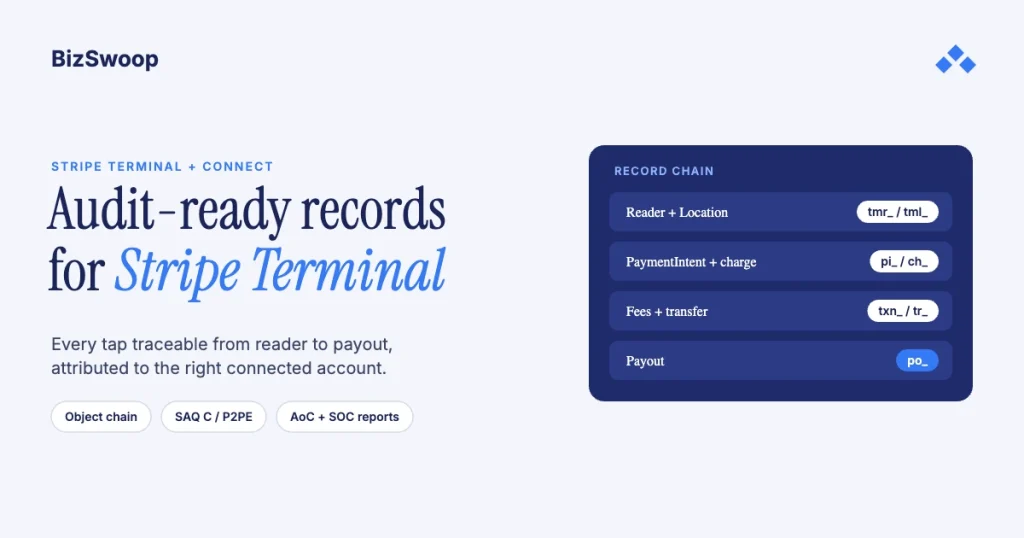
You build audit-ready records for Stripe Terminal by capturing and linking the full Stripe object chain for every card-present sale. That means the reader and Location, the PaymentIntent, the charge, the balance transaction, any Connect transfer and application fee, the payout, and any refund or dispute, stored with their IDs and the links between them so any single transaction can be rebuilt from tap to bank deposit and tied to the right connected account. Stripe’s own compliance (PCI Service Provider Level 1, annual SOC 1 and SOC 2 Type II reports, EMVCo-certified Terminal hardware) shrinks your PCI scope and becomes evidence in your own file, but it doesn’t reconstruct your transactions for you. This guide covers the records blueprint: the required record types, a worked reconstruction, the platform-versus-connected-account split on Connect, retention, and the compliance overlay.
Jovvie, an official Stripe Partner, has built in-person Stripe Terminal payments for WooCommerce merchants since 2016. Every Stripe mechanic below was re-checked against Stripe’s documentation in November 2026. This is a cluster piece under the Stripe Connect platform economics guide; for the scope-reduction mechanics, pair it with our Stripe Terminal PCI compliance guide.
Key Takeaways
- An audit-ready record is a linked object chain, not a row. Store the reader, Location, PaymentIntent, charge, balance transaction, transfer, application fee and payout IDs, and the links between them.
- Put your own references in metadata at payment time. An order or invoice number and the connected account on the PaymentIntent turn every later audit question into a lookup.
- On Connect, attribution is the platform’s job. Stripe records the objects; the platform proves which merchant each transaction belongs to and itemizes its own application fees.
- Keep your own copy for your longest obligation. Stripe keeps data for its own purposes; set retention to the strictest tax, sector or card-scheme rule that applies to you.
- Stripe’s attestations are inputs, not a substitute. Download the PCI AoC, SOC reports and bridge letters from the Dashboard and file them in your PCI DSS third-party service provider register.
- Terminal validates on SAQ C by default. Terminal encrypts end to end by default; merchants who opt into Stripe’s P2PE can validate with SAQ P2PE instead.
What records do you need to reconstruct a Stripe Terminal transaction?
You need the linked chain of Stripe objects that one card-present sale creates: capture each one, store its ID and preserve the links, and you can rebuild any transaction on demand.
The common mistake is treating “the payment” as one record: a row in the ERP with an amount and a timestamp. An auditor, a card-scheme dispute or a regulator asks a harder question: prove that this tap at this reader became this deposit in this bank account, and show the fees taken along the way. That needs the whole chain.
| Record type | Stripe object | What it proves | Key fields to retain |
|---|---|---|---|
| Device and location | Terminal.Reader, Terminal.Location | Where and on what hardware the card was presented | reader ID (tmr_…), Location ID (tml_…), serial number, address |
| Payment intent | PaymentIntent | The intended payment and its status | pi_… ID, amount, currency, status, metadata |
| Charge | Charge | The actual card-present payment | ch_… ID, card brand, last 4, read method, authorization code |
| Balance transaction | BalanceTransaction | Gross amount, Stripe fee and net that hit the balance | txn_… ID, fee, net, available-on date |
| Transfer (Connect) | Transfer | Funds moved to a connected account | tr_… ID, destination account, amount |
| Application fee (Connect) | ApplicationFee | The platform’s fee on the transaction | fee_… ID, amount, refunded amount |
| Payout | Payout | The deposit to the bank account | po_… ID, arrival date, status |
| Refund or dispute | Refund, Dispute | Any reversal and its reason | re_… or dp_… ID, amount, reason, evidence |
The requirement isn’t just storing each object; it’s preserving the links. The reader action ties to the PaymentIntent, the PaymentIntent’s charge produces a balance transaction, on Connect the funds move to a connected account (net of any application fee), and the balance settles to a payout. Stripe documents these objects across the Terminal docs and Use Terminal with Connect; your job is to persist the IDs and edges so the graph is still walkable years later.
How do you reconstruct one card-present transaction from reader to payout?
Walk the object chain in order and store each ID as you go, so you can answer “what happened to this payment?” without re-deriving it from Stripe. Here is the procedure for one card-present sale on a Connect platform:
- Record the device and Location. The customer taps or inserts a card at a registered reader. Store the reader ID and Location ID; they anchor the sale to a place and a device.
- Record the PaymentIntent. Store the
pi_…ID, amount, currency and your metadata (order or invoice number, connected account, location). Metadata is your bridge back to the ERP and the merchant. - Record the charge. When the payment succeeds, store the charge ID and the card-present details Stripe returns (brand, last 4, read method, authorization code). This is what a dispute or scheme inquiry asks for.
- Record the balance transaction. Store the
txn_…ID and the gross, fee and net split; this reconciles Stripe’s numbers to your books. - Record the Connect transfer and application fee. With destination charges, funds move to the connected account by transfer and your cut is an application fee; with direct charges, the charge sits on the connected account and your fee is the application fee. Store the
tr_…andfee_…IDs and the connected account ID. - Record the payout. Store the
po_…ID and arrival date for the account whose balance settled. This closes the loop from tap to deposit. - Record any refund or dispute. Store the
re_…ordp_…ID and reason, linked to the original charge, so the record shows the full lifecycle.
Persist those links per transaction and you have a trail that survives a chargeback investigation, a financial audit, and a merchant asking where the money for a sale went, all answerable from your own store. For the money-movement side of step 5 and 6, see Stripe Terminal payouts and fee extraction.
How do you attribute Terminal transactions across connected accounts on Connect?
On a Connect platform, every transaction must be provably tied to the right connected account, and the platform-versus-merchant money flow (transfers, application fees, payouts) must be rebuildable per account.
Where the objects live depends on your charge type, so decide this first. With direct charges, the readers, payments and payouts live on the connected account and you call the API with the Stripe-Account header. With destination charges, the readers and payments live on your platform account and funds transfer to the merchant; on_behalf_of makes the connected account the settlement merchant and is required for Terminal when the platform and connected account are in different countries. Our multi-tenant Stripe Terminal architecture guide covers both models side by side.
- Stamp the connected account on every payment. Use the
Stripe-Accountheader or the destination fields consistently, and copy the connected account ID into PaymentIntent metadata so attribution survives on the record itself. - Track application fees as first-class records. Each
ApplicationFee(and any refund of it) is platform revenue; whoever audits the platform’s books needs it itemized per transaction. - Keep platform and connected-account balances apart. Payouts to the platform and to merchants are different flows; never conflate them in your records.
- Reconcile per account, then roll up. Check each merchant’s payments, fees, refunds and payouts first, then aggregate to the platform.
Who owns which obligation on a Connect platform:
| Obligation | Platform | Connected account | Stripe |
|---|---|---|---|
| Card data encryption at the reader | — | — | Yes (E2EE by default; optional P2PE) |
| Platform PCI validation | Yes | — | Provides its AoC |
| Connected account’s own PCI validation | Guides and enables | Yes | Provides AoC; prefilled SAQ in the Dashboard |
| Transaction attribution and records | Yes | Reviews | Stores the objects |
| Application-fee accounting | Yes | — | Records the fees |
| Payout reconciliation | Yes (platform balance) | Yes (own balance) | Executes payouts |
| Dispute evidence and response | Coordinates | Depends on charge type and who is merchant of record | Routes the dispute |
| Retention of transaction history | Yes | Yes | Retains under its own policy |
The theme: Stripe secures and records the payment primitives; the platform owns attribution, fee accounting and the audit trail across accounts.
Running in-person payments for WooCommerce stores? Jovvie runs on Stripe Terminal readers and Tap to Pay out of the box.
How long should you keep Terminal transaction records?
Keep the linked records for as long as your longest applicable obligation requires, typically several years, because Stripe’s retention serves Stripe’s purposes and isn’t a substitute for records you control.
There’s no single universal number. Tax and financial-record rules (commonly several years, depending on the jurisdiction), sector regulation, card-scheme dispute windows and PCI DSS’s own audit-log requirements each set a floor. Rather than quote one regulator’s figure, use this framework and confirm the numbers with your accountant or counsel:
- Set retention to the maximum of your obligations. Tax, sector and card-scheme rules each imply a floor; keep records for the longest.
- Keep your own copy of the linked chain. Export the object IDs and their links into your system of record, so an audit years from now doesn’t depend on Stripe’s API or retention policy.
- Separate hot from cold. Recent transactions must be instantly rebuildable for refunds and disputes; older ones can sit in archive storage as long as you can retrieve them within the obligation window.
- Log access to the archive. A trail you can’t show is tamper-evident is weaker; keep an access and change log.
- Where Stripe’s retention ends, yours takes over. Treat Stripe as the source while the data lives there and your archive as the source for the full obligation period.
How does Stripe’s compliance reduce your PCI scope?
Stripe’s compliance reduces your burden in two ways: Terminal encrypts card data before it reaches your systems, and Stripe’s attestations become the third-party evidence in your own PCI file. The obligation to validate is still yours.
Scope reduction. Stripe says Terminal provides end-to-end encryption by default, and in-person Terminal payments validate with the SAQ C template; merchants who sign up for Terminal P2PE (5¢ extra per authorization in the US) get a prefilled SAQ P2PE instead. Stripe’s security page also notes that Terminal is certified to EMVCo Level 1 and 2. Details are on Stripe’s PCI compliance for Stripe Terminal page and in our PCI compliance guide.
Evidence. Stripe is certified as a PCI Service Provider Level 1 and produces SOC 1 and SOC 2 Type II reports annually. PCI DSS expects you to keep a list of the third-party service providers that handle cardholder data for you and to monitor their compliance status. Here is the routine:
- Download Stripe’s PCI Attestation of Compliance and SOC reports from the Dashboard (Settings → Compliance and documents). Stripe says owners and administrators can download them without a separate NDA, and bridge letters cover the gap after a report period ends.
- File them in your third-party service provider register with a description of the service (Stripe processes and stores card data for your Terminal payments).
- Complete your own SAQ, using the prefilled questionnaire in the Dashboard where you qualify, and cite Terminal’s encryption as the basis for scope reduction.
- Re-collect every year. Attestations expire; make the AoC and SOC refresh part of your annual compliance cycle.
The one sentence to remember: Stripe’s compliance is a necessary input to yours, not a replacement for it.
Frequently asked questions
Is Stripe Terminal PCI compliant?
Stripe is certified as a PCI Service Provider Level 1, and Terminal encrypts card data end to end by default, which keeps it out of your systems. You still validate your own compliance each year: in-person Terminal payments use SAQ C, or SAQ P2PE if you opt into Stripe’s P2PE.
How long does Stripe retain transaction records?
Stripe keeps data under its own policies and for its own purposes, which isn’t a substitute for the records you must keep. Set your retention to the longest obligation that applies to you (tax, sector regulation, card-scheme rules) and keep your own exported copy of the linked object chain.
How do I get Stripe’s PCI AoC and SOC 2 report?
Download them from the Stripe Dashboard under Settings, Compliance and documents. Stripe says account owners and administrators can download the SOC reports without contacting support or signing a separate NDA, and bridge letters are available there too. File them in your third-party service provider register.
What records do I need to reconstruct a card-present transaction?
The linked object chain: reader and Location, PaymentIntent, charge and balance transaction, plus on Connect the transfer, application fee and payout, and any refund or dispute. Store each object’s ID and the links between them so one transaction can be walked from tap to deposit.
Who is responsible for compliance on a Stripe Connect platform?
It’s shared. Stripe secures and records the payment primitives and supplies its attestations; the platform owns transaction attribution, application-fee accounting, cross-account reconciliation and the audit trail; each connected account validates its own PCI compliance and reconciles its own balance.
Does Stripe Terminal reduce my PCI scope?
Yes. Terminal encrypts card data before it reaches your systems, so in-person payments validate with SAQ C instead of the much longer SAQ D. Opting into Stripe’s P2PE lets eligible merchants use SAQ P2PE, the shortest in-person questionnaire.
Want your records architecture reviewed before an audit?
Certificates prove Stripe is trustworthy; they don’t prove your transaction happened the way you say it did. Talk to a Jovvie advisor and we’ll pressure-test your object-chain capture, retention policy and evidence file. If your merchants sell through WooCommerce, a Stripe POS like Jovvie handles the in-person side.
Sources: PCI compliance for Stripe Terminal · Security at Stripe · Download SOC reports · PCI compliance FAQ · Stripe Terminal docs · Use Terminal with Connect · Stripe pricing.
