
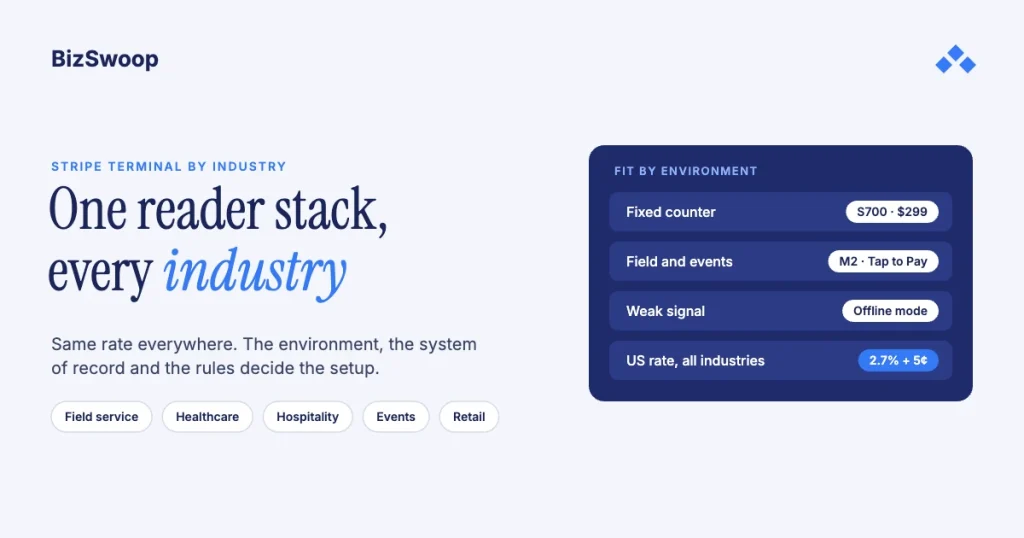
Stripe Terminal is used by almost any business that takes a card in person. Field services, healthcare, hospitality, events, property management, faith and non-profit groups, fitness, marine, education and retail all run on the same Terminal building blocks and, in the US, the same 2.7% + 5¢ card-present rate. What changes between industries is the hardware, the system the payment posts to, and the regulatory context. A plumber tapping a phone in a driveway, a dental front desk collecting a copay, a festival vendor on a patchy signal and a boutique at a fixed counter differ only in which reader fits and where the payment lands.
Jovvie, an official Stripe Partner, has built in-person Stripe Terminal payments for WooCommerce merchants since 2016. Prices and features below were re-checked against Stripe in November 2026. This is the pillar for our industry library: it shows how the choices differ by vertical and links to the deeper guides already live across our sites. If you haven’t chosen hardware yet, start with the Stripe Terminal hardware reader guide; if you take payments without a register, see Stripe Terminal for back-office payments.
Key Takeaways
- Every industry pays the same Terminal rate. In the US it’s 2.7% + 5¢ per successful in-person card payment, plus 1.5% for international cards and 10¢ for Tap to Pay.
- Environment picks the hardware. Counters suit smart readers like the $299 S700; field and event work suits the $59 M2 or Tap to Pay on a phone.
- The system of record picks the integration. Retail posts to a POS, clinics to practice-management software, trades to field-service software, B2B and property managers to an ERP or ledger.
- Regulation sets the constraints. Healthcare keeps protected health information out of payment data, non-profits need donor receipts, and EU merchants expect chip and PIN.
- Offline is possible but limited. Terminal can store payments offline on supported readers and forward them later; plan for it before an outdoor event, not during it.
- Terminal is usually embedded, not standalone. Stripe’s own case studies (Nextech, Lightspeed, Jobber) put Terminal inside the software each industry already runs.
Which industries use Stripe Terminal?
Any industry that accepts payment in person uses Stripe Terminal; the heaviest adopters are field services, healthcare, hospitality, events, property management, faith and non-profit organizations, fitness, marine, education and retail.
Stripe’s customer stories show the spread. Nextech built in-person payments for specialty healthcare practices on Stripe’s server-driven Terminal integration; Lightspeed uses Terminal for contactless payments and faster checkout in retail and hospitality; and field-service platform Jobber added Tap to Pay on iPhone so pros can take payment on site without a card reader. The common thread is that Terminal is rarely a standalone register; it’s built into the software the industry already uses, which is why “which system does the payment plug into” matters more than the industry label.
Why does industry context change the Stripe Terminal decision?
Industry changes three things: the physical environment the reader lives in, the system of record the payment posts to, and the rules around the transaction. The rate and the core SDK stay the same.
The environment decides hardware: a fixed counter wants a smart reader, a field truck wants a phone with Tap to Pay or a pocket M2, an outdoor stall needs a plan for weak signal. The system of record decides integration: a retailer posts to a POS, a clinic to practice-management software, a property manager to a rent ledger, a B2B seller to an ERP. The regulatory context decides constraints: HIPAA in healthcare, donor receipting for non-profits, chip and PIN for EU cards.
What hardware and integration fit each industry?
Match your environment, system of record and main constraint against this table, then go to the vertical section below.
| Industry group | Typical environment | US hardware that fits | Posts to | Key constraint |
|---|---|---|---|---|
| Field services (HVAC, plumbing, electrical) | Customer site | Tap to Pay or M2 | Field-service software or ERP | Signal on site, getting paid same day |
| Healthcare (medical, dental, vet) | Front desk | S700 or WisePOS E | Practice-management software | HIPAA, copay and balance collection |
| Hospitality and restaurants | Counter, table, bar | S700 or T600 at the counter; Tap to Pay tableside | POS | Tipping, split bills, speed |
| Events and pop-ups | Outdoor, temporary | Tap to Pay or M2; S710 with cellular | Event platform or light POS | No fixed network, short rushes |
| Property management | Leasing office | S700 | Rent or AR ledger | Mix of recurring and one-off payments |
| Faith and non-profit | Lobby, events | Tap to Pay or M2 | Donation or CRM platform | Donor receipts, fund designation |
| Fitness and wellness | Front desk | S700 or M2 | Membership or booking software | Memberships plus retail add-ons |
| Marine and specialty | Vessel, dock | Tap to Pay or M2 | POS or order tool | Water, motion, weak signal |
| Education | Cafeteria, office | S700 or M2 | School payment system | Many small payments |
| Retail | Fixed counter | S700 | POS | Checkout experience, inventory sync |
Every row pays the same US card-present rate, per Stripe Terminal pricing: 2.7% + 5¢, with +1.5% for international cards, +10¢ for Tap to Pay and +5¢ if you opt into P2PE. Hardware is the variable: the S700 and S710 cost $299, the M2 $59, and the T600 $329 plus a $39 Reader Hub; Tap to Pay needs no reader. The BBPOS WisePad 3 isn’t sold in the US. For the full hardware comparison, see Stripe Terminal hardware compared.
What do all Stripe Terminal deployments have in common?
Every deployment has the same three layers: a reader, a Terminal SDK or Stripe’s server-driven integration, and a backend that creates the PaymentIntent with a business reference attached.
The reader is interchangeable across verticals; a clinic and a food truck can run the same M2. The backend always does the same two jobs: it creates a short-lived connection token so the SDK can talk to readers, and it creates a PaymentIntent carrying the amount plus a reference such as an invoice number, patient account, donor record or order ID, so the payment explains itself when it lands. Because the core is shared, skills transfer: a field-service firm that opens a retail counter points the same building blocks at a different system of record.
How do integration patterns differ by industry?
They differ mainly in where the payment posts: a POS for retail and hospitality, practice-management software for healthcare, field-service software for the trades, a donation or CRM platform for non-profits, and an ERP or ledger for B2B and property management.
- Built into vertical software. The payment is a feature of the app that already owns the workflow, as with Nextech and Lightspeed. This dominates healthcare, retail, hospitality and fitness.
- Mobile-first with Tap to Pay. The payment runs on a phone the operator already carries, driven by a thin app or CRM action. This dominates field service, sales, events and donations; see the Salesforce field sales guide for one example.
- Back office and ledger posting. The payment posts to an ERP or AR ledger through webhooks instead of a register. This dominates property management and B2B collection against invoices; see the ERP integration patterns guide and NetSuite architecture patterns.
In every pattern the reconciliation discipline is the same: attach a reference when you create the payment, then match the payment_intent.succeeded webhook back to it, with signature verification and idempotent handlers.
How does connectivity differ by industry?
Fixed indoor businesses have reliable networks while field, marine and event businesses often don’t, and that drives both the hardware choice and your plan for outages.
A retail counter or clinic front desk has stable Wi-Fi, so a smart reader is ideal. A plumber’s truck, a boat or a festival field may have weak or no signal, so those businesses lean on a phone with Tap to Pay or an M2 paired over Bluetooth, which uses the phone’s mobile data. The S710 adds built-in cellular for $10 per reader per month. Stripe Terminal can also take offline payments on its mobile and smart readers, storing them and forwarding them when the connection returns; Tap to Pay on iPhone offline mode is in private preview in the US, and Tap to Pay on Android doesn’t support it. Offline payments carry risk because a stored card can still decline later, so read our Stripe Terminal offline mode guide before relying on it.
How do field-service businesses use Stripe Terminal?
Field-service businesses collect payment at the customer’s site when the job is done, usually with Tap to Pay on the technician’s phone or a $59 M2, and post it back to their field-service software or ERP.
The alternative is painful: mailing an invoice and waiting, or keying a card at Stripe’s online rate plus the 0.5% manual-entry fee (3.4% + 30¢ in the US). Taking the card in person gets the business paid the same day at 2.7% + 5¢, and Tap to Pay means no extra hardware; Stripe’s case study reports that Jobber’s card-present transactions doubled within six months of adding Tap to Pay on iPhone. Setup guides: Tap to Pay on iPhone and Tap to Pay on Android.
- HVAC, plumbing and electrical. On-site collection after an install, repair or emergency call-out.
- Dispatch software. When software like ServiceTitan already owns the job, the payment should run inside it rather than in a separate app.
- B2B field work. Jobs billed against a known invoice post straight to the ERP; see Stripe Terminal for back-office payments.
How do healthcare practices use Stripe Terminal?
Healthcare practices collect copays, coinsurance and patient balances at the front desk, usually on a smart reader connected to practice-management software, and handle HIPAA by keeping protected health information out of the payment data.
Embedded software dominates here: Nextech built Terminal into its practice-management product so payment is part of the clinical workflow. Terminal doesn’t need clinical detail to take a payment; the PaymentIntent carries an amount and a reference, not a diagnosis. So the integration’s job is to link the clinical and payment records with an opaque account ID and to keep diagnoses, procedures and other health details out of descriptions and metadata. The part generic guides miss is the copay timing: you often collect an estimate at the desk and reconcile against the insurer’s adjudication later. Confirm your own compliance program with counsel. The same front-desk model fits dental (treatment-plan deposits) and veterinary clinics (payment after treatment).
How do restaurants and hospitality businesses use Stripe Terminal?
Restaurants and hotels use Terminal for fast counter and tableside payments with tipping and split bills, typically a smart reader at the register or bar and Tap to Pay or a handheld for tableside, all inside the venue’s POS.
On-reader tipping is supported on Stripe’s smart readers, which is one reason they dominate here. Stripe’s hospitality and travel page covers the industry view, and Lightspeed is a reference for contactless checkout built on Terminal. For the register side, see how Stripe Terminal works as a POS.
- Restaurants. Tipping, splits and tableside payment; see Stripe Terminal for restaurants and tipping configuration.
- Bars and nightclubs. Tabs and speed at peak; see Stripe Terminal for bars and nightclubs.
- Hotels. Front-desk and incidental charges; see Stripe Terminal at the hotel front desk.
- Cafes and quick service. Speed and modifiers; see Stripe Terminal for cafes.
- Food trucks. Mobile service with modifier-heavy menus; see Stripe Terminal for food trucks.
Running in-person payments for WooCommerce stores? Jovvie runs on Stripe Terminal readers and Tap to Pay out of the box.
How do events and pop-ups use Stripe Terminal?
Events and pop-ups need fast, mobile card acceptance in temporary spaces, usually Tap to Pay or an M2 paired to a phone, with receipts and confirmations handled by an event or notification platform.
There’s no fixed network, the counter is a folding table and the rush lasts a few hours. That pushes hardware toward phones and pocket readers and makes connectivity planning the real work. Receipts matter more than at a fixed store because the customer is gone in seconds.
- Festival and event vendors. High-throughput mobile acceptance; see Stripe Terminal for festival vendors.
- Pop-up shops. Temporary retail; see Stripe Terminal for pop-up shops.
- Stadiums and live events. Concourse and vendor acceptance at scale; see Stripe Terminal for stadiums and live events.
- Trade shows. Booth sales and deposits, usually on Tap to Pay or an M2.
How does property management use Stripe Terminal?
Property managers take rent, deposits and fees in person at the leasing office, usually on a smart reader posting to the rent or AR ledger, alongside recurring billing for the monthly cycle.
Monthly rent is best charged automatically to a saved payment method, but in-person moments (a new tenant signing in the office, a renter paying at the counter) get the card-present rate and belong on a reader. Self-storage works the same way for move-ins and overdue balances. These flows follow the back-office payments pattern.
How do churches and non-profits use Stripe Terminal?
Churches and non-profits take in-person donations with Tap to Pay or a simple M2 at a lobby table or giving station, with the focus on fund designation and donor receipts rather than a register.
The donor wants a receipt for tax purposes and the organization wants the gift assigned to the right fund, so receipting and notifications are central. Tap to Pay lets volunteers take contactless gifts with nothing but a phone.
- Donations at events. See Stripe Terminal for donations.
- Churches and faith organizations. See church and faith-org Tap to Pay donations.
How do gyms, studios and spas use Stripe Terminal?
Fitness and wellness businesses sell memberships, class packs and retail add-ons at the front desk, typically on an S700 or M2 connected to membership or booking software.
Gyms, studios and spas mix recurring memberships (billed automatically) with in-person moments like a drop-in class or a product sale. The upsell happens at checkout, so these businesses also care about product options and add-ons.
- Gyms and studios. See Stripe Terminal for gyms and studios.
- Spas and wellness. See Stripe Terminal for spas.
How do marine and specialty operators use Stripe Terminal?
Marine operators take payments on vessels, at marinas and dockside, where water, motion and weak signal make a phone with Tap to Pay or an M2 a better fit than a fixed reader.
Charters, tours and on-board sales face physical constraints (salt, spray, motion) and connectivity gaps offshore. Plan for offline handling up front, check that your reader and SDK support it, and decide in advance how large a payment you’ll accept without a connection.
How does education use Stripe Terminal?
Schools and tutoring businesses use Terminal for many small in-person payments, such as cafeteria lines, activity fees and sessions, on a smart reader or an M2.
With many small tickets, the 5¢ per-payment part of the rate matters as much as the percentage, and throughput drives hardware choice. Tutoring businesses look more like a service model and take payment at the appointment.
How does retail use Stripe Terminal?
Retail uses Terminal as the payment rail behind a POS, usually an S700 at the counter, with the POS handling the cart and inventory; it’s the most familiar and best-supported Terminal setup.
The work here is mostly the POS and inventory integration rather than payments; see inventory sync with Stripe Terminal.
- Boutiques. See Stripe Terminal for boutique retail.
- Garden centers. Seasonal and often outdoor; see Stripe Terminal for garden centers.
- Bookstores. Inventory-heavy independent retail; see Stripe Terminal for bookstores.
When is Stripe Terminal the wrong fit?
Terminal is the wrong fit when a business has no in-person payments, when its core software locks payments to another processor, or when in-person volume is too low to justify any setup.
A pure online seller belongs on Stripe’s online checkout. A clinic whose practice-management vendor only supports another processor may find switching costs outweigh the savings. A business taking a few in-person payments a month is often better served by Tap to Pay or Stripe’s hosted tools than by a custom integration; see Stripe Terminal vs Virtual Terminal.
Frequently asked questions
Which industries use Stripe Terminal the most?
Field services, healthcare, restaurants and hospitality, events, property management, faith and non-profit organizations, fitness, marine operators, education and retail. Any business with regular in-person payments is a fit, and Stripe’s customer stories range from specialty clinics to field-service platforms.
Does Stripe Terminal work for HVAC and plumbing businesses?
Yes. Technicians use Tap to Pay on their phone or a $59 M2 to take payment at the customer’s site when the job is done, paying 2.7% + 5¢ in the US instead of keying the card at 3.4% + 30¢ or waiting on a mailed invoice. Jobber added Tap to Pay on iPhone for exactly this.
Can healthcare practices use Stripe Terminal under HIPAA?
Practices can take payments with Terminal without sending protected health information, because a payment only needs an amount and a reference. Link the clinical and payment records with an opaque account ID, keep diagnoses and procedures out of descriptions and metadata, and confirm your compliance program with counsel.
What Stripe Terminal hardware is best for my industry?
Use a smart reader such as the $299 S700 at fixed counters (retail, restaurants, clinics), and Tap to Pay or the $59 M2 for mobile work (field service, events, donations, marine). The BBPOS WisePad 3 isn’t sold in the US. Our hardware comparison covers every current reader.
Does the Stripe Terminal rate change by industry?
No. In the US every industry pays 2.7% + 5¢ per successful in-person card payment, plus 1.5% for international cards and 10¢ per Tap to Pay authorization. What changes is the hardware, the software the payment posts to, and the regulatory context.
Can Stripe Terminal take payments with no internet connection?
Yes, within limits. Terminal can store payments offline on its mobile and smart readers and forward them when the connection returns; Tap to Pay on iPhone offline mode is in private preview in the US and Android doesn’t support it. Stored payments can still decline later, so set limits and plan connectivity for outdoor venues.
Want a setup matched to your industry?
The decision comes down to three questions: where the reader lives, where the payment posts, and which rules apply. Talk to a Jovvie advisor and we’ll map the hardware, integration and rollout for your business. If you sell through WooCommerce, a POS for Stripe like Jovvie handles the register side.
Sources: Stripe Terminal pricing · Accept offline payments · Nextech case study · Lightspeed case study · Jobber case study · Stripe hospitality and travel · Stripe pricing.
