
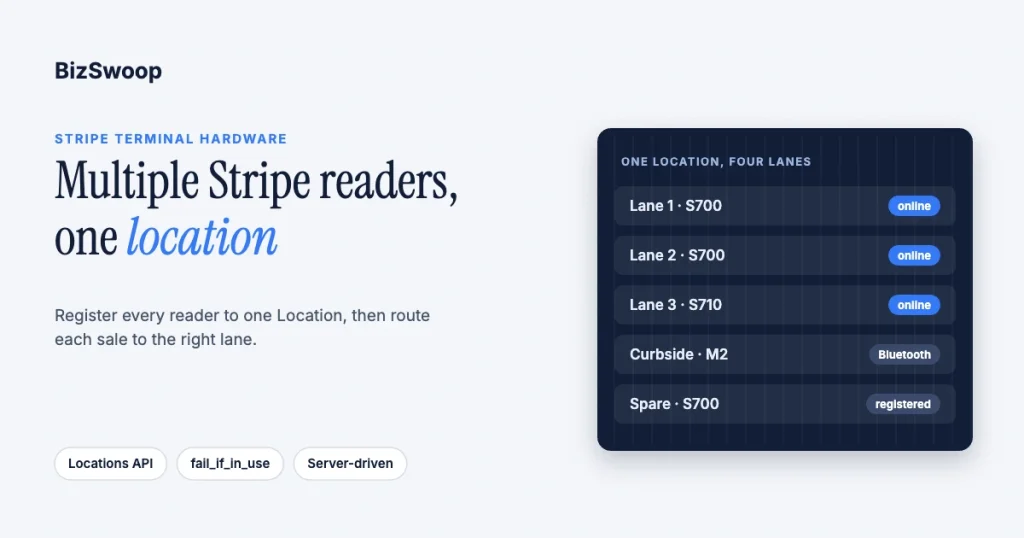
Yes, you can run several Stripe Terminal readers at one location, and Stripe’s model is built for it. You register every reader to the same Stripe Location (one per physical site), give each a clear label, and then make sure each checkout lane sends its payments to its own reader. How you do that last step depends on your integration: with Stripe’s server-driven integration your backend names the reader on every payment, while with the Terminal SDK each app instance connects to one reader at a time. This guide covers both, plus how many readers a counter actually needs and how to keep a multi-reader floor healthy.
We deploy and integrate Stripe Terminal for retail counters, restaurants, service desks and multi-site operators, and BizSwoop runs its own Stripe Connect platform at payments.bizswoop.app. Every behavior described below was re-checked against Stripe’s Terminal documentation in November 2026. If you are still choosing hardware, start with the 2026 Stripe Terminal hardware guide; if you are planning a chain rather than one busy site, read multi-location POS with the Stripe Terminal Locations API.
Key Takeaways
- One Location can hold many readers. Stripe’s docs say you can register multiple readers to each Location; a reader must be registered to a Location before it can take payments.
- Server-driven integrations route by reader ID. Your backend stores each reader’s
tmr_ID and sends each payment to the reader for that lane, so one POS backend can drive every smart reader on the floor. - SDK integrations are one reader per app instance. Only one Terminal SDK instance can connect to a reader at a time, so concurrent lanes need one connected device each.
- Use
fail_if_in_useon busy floors. By default a new SDK connection replaces the existing one; settingfail_if_in_useto true stops a cashier from interrupting another lane’s payment. - Location-scoped tokens only filter smart readers. A ConnectionToken scoped to a Location limits access to smart readers at that Location; it has no effect on Bluetooth readers such as the M2.
- Size to your peak, plus a spare. Plan one reader per lane that can be paying at the same moment, and keep a registered, labeled spare.
Can you run more than one Stripe reader at one location?
Yes. A Stripe Terminal Location represents a physical site, and Stripe’s Locations documentation says you can register multiple readers to each Location; its own example shows “Checkout 1” and “Checkout 2” readers under one store. We are not aware of a per-Location reader cap that a single store would hit.
What changes as you add readers is coordination, not permission. Each reader processes payments independently, but your point-of-sale software has to know which physical reader belongs to which lane and send each sale to the right one. Get that mapping wrong and a cashier taps “charge” while the payment prompt lights up three stations away. The rest of this guide is about getting the mapping right.
How do you register several readers to one Location?
You create one Location for the site and register every reader to it. Stripe’s register readers guide covers each method: smart readers (S700, S710, T600, WisePOS E) register with a pairing code generated on the device, by serial number, or straight from a hardware order, while Bluetooth readers such as the M2 are registered to a Location by your app when it connects.
- Create the Location. In the Dashboard or with the Locations API, create one Location per physical site with its real street address. The Location defines the reader’s country settings, and you can’t change a Location’s country later.
- Register each reader to that Location. Use a pairing code, the serial number (you can enter several at once), or the hardware order. When ordering, you can also pre-register a whole order’s smart readers to one Location.
- Label each reader. Give every reader a name such as “Lane 1”, “Front desk” or “Curbside”. When you register readers from one order in a batch, Stripe numbers them sequentially from the name you enter.
- Map lanes to readers in your POS. Store each reader’s ID (
tmr_…) against the station or lane that should use it. This mapping is what routing is built on. - Verify before you open. Check that every reader shows as online and correctly labeled under the Location in the Dashboard.
How do you route a payment to the right reader?
You route a payment by telling Stripe which reader should take it, and the mechanism depends on whether you use the server-driven integration or a Terminal SDK.
Server-driven integration (smart readers)
With the server-driven integration, there is no app-to-reader connection to manage. Stripe’s connect a reader guide recommends storing each reader’s ID in your application “so you know which reader to send transactions to from your point of sale.” Your backend sends each payment to a specific reader through the Stripe API, so a single POS backend can drive every smart reader at the site. Stripe recommends this integration for smart readers such as the S700, S710 and WisePOS E, partly because it doesn’t depend on the POS and reader sharing a local network.
Terminal SDK integration (JavaScript, iOS, Android, React Native)
With an SDK, each app instance discovers readers and connects to one. Stripe’s documentation is explicit: only one instance of the Stripe Terminal SDK can connect to a reader at a given time. By default, if a second app calls connectReader, the new connection replaces the old one and the first app is disconnected, even in the middle of a payment.
To prevent that, set fail_if_in_use to true on the first connection attempt. The incoming connection then fails if the reader is mid-transaction for another app, and Stripe suggests letting the user retry with it set to false only when they really mean to take the reader over. On a multi-lane floor this one setting stops most “my payment vanished” incidents.
When you run discovery for internet-connected readers, you can scope it to the Location so each device sees only that store’s readers, then connect to the reader whose label matches the lane.
Does ConnectionToken location scoping work for Bluetooth readers?
No. Stripe’s ConnectionToken API reference says a token created with a location “will only be usable with readers assigned to that location”, but that “location scoping only applies to internet-connected readers.” The Locations guide adds that for mobile readers the token’s Location “has no effect” so nearby mobile readers stay discoverable.
So for an M2 or another Bluetooth reader, put the reader-selection logic in your app: save the serial number of the reader each device should use and reconnect to that one. Stripe’s docs describe exactly this pattern for automatic reconnection.
Running WooCommerce across several counters? Jovvie gives each station its own Stripe reader and settings, and every sale lands in your own Stripe account.
How many devices do you need for multiple lanes?
It depends on the integration, and this is the planning question most teams get wrong.
| Setup | Readers for 4 concurrent lanes | Separate driving devices | How payments reach the reader |
|---|---|---|---|
| Smart readers, server-driven | 4 (S700 or S710) | None required beyond your POS screens; one backend drives all four | Backend sends each payment to a reader ID |
| Smart readers, app on the reader (Apps on Devices) | 4 | None: the POS app runs on each reader | Each reader runs its own app |
| Smart readers, JavaScript SDK | 4 | 4 browser sessions, one connected per reader | Each session connects to one reader |
| Bluetooth readers (M2), iOS/Android SDK | 4 | 4 phones or tablets, one paired per reader | Each app connects to one reader |
| Tap to Pay | None | 4 supported phones | Each phone is its own reader |
A single tablet can disconnect from one reader and connect to another, which is useful for a floating station, but an SDK instance can’t hold two readers live at once. If you use the SDK and want four lanes taking payments at the same time, plan for four connected devices.
How many readers does your counter need?
Size your fleet to the number of customers who are ever paying at the same moment, not to daily volume, and add a spare. A shop doing 300 sales a day but never more than one at a time needs one reader; a pop-up that takes 60 sales in a 20-minute rush needs several.
| Operation | Concurrent paying lanes | Readers to register | Typical reader mix |
|---|---|---|---|
| Single café or boutique counter | 1 | 2 (1 + spare) | One S700, or an M2 with a phone |
| Busy retail counter, two registers | 2 | 3 (2 + spare) | S700 or S710 per register |
| Restaurant: counter plus tableside | 2–3 | 4 | S700s at the counter, M2s or Tap to Pay for tableside |
| Multi-lane store at peak | 4 | 5 (4 + spare) | S700, S710 or T600 per lane |
| Curbside or line-busting add-on | +1 mobile | +1 | M2 or Tap to Pay on a phone |
On price: Stripe lists the S700 and S710 at $299 and the M2 at $59 in the US, and the countertop T600 is $329 plus a $39 Reader Hub. The S710 adds cellular connectivity for $10 per reader per month. Check Stripe Terminal pricing on the day you order, and see our hardware costs guide for the full picture. Note that the BBPOS WisePad 3 is not sold in the US.
- Always register a spare. A labeled, registered spare in a drawer can replace a failed lane in a minute.
- Match the reader to the station. Fixed lanes suit smart readers; mobile or curbside stations suit an M2 or Tap to Pay on iPhone. The M2 vs S700 comparison covers the trade-off.
- Self-service lanes have rules. Stripe’s readers and Tap to Pay support attended and semi-attended setups (for example, self-checkout with staff nearby); the Verifone UX700 is the only device Stripe offers for fully unattended use (Stripe support).
How do you monitor a multi-reader floor?
Use Stripe’s reader monitoring in the Dashboard or API to watch each reader’s status, so a dropped lane is caught before a customer finds it. The API’s Reader Events include Wi-Fi connect and disconnect events and are kept for 30 days.
- Check every reader at opening. Add “all readers online and labeled” to the opening checklist.
- Keep labels consistent across stores. “Lane 1 / Lane 2” beats a list of serial numbers when you are triaging at speed.
- Watch for connectivity drops. A reader that keeps losing Wi-Fi will fail at peak; our Stripe Terminal troubleshooting guide covers Stripe’s network requirements.
- Keep SDKs current. Stripe will block Terminal SDK versions 1.x–3.x from January 2027, so update older apps before then.
For a chain, the same structure scales up: one Location per site, optional Zones to group Locations, and per-Location monitoring.
Frequently asked questions
Can I have more than one Stripe reader at one location?
Yes. Stripe lets you register multiple readers to each Location. Register every reader at the site to the same Location, label each one, and map each label to a checkout lane in your POS.
How do I send a payment to a specific Stripe reader?
With the server-driven integration, your backend sends the payment to the reader’s ID, so you store which reader ID belongs to each lane. With a Terminal SDK, the payment runs on whichever reader that app instance is connected to.
Can two POS devices connect to the same Stripe reader?
Not at the same time. Only one Terminal SDK instance can connect to a reader at a time, and by default a new connection replaces the existing one. Set fail_if_in_use to true so a second device can’t interrupt a payment in progress.
Does a location-scoped ConnectionToken work with Bluetooth readers?
No. Stripe says location scoping only applies to internet-connected readers. For Bluetooth readers such as the M2, choose the reader in your own app logic, for example by saved serial number.
How many card readers does my business need?
One for each lane that can be taking a payment at the same moment, plus a spare. Size to your peak, not your daily total.
Do I need a tablet for every Stripe reader?
Not with smart readers on the server-driven integration, where one POS backend can drive all of them, or when your POS app runs on the reader itself. Bluetooth readers and Tap to Pay need one phone or tablet per reader.
Want a second opinion on your reader-to-lane plan?
If you are fitting out a busy site or rolling readers out across stores, talk to a Jovvie advisor. We will size the fleet, pick the reader per station and choose between the server-driven and SDK models before you buy hardware. Already sure? A Stripe POS like Jovvie handles the station-to-reader mapping for you.
Sources: Manage locations · Register readers · Connect to a reader · Create a ConnectionToken · Monitor readers · Attended, semi-attended and unattended environments · Stripe Terminal pricing.
