
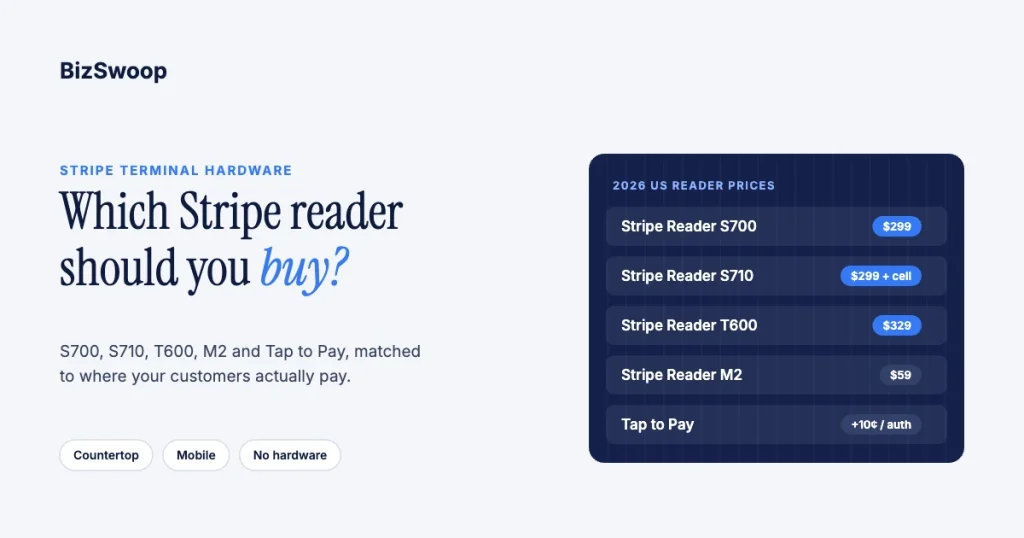
The best Stripe reader is the one that matches where money changes hands. In the US that means the Stripe Reader S700 for a counter, the S710 when Wi-Fi is unreliable, the T600 for a fixed countertop with a bigger screen, the M2 for mobile or occasional selling, and Tap to Pay on iPhone or Android when you’d rather buy no hardware. There is no single winner: Stripe splits the lineup by form factor and connectivity, so the right choice comes from one question. Is the customer standing at a fixed point of sale, or is the payment coming to them?
Jovvie, an official Stripe Partner, has run WooCommerce POS on Stripe Terminal since 2016, so we have put these readers on counters, in trucks and at events. We don’t sell hardware. Prices and specs below were re-checked against Stripe’s pricing page and reader documentation in November 2026. This guide sits under our 2026 Stripe Terminal hardware guide; for single-device depth, see the Stripe Reader S700 guide, the M2 vs S700 head-to-head and our BBPOS WisePad 3 review.
Key Takeaways
- Match the reader to the spot, not the spec sheet. Fixed counters want a smart reader with its own screen; payments that travel want a mobile reader or Tap to Pay.
- S700 and S710 cost the same $299. The S710 adds 4G/LTE fallback when Ethernet and Wi-Fi drop, with cellular at $10 per reader per month.
- The T600 is the new countertop option. It costs $329 plus a $39 Reader Hub, has an 8-inch screen, and runs on mains power with no battery.
- The M2 is the cheapest physical reader at $59. It pairs to a phone or tablet over Bluetooth (or USB on Android) and is sold in the US.
- Tap to Pay needs no hardware. It adds 10¢ per authorization to the 2.7% + 5¢ in-person rate and takes contactless cards and wallets only.
- The WisePad 3 isn’t sold in the US. Stripe’s devices page marks it unavailable here; it remains an option in other markets.
Which Stripe reader is best? The 2026 verdict matrix
There is no universal best reader, only a best reader for each situation. Find your row in the matrix rather than looking for a winner.
| Your situation | Best reader | Why | Runner-up |
|---|---|---|---|
| Shop, clinic or quick-service counter | S700 | Own touchscreen, on-reader tipping, can run your POS app on the device | T600 |
| Counter with weak or no Wi-Fi | S710 | Falls back to cellular automatically | S700 on Ethernet via the hub |
| Fixed counter wanting a larger screen | T600 | 8-inch countertop display, wired power | S700 in its dock |
| Field-service truck or mobile team | M2 | Pocketable, pairs to the phone staff already carry | Tap to Pay |
| Trade show, pop-up or roaming sales | M2 or Tap to Pay | No fixed station needed | S710 |
| Occasional selling at the lowest cost | Tap to Pay | No hardware to buy | M2 ($59) |
| Tableside or bottle service | M2 or Tap to Pay | Goes to the customer | S700 at the bar |
All of these readers take chip, contactless and mobile wallets; Tap to Pay takes contactless and wallets only. The differences that decide the purchase are physical: screen or no screen, how it connects, and whether it needs a phone.
How do the S700, S710, T600, M2 and Tap to Pay compare on specs?
The lineup splits into smart readers (their own screen, can run a POS app on the device), mobile readers (pair to a phone or tablet) and software-only Tap to Pay. Specs come from Stripe’s reader documentation and prices from Stripe Terminal pricing.
| Spec | S700 | S710 | T600 | M2 | Tap to Pay |
|---|---|---|---|---|---|
| Type | Smart reader | Smart reader | Smart reader | Mobile reader | Software on a phone |
| Screen | 5.5″ touchscreen | 5.5″ touchscreen | 8″ touchscreen | None (LED status lights) | The phone’s screen |
| Needs a phone or tablet | No | No | No | Yes | It is the phone |
| Connectivity | Wi-Fi; Ethernet with optional hub | Wi-Fi; Ethernet with hub; 4G/LTE | Wi-Fi; Ethernet with optional hub | Bluetooth LE; USB on Android | The phone’s connection |
| Power | Battery (about 15 hours active use) | Battery (about 15 hours active use) | Mains power, no battery | Battery | The phone |
| Form factor | Countertop or handheld | Countertop or handheld | Countertop or pole mount | Handheld, optional dock | Handheld |
| On-reader tipping | Yes | Yes | Yes | No (collect tips in your app) | In your app |
| US price | $299 | $299 + $10/month cellular | $329 + $39 Reader Hub | $59 | $0 hardware, +10¢ per authorization |
If the payment happens at a fixed spot, choose a smart reader (S700, S710 or T600). If it travels to the customer, choose the M2 or Tap to Pay. The rest is connectivity.
Which reader fits your use case?
Match the reader to the physical reality of your business and the decision makes itself. Four patterns cover most operators.
Countertop register (retail, clinic front desk, quick service). You want a device that stands on its own with a customer-facing screen, on-reader tipping and no phone tying up a staff member. That is the S700, an Android-based smart reader that can run your POS app on the device. The T600 is the alternative when you want a larger 8-inch screen on a fixed counter and don’t need a battery. Stripe ended sales of the BBPOS WisePOS E on September 1, 2026, so it is no longer the budget countertop pick.
Mobile field team (HVAC, plumbing, delivery, home services). Technicians already carry a phone, and the payment happens at the customer’s door. The M2 is the cheapest way to add a chip-and-tap reader to that phone, and Tap to Pay removes even that. Don’t buy a countertop smart reader for a truck; you’d be paying for a screen nobody looks at.
Markets outside the US. The WisePad 3, a compact Bluetooth reader with a physical PIN pad, is sold in other Stripe markets but not the US, and the M2 is US-only. Check Stripe’s devices page for what is available in your country.
Sites with unreliable networks (food-truck windows, remote locations, event booths). A countertop reader is useless if it can’t get online. The S710 prefers Ethernet, then Wi-Fi, then cellular, and switches back automatically when the primary network returns (network transitions). For bars, the usual split is an S700 at the well and an M2 or Tap to Pay on the floor, as covered in our bar and nightclub guide.
How much does each Stripe reader cost in 2026?
Stripe readers are bought upfront with no monthly hardware fee, apart from optional cellular on the S710. Card-present payments in the US cost 2.7% + 5¢ on Stripe’s standard pricing (Stripe Terminal pricing, checked November 2026).
| Reader | Upfront price (US) | Recurring cost |
|---|---|---|
| Stripe Reader M2 | $59 | None |
| Stripe Reader S700 | $299 | None |
| Stripe Reader S710 | $299 | $10 per reader per month for cellular |
| Stripe Reader T600 | $329, plus $39 Reader Hub | None |
| Tap to Pay (iPhone or Android) | $0 | +10¢ per authorization |
Other per-payment add-ons on Stripe’s pricing page: +1.5% for international cards and +5¢ per authorization for optional point-to-point encryption (P2PE). High-volume businesses can ask Stripe about custom pricing. The reader is a one-time cost you own outright, which is a real difference from POS vendors that bundle hardware into a monthly contract. Prices change, so confirm on Stripe’s pricing page before you buy. For a full cost breakdown, see Stripe Terminal hardware costs explained.
Selling through WooCommerce? Jovvie works with Stripe’s S700, S710, T600 and M2 readers, plus Tap to Pay on iPhone and Android.
Do you even need a reader?
Often, no. Tap to Pay turns a supported iPhone or Android phone into a contactless reader with no hardware to buy, so it belongs in the decision as a first-class option.
For a mobile team, a pop-up, a sales rep taking a deposit or any occasional seller, Tap to Pay on iPhone and Tap to Pay on Android are frequently the right answer. The trade-offs to plan for:
- Contactless only. No chip insert or swipe, so keep an M2 or smart reader if you see cards that can’t tap.
- Device and region limits. It needs a supported phone model and OS, and availability varies by country.
- Per-payment fee. Tap to Pay adds 10¢ per authorization in the US.
- Offline support differs. Stripe lists offline mode for Tap to Pay on iPhone as a private preview; Tap to Pay on Android doesn’t support it.
- Not a register. A phone screen isn’t a customer-facing counter display, so a busy fixed counter still wants a smart reader.
Which connection type do you need: Wi-Fi, Ethernet, cellular or Bluetooth?
Choose the connection type before the form factor whenever a site’s network is in doubt, because a reader that can’t stay online is worse than a cheaper one that can.
- Wi-Fi or Ethernet (S700, T600). Ideal for a fixed counter with a stable network. Ethernet through Stripe’s hub is the most dependable option for a permanent register.
- Cellular fallback (S710). The S700 experience without relying only on local Wi-Fi. Stripe says payments can fail briefly while the reader switches, typically 15 seconds to 2 minutes for server-driven integrations.
- Bluetooth to a phone (M2). The reader uses the paired device’s connection, so it is only as online as that phone or tablet.
- Offline mode as a backup. The M2, S700/S710 and T600 can store payments offline and forward them later; you carry any declines, and each offline payment is capped at $10,000 (Stripe offline payments).
Which reader should each type of business buy?
If you want the answer without the matrix, here it is by business type.
- Retail shop or clinic front desk: an S700 (or T600) at each register, plus an M2 for line-busting or curbside.
- Restaurant or bar: an S700 at the counter or well; an M2 or Tap to Pay for tableside and bottle service.
- Field service: an M2 on each truck, or Tap to Pay if you only see contactless cards. Skip smart readers.
- Pop-up, market stall or trade show: Tap to Pay first; an M2 if you need chip; an S710 if you want a counter display without reliable Wi-Fi.
- Remote or poor-network site: an S710 for its cellular fallback, with offline mode switched on.
- Outside the US: check Stripe’s devices page; the WisePad 3 is a common mobile choice where it is sold.
Whatever you pick, you keep Stripe’s processing pricing, own the hardware and run the same payments platform across the fleet, so a mixed deployment (S700s at the counter, M2s in the field) is normal. If you run several readers at one site, see running multiple readers at one location.
Frequently asked questions
Which Stripe reader is best?
It depends on where you take payments. In the US, choose the S700 for a fixed counter, the S710 where Wi-Fi is unreliable, the T600 for a larger countertop screen, the $59 M2 for mobile teams, and Tap to Pay when you want no hardware at all.
How much does a Stripe card reader cost?
In the US, the Stripe Reader M2 is $59, the S700 and S710 are $299 each (S710 cellular is $10 per reader per month), and the T600 is $329 plus a $39 Reader Hub. Tap to Pay has no hardware cost but adds 10¢ per authorization. In-person payments cost 2.7% + 5¢ on Stripe’s standard pricing.
What is the difference between the S700 and the M2?
The S700 is a smart reader with its own 5.5-inch touchscreen that can run your POS app on the device. The M2 has no screen and pairs to a phone or tablet over Bluetooth. The S700 ($299) suits a fixed counter; the M2 ($59) is the cheapest way to take chip and contactless payments on the move.
Does the Stripe Reader S700 need a phone or tablet?
No. The S700 is a self-contained Android-based smart reader. It can run your POS app on the device, or connect to a POS on another device over the internet or local network.
Can I use Tap to Pay instead of buying a reader?
Often, yes. Tap to Pay on a supported iPhone or Android phone accepts contactless cards and mobile wallets with no hardware to buy, for an extra 10¢ per authorization. It can’t take chip-insert or swiped cards, so keep a reader if you see those.
Can I buy the BBPOS WisePad 3 in the US?
No. Stripe’s devices page lists the WisePad 3 as unavailable in the US, where the M2 is the mobile reader. The WisePad 3, with its physical PIN pad, is still sold in other Stripe markets.
Want a second opinion before you buy the fleet?
The right Stripe reader is a matching problem, not a ranking problem. For a single counter the answer is usually obvious; for a mixed or multi-location rollout, the fleet decision has real cost and reliability consequences. Talk to a Jovvie advisor and we’ll help you buy the right readers once. If you also need software, a Stripe POS like Jovvie runs on all of them.
Sources: Stripe Terminal pricing · Stripe Terminal devices · Stripe Reader S700/S710 docs · Stripe Reader T600 docs · Stripe Reader M2 docs · Network transitions on cellular readers · Offline payments.
