
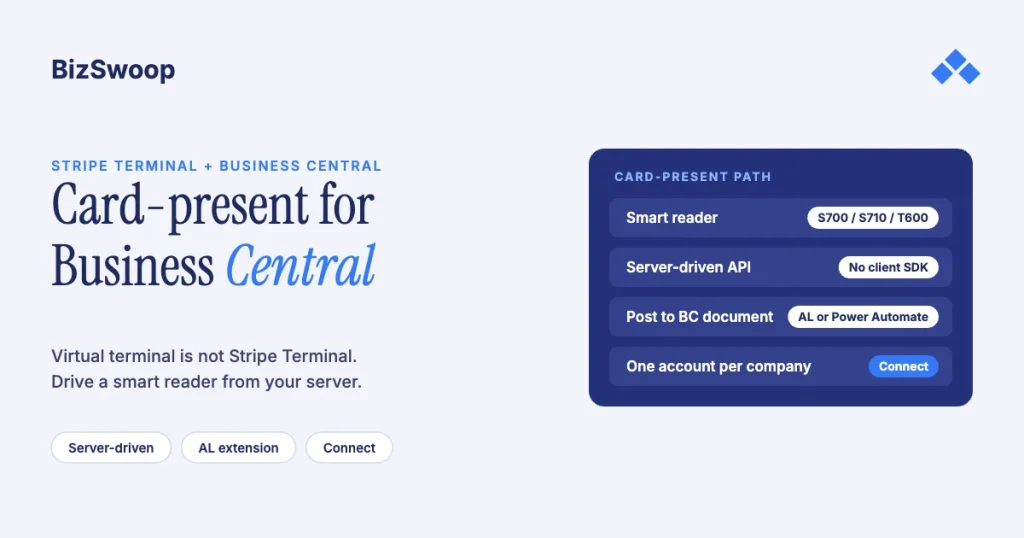
You integrate Stripe Terminal with Dynamics 365 Business Central by building a middleware layer that drives a Stripe smart reader from your server and posts the captured payment back to the BC document. Most “Stripe for Business Central” products are virtual terminals (keyed or card-on-file charges), not a card-present hardware flow. The pattern that fits BC is Stripe’s server-driven integration: the Stripe API controls an S700, S710, T600 or WisePOS E smart reader directly with no client SDK, your back end mediates, and an AL extension or Power Automate flow writes the payment onto the sales order or invoice. Multi-company BC maps to Stripe Connect, one connected account per company.
Jovvie, an official Stripe Partner, has built in-person Stripe Terminal payments for WooCommerce merchants since 2016. The Stripe mechanics below were re-checked against Stripe’s documentation in November 2026. This is a cluster piece under the Stripe Terminal ERP integration patterns guide; the closest sibling for multi-entity design is Connecting NetSuite to Stripe Terminal: Architecture Patterns. For the fee mechanics, see how Stripe Terminal application fees work.
Key Takeaways
- A virtual terminal isn’t Stripe Terminal. Most Stripe listings for BC charge keyed or stored cards (card-not-present); a tap on hardware needs a card-present flow.
- Server-driven is the natural fit for BC. Stripe’s API drives a smart reader over the internet, so a .NET or cloud back end can take card-present payments without a client SDK.
- Use a smart reader. Server-driven works with the S700/S710, T600, WisePOS E and Verifone smart readers; the M2 and Tap to Pay need a mobile SDK.
- Post with AL for control, Power Automate for speed. An AL extension keeps the operator inside BC; a webhook-driven flow is quicker to build but more brittle.
- Keep a two-way key. Write the PaymentIntent ID on the BC payment and the BC document number in the PaymentIntent metadata.
- One connected account per BC company. With Connect direct charges, readers, Locations and PaymentIntents belong to each company’s account via the
Stripe-Accountheader.
Does Stripe Terminal work with Business Central?
Yes, through a custom or packaged middleware integration; there’s no Microsoft-built or Stripe-built card-present connector for Business Central. Stripe’s own ERP apps cover NetSuite and SAP’s Digital Payments Add-on. The key thing to understand is that “Stripe for Business Central” usually means a virtual terminal, and that’s a different payment flow:
- Virtual terminal / card-on-file. A card number is keyed, stored, or charged against an invoice through the Stripe API. That’s a card-not-present transaction, priced and risk-scored like an online payment. Insight Works’ Stripe integration for BC, for example, describes “Stripe virtual terminal support” for in-store and remote customers. No-code tools such as Power Automate typically land here too.
- Card-present Stripe Terminal. A physical card is tapped, inserted or swiped on a Stripe reader. In the US that’s Stripe’s in-person rate of 2.7% + 5¢ per successful card transaction, versus card-not-present pricing for keyed charges, and it’s what you want at a counter, service desk, trade-show booth or will-call window. See Stripe Terminal vs virtual terminal.
If the goal is a chip or tap on hardware landing on a BC document, a virtual-terminal connector won’t get you there. You need the architecture below.
How does the server-driven card-present architecture work?
In Stripe’s server-driven integration, the Stripe API (not a client SDK) drives a smart reader, and your back end sits between BC and Stripe. Stripe says this lets you use Terminal even if your infrastructure doesn’t support the iOS, Android or JavaScript SDKs and build an integration powered by your own middleware or cloud infrastructure, which describes a BC estate well. Stripe also lists a .NET Terminal SDK in preview, but the server-driven route needs no client SDK at all.
The flow has three parts:
- Point-of-sale surface. Where a clerk opens the BC sales order or invoice and starts “collect payment”: a BC page action, a companion POS app or a small web app beside BC.
- Back-end middleware. Reads the document amount, creates the PaymentIntent and calls process_payment_intent on a registered reader. This is where the BC-to-Stripe logic lives.
- Stripe API and smart reader. Stripe forwards the request to the reader, which prompts the customer to tap, insert or swipe, and Stripe sends the result to your back end by API response and webhook.
The hardware must be a smart reader: Stripe lists the S700/S710 ($299 each; the S710 adds cellular at $10 per reader per month), the T600 ($329, plus the optional $39 Reader Hub), the WisePOS E and supported Verifone readers. The Stripe Reader M2 ($59) connects by Bluetooth or USB to a phone or tablet running a mobile SDK, so it can’t use server-driven. Server-driven also can’t take payments offline; offline mode needs a mobile SDK.
| Step | System | What happens |
|---|---|---|
| 1. Register reader | Stripe / middleware | Reader registered to a Stripe Location (one per site) |
| 2. Start collection | BC → middleware | Operator opens an order or invoice; middleware reads amount and document number |
| 3. Create PaymentIntent | Middleware → Stripe | PaymentIntent for the balance due, BC document number in metadata |
| 4. Drive the reader | Stripe → smart reader | process_payment_intent sends the amount; customer taps |
| 5. Get the result | Stripe → middleware | Success or decline via webhook; capture confirmed |
| 6. Post to BC | Middleware → BC | Payment applied to the document (AL or Power Automate) |
| 7. Reconcile | Middleware / finance | Stripe payout matched to BC payments by PaymentIntent ID |
Should you post payments to BC with an AL extension or Power Automate?
Use an AL extension when the flow is business-critical and you want control; use a Power Automate or HTTP flow for lower volume or a proof of concept. Both work against Business Central.
- AL extension. Adds a “Collect on reader” action to the sales order or invoice page, calls your middleware over HTTP and, on success, creates and applies a customer payment to the document, writing the PaymentIntent ID on the payment. The operator never leaves BC and you control exactly when the ledger entry is created. It costs more up front (AL development and deployment) but gives the cleanest audit trail.
- Power Automate / HTTP flow. Listens for the Stripe webhook and uses BC’s standard API to record the payment against the referenced document. It’s quicker and needs no AL, but it relies on event delivery and retries, and the operator still needs somewhere to start the charge.
Either way: write the PaymentIntent ID on the BC payment and store the BC document number in the PaymentIntent metadata. That two-way key lets you match payouts to BC payments on a schedule and post fees and refunds explicitly.
Running in-person payments for WooCommerce stores? Jovvie runs on Stripe Terminal readers and Tap to Pay out of the box.
How does multi-company Business Central map to Stripe Connect?
Give each BC company its own Stripe connected account, so each company’s card-present revenue settles to its own account and posts to its own BC ledger. With Terminal on Connect direct charges, Stripe says all API resources, including readers and Locations, belong to the connected account, and your platform sends requests with its API key plus the Stripe-Account header.
- One connected account per company. A reader registered to Company A’s Location can’t take a payment into Company B.
- Scope every call. Set
Stripe-Accountto the account of the company that owns the document. The PaymentIntent, reader command and payout all belong to that company. - Post back to the matching company. The middleware already knows which BC company the document came from, so it applies the payment there.
- Know the charge-type trade-off. With destination charges, readers stay on your platform and the connected account is identified in metadata; with direct charges, the connected account pays Stripe’s fees, refunds and chargebacks. See Connect Express vs Standard for Terminal and the platform economics guide.
A single-company deployment doesn’t need Connect; one Stripe account with server-driven is simpler.
Should you buy an AppSource connector or build a custom integration?
Buy a connector when you only need card-on-file collections and reconciliation; build a server-driven integration when you need card-present Stripe Terminal hardware on BC documents.
| Factor | Virtual-terminal connector | Custom server-driven Terminal integration |
|---|---|---|
| Payment type | Keyed or card-on-file (card-not-present) | Card-present on a smart reader |
| US Stripe pricing | Card-not-present pricing | 2.7% + 5¢ in-person rate |
| Time to deploy | Fast: install and configure | Slower: middleware plus AL or Power Automate |
| Card-present hardware | Usually none | S700/S710, T600, WisePOS E |
| Multi-company | Varies by product | Connect, one account per company |
| Control of posting | Vendor-defined | Full: you own the posting logic |
| Best for | AR teams charging saved cards against invoices | Counters, service desks, will-call, trade shows |
Many groups run both: a connector for card-on-file AR and a card-present Terminal flow for the counter. For a cost view, see Build vs Buy: Stripe Terminal ERP Connectors.
How do you set up the integration step by step?
Set up the Stripe side first (accounts, Locations, readers), then the middleware, then the posting path back into BC.
- Provision the Stripe accounts. One Stripe account for a single company; a Connect platform with one connected account per company for multi-company tenants or ISVs.
- Create a Location per physical site. Readers belong to Locations, so payments and reporting attribute correctly; under Connect, each Location belongs to the right connected account.
- Register the smart readers to their Locations (see Stripe’s S700/S710 setup guide).
- Build the middleware. A .NET service fits BC estates: it authenticates to Stripe, reads the document balance and number, creates a PaymentIntent with the document number in metadata, and calls
process_payment_intenton the target reader. - Add the operator trigger: an AL page action in BC or a companion POS surface that sends the document number to the middleware.
- Wire the posting path (AL or Power Automate) and confirm the document status updates after a successful capture.
- Set up reconciliation. Match Stripe payouts to BC payments using the PaymentIntent ID ↔ document number key, and post Stripe fees and refunds as explicit entries, tagged by company.
- Test failure paths. Use Stripe’s simulated reader to rehearse declines, connectivity loss and refunds. A decline must leave the document unpaid and retriable; a refund must reverse both the Stripe charge and the BC payment.
Get the account structure and Locations right before writing middleware; retrofitting Connect onto a single-account build is the most expensive rework.
Frequently asked questions
Does Stripe integrate with Dynamics 365 Business Central?
Yes, through third-party connectors or custom development, not a Microsoft- or Stripe-built integration. Most connectors provide virtual-terminal or card-on-file charging and reconciliation. Card-present Stripe Terminal needs a custom or packaged server-driven integration.
Can Business Central accept card-present payments?
Yes, through middleware that drives a Stripe smart reader (S700, S710, T600 or WisePOS E) with Stripe’s server-driven integration and posts the payment back to the BC document. BC has no native card-present Stripe Terminal path.
Is there a Stripe app for Business Central on AppSource?
There are third-party Stripe listings for BC, and the ones we reviewed, such as Insight Works’ integration, describe virtual-terminal or card-on-file flows. We haven’t found one that provides card-present Stripe Terminal hardware, which is why the server-driven pattern is the recommended route.
How do you post Stripe payments in Business Central?
Use an AL extension that applies a customer payment to the sales order or invoice, or a Power Automate flow that records the payment through BC’s API when the Stripe webhook arrives. In both cases, write the PaymentIntent ID on the BC payment and store the BC document number in the PaymentIntent metadata.
Can you use one Stripe account across multiple BC companies?
You can, but for a multi-company tenant it’s cleaner to use Stripe Connect with one connected account per BC company and scope each call with the Stripe-Account header. That keeps revenue, payouts and reporting separate by legal entity and posts each payment to the right company.
Do I need a smart reader for the server-driven integration?
Yes. Server-driven works only with smart readers: the S700/S710, T600, WisePOS E and supported Verifone readers. The Stripe Reader M2 and Tap to Pay need a mobile SDK, and offline payments also require the mobile SDK.
Scoping a card-present Business Central integration?
We’ll map the capture flow, the AL-or-Power-Automate decision, the multi-company Connect model and, if you’re an ISV, the application-fee economics before you commit engineering time. If you also sell through WooCommerce, a Stripe POS like Jovvie covers the in-person side.
Sources: Server-driven integration (Stripe) · Select a reader (Stripe) · Use Terminal with Connect · Process a PaymentIntent on a reader · Apps from Stripe · Stripe for Business Central (Insight Works) · Business Central documentation (Microsoft Learn) · Stripe Terminal pricing.
