
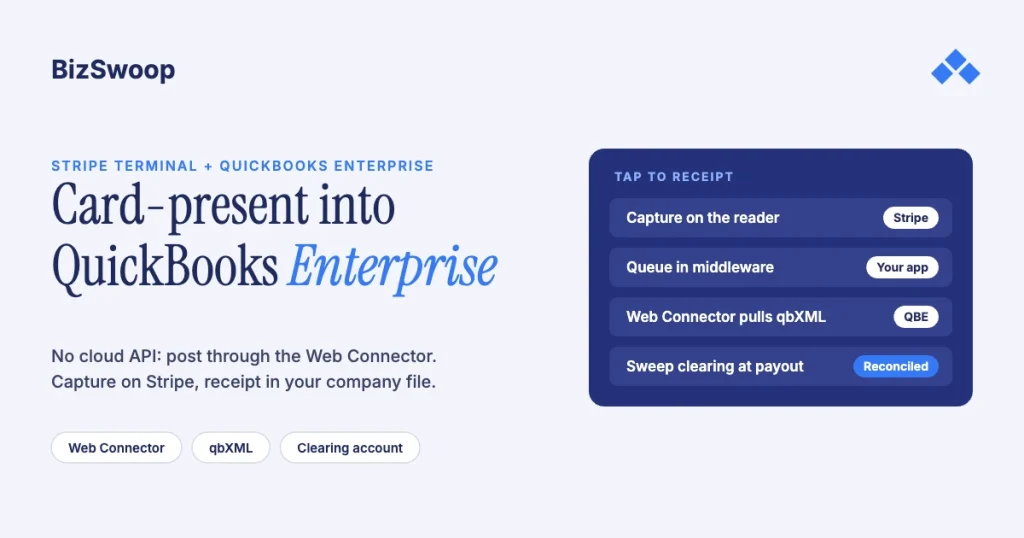
You integrate Stripe Terminal with QuickBooks Enterprise by capturing the card on a Stripe reader and posting the result into the company file through the QuickBooks Web Connector as qbXML. QuickBooks Desktop Enterprise has no cloud REST API, so the flow is: the reader takes the card and Stripe returns a succeeded PaymentIntent, your middleware stores that charge, and the Web Connector pulls a qbXML SalesReceipt or ReceivePayment into QBE so the in-person charge lands as a matched receipt. The fact that decides the whole project is that QuickBooks Enterprise (Desktop) and QuickBooks Online are different integration surfaces, and most Stripe-to-QuickBooks connectors are built for the Online one.
Jovvie, an official Stripe Partner, has built in-person Stripe Terminal payments for WooCommerce merchants since 2016. The Stripe and Intuit mechanics below were re-checked against Stripe’s and Intuit’s documentation in November 2026. This is a cluster piece under the Stripe Terminal ERP integration patterns guide; the closest sibling is Connecting NetSuite to Stripe Terminal: Architecture Patterns, the same capture-versus-reconciliation split on a cloud ERP. For deciding whether to build this at all, see Build vs Buy: Stripe Terminal ERP Connectors.
Key Takeaways
- QuickBooks is the ledger, Stripe is the processor. QuickBooks Enterprise has no built-in Stripe connection, so a Terminal charge is captured in Stripe and then posted into QBE.
- QBE integrates through the Web Connector, not a REST API. The Web Connector is a Windows app that exchanges qbXML with the company file and starts every conversation itself.
- Posting is pull-based, so plan for lag. The card is captured in real time; the receipt appears in QBE the next time the Web Connector runs.
- Post gross to a clearing account. Deposit each receipt to a “Stripe Clearing” account and sweep it to the bank at payout, booking Stripe’s fees as an expense.
- Match on IDs, never names. Carry the QBE customer
ListIDand invoiceTxnIDwith the PaymentIntent so the post never creates duplicate customers. - Only build this if you’re committed to Stripe. Intuit’s own QuickBooks Payments is the low-effort path if you have no reason to process on Stripe.
How do you integrate Stripe Terminal with QuickBooks Enterprise?
You pair a Stripe Terminal capture layer with the QuickBooks Web Connector, because QBE can’t be called over the web the way a cloud system can. The reader takes the card and Stripe creates the PaymentIntent; your middleware stores the result; the Web Connector, an Intuit utility installed on the same machine as QuickBooks or on its local network, periodically asks your web service for work and exchanges qbXML over SOAP; your service answers with a SalesReceipt or ReceivePayment that posts the charge to the right customer and, ideally, the right invoice.
Settle three questions first, in this order:
- Do you need card-present capture, or only reconciliation? If you only need Stripe’s online revenue in QuickBooks, a sync tool may be enough. If someone is tapping or inserting a card at a counter or in the field, you need Terminal plus a posting path into QBE.
- Is your ledger QuickBooks Enterprise (Desktop) or QuickBooks Online? QuickBooks Online has a REST API; QBE does not. Check this before you buy any tool that says “QuickBooks integration.”
- Are you posting your own charges, or a platform posting for sub-merchants? The platform case adds Stripe Connect application-fee handling, covered near the end.
Can QuickBooks Enterprise accept Stripe payments?
Yes, but not natively: QuickBooks Enterprise has no Stripe setting, so a Stripe Terminal charge is captured in Stripe and the result is posted into QBE through the Web Connector. Intuit’s own in-person option is QuickBooks Payments, which takes cards through the QuickBooks mobile or GoPayment apps, Tap to Pay on iPhone, or Intuit’s $49 Bluetooth card reader. That uses Intuit as the processor, not Stripe.
If you’re committed to Stripe, because you already run Stripe Connect, want Stripe’s card-present pricing, or want Stripe hardware like the S700 or M2, then QuickBooks is the ledger and the integration is a posting integration, not a setting you switch on. Stripe’s own ERP apps cover NetSuite and SAP’s Digital Payments Add-on; there is no Stripe-built connector for QuickBooks Desktop.
Why is QuickBooks Enterprise different from QuickBooks Online?
QuickBooks Enterprise integrates through the QuickBooks Desktop SDK, exchanging qbXML with the company file over the Web Connector; it has no cloud REST API. QuickBooks Online exposes an OAuth-secured REST API, and most “Stripe to QuickBooks” connectors are written against it. QBE is a desktop application whose company file (.QBW) lives on a local machine or a hosted Windows server. According to Intuit’s Web Connector documentation, the Web Connector is a Microsoft Windows application that passes qbXML between a web service and QuickBooks, and because it initiates all communication, you don’t need to open firewall ports.
Three consequences shape the design:
- QBE is pull-based. You can’t push a payment into QBE on demand. The Web Connector runs on a schedule (or when someone clicks Update), asks your service for queued work, and applies it. Capture is real-time; posting happens on the next run, typically minutes later.
- The company file must be reachable. The Web Connector runs on a Windows machine (or at a QuickBooks hosting provider) with access to the file. Keep that machine on an Enterprise release Intuit still supports.
- You own the mapping. Your middleware translates a Stripe PaymentIntent into the right
SalesReceiptorReceivePayment, picks the deposit-to account, item or income account and payment method, and matches an existing customer instead of creating duplicates.
Stripe’s side is real-time: the Terminal quickstart covers connection tokens, connecting a reader and the PaymentIntent flow. The middleware is where a real-time cloud capture meets a batch-oriented desktop ledger.
What does the Stripe Terminal to QBE architecture look like?
It’s a five-stage loop: capture on the reader, record in middleware, queue a qbXML request, let the Web Connector apply it, then reconcile the Stripe payout against the QBE deposit.
- Create a connection token and connect the reader. Your backend creates a connection token, and the Terminal SDK connects to a reader: an S700/S710 or T600 smart reader, the M2 with a phone or tablet, or Tap to Pay on a supported phone. A smart reader can also be driven from your server with Stripe’s server-driven integration, with no client SDK. QuickBooks isn’t involved yet.
- Create and capture the PaymentIntent. Take the amount from the QBE invoice or order you’re collecting against, create a PaymentIntent with
payment_method_types: ['card_present'], collect on the reader and capture. Put the QBE customerListIDand invoiceTxnIDin the PaymentIntentmetadata. - Record the charge in middleware as “pending QBE post.” Store the PaymentIntent ID, charge ID, amount, the matched QBE customer and the source invoice. This durable record is the queue item the Web Connector consumes, and it’s what makes posting reliable and idempotent.
- Post into QBE via the Web Connector. On its next run, the Web Connector authenticates to your service and asks for work. Against an open invoice, return a
ReceivePaymentAddRqthat applies the payment to that invoice, sets a “Stripe Terminal” payment method and deposits to a clearing account. For a counter sale with no invoice, return aSalesReceiptAddRqwith the lines (or a summary item), customer, payment method and deposit account. Put the Stripe charge ID in the memo, store the returnedTxnIDand mark the record posted. - Reconcile the payout. Stripe pays out in batches, net of fees. When a payout lands, match it to the clearing-account entries it covers and record the bank deposit and the fee expense in QBE.
Three implementation rules:
- Post to a clearing account, not the bank. Depositing each receipt to “Stripe Clearing” (or Undeposited Funds) makes payout reconciliation a sweep of that balance to zero.
- Keep fees separate. Record Stripe’s fee as an expense at payout (or per charge), never by netting it out of the receipt, or revenue is understated. The US in-person rate is 2.7% + 5¢ per successful card transaction, with +1.5% for international cards and +10¢ per authorization for Tap to Pay; see the Stripe Terminal fee structure.
- Make the post idempotent. The Web Connector can retry. Key each post on the PaymentIntent ID and refuse to create a second QBE transaction for one that already has a stored
TxnID. Duplicate receipts are the classic failure here.
Should you use QuickBooks Payments, a gateway, or custom Stripe Terminal?
Use Intuit’s QuickBooks Payments if you want the least work and don’t need Stripe; use a QuickBooks-integrated third-party gateway if you want reconciliation handled without a build; build custom Stripe Terminal plus Web Connector if you’re committed to Stripe and need to own the flow.
| QuickBooks Payments (Intuit) | QuickBooks-integrated gateway | Custom Stripe Terminal + Web Connector | |
|---|---|---|---|
| Processor | Intuit | Third-party gateway | Stripe |
| Card-present hardware | QuickBooks card reader ($49), Tap to Pay on iPhone | The vendor’s readers | S700/S710 ($299), T600 ($329, + $39 Reader Hub), M2 ($59), Tap to Pay on iPhone or Android |
| QBE posting | Built in | Handled by the vendor | You build it (this guide) |
| Reconciliation | Built in | Built in | You design it (clearing-account sweep) |
| Stripe Connect application fees | No | No | Yes |
| Build effort | None | Low (configure) | Medium to high |
| Best fit | Small QBE shop, no Stripe requirement | Wants turnkey, indifferent to processor | Already on Stripe, a Connect platform, or needs custom UX |
| Lock-in | High (Intuit) | Medium (vendor) | Low (you own it) |
If you have no reason to be on Stripe, Intuit’s path or a gateway costs you less effort. The custom build makes sense when Stripe is already your platform: you run Connect, you want Stripe’s in-person pricing and hardware, or you need a checkout the packaged products can’t give you.
Running in-person payments for WooCommerce stores? Jovvie runs on Stripe Terminal readers and Tap to Pay out of the box.
How do you match a Terminal charge to a QBE customer and invoice?
Match on stable QBE identifiers you carry through the whole flow, not on names, because qbXML CustomerAdd will happily create a second “John Smith.”
- Capture the IDs when the order starts. Store the customer
ListIDand, for invoice collections, the invoiceTxnIDon the middleware record and in the PaymentIntent metadata. - Reference them in the post. The
ReceivePaymentAddRqapplies to the invoice byTxnIDand the customer byListID. No fuzzy matching. - Decide how walk-ins post. Either post to a single “Counter Sales” customer (common in high-volume retail) or run a
CustomerQueryRqbefore creating anyone. Never create a customer per transaction. - Leave a trail both ways. Put the Stripe charge ID in the QBE memo so finance can trace any line to the Stripe Dashboard.
How do you reconcile Stripe payouts against QBE?
Reconcile at the payout level using the clearing account, because Stripe batches many charges into one deposit, net of fees, so one-charge-to-one-bank-line never ties out.
- Each receipt or payment posts its gross amount to Stripe Clearing in QBE.
- When Stripe pays out, list the payout’s balance transactions, every charge, refund and fee in the batch. Stripe’s payout reconciliation report gives the same view in the Dashboard.
- In QBE, record a deposit that moves the batch’s gross from Stripe Clearing to the bank and a fee expense for the batch’s Stripe fees. Clearing returns to zero for that batch.
- The bank feed matches the real deposit to that QBE deposit, as in any bank reconciliation.
Handle the edge cases explicitly: partial payments apply to an invoice and leave a balance (ReceivePayment supports this); refunds made on the reader post as a refund and reduce the clearing balance; disputes appear as adjustments in the payout and should post as such, not as a reversal of the original receipt. For the Stripe-side mechanics of fees and payouts, see Stripe Terminal payouts and fee extraction.
How do Connect platforms post application-fee charges to QBE?
If you’re a Stripe Connect platform reselling Terminal, the revenue on your own QuickBooks ledger is the application fee you earn, not the sub-merchant’s gross charge, so posting splits along the Connect boundary. The connected account receives the charge and your platform collects an application fee.
- On the platform’s ledger, post application fees as revenue and reconcile them to your platform’s payouts through the same clearing-account sweep. Who pays Stripe’s processing fee depends on the charge type (direct or destination charges), so book it the way your setup actually settles.
- On a sub-merchant’s ledger (if you also post into their QBE), the gross charge is their revenue and your application fee is their expense. Mirror the split so both sides tie out.
The charge-type and account-type choices are covered in the Stripe Connect platform economics guide. The QBE point is simple: post what you actually earned and keep the sub-merchant’s gross out of your own revenue accounts.
Frequently asked questions
Can QuickBooks Enterprise accept Stripe payments?
Not natively. QuickBooks Enterprise has no built-in Stripe connection. You capture the payment in Stripe (in person with Stripe Terminal) and post the result into the company file through the QuickBooks Web Connector as a qbXML sales receipt or received payment. Intuit’s own in-person option, QuickBooks Payments, uses Intuit as the processor.
Does QuickBooks Enterprise have an API?
Not a cloud REST API. QuickBooks Enterprise integrates through the QuickBooks Desktop SDK, exchanging qbXML with the company file through the Web Connector, a Windows application that starts each exchange with your web service. QuickBooks Online is the edition with a REST API, which is why most Stripe-to-QuickBooks connectors don’t work with Enterprise.
How do I record in-person card payments in QuickBooks Enterprise?
Record a sales receipt for a counter sale, or a received payment applied to an open invoice, deposited to a clearing account and posted through the Web Connector. Capture the card on the Stripe reader first, store the charge in middleware, then queue the qbXML request. Reconcile the clearing account when the Stripe payout lands.
What card reader works with QuickBooks Desktop Enterprise?
No reader plugs into QuickBooks Desktop Enterprise directly; you choose a reader for your processor. With QuickBooks Payments that’s Intuit’s card reader or Tap to Pay on iPhone. With Stripe it’s an S700/S710 ($299), T600 ($329), M2 ($59) or Tap to Pay on iPhone or Android, and the resulting charge is posted into QBE through the Web Connector.
Is QuickBooks Online easier to integrate with Stripe Terminal than Enterprise?
For posting, yes. QuickBooks Online’s REST API lets you create a sales receipt in real time, while Enterprise waits for the next Web Connector run. The Terminal capture side is identical, and the Web Connector path is reliable once built, so the integration surface rarely decides the edition on its own.
How long does the Web Connector take to post a Terminal payment?
It posts on the Web Connector’s next run, which you schedule (or trigger with Update), so expect minutes rather than seconds. The card is approved instantly on the reader; only the QBE receipt waits. A durable middleware queue means nothing is lost if the QuickBooks machine is offline.
Ready to scope this against your company file?
Bring your QBE setup and reconciliation requirements, and we’ll pressure-test the Web Connector posting design with you and say plainly whether custom Stripe Terminal, a gateway or Intuit’s own path is the right answer. If you also sell through WooCommerce, a Stripe POS like Jovvie covers the in-person side.
Sources: QuickBooks Web Connector: get started (Intuit) · QuickBooks in-person payments (Intuit) · Stripe Terminal quickstart · Server-driven integration · Balance transactions API · Payout reconciliation report · Stripe Terminal pricing.
