
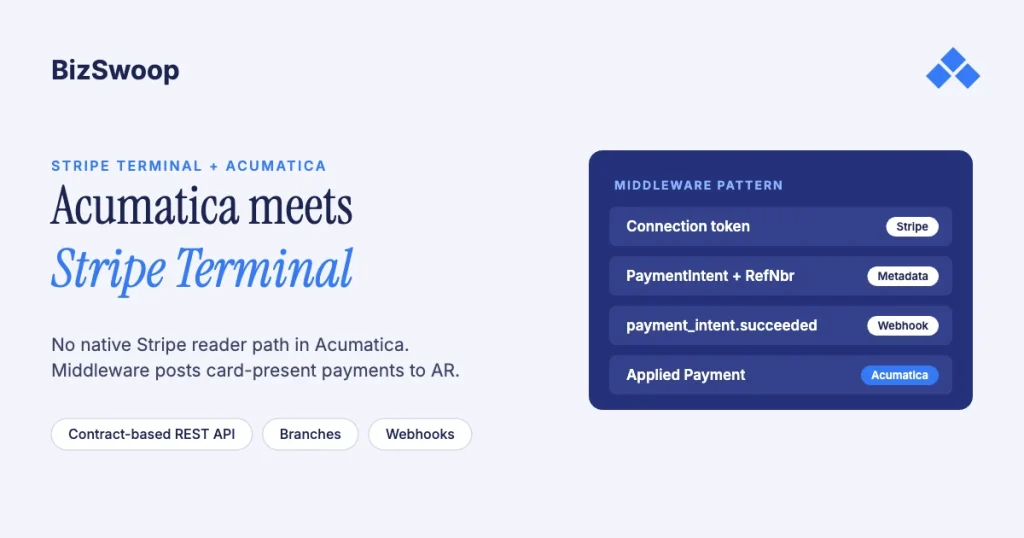
Acumatica has no built-in way to drive a Stripe Terminal reader, so you add card-present Stripe payments with a middleware service between the two. The middleware reads the open sales order or invoice through Acumatica’s contract-based REST API, mints a Stripe connection token, collects the card on a reader or with Tap to Pay, and posts a Payment applied to that document back into Acumatica, with the Stripe PaymentIntent ID stored for reconciliation. Acumatica’s own Stripe processing center handles keyed and card-on-file payments; it doesn’t talk to a reader.
Jovvie, an official Stripe Partner, has built in-person Stripe Terminal payments for WooCommerce merchants since 2016. The Stripe and Acumatica details below were re-checked against both vendors’ documentation in November 2026. This is the Acumatica piece in the ERP pillar; for the cross-ERP view, start with the Stripe Terminal ERP integration patterns guide. The closest sibling is Connecting NetSuite to Stripe Terminal, the same capture-versus-reconciliation split on a different API.
Key Takeaways
- Acumatica’s Stripe plug-in isn’t a reader integration. It processes card payments entered in Acumatica, stores customer payment methods and imports settlement batches; it doesn’t drive Stripe Terminal hardware.
- Card-present Stripe means middleware. A service you own (or buy) brokers between the Stripe reader and Acumatica’s contract-based REST API.
- Acumatica stays the ledger. The middleware only creates a Payment applied to the right sales order or invoice, in the right branch; GL accounts and tax stay Acumatica’s job.
- Link both systems at the moment of payment. Put the Acumatica reference in PaymentIntent metadata and the PaymentIntent ID on the Acumatica payment; reconciliation depends on it.
- Map branches to Stripe Locations. Register each branch’s readers to its own Location and stamp the branch on every payment so payouts split cleanly.
- Don’t let Acumatica re-authorize the card. Stripe already captured it; Acumatica should record a settled payment, not run it through a processing center again.
Does Acumatica support Stripe Terminal card-present payments?
No. Acumatica’s built-in Stripe integration processes card payments that are entered in Acumatica, but there’s no setting that pairs it with a Stripe Terminal reader, so a card-present Stripe payment needs a middleware layer.
Acumatica’s documentation for the Stripe processing center lists what the Stripe plug-in does: load card data from Stripe, add customer payment methods, process credit card payments, import settlement batches, and, for over-the-counter sales, accept payments from new cards and refund them. All of that is card-not-present: someone types or stores the card. On Acumatica’s community forum, a UK retailer running the Stripe integration described exactly this. They could key card details into Acumatica, but couldn’t get a Stripe card reader in the showroom to take the payment and update Acumatica. The accepted answer was that they’d need a POS solution, because Acumatica doesn’t really ship one.
Two things are easy to confuse here:
- Acumatica Payments is Acumatica’s own payment processing offering. Its product page describes EMV acceptance on a compact Bluetooth reader through the Acumatica mobile app. That’s a real in-person option, but it isn’t Stripe.
- Stripe’s own apps don’t fill the gap either. Stripe’s list of apps it builds and maintains includes ERP apps for NetSuite and the SAP Digital Payments Add-on, plus in-person apps for several retail and hospitality POS systems, but nothing for Acumatica.
If you’re committed to Stripe for card-present payments, whether for one Stripe balance across channels, Stripe’s reader fleet tooling, or a Connect platform, you add the capture layer yourself.
How does Acumatica handle payments today?
Acumatica routes card payments through a processing center (the connection to a payment provider) and a payment method that references it, and records the money as a Payment applied to AR documents. That tells you where a Stripe Terminal flow plugs in: at the Payment, not the processing center.
- Processing center: the provider connection. The Stripe plug-in configures one for card-not-present processing. A reader driven by the Stripe Terminal SDK doesn’t fit here, because the processing center expects to authorize the card itself.
- Payment method: how a customer or document is paid, referencing a processing center for card transactions.
- Payment: the AR document the money is applied to, against an invoice or a sales order. This is what the middleware creates.
- Branch: the accounting dimension every payment carries, which is why multi-branch handling gets its own section below.
So the middleware’s only job inside Acumatica is narrow: create a Payment, applied to the right document in the right branch, with the Stripe reference stored on it. Everything about how the card was read stays in Stripe.
What does Acumatica’s Stripe integration do, and what doesn’t it do?
The Stripe plug-in covers card-not-present processing and settlement import well; it doesn’t cover anything that involves a physical reader.
| Capability | Acumatica Stripe processing center | Middleware + Stripe Terminal |
|---|---|---|
| Store a customer payment method | Yes | Not needed for card-present |
| Charge a keyed or stored card against an invoice | Yes | — |
| Import Stripe settlement batches and fees | Yes | Your reconciliation job does this |
| Drive a chip or contactless reader | No | Yes |
| Tap to Pay on iPhone or Android | No | Yes |
| Card-present pricing (2.7% + 5¢ in the US) | No | Yes |
| Apply a card-present payment to a sales order at pickup | No | Yes |
The pricing row matters. Stripe’s US card-present rate is 2.7% + 5¢ per successful transaction (+1.5% for international cards, +10¢ per Tap to Pay authorization). A distributor doing will-call pickups or a field crew collecting on delivery pays online rates if those payments go through the keyed flow instead. See card-present rates on Stripe for how the two compare.
How do you bring Stripe Terminal into an Acumatica workflow?
Run a middleware capture service beside Acumatica: it reads the document being paid and posts the payment back through Acumatica’s contract-based REST API, and it drives the reader through Stripe Terminal. Acumatica never talks to the reader.
- The clerk opens the sale in the middleware’s POS screen, which fetches the open sales order or AR invoice through the REST API and shows the balance due.
- The middleware’s backend mints a connection token from Stripe. Each reader is registered to a Stripe Location.
- The middleware creates a PaymentIntent for the balance, with the Acumatica reference (order or invoice number, customer ID, branch) in metadata.
- The reader collects the card: chip, contactless, or Tap to Pay on a phone.
- On
payment_intent.succeeded, the middleware creates the Payment in Acumatica, applied to the invoice or sales order, with the PaymentIntent ID in a custom field. - A receipt goes out, and the document balance in Acumatica reflects the payment.
- A scheduled job reconciles Stripe payouts against those payments (next section).
Which reader? For a counter, a smart reader: the Stripe Reader S700 or S710 ($299 each in the US; the S710 adds cellular at $10 per reader per month), the T600 ($329 plus the $39 Reader Hub), or the BBPOS WisePOS E. Smart readers work with a server-driven integration, so a web-based middleware screen needs no client SDK. For field staff, the M2 ($59, US) pairs with a phone or tablet app over Bluetooth, and Tap to Pay needs no hardware at all. Outside the US, the BBPOS WisePad 3 takes the M2’s place. The 2026 reader guide compares them.
There are three common shapes for the middleware:
| Middleware shape | Best fit | Who drives the reader | Effort |
|---|---|---|---|
| Packaged POS bridged to Acumatica | Shops that want a supported register fast | The POS app | Low to medium; the vendor owns the POS layer |
| iPaaS or integration broker | Estates already running an iPaaS | A POS screen you still need; the broker posts back | Medium; recurring broker cost |
| Custom service on Acumatica + Stripe APIs | Teams that want full control of the accounting boundary | Your service | Highest to build; lowest per-transaction cost |
Whichever you pick, the boundary is the same: Acumatica is the ledger, the middleware is the card-present layer, and Stripe handles the hardware and the money. Card data stays between the reader and Stripe, which keeps your PCI scope small.
Selling through WooCommerce as well as Acumatica? Jovvie runs in-person payments on Stripe Terminal readers and Tap to Pay out of the box.
How do you reconcile a Terminal payment to an Acumatica sales order or invoice?
Write the PaymentIntent ID onto the Acumatica payment when you capture it, then match each Stripe payout’s balance transactions to those payments on a schedule. Every card-present charge then traces from reader, to Acumatica document, to bank deposit.
- At capture, store the PaymentIntent ID on the Acumatica Payment and the Acumatica document number in PaymentIntent metadata. That two-way link is the backbone.
- When a payout lands, list its balance transactions and map each one to its PaymentIntent, and through it to the Acumatica payment.
- Post the payout as a deposit from a Stripe clearing account, so the bank reconciliation ties out to the cent.
- Book Stripe’s fees explicitly. Stripe deducts fees before paying out, so record them as an expense; the deposit equals gross payments minus fees.
- Handle refunds and disputes the same way. A Terminal refund is a negative balance transaction that has to post back against the original document.
The payouts and fee extraction guide covers the payout side in more depth.
How should the integration surface inside Acumatica?
Package the Acumatica side as a Customization Project: the custom fields, a “Charge on Terminal” action on the sales order and invoice screens, and an extended endpoint exposing only what the middleware needs. A versioned package stays upgrade-safe and deploys the same way to test and production tenants.
- Custom fields on the Payment (and optionally the sales order) for the PaymentIntent ID, payout ID and reader or Location.
- A “Charge on Terminal” action that hands the document number, customer, branch and balance due to the middleware screen.
- An extended contract-based endpoint that exposes just the documents and payment operations the middleware calls: the narrowest surface that does the job.
- A clear write-back path, so the captured payment lands as an applied Payment and the document shows as paid.
A single package also gives an auditor one artifact that describes how card-present money enters the ledger. For an ISV serving several Acumatica customers, it’s the thing you ship and version per customer.
What changes with multiple branches?
Register each branch’s readers to its own Stripe Location and stamp the branch on every PaymentIntent and Acumatica payment. Acumatica accounts by branch; Stripe doesn’t know your org chart unless you tell it.
- Map branches to Locations one-to-one, so reader management and reporting mirror Acumatica. Running several readers at one location covers the device side.
- Carry the branch in metadata and on the payment. One Stripe payout can cover several branches; without the tag you can’t split it back.
- Reconcile per branch, then roll up. The consolidated view should be a sum of clean branch reconciliations.
- Let the document’s branch drive GL and tax. The middleware applies the payment; Acumatica decides the accounts.
- Use separate Stripe accounts only for separate legal entities. For one entity with several branches, one account plus branch metadata is simpler.
How do ISVs earn on Terminal across Acumatica customers?
If you’re an ISV or integrator putting several Acumatica customers on Stripe Terminal, Stripe Connect lets each customer be a connected account, with readers and Locations managed from your platform and an application fee on each in-person payment. Acumatica’s Stripe plug-in has no notion of a platform fee.
- Revenue on card-present volume through
application_fee_amount, on top of any integration retainer. - One place to manage readers and Locations across every customer.
- Consistent refund and reconciliation rules enforced at the platform.
- Know where readers live. With direct charges, readers and Locations sit on the connected account; with destination charges, they stay on the platform and the connected account is identified in metadata. Stripe’s Terminal with Connect page covers both.
For the fee math, see how application fees work on Terminal and the Stripe Connect platform economics guide.
Frequently asked questions
Does Acumatica integrate with Stripe?
Yes, for card-not-present payments. Acumatica’s Stripe processing center processes card payments entered in Acumatica, stores customer payment methods, handles refunds and imports settlement batches with fees. It doesn’t drive a Stripe Terminal reader.
Can Acumatica take in-person card payments?
Yes, through Acumatica Payments, which supports EMV on a Bluetooth reader in the Acumatica mobile app, or through other processor integrations. For in-person payments on Stripe specifically, you add a middleware layer that drives a Stripe reader and posts the payment back.
Does Acumatica support Stripe Terminal readers?
Not natively. No Acumatica setting pairs a Stripe reader, and Stripe doesn’t list an Acumatica app among the apps it maintains. A middleware service bridges Acumatica documents to a Stripe Terminal payment.
Which Stripe readers work with an Acumatica integration?
Any Stripe Terminal reader your middleware supports. Counters usually use a smart reader (S700, S710, T600 or WisePOS E), field staff use the M2 in the US or the WisePad 3 elsewhere, and Tap to Pay works on a compatible phone with no reader.
How do I reconcile a Stripe Terminal payment in Acumatica?
Store the PaymentIntent ID on the Acumatica payment and the Acumatica document number in the PaymentIntent metadata, then match each Stripe payout’s balance transactions to those payments, booking Stripe fees and refunds explicitly. Tag by branch so multi-branch deposits split correctly.
Should Acumatica’s processing center authorize the Terminal payment?
No. Stripe already authorized and captured the card on the reader. Record it in Acumatica as a settled payment so the card isn’t authorized twice and Stripe stays the source of truth for the charge.
Scoping card-present payments into Acumatica?
Bring your branch structure and how you take payments today, and we’ll review the capture, posting and reconciliation design with you before you build. If you also sell through WooCommerce, a Stripe POS like Jovvie covers the in-person side.
Sources: Stripe processing center setup (Acumatica docs, MYOB Acumatica edition) · Acumatica Community: Stripe integration to accept card terminal · Acumatica Payments · Apps from Stripe · Select a reader · Terminal with Connect · Connection tokens API · Balance transactions API · Stripe Terminal pricing.
