
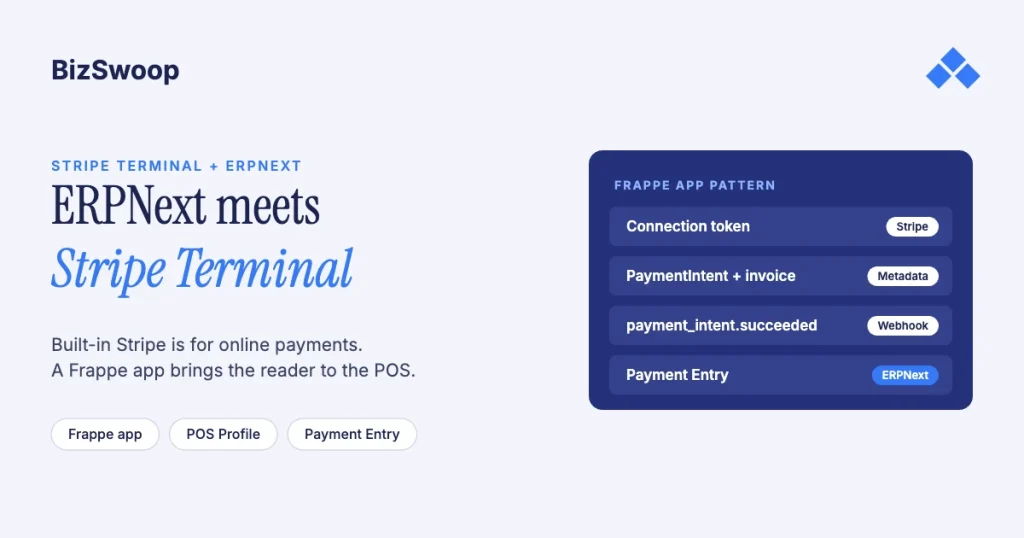
ERPNext’s built-in Stripe integration takes online payments only, so you add Stripe Terminal with a Frappe app that brings a Stripe reader to the ERPNext POS. The app adds a Stripe-backed mode of payment to the POS Profile, mints connection tokens server-side, sends the amount to a Stripe smart reader, and records the result against the POS or Sales Invoice with the PaymentIntent ID as the reference. Card data goes from the reader to Stripe and never touches ERPNext.
Jovvie, an official Stripe Partner, has built in-person Stripe Terminal payments for WooCommerce merchants since 2016. The ERPNext and Stripe details below were re-checked in November 2026, including the state of the community apps. This is the ERPNext piece in the ERP pillar; for the cross-ERP view, start with the Stripe Terminal ERP integration patterns guide. The open-source sibling is Odoo + Stripe Terminal, where the POS integration is native.
Key Takeaways
- Built-in Stripe is the online gateway. ERPNext’s Stripe Settings create a payment gateway for online payment requests; there’s no first-party card-reader support.
- Card-present means a Frappe app. Either adapt a community app or build your own bench app on the same pattern.
- The community apps are old. The public Stripe Terminal apps for ERPNext were written and tested for ERPNext v13 in 2021 and 2022; treat them as a starting point, not a drop-in.
- Smart readers fit a browser POS. Stripe’s JavaScript SDK and server-driven integration both work with smart readers only: S700, S710, T600, WisePOS E.
- Post the payment, then reconcile the payout. Store the PaymentIntent ID on every Payment Entry and book Stripe’s fees when each payout lands.
- More than one entity means Connect. Several companies or sub-merchants taking payments is a Stripe Connect build, not a plugin install.
How do I add Stripe Terminal to ERPNext?
Enable Terminal on your Stripe account, deploy a Frappe app that adds a Terminal mode of payment to the POS, register your reader to a Stripe Location, and confirm captured payments post back to ERPNext.
- Set up Stripe Terminal. In the Stripe Dashboard, create a Terminal Location for each site and order or register readers. Locations, readers and connection tokens are the objects your app works with (Stripe Terminal docs).
- Deploy a Frappe Terminal app. Add the app to your bench, install it on the site and migrate. Use a community app as a reference (
aisenyi/stripe_terminal, or the Pasigono hardware app that bundles Stripe Terminal with scale and receipt-printer integrations), or build your own on the same pattern. - Register the reader. Register a smart reader (S700, S710, T600 or WisePOS E) to the Location by pairing code or serial number, and store the API keys and Location ID in the app’s settings.
- Add the mode of payment. Map a Mode of Payment to Stripe and add it to the POS Profile. When the cashier selects it, the app sends the amount to the reader and the customer taps or inserts.
- Confirm the post-back. On a succeeded PaymentIntent, the app records the payment against the POS or Sales Invoice with the PaymentIntent ID as the reference. Check the amount, reference and ledger accounts before you go live.
The sections below cover the decisions inside each step: which app, whether you need Connect, how the money lands in the ledger, and which reader to buy.
How is Stripe Terminal different from ERPNext’s built-in Stripe integration?
ERPNext’s built-in Stripe integration is an online payment gateway; Stripe Terminal is Stripe’s separate card-present product, and ERPNext doesn’t ship support for it.
Frappe’s Stripe setup docs describe the built-in path: enter your publishable and secret keys in Stripe Settings, and ERPNext creates a Payment Gateway record, a bank-type account and a Payment Gateway Account so the system can accept online payments, including Stripe subscriptions through payment requests. That’s the right guide for collecting a card online. It’s the wrong guide for a card at a counter.
- Online gateway (built in): the customer enters card details in a browser to pay a payment request. No reader.
- Stripe Terminal (added through an app): the card is tapped or inserted on a Stripe reader. In the US that’s 2.7% + 5¢ per successful transaction (+1.5% for international cards, +10¢ per Tap to Pay authorization), and the payment is card-present for disputes and liability. See card-present rates on Stripe.
The two coexist: keep the gateway for online payment requests and add the Terminal mode of payment for in-person sales.
Which Frappe app approach should you use?
There’s no first-party option, so it’s a choice between adapting a community app and building your own on the same pattern. Check the community apps’ age before you decide.
| Route | What it is | Best when | Trade-offs |
|---|---|---|---|
aisenyi/stripe_terminal | Open-source app that integrates the Terminal API with the ERPNext POS page | You want a reference implementation to fork | Last updated in 2021; expect to port it to current ERPNext and own all updates |
Pasigono (samjaninf/erpnext-stripe-terminal, a fork of aisenyi/pasigono) | POS hardware app: Stripe Terminal, weigh scales and QZ Tray receipt printing | You also need scale or receipt-printer integration | README lists testing on ERPNext v13 only; written for the WisePOS E |
| Custom Frappe app | Your own bench app calling the Terminal API on the same pattern | Multi-entity, Connect, strict change control | Highest build cost; you own the whole surface |
The Pasigono README explains why these apps target smart readers: at the time, the WisePOS E was the only reader Stripe’s JavaScript SDK supported. Today Stripe’s JavaScript SDK and its server-driven integration support all of its smart readers (T600, S700/S710, WisePOS E and supported Verifone models), but still not the Bluetooth readers, which need a mobile SDK.
Our recommendation: read the community code, but plan on a maintained fork or your own app. Pin versions, test against your exact ERPNext and Frappe release, and own the update cycle. For a platform serving several entities, a custom app is usually unavoidable once Connect is involved.
How do you post Terminal payments to Sales Invoices and Payment Entries?
Record each succeeded PaymentIntent against the POS or Sales Invoice under the Stripe mode of payment, with the PaymentIntent ID as the reference, so the ledger can be matched to Stripe payouts line by line.
- The PaymentIntent succeeds on Stripe.
- The app records the payment against the open POS Invoice or Sales Invoice using the Stripe mode of payment; for an invoice paid after the fact, it creates a Payment Entry.
- The money lands in a Stripe clearing account, the account mapped to that mode of payment, with the PaymentIntent ID stored as the reference. That ID is your join key.
- Reconcile against the payout. Stripe pays out on a schedule, net of fees. Match each payout’s balance transactions to the Payment Entries by PaymentIntent ID, then record the bank deposit from the clearing account.
Two mistakes to avoid. Posting gross payments and forgetting Stripe’s fee means the bank balance never matches the payout, so map a fee account and book the fee at payout time. And in Connect deployments, keep your application fee separate from the merchant’s revenue so your margin is visible. The payouts and fee extraction guide covers both.
Running in-person payments for WooCommerce stores too? Jovvie runs on Stripe Terminal readers and Tap to Pay out of the box.
When does an ERPNext deployment need Stripe Connect?
When more than one legal entity or sub-merchant takes card-present payments through the same ERPNext-based POS. Each becomes a Stripe connected account, and your platform can take an application fee on every transaction.
The community apps assume one Stripe account for one business. That breaks for a franchise, a multi-company group or a platform reselling the register. With Stripe Connect, each entity is a connected account and you set application_fee_amount on each PaymentIntent. Three decisions shape the economics:
- Account type. Express and Custom accounts let the platform control fees, payout timing and the dashboard. Standard accounts hold their own full Stripe relationship, which limits what the platform can dictate.
- Charge type. With destination charges, the platform pays Stripe’s fee by default; with direct charges, the connected account is the merchant of record and normally pays it. Your margin is the application fee minus whatever share of Stripe’s fee you absorb.
- Where readers live. With direct charges, readers and Locations sit on the connected account. With destination charges, they stay on the platform and the connected account is identified in metadata (Terminal with Connect).
For a multi-company ERPNext group, the clean setup is one connected account per company, its Locations and readers under it, and payments posting into that company’s books. See Stripe Connect Express vs Standard for Terminal and the Stripe Connect platform economics guide.
Which reader should you use with ERPNext?
Use a smart reader, because the ERPNext POS runs in a browser and Stripe’s browser-side options (the JavaScript SDK and the server-driven API) support smart readers only.
| Reader | US price | Best for in ERPNext | Notes |
|---|---|---|---|
| Stripe Reader S700 | $299 | General counters | Android-based smart reader; Wi-Fi or Ethernet |
| Stripe Reader S710 | $299 + $10/month cellular | Counters without reliable Wi-Fi | Adds 4G LTE |
| Stripe Reader T600 | $329 + $39 Reader Hub | Fixed countertop or pole mount | Continuously powered, 8-inch customer display |
| BBPOS WisePOS E | Check Stripe’s hardware shop | Existing deployments; the reader the community apps were built on | Smart reader; Wi-Fi or Ethernet with a dock |
| Tap to Pay | No hardware | Field or pop-up sales | Needs a native mobile app, not the browser POS |
A Stripe M2 (US) or WisePad 3 (outside the US) won’t work with a browser POS; they connect over Bluetooth or USB to an app built on Stripe’s iOS, Android or React Native SDK. Compare models in the 2026 reader guide.
How does Stripe Terminal keep card data out of ERPNext?
The reader encrypts card data and sends it straight to Stripe, so the card number never enters ERPNext, the Frappe app or the browser. ERPNext only receives references: the PaymentIntent ID, amount, status, and card brand and last four digits for the receipt.
That keeps the cardholder-data environment out of your systems, which is the main reason to use Terminal rather than a home-grown card flow. It doesn’t remove your obligations: you still secure the ERPNext instance, admin access, the connection-token endpoint and the API keys in the app’s settings, and you complete the PCI self-assessment that applies to you. See the Stripe Terminal PCI compliance guide.
Frequently asked questions
Does ERPNext support Stripe card readers?
Not out of the box. ERPNext’s built-in Stripe integration is an online payment gateway. In-person payments on Stripe readers need a Frappe app, community or custom, that connects the ERPNext POS to Stripe Terminal.
Are the community Stripe Terminal apps for ERPNext production-ready?
Treat them as reference code. aisenyi/stripe_terminal was last updated in 2021, and the Pasigono app’s README lists testing on ERPNext v13 only. Fork, port and test against your ERPNext and Frappe versions, and plan to maintain the code yourself.
What hardware works with Stripe Terminal on ERPNext?
Stripe smart readers: the S700, S710, T600 and BBPOS WisePOS E. The ERPNext POS runs in a browser, and Stripe’s browser-side integrations support smart readers only. Bluetooth readers and Tap to Pay need a native mobile app.
Can I use ERPNext’s built-in Stripe integration and Stripe Terminal together?
Yes. Keep the built-in gateway for online payment requests and add a Stripe Terminal mode of payment for in-person sales. They’re separate modes of payment and can share the same Stripe account.
How do Stripe Terminal payments reconcile in ERPNext?
Post each payment to a Stripe clearing account with the PaymentIntent ID as the reference, then match each Stripe payout’s balance transactions to those entries and book the payout to the bank with Stripe’s fees as a separate expense.
Do I need Stripe Connect for ERPNext?
Only if more than one entity or sub-merchant takes payments, or you want to earn an application fee. One business on one Stripe account doesn’t need Connect.
Planning Stripe Terminal for ERPNext?
Bring your ERPNext version, entity structure and how you take payments today, and we’ll review the app, ledger posting and fee design with you before you build. If you also sell through WooCommerce, a Stripe POS like Jovvie covers the in-person side.
Sources: Frappe: Setting up Stripe · aisenyi/stripe_terminal · samjaninf/erpnext-stripe-terminal (Pasigono) · Select a reader · Stripe Terminal docs · Stripe Connect · Terminal with Connect · Stripe Terminal pricing.
