
Stripe Connect lets a software platform take in-person Stripe Terminal payments on behalf of the businesses it serves. Each payment is routed to the right merchant’s connected account, and the platform can take its own cut through an application fee. Every Connect-plus-Terminal design comes down to two choices: the charge type (direct charges, destination charges, or separate charges and transfers) and who owns the reader hardware. The SDK and the readers are the easy part. The hard part is the money map: where the charge settles, who is the merchant of record, who pays Stripe’s processing fee, and how a refund taken at the counter flows back through the platform’s books.
Jovvie, an official Stripe Partner, has built in-person Stripe Terminal payments for WooCommerce merchants since 2016. This is the Connect pillar of our Stripe Terminal library, written for the ISV, marketplace or vertical-SaaS architect who has to pick the account setup, charge type and reconciliation approach before writing integration code. Every mechanic below comes from Stripe’s Connect and Terminal documentation, re-checked in November 2026. If you haven’t chosen hardware yet, start with the Stripe Terminal hardware reader guide.
Key Takeaways
- Connect is for other people’s money. One business taking its own payments, even across many locations, uses plain Terminal; you need Connect when payments belong to merchants you serve.
- The charge type decides who pays Stripe. On destination charges and separate charges and transfers, the platform always pays Stripe’s fees, refunds and disputes; on direct charges the fee payer is set when the connected account is created.
- Reader ownership follows the charge type. Destination charges put Locations, readers and connection tokens on the platform, so one reader can serve many merchants; direct charges put them on each connected account.
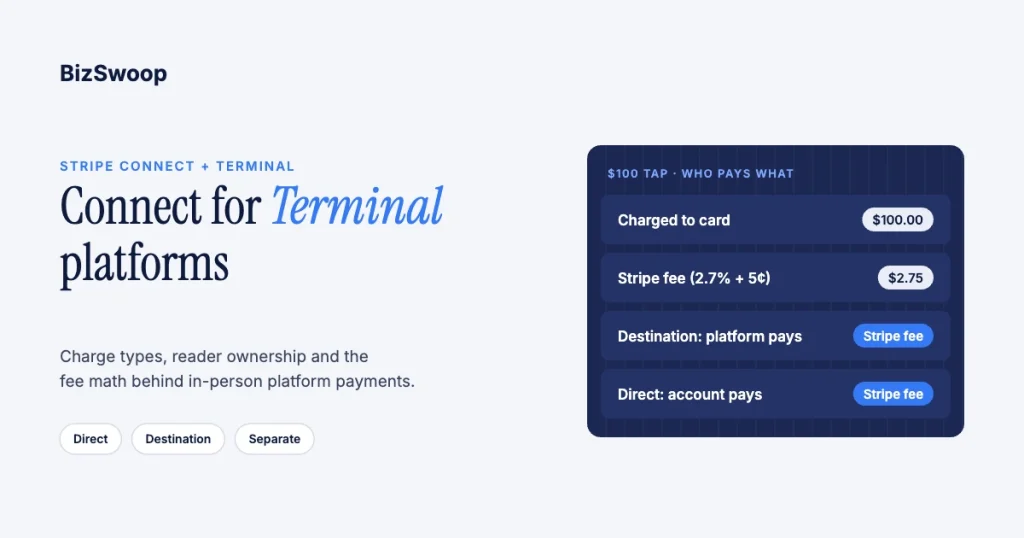
- Price the application fee against Stripe’s fee. On a $100 destination charge the platform pays Stripe $2.75 (2.7% + 5¢), so a 1.5% application fee loses $1.25 per sale.
- Account “types” are legacy. Stripe now recommends configuring connected accounts with controller properties (who pays fees, who carries losses, which dashboard) instead of Standard, Express or Custom.
- Record the money map at the tap. Store the PaymentIntent ID, connected account ID, charge type and fee when the payment happens, and use Stripe’s reports to confirm rather than reconstruct.
What is Stripe Connect, and how does it work with Stripe Terminal?
Stripe Connect is Stripe’s product for platforms and marketplaces that move money on behalf of other businesses; combined with Terminal, it lets one platform take card-present payments on readers and settle them to the merchants it serves.
Plain Terminal collapses three roles into one Stripe account: the merchant of record, the account that takes the payment, and the account that gets paid. Connect splits them apart. The platform is your software business and holds the platform account and API keys. The connected account is each merchant you serve: a clinic, a food truck, a franchise location. The customer is the cardholder at the reader. Connect defines, per payment, which party is the merchant of record, where the funds settle and how your fee is taken. Stripe documents the Terminal side in Use Terminal with Connect; every connected account taking Terminal payments needs the card_payments capability.
Why use Connect with Terminal instead of plain Terminal?
Use Connect when the businesses you serve each need to be paid into their own bank account as their own merchant; a single Stripe account pays out to one legal entity.
The dividing line is ownership of the funds. A single business with many stores uses plain Terminal and groups readers with Locations; the back-office side is covered in Stripe Terminal for back-office payments. You need Connect when the money belongs to someone else: salon software whose customers get their own payouts, a marketplace with a shared kiosk, a franchise platform paying franchisees, or an ISV embedding payments. Connect is also how a platform earns payment revenue, through application fees, covered in how application fees work on Stripe Terminal. If you’re still deciding whether you need Connect at all, see Stripe Terminal vs the direct Stripe API.
What are the three Connect charge types for Terminal?
Connect supports direct charges, destination charges, and separate charges and transfers, and the one you pick sets the merchant of record, where funds land first, who pays Stripe’s fees and who owns the readers (how charges work in a Connect integration).
| Dimension | Direct charges | Destination charges | Separate charges and transfers |
|---|---|---|---|
| Payment created on | Connected account (Stripe-Account header) | Platform | Platform |
| Merchant of record | Connected account | Platform, or the connected account with on_behalf_of | Platform, or the connected account with on_behalf_of |
| Funds land in | Connected account | Platform, transferred automatically | Platform, transferred by you later |
| Stripe fees, refunds, disputes paid by | Fee payer set on the account (connected account by default) | Platform, always | Platform, always |
| Your revenue | application_fee_amount | application_fee_amount | Whatever you don’t transfer |
| Locations, readers, connection tokens | Connected account | Platform | Platform |
| One reader for many merchants | No (private preview for platform-owned readers) | Yes | Yes |
| Best for | Merchants who want their own Stripe relationship | Most embedded SaaS and ISV platforms | Splitting one payment across several recipients |
Direct charges: the connected account is the merchant
With direct charges, the payment is created on the connected account, settles there, and shows the connected account on the customer’s statement; your platform takes an application fee on top.
For Terminal, you create the connected account’s Locations, register its readers and create its connection tokens with your platform key plus the Stripe-Account header. Stripe states that with this setup the connected account is responsible for Stripe fees, refunds and chargebacks. Direct charges suit franchise or reseller models where each merchant is an independent business. A reader registered to one connected account can’t take payments for another; Stripe has a private preview for platform-owned readers with direct charges, limited to smart readers on a server-driven integration.
Destination charges: the platform controls the payment
With destination charges, the payment is created on the platform, Stripe transfers the funds to the connected account minus your application fee, and the platform pays Stripe’s fees, refunds and disputes.
For Terminal, the platform owns the Locations and readers and creates connection tokens without the Stripe-Account header, so the same reader can take a payment for merchant A at 10:00 and merchant B at 10:05. Stripe suggests grouping readers by connected account with one Location each, and scoping each connection token to a Location. Set on_behalf_of to make the connected account the settlement merchant; for Terminal it’s required when the connected account is in a different country from the platform (destination charges). The multi-tenant Stripe Terminal architecture guide walks through that isolation pattern end to end.
Separate charges and transfers: splitting one payment
With separate charges and transfers, the platform creates the charge on its own account and later moves money to one or more connected accounts with Transfer objects, keeping the remainder.
Reader ownership works like destination charges. You gain control over when and how much to transfer, and you take on the reconciliation between the two events. Reserve it for real split-payment needs, such as one counter sale covering items from several vendors (separate charges and transfers).
Which charge type should a Terminal platform use?
Most Terminal platforms should start with destination charges; choose direct charges when each merchant should own its Stripe relationship, and separate charges only when one payment must be split.
- Does one reader need to serve several merchants? Use destination charges or separate charges and transfers.
- Must the merchant appear as the merchant of record? With a shared reader, use destination charges with
on_behalf_of; with merchant-owned readers, direct charges fit. - Does one payment split across several connected accounts? Use separate charges and transfers.
- None of the above? Use destination charges, which Stripe pairs with platform-controlled pricing and an Express-style or embedded dashboard (Stripe’s recommended configurations).
How do application fees work on Terminal payments?
An application fee is your platform’s cut of a connected account’s payment, set per payment as application_fee_amount in the smallest currency unit, and it is separate from Stripe’s processing fee (collect application fees).
Stripe charges 2.7% + 5¢ per successful in-person card payment in the US (Stripe Terminal pricing), plus 1.5% for international cards and 10¢ for Tap to Pay. Who pays that fee depends on the charge type, and getting it backwards is the most common modeling error: a platform sets a 1.5% fee on destination charges and forgets it is also paying Stripe.
| Line item on a $100 sale | Direct charge (connected account pays Stripe) | Destination charge |
|---|---|---|
| Stripe fee (2.7% + 5¢) | $2.75, paid by the connected account | $2.75, paid by the platform |
| Application fee (1.5%) | $1.50 | $1.50 |
| Platform net | $1.50 | −$1.25 |
| Connected account receives | $95.75 | $98.50 |
To run destination charges profitably, set the application fee above Stripe’s fee (on this ticket, above $2.75) or pass Stripe’s cost through in your pricing. On direct charges, you choose the fee payer when you create the account; if your platform pays, the fee has to cover both (fee behavior on connected accounts). The pricing playbook is in Stripe application fee best practices, and the full cost picture in the Stripe Terminal fee structure for 2026.
Building in-person payments for WooCommerce merchants? Jovvie runs on Stripe Terminal readers and Tap to Pay out of the box.
Which connected account setup should a Terminal platform use?
New platforms should configure connected accounts with controller properties rather than the legacy Standard, Express or Custom types; Stripe now describes the types as legacy and recommends controller properties or its Accounts v2 API (migrate to controller properties).
The properties are the decisions the old types bundled together: who pays Stripe’s fees (fees.payer), who covers negative balances (losses.payments), who collects verification requirements, and which dashboard the merchant sees. The legacy types map onto them like this (connected account types):
| Legacy type | Fee payer | Negative balances | Merchant dashboard | Charge types |
|---|---|---|---|---|
| Standard | Connected account | Stripe | Full Stripe Dashboard | Direct only |
| Express | Platform | Platform | Express Dashboard | Destination, separate, direct |
| Custom | Platform | Platform | None (you build it) | Destination, separate, direct |
For Terminal, the common pairings are an Express-style account (platform pays fees and carries losses, Express Dashboard) with destination charges and a platform-owned reader fleet, or a Standard-style account with direct charges and merchant-owned readers. Stripe warns that direct charges on legacy Express or Custom accounts bill connected accounts at standard rates; use destination charges if you want pricing control. The full comparison is in Stripe Connect Express vs Standard for Terminal.
Who owns the Locations and readers?
Reader ownership follows the charge type: on direct charges the connected account owns its Locations and readers and its connection tokens are created with the Stripe-Account header; on destination charges and separate charges and transfers the platform owns them and creates connection tokens on its own account.
A connection token is the short-lived credential the Terminal SDK uses to talk to readers. Where you create it decides which readers the SDK can see, and adding a location limits it to that Location’s readers. Server-driven integrations don’t need connection tokens at all. Stripe’s private preview for direct charges lets a platform own the readers while connected accounts own the PaymentIntents, but it’s limited to smart readers on a server-driven integration and connected accounts controlled through a single platform. For most platforms, owning the fleet centrally (provisioning, firmware, monitoring, retirement) is far easier at scale than chasing registrations across hundreds of accounts. If several readers share one counter, see pairing multiple Stripe readers to one location.
What are the multi-tenant patterns for Terminal platforms?
There are three patterns: a reader per connected account, a shared platform reader pool, and a hybrid where the platform owns the readers but assigns each to a merchant’s Location.
- Reader per connected account (isolated). Each merchant owns its readers on direct charges. Clean isolation for separate businesses such as franchisees, but no sharing and no central fleet.
- Shared platform readers (pooled). The platform owns the fleet and routes each payment with the destination on the PaymentIntent. This is what a shared kiosk or multi-vendor counter needs.
- Hybrid. The platform owns readers and monitoring but assigns them to merchant Locations, so day to day each merchant uses “its” reader and you can re-pool hardware as merchants churn. Most maturing vertical-SaaS platforms land here.
PCI scope is lighter with Terminal because card data goes from the reader to Stripe and never touches your servers; Connect adds responsibilities around onboarding and account data rather than cardholder data. See PCI compliance with Stripe Terminal.
How do you reconcile Terminal revenue across connected accounts?
Tie three things together for every payment, the charge and its connected account, your application fee, and the payout that later reaches the merchant’s bank, by recording the PaymentIntent ID and connected account ID at the moment of the tap.
Don’t reconstruct who got paid from payout reports after the fact. At charge time, store the PaymentIntent ID, connected account ID, gross amount, application fee and charge type, and treat that record as your source of truth. Each fee creates an Application Fee object you can list and total, and the payout reconciliation report ties transactions to each payout. If you also post to an ERP, the same discipline applies; see the Stripe Terminal ERP integration patterns guide. Payout timing and fee extraction are covered in Stripe Terminal payouts and fee extraction.
How much does it cost to run a Terminal platform on Connect?
The cost has four parts: Stripe’s in-person processing fee, Connect’s own fees when your platform handles pricing, reader hardware, and your build-and-operate cost; your application fee is the revenue line that has to cover whatever you front.
| Cost | Who typically pays | Amount (US, November 2026) |
|---|---|---|
| In-person processing | Platform on destination charges; fee payer on direct charges | 2.7% + 5¢; +1.5% international cards; +10¢ Tap to Pay |
| Connect fees when Stripe handles pricing | Nobody | $0 |
| Connect fees when you handle pricing | Platform | $2 per monthly active account, plus 0.25% + 25¢ per payout |
| Instant Payouts (optional) | Platform, often passed on | 1% of payout volume |
| Reader hardware | Platform (pooled) or merchant (isolated) | M2 $59; S700 or S710 $299; T600 $329 plus $39 Reader Hub |
| Cellular on S710 | Whoever owns the reader | $10 per reader per month |
| Build and operate | Platform | Engineering, support, fleet management |
Connect figures are from Stripe Connect pricing; an account is “active” in any month it receives a payout. Hardware is small next to transaction economics at real volume, so design the application-fee model first and let it drive the charge-type choice. More detail is in the hidden costs of Stripe Terminal and the Stripe Terminal hardware comparison.
How do refunds, disputes and tips work on a Connect Terminal payment?
Refunds, disputes and tips all follow the original charge, so the charge type you chose at the tap decides who absorbs the money weeks later.
- Refunds. A refund comes out of the account that holds the charge: the connected account on direct charges, the platform on destination charges (reverse the transfer to recover it). The platform keeps its application fee unless you set
refund_application_fee=true; partial refunds return a proportional share. Decide the policy once and encode it. - Disputes. On destination charges and separate charges and transfers, Stripe debits the disputed amount and fees from the platform, with or without
on_behalf_of. On direct charges Stripe debits the connected account first; if it can’t pay, whoever is responsible for negative balances covers it (disputes on Connect platforms). - Tips. Smart readers (S700, S710) can suggest tips on the reader before payment; on-receipt tipping is US-only, needs manual capture and is limited to certain merchant categories. The M2 has no screen, so tips are entered in your app or on the receipt (collect tips). Tips are part of the payment amount, so exclude them from your fee base by calculating
application_fee_amounton the pre-tip subtotal.
Frequently asked questions
Do I need Stripe Connect to use Stripe Terminal?
No. A single business taking its own in-person payments, even across many locations, uses plain Stripe Terminal with Locations. You need Connect only when you take payments on behalf of other businesses that each need their own payouts.
How does Stripe Connect work with Stripe Terminal?
Your platform takes card-present payments on Terminal readers and settles them to the connected accounts of the merchants you serve, optionally taking an application fee. You choose a charge type (direct, destination, or separate charges and transfers), which decides who owns the readers and who pays Stripe’s fees.
Can one Stripe Terminal reader take payments for several connected accounts?
Yes, when the platform owns the reader, which means destination charges or separate charges and transfers. With direct charges each reader belongs to one connected account, apart from a Stripe private preview for platform-owned smart readers on a server-driven integration.
Who pays the Stripe fee on a Connect Terminal payment?
On destination charges and separate charges and transfers, the platform always pays Stripe’s fees. On direct charges it depends on the fee payer set when the connected account was created: the connected account by default, or the platform.
Should a Terminal platform use Express or Standard connected accounts?
New platforms should configure accounts with controller properties rather than the legacy types. In legacy terms, Express-style accounts pair with destination charges and a platform-owned reader fleet; Standard-style accounts pair with direct charges and merchant-owned readers.
Who is the merchant of record on a Connect Terminal payment?
The connected account on direct charges. On destination charges and separate charges and transfers it is the platform, unless you set on_behalf_of to make the connected account the settlement merchant, which Terminal requires when the two are in different countries.
What does Stripe Connect cost on top of Terminal processing?
Nothing extra if Stripe handles pricing for your connected accounts. If your platform handles pricing, Connect charges $2 per monthly active account plus 0.25% + 25¢ per payout, and Instant Payouts cost 1% of payout volume. In-person processing is 2.7% + 5¢ in the US.
Ready to plan your Terminal platform on Connect?
The readers and SDK take a week to get working. The charge type, account setup, fee model and reconciliation decide whether your platform is profitable and auditable for years, and they are expensive to change once merchants are onboarded. Talk to a Jovvie advisor and we’ll map your money flow end to end, including where plain Terminal is the better answer. If your merchants sell through WooCommerce, a Stripe POS like Jovvie handles the Terminal side.
Sources: Use Terminal with Connect · Charge types · Destination charges · Recommended Connect configurations · Collect application fees · Fee behavior on connected accounts · Controller properties · Connected account types · Disputes on Connect platforms · Collect tips · Connect pricing · Stripe Terminal pricing.
