
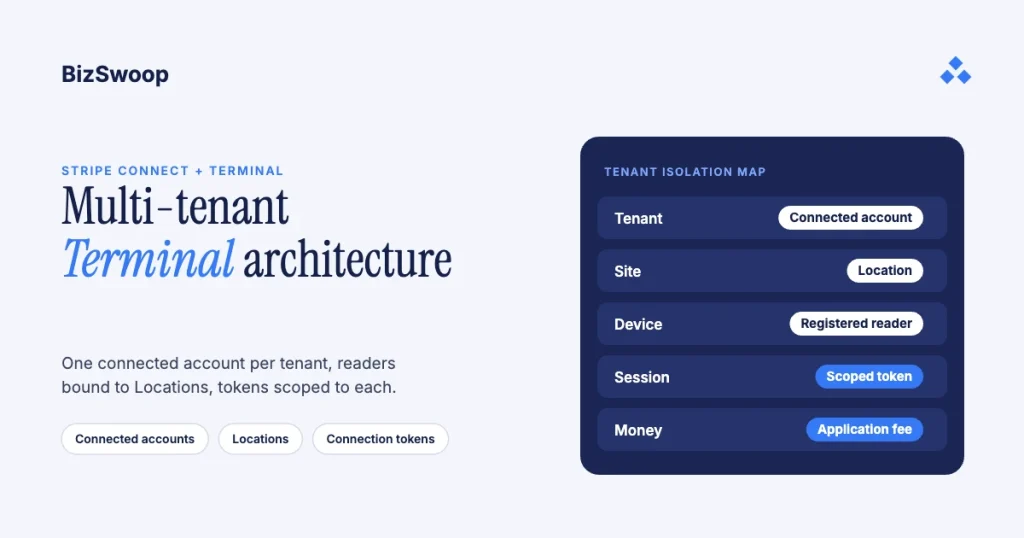
You build a multi-tenant SaaS app on Stripe Terminal with Stripe Connect: each tenant is a connected account, each reader is registered to a Location that maps to one tenant, and every connection token is scoped to that Location. Which account owns the Locations and readers depends on your charge type. With destination charges your platform owns them and routes each payment to the tenant; with direct charges they live inside each tenant’s connected account and you act through the Stripe-Account header. Either way, isolation isn’t a layer you add on top. It’s the account model, the Location boundary and the connection-token scope working together so tenant A’s reader can’t take money into tenant B’s account.
Most writing about “multi-tenant Stripe” covers online billing: subscriptions, marketplace splits, destination charges on web checkouts. The card-present version, a platform operating physical readers for dozens or hundreds of tenants, is where the real traps are, because a reader is shared hardware on a counter and isolation has to hold at the moment a card is tapped, not just in your database.
Jovvie, an official Stripe Partner, has built in-person Stripe Terminal payments for WooCommerce merchants since 2016. Every mechanic below was re-checked against Stripe’s documentation in November 2026. This guide sits under the Stripe Connect for Terminal platforms guide; if you’re embedding card-present payments in your product for the first time, start with the Stripe Terminal SaaS embedding guide.
Key Takeaways
- One connected account per tenant. It’s what makes per-tenant payouts, reporting and fees possible; never run many tenants on one account separated only by metadata.
- Charge type decides who owns the readers. Destination charges: Locations and readers live on the platform. Direct charges: they live in each connected account, reached with the
Stripe-Accountheader. - Always scope connection tokens to a Location. An unscoped token works with every reader on the account; Location scoping applies to internet-connected (smart) readers only.
- Fail closed on the destination. Before every payment, check server-side that the tenant being paid owns the reader taking the payment.
- Build new platforms on Accounts v2. Stripe recommends it for all new platforms; one Account can be both a merchant and a subscription customer. OAuth still needs Accounts v1.
- Your application fee must cover Stripe’s fee on destination charges. The platform pays Stripe’s 2.7% + 5¢ there, so price per tenant class, not with one flat number.
How do you build a multi-tenant SaaS app on Stripe Terminal?
You build it on Stripe Connect by mapping four Stripe objects to each tenant, so Stripe enforces the isolation rather than your application code: tenant → connected account → Location → registered reader, plus a connection token scoped to that Location at the moment of use.
| Layer | Stripe object | Multi-tenant role | Isolation guarantee |
|---|---|---|---|
| Tenant | Connected account | One account per tenant; funds settle here | A payment is attributed only to the account you name |
| Physical site | Location | Groups a tenant’s readers under one address | Readers inherit the Location’s tenant mapping |
| Device | Registered reader | The counter hardware for one tenant | A reader belongs to one Location, so one tenant |
| Session | Connection token (Location-scoped) | Lets your app connect to readers | A scoped token only works with readers in that Location |
| Money | Destination or direct charge + application_fee_amount | Settles to the tenant; the platform takes its fee | Funds route only to the named connected account |
Read top to bottom, that table is the whole system. You provision a tenant as a connected account, register its readers to a Location that belongs only to that tenant, and each time your app connects to a reader you mint a connection token scoped to that Location. When a card is tapped, the PaymentIntent routes the money to the tenant’s account and takes your platform fee. Stripe documents the model in Use Terminal with Connect, and Terminal connected accounts must have the card_payments capability to take payments.
Where do the readers live: destination or direct charges?
It depends on the charge type, and it’s the first architectural decision to make.
| Destination charges | Direct charges | |
|---|---|---|
| Owns Locations and readers | Platform account | Each connected account |
| How you create them | Platform secret key, no Stripe-Account header | Platform secret key + Stripe-Account header |
| Connection token | Created on the platform, scoped to the tenant’s Location | Created with the Stripe-Account header, optionally scoped to a Location |
| PaymentIntent | transfer_data[destination] + application_fee_amount; on_behalf_of required when the platform and tenant are in different countries | Created on the connected account with application_fee_amount |
| Pays Stripe’s fees, refunds and disputes | Platform | Connected account by default (the fee payer is an account setting) |
Stripe also has a private preview that lets the platform own smart readers while using direct charges, for server-driven integrations and connected accounts you control through a single platform. Outside that preview, direct-charge readers belong to the connected account. The fee and liability trade-offs are covered in Stripe Connect vs direct API for Terminal.
How do you model tenants on Connect: Accounts v2 or v1?
Each tenant is one Stripe connected account, and for a new platform Stripe recommends modeling those accounts with the Accounts v2 API (/v2/core/accounts). One connected account per tenant is what makes per-tenant payouts, reporting and fee economics possible; everything downstream hangs off it.
In a plain Stripe integration, one account is the merchant of record, the entity taking the payment and the entity getting paid. Connect splits those roles: your platform account holds the API keys, and each connected account is a tenant that’s paid into its own bank account and appears as its own merchant. That three-role split (platform, connected account, cardholder) is covered in the Connect platform economics guide.
Should new platforms use the Accounts v2 API?
Yes. Stripe recommends Accounts v2 for all new platforms. A v2 Account carries configurations: the merchant configuration lets a tenant accept payments (it includes card_payments), the customer configuration lets your platform bill the same tenant for its software subscription, and the recipient configuration enables transfers, which destination charges need. One Account per tenant can represent both “this tenant takes card payments” and “this tenant pays us monthly”, instead of an Account plus a separate Customer you have to keep in sync (SaaS configurations in Accounts v1 and v2).
Accounts v2 vs v1: which to build on. Building a new multi-tenant Terminal platform? Start with Accounts v2, but check Stripe’s list of v2 limitations first: OAuth, recipient service agreements and some capabilities still require Accounts v1. Already running a live v1 integration with hundreds of connected accounts? Stripe supports a staged migration and discourages running both versions indefinitely, so plan the move rather than ripping it out.
Whichever version you use, keep one connected account per tenant. Running many tenants under one Stripe account, separated only by metadata, loses per-tenant payouts, blurs merchant-of-record responsibility and makes isolation your problem instead of Stripe’s.
How do connection tokens isolate tenants?
A connection token is the short-lived credential the Terminal SDK uses to connect to readers, and scoping it to a Location is the most important isolation control in a multi-tenant build.
Your backend creates a connection token and returns its secret to the SDK; the SDK asks for a fresh one whenever it needs to connect. With destination charges you create it on the platform account (no Stripe-Account header). With direct charges you create it with the Stripe-Account header set to the tenant. Server-driven integrations don’t use connection tokens at all; your backend drives the reader through the API.
What is a Stripe Terminal connection token and how is it scoped?
It’s the credential that lets a Terminal SDK session use readers, and it’s scoped by the optional location parameter. Per Stripe’s API reference, if you set a Location the token only works with readers assigned to that Location; if you omit it, the token works with all readers on the account. On a destination-charge platform, an unscoped token on your platform account can reach every reader in your fleet, across every tenant. So never mint an unscoped token in production:
- Authenticate the request and resolve the acting tenant from your own session layer.
- Look up that tenant’s Location ID, stored when you provisioned the site.
- Create the connection token with
locationset to that ID (and theStripe-Accountheader on direct charges). - Return only the secret to the client SDK.
- Let the SDK request a fresh, re-scoped token for the next connection; don’t cache tokens.
How do you isolate readers per tenant in Stripe Terminal?
Register each tenant’s readers to a tenant-specific Location and always mint Location-scoped tokens, with one caveat: Location scoping only applies to internet-connected readers (smart readers such as the S700/S710, T600 and WisePOS E). For Bluetooth readers like the Stripe Reader M2 and for Tap to Pay, the reader pairs with one phone or tablet, so the device’s provisioning to a tenant and your backend checks are the boundary. On those flows, refuse to create a PaymentIntent whose destination (or Stripe-Account) doesn’t match the tenant that owns the device.
How do you bind readers to tenants and prevent cross-tenant charges?
You bind a reader to a tenant by registering it to a Stripe Location that belongs to that tenant, and you prevent cross-tenant charges by never letting a payment’s destination diverge from the reader’s tenant. The Location is the join key between hardware and tenant.
A Location represents a physical address that groups readers. Create at least one per tenant (more for multi-site tenants), store tenant_id → location_id at provisioning, then register each reader to that Location with its registration code.
Can multiple businesses share one Stripe Terminal integration?
Yes. That’s what a multi-tenant Connect platform is: one integration, one platform account and one codebase serving many businesses, each its own connected account with its own Locations and readers. What tenants generally shouldn’t share is a physical reader. If one kiosk must take payments for several tenants (a shared food-hall stall, say), destination charges allow it because the platform owns the reader and sets the destination per PaymentIntent. That’s a deliberate, higher-responsibility pattern, and you own the reconciliation and merchant-of-record implications.
Do you need Stripe Connect to run Terminal for multiple accounts?
You need Connect when the money belongs to separate businesses that must be paid into their own bank accounts and appear as their own merchants. If “multiple accounts” means many locations of one business you own, plain Terminal with Locations is enough, as covered in the back-office payments guide.
The safeguard worth building explicitly: on every PaymentIntent, assert server-side that the tenant being paid (transfer_data[destination] or the Stripe-Account you’re acting as) owns the reader collecting the payment. Enforced and failing closed, that check turns “we mapped readers to tenants in the database” into “tenant A’s reader can’t move money into tenant B’s account”, even if reader selection has a bug.
Running in-person payments for WooCommerce stores? Jovvie runs on Stripe Terminal readers and Tap to Pay out of the box.
How do you report Terminal payments per tenant?
Read each connected account’s own balance transactions, payments and payouts with the Stripe-Account header, and reconcile your platform’s Application Fee objects to attribute your revenue per tenant. Because each tenant is a separate account, the ledgers are already separate; you query them per account instead of untangling one blended ledger.
Three reporting surfaces cover most platforms:
- Per-tenant statements. Query the connected account’s balance transactions and payouts with the
Stripe-Accountheader to get only that tenant’s charges, refunds, fees and deposits. On destination charges, the tenant’s balance shows the incoming transfers, while the charges themselves sit on the platform. - Platform revenue. Each Application Fee object references the connected account it came from, so you can roll platform revenue up per tenant.
- Volume reporting. Sigma or the Reporting API for rollups per connected account, Location or reader once per-account API pulls get unwieldy.
Store the Location ID, reader ID and connected account ID as metadata on every PaymentIntent. It costs nothing at write time and turns every per-tenant, per-site or per-device report into a filter instead of a cross-system join.
How does the platform earn on each tenant’s card-present volume?
Your platform earns by setting application_fee_amount on each tenant’s in-person payment; the fee lands in your platform balance as the money reaches the tenant. That’s the line that turns a multi-tenant Terminal build into a revenue product.
On destination charges you create the PaymentIntent on the platform with transfer_data[destination] set to the tenant and application_fee_amount in the smallest currency unit, and you must add on_behalf_of when the platform and the tenant are in different countries. On direct charges you create it on the tenant’s account with the Stripe-Account header. The mechanics are covered in application fees with Stripe Terminal.
Two things to get right:
- Price against who pays Stripe. On destination charges the platform always pays Stripe’s fees (2.7% + 5¢ for US in-person cards), so your fee must clear that before you earn anything. A coffee stall taking hundreds of $4 taps and a clinic taking $600 payments behave very differently; a flat percentage treats them the same, and a flat per-transaction fee can swallow a small ticket. Model each tenant class separately.
- Being a platform carries obligations. Facilitating payments for other businesses brings connected-account onboarding and verification, loss liability that depends on your setup, and residual PCI scope; see Express vs Standard for Terminal and PCI compliance with Stripe Terminal. The fee is one API parameter; being a platform is not.
What does a minimal end-to-end flow look like?
Here’s the whole loop for a destination-charge platform, from onboarding a tenant to an isolated in-person payment:
- Provision the tenant. Create a connected account (Accounts v2 with the
merchantandrecipientconfigurations) and complete Stripe’s onboarding. Storetenant_id → account_id. - Create the tenant’s Location on the platform account. Store
tenant_id → location_id. - Register the reader to that Location with its registration code. Store
reader_id → location_id. - Mint a scoped connection token on the platform account with
locationset to the tenant’s Location (SDK integrations only; server-driven integrations skip this). - Collect the payment. Create the PaymentIntent with
transfer_data[destination],application_fee_amountand, cross-border,on_behalf_of; assert the destination matches the reader’s tenant; then collect the card-present payment. - Report and reconcile per tenant with the
Stripe-Accountheader, and reconcile Application Fee objects for platform revenue.
On direct charges, steps 2–5 run with the Stripe-Account header set to the tenant, so the Location, reader, token and payment all live in the tenant’s account. For the client side of step 4, see OAuth and connection token patterns for SaaS Terminal embeds.
Frequently asked questions
Can multiple businesses share one Stripe Terminal integration?
Yes. A multi-tenant Connect platform is one integration and one codebase serving many businesses, each its own connected account with its own Locations and readers. They shouldn’t share a physical reader by default. A shared kiosk is possible with destination charges, where the platform owns the reader and sets the destination per payment, but it’s a deliberate pattern with extra reconciliation work.
How do you isolate readers per tenant in Stripe Terminal?
Register each tenant’s readers to a tenant-specific Location and mint connection tokens scoped to that Location, so a token only works with that tenant’s readers. Location scoping applies only to internet-connected readers; for Bluetooth readers and Tap to Pay, the device’s tenant provisioning and a server-side destination check enforce the boundary.
What is a Stripe Terminal connection token and how is it scoped?
It’s a short-lived credential your backend creates so the Terminal SDK can connect to readers. Set the location parameter and it only works with readers assigned to that Location; omit it and it works with all readers on the account. In a multi-tenant build, always scope it.
Do you need Stripe Connect to run Terminal for multiple accounts?
You need Connect when the money belongs to separate businesses that must be paid into their own bank accounts and appear as their own merchants. If you run many locations of one business, plain Terminal with Locations is enough.
Should new platforms use the Accounts v2 API?
Yes. Stripe recommends Accounts v2 for all new platforms; one Account can be a merchant and a subscription customer at once. Check the limitations first: OAuth and a few capabilities still require Accounts v1. Existing v1 platforms can migrate in stages.
Who owns the readers on a multi-tenant Connect platform?
With destination charges, the platform owns the Locations and readers and routes each payment to the tenant. With direct charges, they belong to each connected account and you manage them with the Stripe-Account header. Platform-owned readers with direct charges are a Stripe private preview for server-driven smart-reader integrations.
How does the platform make money on each tenant’s card-present volume?
By setting application_fee_amount on each PaymentIntent; the fee lands in your platform balance. On destination charges the platform also pays Stripe’s 2.7% + 5¢, so price the fee above that, and model low-ticket, high-volume tenants separately from high-ticket ones.
Designing a multi-tenant Terminal platform?
Connection-token scoping, reader-to-tenant binding and per-tenant reporting are much easier to get right before the first tenant is onboarded. Talk to a Jovvie advisor and we’ll map your tenant model, isolation boundary and fee economics against your stack. If your tenants sell through WooCommerce, a Stripe POS like Jovvie handles the in-person side.
Sources: Use Terminal with Connect · Create a connection token · Terminal Locations API · Register readers · Connect and the Accounts v2 API · SaaS configurations in Accounts v1 and v2 · Application Fees API · Balance transactions API · Stripe Terminal pricing.
