
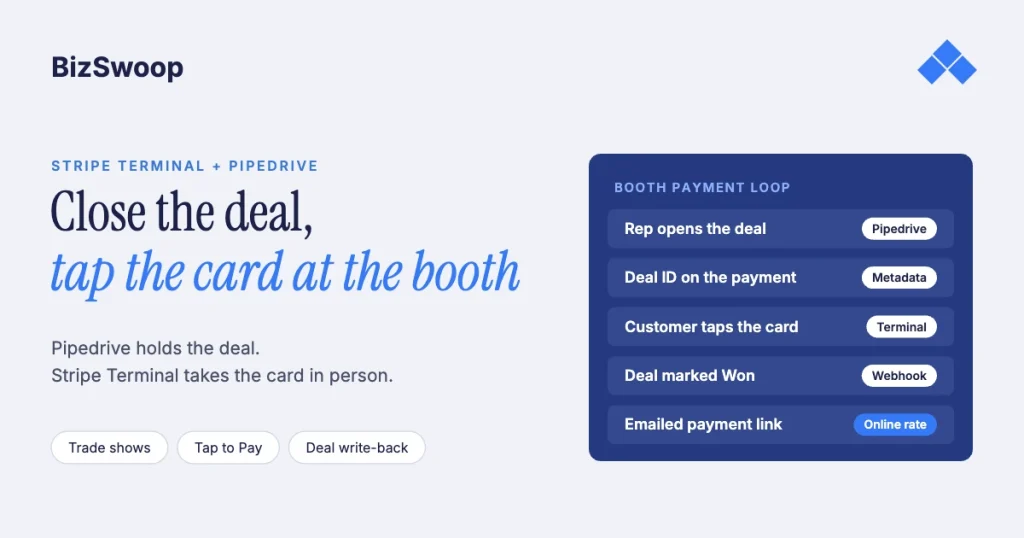
Pipedrive can’t take a card-present payment by itself, but you can pair it with Stripe Terminal. A rep taps the customer’s card on Tap to Pay or a Stripe reader at the booth, Stripe captures the card-present charge, and a webhook writes the payment back onto the Pipedrive deal. The Stripe apps in Pipedrive’s marketplace work differently: they sync Stripe customers and invoices or send online invoices, which are card-not-present payments at a higher rate.
Jovvie, an official Stripe Partner, has built in-person Stripe Terminal payments for WooCommerce merchants since 2016. The Pipedrive and Stripe details below were re-checked against both vendors’ documentation in November 2026. This guide sits in the SaaS pillar, Stripe Terminal beyond POS: embedding card-present payments into SaaS platforms. Its closest siblings are Salesforce + Stripe Terminal for field sales and HubSpot + Stripe Terminal for in-person deal close.
Key Takeaways
- Pipedrive has no card-present capability. Its Stripe marketplace apps and Zapier recipes sync customers, invoices and payment links, all online payments.
- Card-present needs three parts. Pipedrive holds the deal, Stripe Terminal or Tap to Pay captures the card, and a webhook bridge updates the deal.
- Put the deal ID in the PaymentIntent metadata. That single step makes the write-back exact, even when dozens of deals close at one booth.
- Tap to Pay is the easiest booth device. Reps’ phones become contactless readers on their own cellular data; add an S710 ($299, cellular) for chip-only cards.
- Card-present is cheaper than a link. US in-person cards cost 2.7% + 5¢, versus 2.9% + 30¢ for an online card and 3.4% + 30¢ if staff key the card in.
- Agencies can run booths on Stripe Connect. Each team or client gets its own connected account, and the platform can take an application fee.
Can a Pipedrive workflow take a card-present payment at a trade show?
Yes, but not on its own and not with a payment link. Pipedrive is a CRM with no card reader. You add a Stripe card-capture surface (Tap to Pay on a phone, or a Stripe reader) and connect it back to the deal with a small bridge.
Think of it as three parts. Pipedrive is the system of record: the deal, the contact and the amount owed. Stripe Terminal or Tap to Pay is the capture surface that reads the card at in-person rates. A bridge (a webhook handled by Zapier, Make or a small backend) carries the result from Stripe back onto the deal, so the rep never re-keys anything. Pipedrive never touches card data.
Why isn’t a Stripe payment link a card-present payment?
A payment link is a hosted online checkout the customer opens on their own phone; a card-present payment is a card read on certified hardware. They’re different transaction types with different rates, fraud exposure and booth experience.
- A link is priced as an online card. Stripe’s standard US online rate is 2.9% + 30¢, versus 2.7% + 5¢ in person, and the card is never physically authenticated.
- It stalls the close. “I’ll send you a link” is where a warm booth conversation goes cold, and some links never get paid.
- It weakens reconciliation. A link paid days later from a personal inbox is harder to tie to the deal and rep than a charge created with the deal ID attached.
Pipedrive’s marketplace does list Stripe apps. One, Stripe for Pipedrive by Ulgebra, syncs Stripe customers, invoices and payment records into Pipedrive and sends online invoices. Zapier’s Pipedrive and Stripe recipes create payment links for new deals or log Stripe payments as activities. All of these handle online payments; none starts a card-present charge.
What is the reference architecture for Pipedrive and Stripe Terminal?
It’s a four-stage loop: the rep opens the deal, a card-present surface captures the card, Stripe confirms the PaymentIntent, and a bridge writes the result back onto the deal.
| Stage | System | What happens |
|---|---|---|
| 1. Trigger | Pipedrive | Rep opens the deal and starts collection from your booth app with the deal amount |
| 2. Capture | Stripe Terminal or Tap to Pay | A PaymentIntent is created with the Pipedrive deal ID in metadata; the customer taps or inserts the card (collect a card payment) |
| 3. Confirm | Stripe | Stripe authorizes the card-present charge and sends a payment_intent.succeeded webhook |
| 4. Write back | Zapier, Make or your backend | The bridge reads the deal ID from metadata, marks the deal won and logs the amount and Stripe charge ID |
The design decision that makes this reliable is stamping the Pipedrive deal ID into the PaymentIntent’s metadata at stage 2. With the deal ID on the charge, the write-back always knows which deal a payment belongs to, even when fifty deals close at one booth in an afternoon. Without it you’re matching payments to deals by amount, which breaks the moment two customers pay the same price.
Stage 1 needs an app that can create PaymentIntents and drive the reader, because Stripe Terminal requires a backend holding your secret key. Smart readers (S700, S710) can be driven from your server; Tap to Pay and the Bluetooth Stripe Reader M2 need a mobile app built on Stripe’s iOS, Android or React Native SDK. Our Stripe Terminal SDK choice guide covers that decision.
Should booth reps use Tap to Pay or a Stripe reader?
For most booths, start with Tap to Pay on the reps’ phones: no hardware to ship, charge or lose. Add a Stripe reader when you need chip insert, swipe or a dedicated device on the table.
| Option | Best for | Price (US) | Connectivity | Notes |
|---|---|---|---|---|
| Tap to Pay on iPhone or Android | Roaming reps, deposits, line-busting | No hardware; +10¢ per authorization | The phone’s own data | Contactless cards and wallets only; Tap to Pay |
| Stripe Reader S710 | Booths with unreliable venue Wi-Fi | $299 | Built-in cellular | Chip, swipe and contactless on its own screen |
| Stripe Reader S700 | A fixed, staffed payment desk | $299 | Wi-Fi or Ethernet | Best where you control the network |
| Stripe Reader M2 | Budget chip capture paired to a phone | $59 | Bluetooth to the rep’s phone | Adds chip and swipe that Tap to Pay lacks; no screen |
A practical default for a Pipedrive sales team: Tap to Pay on every rep’s phone, plus one S710 per staffed booth as the fallback for cards that won’t tap. That combination survives the two things that most often break booth payments: overloaded venue Wi-Fi and chip-only cards. Our hardware costs guide covers accessories and the $39 Reader Hub.
What trade-show problems should you plan for?
Connectivity, queues and receipts. Each has a specific fix you should set up before the show opens.
- Connectivity. Venue Wi-Fi is often oversubscribed or behind a captive portal, which is where a Wi-Fi-only reader fails. Tap to Pay on a cellular phone or an S710 avoids the venue network entirely. If you must use venue Wi-Fi, test it at your booth during setup.
- Offline capture. Stripe Terminal can accept payments offline on supported readers and forward them when the connection returns. Treat it as a safety net: the card isn’t authorized until the reader reconnects, so an offline payment can still be declined after the customer has left.
- Line-busting. One countertop reader becomes the bottleneck when a demo draws a crowd. With Tap to Pay, every rep’s phone is a register, and each phone creates its own PaymentIntent tagged to its own deal.
- Receipts. Stripe can email a receipt from the payment, so you don’t need a printer. Capture the customer’s email on the Pipedrive person record and pass it as the receipt email.
Selling at events and in a WooCommerce store? Jovvie is a POS for Stripe Terminal readers and Tap to Pay that keeps both in one catalog.
How do you write the charge back onto the Pipedrive deal?
Listen for Stripe’s payment_intent.succeeded webhook, read the deal ID from the PaymentIntent metadata, and update the deal through the Pipedrive API. Zapier, Make or a small backend can each do it.
- Stamp the deal ID at capture. When your booth app creates the PaymentIntent, set metadata pipedrive_deal_id to the deal’s ID (optionally also the person ID and the rep’s user ID).
- Register a Stripe webhook. Point a webhook endpoint at your bridge for payment_intent.succeeded and payment_intent.payment_failed, and verify Stripe’s signature.
- Choose the bridge. Zapier or Make is the fastest way to prove the loop for a few shows a year. A small backend gives you full control, no per-task fees and idempotency, so a retried webhook never updates a deal twice.
- Update the deal. Read the deal ID from the event, set the deal’s status to won, and record the amount, Stripe charge ID and time in deal fields or a note.
- Handle failures. On payment_intent.payment_failed, add a note and leave the deal open so the rep can retry. Never mark a deal won on a failed or pending charge.
- Reconcile. Because every charge carries its deal ID, month-end reconciliation is a metadata join between Stripe and Pipedrive, not a manual match.
How do agencies run booths across teams with Stripe Connect?
Put each team or client on its own Stripe connected account and route their card-present takings through your Stripe Connect platform. Each team’s money settles to its own account, and the platform can take an application fee on each payment.
- Separate funds by default. A connected account per team keeps balances, payouts and reporting apart, with no splitting after the show.
- Application fees. Your platform can set an application_fee_amount on each PaymentIntent. See application fees with Stripe Terminal and the Stripe Connect platform economics guide.
- Terminal works under Connect. Readers, locations and connection tokens can be scoped to connected accounts, so the same booth flow runs per team.
- Per-team, per-deal reporting. Each charge lives on a connected account and carries its Pipedrive deal ID.
Frequently asked questions
Can Pipedrive process card-present payments?
No. Pipedrive is a CRM with no card-present capability. Pair it with Stripe Terminal or Tap to Pay for capture and a webhook bridge that writes the result back to the deal.
Does Stripe Terminal work with Pipedrive?
There’s no native Stripe Terminal connector in Pipedrive, but they work together through a bridge. Create the PaymentIntent with the Pipedrive deal ID in metadata, capture the card on Terminal or Tap to Pay, and update the deal from Stripe’s payment_intent.succeeded webhook.
What do Pipedrive’s Stripe integrations do?
Marketplace apps such as Stripe for Pipedrive sync Stripe customers, invoices and payments into Pipedrive and send online invoices. Zapier recipes create payment links for deals or log Stripe payments as activities. All of them handle online payments only.
Can I use Tap to Pay for trade-show sales?
Yes. Tap to Pay turns a supported iPhone or Android phone into a contactless reader with no extra hardware. In the US it costs the standard 2.7% + 5¢ plus 10¢ per authorization. For chip-only cards, add a reader such as the Stripe Reader M2 or S710.
How do you get a card payment back onto a Pipedrive deal?
Put the deal ID in the PaymentIntent’s metadata, subscribe to payment_intent.succeeded, and have Zapier, Make or a small backend read the deal ID and mark the deal won with the charge details.
Is a Stripe payment link cheaper than Stripe Terminal?
No. A payment link is an online card payment at 2.9% + 30¢ in the US. A Stripe Terminal card-present payment is 2.7% + 5¢, and the card is authenticated at the booth.
Taking card payments at your next show?
Bring your Pipedrive pipeline, booth setup and team structure, and we’ll map the capture device, the deal write-back and the Connect setup before your next event. If you also sell in a WooCommerce store, a POS for Stripe like Jovvie handles the counter.
Sources: Pipedrive API · Stripe for Pipedrive · Zapier: Pipedrive + Stripe · Collect a card payment · Tap to Pay · Offline payments · Stripe Connect · Stripe pricing
